Our Short List of 3

- Best for: Players who want one projector for competitive games and movie nights alike.
- 4K UHD resolution with 8.3 million distinct on-screen pixels
- 3,600 ANSI lumens
- 1080p 240Hz with 4ms input lag in Enhanced Gaming Mode
- HDR10 and HLG compatibility
- Best for: PC players who want high refresh and quick response on a large screen.
- True 4K UHD resolution, 3840 x 2160, with 3,200 ANSI lumens
- 240Hz refresh rate with 4.2ms input lag
- HDR support for smooth home entertainment
- 1.1x optical zoom with auto vertical keystone and H/V keystone

- Best for: Players who want laser color, smart apps, and quick response in one box.
- RGB triple laser with 3200 ISO lumens
- 240Hz refresh with 1ms input lag
- Google TV with licensed Netflix
- Optical zoom and lens shift, IMAX Enhanced, Dolby Vision
All 5 Picks at a Glance
| Product | Specs | Action |
|---|---|---|
| Optoma UHD55 4K Ultra HD DLP Home Theater and Gaming Projector, Built-In Speaker |
| Check price on Amazon |
| ViewSonic PX701-4K 3200 Lumens 4K Projector, 240Hz and HDR Support for Smooth Home Entertainment, 1.1x Optical Zoom, Auto V-Keystone, and H/V Keystone for Flexible Setup, and Dual HDMI Inputs |
| Check price on Amazon |
| XGIMI HORIZON 20 4K RGB Triple Laser Home Projector, 3200 ISO Lumens, Google TV with Licensed Netflix, Optical Zoom and Lens Shift, IMAX Enhanced, Dolby Vision, 300-inch Display, 240Hz, 1ms Input Lag |
| Check price on Amazon |
 Nebula X1 4K RGB Triple Laser Projector, 3,500 ANSI Lumens, Dolby Vision, 56,000:1 Contrast, ISF and TÜV-Certified, Auto-Align Gimbal, Google TV, for Indoor and Outdoor |
| Check price on Amazon |
 BenQ TH671ST 3000 Lumens 1080p Short Throw Home Entertainment Projector, 3000 Lumens Low Input Lag, Auto Vertical Keystone, Dual HDMI, Built-In Speaker, Console Gaming, short throw, 3 year warranty |
| Check price on Amazon |
Key takeaways
- Find the best projectors for hardcore gamers, with sharp 4K images, fast refresh, low input lag, and vivid color for long sessions on a big screen.
A big screen changes how a hard game feels. Enemies at the edge of the frame stay visible, wide maps open up, and a long night of play feels like an event rather than a grind at a desk. A good gaming projector gives you that scale without giving up the speed that competitive play demands.
The five projectors below were picked for low input lag, high refresh, and sharp 4K images. Each one suits a different room and a different style of play, from fast shooters on a PC to story games on a console in a living room. Match the throw distance and the light in your room first, then pick the picture you like. A little planning now saves a swap later, when the mount is already on the wall.
Quick Picks
As an Amazon Associate we earn from qualifying purchases
| Product | Best for | Key spec from title |
|---|---|---|
| Optoma UHD55 4K Ultra HD DLP Home Theater and Gaming Projector, Built-In Speaker | Competitive play on a huge screen | 4K Ultra HD, built-in speaker |
| ViewSonic PX701-4K 3200 Lumens 4K Projector, 240Hz and HDR Support for Smooth Home Entertainment, 1.1x Optical Zoom, Auto V-Keystone, and H/V Keystone for Flexible Setup, and Dual HDMI Inputs | Fast PC games at 240Hz | 3200 Lumens, 240Hz |
| XGIMI HORIZON 20 4K RGB Triple Laser Home Projector, 3200 ISO Lumens, Google TV with Licensed Netflix, Optical Zoom and Lens Shift, IMAX Enhanced, Dolby Vision, 300-inch Display, 240Hz, 1ms Input Lag | Big-screen play with quick response | 3200 ISO Lumens, 240Hz, 1ms input lag |
| Nebula X1 4K RGB Triple Laser Projector, 3,500 ANSI Lumens, Dolby Vision, 56,000:1 Contrast, ISF and TÜV-Certified, Auto-Align Gimbal, Google TV, for Indoor and Outdoor | Vivid color in a living room | 3,500 ANSI Lumens, Dolby Vision |
| BenQ TH671ST 3000 Lumens 1080p Short Throw Home Entertainment Projector, 3000 Lumens Low Input Lag, Auto Vertical Keystone, Dual HDMI, Built-In Speaker, Console Gaming, short throw, 3 year warranty | Console games in a small room | 3000 Lumens, low input lag |
How to Choose
Put input lag first
Input lag is the delay between your controller or mouse and the action on the wall, and it decides whether a projector feels quick or sluggish. For fast shooters and fighting games, look for a model that lists a low lag figure at the resolution you play at, and check whether a gaming mode is needed to reach it. A projector that is quick at 1080p may be slower at 4K, so match the figure to your console or PC output. If you play mostly story games, a slightly higher lag figure is fine, and picture quality can take priority.
Match refresh to your games
Refresh rate decides how smooth motion looks when the camera pans or a character sprints across the frame. A 240Hz mode at 1080p suits competitive PC play, while 120Hz is plenty for most console games, and 60Hz at 4K still looks clean for slower titles. Do not chase a high refresh number on its own. Check which resolution it pairs with, because a 240Hz mode that only runs at 1080p will not help a 4K console session. Pick the combination your hardware can actually drive every night.
Measure throw distance before you buy
Throw distance decides how large the image can be in your room, and it is the detail most buyers get wrong. A standard throw model needs several meters of clear space for a 100-inch image, while a short throw model can fill the same wall from close in. Measure from the lens position to the wall, then check the zoom range and the throw ratio in the listing. Leave room for the mount or table, the cables at the back, and air flow around the case, or the image will end up smaller than you planned.
Check light, sound, and connections
A bright lamp or laser helps in a room with lamps on or daylight through curtains, while a dark room lets a lower output model shine with deeper blacks. Built-in speakers are handy for a quick session, but a soundbar or headset will beat them for long nights, so do not let speakers decide the pick. Count the HDMI ports you need for a console, a PC, and a streaming stick, and confirm the ports support the resolution and refresh you want. A second port saves you from swapping cables in the dark.
The 5 Best Options
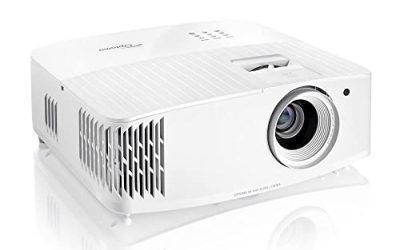
Optoma UHD55 4K Ultra HD DLP Home Theater and Gaming Projector, Built-In Speaker
- Best for: Players who want one projector for competitive games and movie nights alike.
- 4K UHD resolution with 8.3 million distinct on-screen pixels
- 3,600 ANSI lumens
- 1080p 240Hz with 4ms input lag in Enhanced Gaming Mode
- HDR10 and HLG compatibility
Players who want one projector for competitive games and movie nights alike.
The 240Hz mode runs at 1080p, so 4K play uses a lower refresh.
The Optoma UHD55 is the all-rounder of this group, with a sharp 4K image for story games and a quick 240Hz mode for competitive play at 1080p. Its Enhanced Gaming Mode cuts input lag to a level that feels close to a gaming monitor, which matters when every frame counts in a fast shooter. The picture stays vivid in HDR, and the motorized zoom makes it easy to fine-tune the image size without moving the unit.
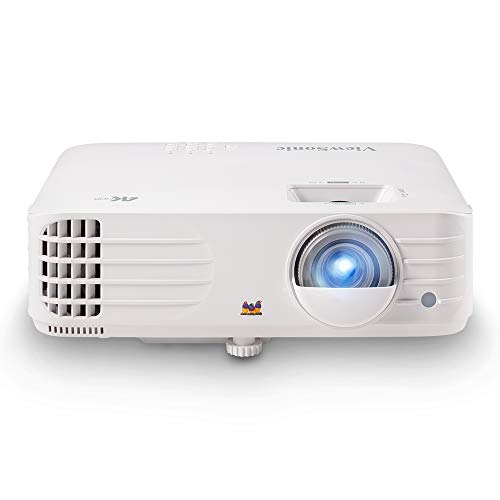
ViewSonic PX701-4K 3200 Lumens 4K Projector, 240Hz and HDR Support for Smooth Home Entertainment, 1.1x Optical Zoom, Auto V-Keystone, and H/V Keystone for Flexible Setup, and Dual HDMI Inputs
- Best for: PC players who want high refresh and quick response on a large screen.
- True 4K UHD resolution, 3840 x 2160, with 3,200 ANSI lumens
- 240Hz refresh rate with 4.2ms input lag
- HDR support for smooth home entertainment
- 1.1x optical zoom with auto vertical keystone and H/V keystone
PC players who want high refresh and quick response on a large screen.
You will need a dark room to get the most from its contrast.
The ViewSonic PX701-4K is built for speed, pairing a sharp 4K image with a 240Hz refresh and a 4.2ms input lag that keeps fast PC games feeling direct and responsive. Motion stays clean when the camera whips across a map, and HDR support adds depth to bright skies and dark corridors alike. The optical zoom and keystone controls make it simple to square the image on a wall that is not perfectly placed.
XGIMI HORIZON 20 4K RGB Triple Laser Home Projector, 3200 ISO Lumens, Google TV with Licensed Netflix, Optical Zoom and Lens Shift, IMAX Enhanced, Dolby Vision, 300-inch Display, 240Hz, 1ms Input Lag
- Best for: Players who want laser color, smart apps, and quick response in one box.
- RGB triple laser with 3200 ISO lumens
- 240Hz refresh with 1ms input lag
- Google TV with licensed Netflix
- Optical zoom and lens shift, IMAX Enhanced, Dolby Vision
Players who want laser color, smart apps, and quick response in one box.
The large image needs a big, flat wall or a proper screen to shine.
The XGIMI HORIZON 20 pairs a triple laser light source with a 1ms input lag figure, which is the quickest response in this group on paper. Its 240Hz refresh keeps fast motion smooth, while Dolby Vision and a wide color range give story games a rich, cinematic look on a huge screen. Google TV with licensed Netflix is built in, so you can move from a long gaming session to a film without swapping inputs or adding a stick.
Nebula X1 4K RGB Triple Laser Projector, 3,500 ANSI Lumens, Dolby Vision, 56,000:1 Contrast, ISF and TÜV-Certified, Auto-Align Gimbal, Google TV, for Indoor and Outdoor
- Best for: Living-room players who want vivid color and an easy setup.
- 4K RGB triple laser with 3,500 ANSI lumens
- Dolby Vision with 56,000:1 contrast
- ISF-certified color accuracy
- Auto-align gimbal with Google TV
Living-room players who want vivid color and an easy setup.
Its gaming response is not as quick as the 240Hz models here.
The Nebula X1 is the living-room pick, with a triple laser image that holds its color well and a gimbal that lines the picture up without a fiddly manual setup. Dolby Vision gives films and story games a deep, layered look, and the high contrast helps dark scenes keep their detail. Google TV is built in, and the unit can move from a living room to a garden session, which suits players who do not want a fixed install.
BenQ TH671ST 3000 Lumens 1080p Short Throw Home Entertainment Projector, 3000 Lumens Low Input Lag, Auto Vertical Keystone, Dual HDMI, Built-In Speaker, Console Gaming, short throw, 3 year warranty
- Best for: Console players in a small room who need a big image from close in.
- Native Full HD 1080p resolution
- 3000 lumens with Rec. 709 color accuracy
- Low input lag for console gaming
- Auto vertical keystone with dual HDMI
Console players in a small room who need a big image from close in.
It is 1080p, so it will not show the fine detail of a 4K model.
The BenQ TH671ST is the small-room answer, throwing a large image from close to the wall so a console setup fits in a bedroom or a compact den. Its low input lag keeps console games feeling direct, and the short throw design means nobody walks through the beam during play. Auto vertical keystone squares the image up quickly, and the built-in speaker covers a casual session without extra gear. It suits a quick game after work as well as a long weekend session.
Which One Fits Your Situation
You play fast shooters on a PC
Pick a 240Hz model with a low lag figure at 1080p, such as the ViewSonic PX701-4K or the Optoma UHD55, and run your PC at the resolution that unlocks that mode. Keep the room dark, sit at a distance where the whole image fills your view without turning your head, and use a wired controller or mouse for the most direct feel.
You play story games on a console in a living room
Pick a 4K laser model with strong color and Dolby Vision, such as the XGIMI HORIZON 20 or the Nebula X1, and let the picture carry the mood of the game. A larger image suits slow, cinematic play, and built-in smart apps mean you can move from a game to a film without extra boxes.
Your room is small
Pick a short throw model such as the BenQ TH671ST, which fills a wall from close in and keeps players out of the beam. Measure the wall first, check that the image size you want fits the throw range, and leave space behind the unit for cables and air flow.
You share the room with daylight and lamps
Pick a bright model with a high lumen figure, such as the Optoma UHD55 or the ViewSonic PX701-4K, and pair it with a light-colored wall or a screen that holds contrast. Close the curtains you can, and use the brighter picture mode for daytime play, saving the cinema mode for the evening.
Common Mistakes
- Buying for a 240Hz headline without checking which resolution that mode runs at.
- Measuring the wall but not the distance from the lens to the wall.
- Placing the projector where players walk through the beam during play.
- Using a single HDMI port for a console, a PC, and a streaming stick.
- Ignoring room light and then blaming the projector for a washed-out image.
Frequently Asked Questions
Is a projector good for hardcore gaming?
Yes, if you pick one with low input lag and a refresh rate that matches your games. A 4K projector with a quick gaming mode gives you a huge image without the sluggish feel that older projectors had. Check the lag figure at your resolution, use a gaming mode when one is offered, and keep the room dark for the best picture.
What input lag should a gaming projector have?
For fast shooters and fighting games, look for a lag figure under 20ms at the resolution you play at, and under 5ms at 1080p if you play competitively. Story games and slower titles are fine with a higher figure, since timing is less demanding. The figure in the listing is measured in a gaming mode, so use that mode when you play.
Do I need 4K for a gaming projector?
Not always. A 1080p projector with low lag and high refresh is a strong pick for competitive play, where speed matters more than fine detail. A 4K projector shines for story games, open worlds, and films, where the extra detail fills a large screen. Match the resolution to your console or PC, your room size, and the games you play most.
Can I use a gaming projector in a bright room?
Yes, with a bright model and a little care. Pick a projector with a high lumen figure, use its brighter picture mode during the day, and close curtains where you can. A screen that rejects ambient light also helps. In a very bright room, a smaller image will look punchier than a very large one.
FAQ
Is a projector good for hardcore gaming?
What input lag should a gaming projector have?
Do I need 4K for a gaming projector?
Can I use a gaming projector in a bright room?
More from Amazon
Programs that pair well with the guide above. Offers and eligibility are set by Amazon and may change.
Free shipping on eligible items, Prime Video and more. Eligible new members can start with a free trial.
Start a Prime free trialAd-free music streaming. Eligible new subscribers can start with a free trial.
Try Music Unlimited freeA Prime membership for ages 18-24 with a trial period. Eligibility is set by Amazon.
See Prime for Young AdultsAudiobooks and podcasts to listen to on the go. Eligible new members can start with a free trial.
Try Audible freeAs an Amazon Associate we earn from qualifying purchases.