Our Short List of 3

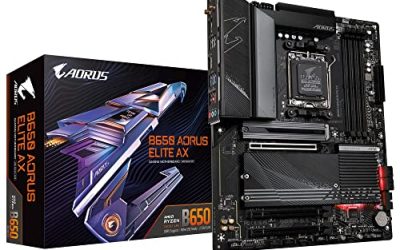
- ASUS ROG Strix B550-F Gaming WiFi II — Best overall B550 board for a Ryzen 5000 gaming build. Check on Amazon
- ASUS TUF Gaming B550-Plus WiFi II — Best value B550 board for Ryzen 5 builds. Check on Amazon
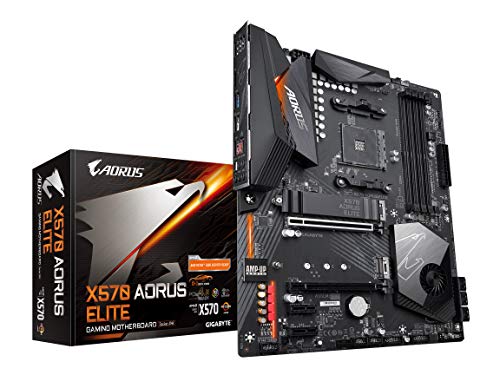
- Gigabyte X570 AORUS Elite — Best X570 board without WiFi for wired setups. Check on Amazon
- MSI MAG X570 Tomahawk WiFi — Best all-round X570 board with WiFi 6 and 2.5Gb LAN. Check on Amazon

- WiFi 6 and 2.5Gb LAN included at a lower tier than the Strix board
- BIOS Flashback for easy Ryzen 5000 setup
- 10 DrMOS power stages suit Ryzen 5 and Ryzen 7 builds
- Dual M.2 slots and USB 3.2 Gen 2 Type-C
- Full X570 chipset with PCIe 4.0 lanes from the chipset as well as the CPU
- 12+2 phase power design handles higher-core Ryzen chips
- M.2 Thermal Guard on the primary M.2 slot
- Q-Flash Plus for BIOS updates without a CPU
All 5 Picks at a Glance
| Product | Specs | Action |
|---|---|---|
| Our Top Picks |
| Check price on Amazon |
| 2. ASUS TUF Gaming B550-Plus WiFi II |
| Check price on Amazon |
| 3. Gigabyte X570 AORUS Elite |
| Check price on Amazon |
 4. MSI MAG X570 Tomahawk WiFi |
| Check price on Amazon |
 5. ASUS ROG Strix X570-E Gaming |
| Check price on Amazon |
Our Top Picks
- ASUS TUF Gaming B550-PLUS WiFi II AMD AM4B550-Plus|M.2x2|D4|WiFi610.75 x 2.75 x 13.5 inches1.27 poundsCheck on Amazon
As an Amazon Associate I earn from qualifying purchases.
The Short Answer
If you are building or upgrading a Ryzen gaming PC on the AM4 platform, the ASUS ROG Strix B550-F Gaming WiFi II is the board most builders should start with: it pairs a B550 chipset with WiFi 6E, 2.5Gb LAN and BIOS Flashback in a full-size ATX layout. If you want the fuller feature set of the X570 chipset — more PCIe 4.0 lanes from the chipset, more USB ports and more M.2 flexibility — the MSI MAG X570 Tomahawk WiFi is the strongest all-rounder, while the Gigabyte X570 AORUS Elite is the pick for builders who want X570 without built-in WiFi. The ASUS TUF Gaming B550-Plus WiFi II covers the lower end of the range for Ryzen 5 builds, and the ASUS ROG Strix X570-E Gaming is the premium option for high-core-count Ryzen 9 chips. Every board below is an AM4 socket board that takes DDR4 memory, so your existing memory and cooler carry over.
Our Top Picks
- ASUS ROG Strix B550-F Gaming WiFi II — Best overall B550 board for a Ryzen 5000 gaming build. Check on Amazon
- ASUS TUF Gaming B550-Plus WiFi II — Best value B550 board for Ryzen 5 builds. Check on Amazon
- Gigabyte X570 AORUS Elite — Best X570 board without WiFi for wired setups. Check on Amazon
- MSI MAG X570 Tomahawk WiFi — Best all-round X570 board with WiFi 6 and 2.5Gb LAN. Check on Amazon
Quick Comparison
| Board | Chipset | Form Factor | WiFi | LAN | M.2 Slots | Memory |
|---|---|---|---|---|---|---|
| ASUS ROG Strix B550-F Gaming WiFi II | B550 | ATX | WiFi 6E | 2.5Gb | 2 | DDR4, 4 DIMM |
| ASUS TUF Gaming B550-Plus WiFi II | B550 | ATX | WiFi 6 | 2.5Gb | 2 | DDR4, 4 DIMM |
| Gigabyte X570 AORUS Elite | X570 | ATX | None | Gigabit | 2 | DDR4, 4 DIMM |
| MSI MAG X570 Tomahawk WiFi | X570 | ATX | WiFi 6 | 2.5Gb | 2 | DDR4, 4 DIMM |
| ASUS ROG Strix X570-E Gaming | X570 | ATX | WiFi 6 | 2.5Gb + Gigabit | 2 | DDR4, 4 DIMM |
How to Choose
Start with the chipset, because it decides PCIe 4.0
B550 and X570 both support PCIe 4.0, but they hand it out differently. On a B550 board, PCIe 4.0 reaches the graphics slot and the primary M.2 slot, while the chipset link and the remaining lanes run at PCIe 3.0 speeds. On an X570 board, the chipset itself provides PCIe 4.0 lanes, so a second M.2 drive and extra expansion slots can also run at full PCIe 4.0 speed. For a gaming PC with one graphics card and one or two NVMe drives, B550 covers everything. X570 earns its place when you run two fast NVMe drives at once, several PCIe cards, or a large array of fast USB devices.
Match the board to your exact Ryzen chip and BIOS
All five boards here are AM4 boards, and all of them support Ryzen 5000 series processors with the right BIOS. The catch is the BIOS version the board ships with. Boards made after the Ryzen 5000 launch usually ship with a compatible BIOS, but older stock can predate it. Check the listing and the manufacturer’s CPU support list for your exact processor before ordering, and prefer a board with BIOS Flashback — the Strix B550-F Gaming WiFi II and the TUF B550-Plus WiFi II both have it — so you can update the BIOS without a supported CPU installed. Confirm on the listing whether the board ships with a Ryzen 5000-ready BIOS.
Power delivery decides which chips the board handles happily
A Ryzen 5 5600 or 5700X runs comfortably on almost any board here. A Ryzen 9 5900X or 5950X, especially under sustained multi-core loads, needs stronger power stages and better heatsinks. The X570-E Gaming and the X570 Tomahawk WiFi carry the heaviest power delivery in this roundup, the AORUS Elite sits in the middle with a 12+2 phase design, and the TUF B550-Plus WiFi II uses 10 DrMOS power stages that suit Ryzen 5 and Ryzen 7 chips. If you plan to run a 12-core or 16-core chip at full load for hours, buy up the power-delivery ladder rather than down it.
Count the connections you will actually plug in
Count your drives, USB devices and network needs before choosing. Every board here has two M.2 slots and four DDR4 DIMM slots, so the differences are in USB count, SATA ports and networking. The X570-E Gaming is the clear leader with eight SATA ports and dual LAN. The AORUS Elite has six SATA ports and front USB Type-C. If your PC sits far from the router, built-in WiFi matters — only the AORUS Elite in this roundup lacks it, so budget for a WiFi card or a wired run if you choose that board. Check the rear I/O layout on the listing against the ports your monitor, headset, keyboard and drives need.
Form factor and case fit
All five boards are full-size ATX. Measure your case before ordering: an ATX board needs an ATX-compatible case with seven expansion slots and enough clearance for a tall air cooler or a radiator.
The Picks in Detail
1. ASUS ROG Strix B550-F Gaming WiFi II
The Strix B550-F Gaming WiFi II is the most complete B550 board in this roundup. It is an ATX board on the AMD B550 chipset for the AM4 socket, with PCIe 4.0 for the graphics slot and the primary M.2 slot, WiFi 6E, Bluetooth 5.2 and 2.5Gb LAN. Two M.2 slots and four DDR4 DIMM slots cover a typical gaming build, and the board supports Ryzen 5000, 4000 and 3000 series processors. BIOS Flashback lets you update the firmware without a CPU installed, which removes the most common headache of buying an AM4 board late in the platform’s life.
Pros
- WiFi 6E and 2.5Gb LAN cover fast wireless and wired networking in one board
- BIOS Flashback makes Ryzen 5000 compatibility easy to sort out
- PCIe 4.0 for the graphics card and primary NVMe drive
- Strong feature set for a single-GPU gaming build
Cons
- The second M.2 slot and chipset lanes run at PCIe 3.0, as on all B550 boards
- No 10Gb LAN, so very fast local networks need an add-in card
- Confirm on the listing that the shipped BIOS supports your exact Ryzen chip
2. ASUS TUF Gaming B550-Plus WiFi II
- WiFi 6 and 2.5Gb LAN included at a lower tier than the Strix board
- BIOS Flashback for easy Ryzen 5000 setup
- 10 DrMOS power stages suit Ryzen 5 and Ryzen 7 builds
- Dual M.2 slots and USB 3.2 Gen 2 Type-C
The TUF Gaming B550-Plus WiFi II is the value pick of the B550 half. It is an ATX board on the AMD B550 chipset for the AM4 socket, with WiFi 6, 2.5Gb LAN, PCIe 4.0, dual M.2 slots and BIOS Flashback. ASUS lists 10 DrMOS power stages, which is enough for Ryzen 5 and Ryzen 7 chips, and the board supports Ryzen 3000 and 5000 processors with DDR4 memory. USB 3.2 Gen 2 Type-A and Type-C ports sit on the rear panel. It gives up the Strix board’s WiFi 6E and some of its premium audio and lighting features, but the core gaming experience is the same.
Pros
Cons
3. Gigabyte X570 AORUS Elite
- Full X570 chipset with PCIe 4.0 lanes from the chipset as well as the CPU
- 12+2 phase power design handles higher-core Ryzen chips
- M.2 Thermal Guard on the primary M.2 slot
- Q-Flash Plus for BIOS updates without a CPU
The X570 AORUS Elite is the X570 pick for builders who game on a wired connection and do not need built-in WiFi. It is an ATX board on the AMD X570 chipset for the AM4 socket, with PCIe 4.0, dual M.2 slots with a single thermal guard, and a 12+2 phase digital power design. Four DDR4 DIMM slots support up to 128GB of memory, and the board carries six SATA ports, front USB Type-C and a Realtek ALC1200 audio codec. Gigabyte’s Q-Flash Plus button updates the BIOS without a CPU installed, which matters for Ryzen 5000 compatibility on older stock. The integrated I/O shield makes installation simpler. Note that this board has no WiFi, so confirm on the listing that the wired-only configuration suits your setup, or plan for a separate wireless adapter.
Pros
Cons
4. MSI MAG X570 Tomahawk WiFi
- WiFi 6 and 2.5Gb LAN together, the strongest networking mix in the roundup
- Full X570 PCIe 4.0 support for two M.2 drives
- Extended heatsinks and M.2 Shield Frozr cooling
- Six SATA ports and a wide USB selection
The MAG X570 Tomahawk WiFi is the best-balanced X570 board here. It is an ATX board on the AMD X570 chipset for the AM4 socket, with WiFi 6, 2.5Gb LAN, two PCIe 4.0 x16 slots and two M.2 slots. Four DDR4 DIMM slots support up to 128GB of memory, and the board provides six SATA 6Gb/s ports and a generous USB layout with USB 3.2 Gen 2 Type-C and Type-A ports. MSI’s extended heatsink design and Frozr M.2 Shield keep the power stages and drives cool under load. This is the board to choose if you want the X570 feature set, modern wireless and fast wired networking in a single purchase.
Pros
Cons
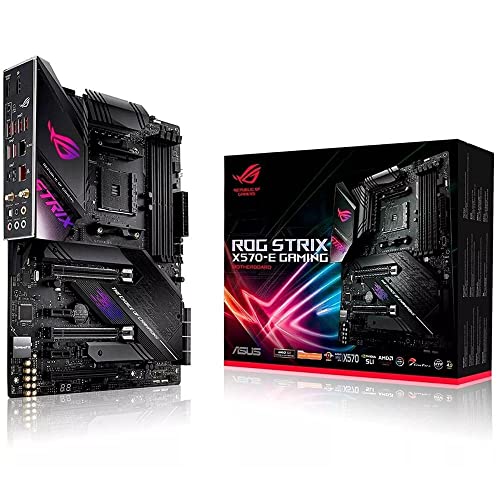
5. ASUS ROG Strix X570-E Gaming
- Dual LAN with 2.5Gb and Gigabit ports
- Eight SATA ports, the most in this roundup
- WiFi 6 and strong power delivery for Ryzen 9 chips
- Two PCIe 4.0 x16 slots for multi-card or capture-card setups
The ROG Strix X570-E Gaming is the premium pick. It is an ATX board on the AMD X570 chipset for the AM4 socket, with WiFi 6, Bluetooth 5.0, 2.5Gb LAN plus a second Gigabit LAN port, and eight SATA ports — the most storage connectivity in this roundup. It has two PCIe 4.0 x16 slots, two M.2 slots, and SupremeFX S1220A audio. The board supports Ryzen 2000, 3000 and 5000 series processors with the right BIOS, and its power delivery is built for high-core-count chips and overclocking. Dual LAN suits builders who run a separate network for streaming or a home lab alongside gaming.
Pros
Cons
Who Should Choose What
- Ryzen 5 5600 or 5700X, single GPU, one or two NVMe drives: the ASUS TUF Gaming B550-Plus WiFi II. It has everything the build needs and nothing it does not.
- Ryzen 7 5800X or 5800X3D, the most common gaming upgrade: the ASUS ROG Strix B550-F Gaming WiFi II. WiFi 6E, 2.5Gb LAN and BIOS Flashback cover the whole build.
- Two fast NVMe drives and lots of USB devices: any of the X570 boards. The MSI MAG X570 Tomahawk WiFi is the balanced choice, with modern wireless included.
- Wired-only setup, no WiFi needed: the Gigabyte X570 AORUS Elite. It trades wireless for a lower tier and keeps the full X570 feature set.
- Ryzen 9 5900X or 5950X, several drives, dual networks: the ASUS ROG Strix X570-E Gaming. Its power delivery, eight SATA ports and dual LAN are built for that load.
- Replacing a dead board and keeping DDR4, CPU and cooler: match the chipset and form factor of the board you are replacing, then confirm BIOS support for your exact processor on the listing before ordering.
Common Mistakes
- Buying X570 for a single-GPU build with one drive. B550 gives you the same graphics and primary storage speed. X570 only pays off when you use its extra PCIe 4.0 lanes, extra USB ports or extra SATA ports.
- Assuming any AM4 board runs any Ryzen chip out of the box. Ryzen 5000 support depends on the BIOS version. Check the manufacturer’s CPU support list for your exact processor and confirm on the listing what BIOS the board ships with.
- Forgetting the chipset fan. X570 boards have a small chipset fan. It is usually quiet, but it is a moving part that B550 boards do not need. If a silent build matters to you, B550 is the simpler choice.
- Choosing the AORUS Elite and then discovering you need WiFi. That board has no wireless. Decide on wired versus wireless before ordering, not after the board arrives.
- Ignoring case fit. All five boards are full-size ATX. A micro-ATX or mini-ITX case will not fit them. Measure the case and check the board dimensions on the listing.
- Reusing an old BIOS-era assumption about DDR4 speed. All five boards take DDR4, but the maximum stable memory speed depends on the CPU’s memory controller and the memory kit. Check the board’s memory support list for your exact kit.
FAQ
Is AM4 still worth buying in 2026?
For gaming, yes, if you already own DDR4 memory or a Ryzen 5000 chip, or you are upgrading an existing AM4 PC. Ryzen 5000 chips still run modern games well, and AM4 boards and DDR4 memory are mature and well supported. If you are building entirely from scratch with no parts to reuse, compare the total build cost against an AM5 build before deciding.
What is the real difference between B550 and X570?
Both chipsets support PCIe 4.0 from the CPU to the graphics slot and the primary M.2 slot. The difference is in the chipset: X570 provides PCIe 4.0 lanes from the chipset itself, which means more fast USB ports, more SATA ports and a second full-speed M.2 slot. B550’s chipset lanes run at PCIe 3.0.
Will a B550 board run a Ryzen 5000 chip without a BIOS update?
It depends on when the board was made. Boards manufactured after the Ryzen 5000 launch usually ship with a compatible BIOS. Older stock may need an update first. Boards with BIOS Flashback or Q-Flash Plus, including the two ASUS B550 boards here and the Gigabyte X570 board, can be updated without a supported CPU installed. Confirm on the listing before ordering.
Can I reuse the DDR4 from my current PC?
Yes, if your current memory is DDR4. All five boards use DDR4 DIMM slots. DDR5 memory does not fit AM4 boards, so check that your kit is DDR4 before reusing it. The board’s memory support list shows which kits and speeds are confirmed for that board.
Do X570 boards need the chipset fan?
X570 boards include a small fan on the chipset because the chipset draws more power than B550. In normal use it runs quietly and often stops at low load, depending on the board’s fan curve. If you want a fanless chipset, choose a B550 board instead.
Which board is best for a Ryzen 7 5800X3D?
The ASUS ROG Strix B550-F Gaming WiFi II is the straightforward choice: it has the power delivery, WiFi 6E and BIOS Flashback the chip needs, and B550 covers a single-GPU build completely. If you also want two PCIe 4.0 NVMe drives running at full speed, step up to the MSI MAG X570 Tomahawk WiFi.
Conclusion
B550 and X570 answer the same question from two directions. B550 is the efficient choice: PCIe 4.0 where it matters, no chipset fan, and every feature a single-GPU Ryzen gaming PC needs. X570 is the expansive choice: more PCIe 4.0 lanes, more USB and SATA ports, and headroom for multi-drive and multi-card builds. The Gigabyte X570 AORUS Elite covers wired-only X570 builds, and the ASUS ROG Strix X570-E Gaming is the premium option for Ryzen 9 and heavy expansion. Whichever board you choose, confirm BIOS support for your exact Ryzen chip on the listing before ordering, and your AM4 build will serve you well.
FAQ
Is AM4 still worth buying in 2026?
What is the real difference between B550 and X570?
Will a B550 board run a Ryzen 5000 chip without a BIOS update?
Can I reuse the DDR4 from my current PC?
Do X570 boards need the chipset fan?
Which board is best for a Ryzen 7 5800X3D?
More from Amazon
Programs that pair well with the guide above. Offers and eligibility are set by Amazon and may change.
Free shipping on eligible items, Prime Video and more. Eligible new members can start with a free trial.
Start a Prime free trialAd-free music streaming. Eligible new subscribers can start with a free trial.
Try Music Unlimited freeA Prime membership for ages 18-24 with a trial period. Eligibility is set by Amazon.
See Prime for Young AdultsAudiobooks and podcasts to listen to on the go. Eligible new members can start with a free trial.
Try Audible freeAs an Amazon Associate we earn from qualifying purchases.