Our Short List of 3

- WiFi 7, the newest wireless standard in this guide
- Four M.2 slots for a large game library
- PCIe 5.0 graphics and storage support
- Dual USB4 Type-C ports on the rear panel

- WiFi 6E with the clean 6 GHz band for crowded homes
- PCIe 5.0 graphics slot and PCIe 5.0 M.2 slot
- 12 plus 2 power stage design with solid headroom
- Three M.2 slots and a USB 3.2 Gen 2×2 Type-C port

- Proven AM5 layout with a strong 14 plus 2 plus 1 phase VRM
- WiFi 6E plus Bluetooth 5.3 for controllers and headsets
- Three Gen 4 M.2 slots and ten rear USB ports
- 2.5Gbps wired networking for competitive sessions
All 4 Picks at a Glance
| Product | Specs | Action |
|---|---|---|
| 1. GIGABYTE X870 AORUS ELITE WIFI7 |
| Check price on Amazon |
| 2. ASUS ROG Strix B650E-F Gaming WiFi |
| Check price on Amazon |
| 3. MSI MAG B650 Tomahawk WiFi |
| Check price on Amazon |
 4. GIGABYTE B650 AORUS ELITE AX |
| Check price on Amazon |
Key takeaways
- Our guide to the best gaming motherboards with wifi compares WiFi 7 and WiFi 6E boards for AMD AM5 and Intel builds, so wireless gaming stays smooth.
As an Amazon Associate I earn from qualifying purchases.
The Short Answer
If the router sits in another room, a gaming motherboard with built-in WiFi is the simplest way to get a PC online without running a cable through the house. The best gaming motherboards with wifi pair a current wireless radio with the gaming fundamentals that matter every day: a socket that matches the processor, power delivery that holds boost clocks through long sessions, enough fast storage for a growing library, and a wired Ethernet port for the days when a cable is the better call.
Our lead pick is the GIGABYTE X870 AORUS ELITE WIFI7, the only board here with WiFi 7, and the right choice for a new AM5 build on a modern router. The ASUS ROG Strix B650E-F Gaming WiFi is the strongest WiFi 6E all-rounder, with PCIe 5.0 graphics and storage. The MSI MAG B650 Tomahawk WiFi covers the same AM5 platform with a proven layout and a deep rear USB set. The GIGABYTE B650 AORUS ELITE AX rounds out the set as a capable WiFi 6E board for builders who want AM5 without the newest chipset. Every board here has wireless networking built in, plus Bluetooth for controllers and headsets, so no separate adapter is needed.
Our Top Picks
- GIGABYTE X870 AORUS ELITE WIFI7 — Best wireless: WiFi 7, four M.2 slots, USB4, and a current AM5 platform for Ryzen 9000 series builds.
- ASUS ROG Strix B650E-F Gaming WiFi — Best all-rounder: WiFi 6E, PCIe 5.0 for graphics and storage, and a 12 plus 2 power stage design.
- MSI MAG B650 Tomahawk WiFi — Best proven AM5 layout: WiFi 6E, three Gen 4 M.2 slots, Bluetooth 5.3, and ten rear USB ports.
- GIGABYTE B650 AORUS ELITE AX — Best value WiFi 6E board: a strong 14 plus 2 plus 1 phase VRM and WiFi 6E on the B650 chipset.
Quick Comparison
| Motherboard | Socket / Chipset | Wireless | Memory | Wired LAN |
|---|---|---|---|---|
| GIGABYTE X870 AORUS ELITE WIFI7 | AMD AM5 / X870 | WiFi 7, Bluetooth | DDR5 | 2.5GbE |
| ASUS ROG Strix B650E-F Gaming WiFi | AMD AM5 / B650E | WiFi 6E, Bluetooth | DDR5 | 2.5G |
| MSI MAG B650 Tomahawk WiFi | AMD AM5 / B650 | WiFi 6E, Bluetooth 5.3 | DDR5 | 2.5Gbps |
| GIGABYTE B650 AORUS ELITE AX | AMD AM5 / B650 | WiFi 6E, Bluetooth | DDR5 | 2.5GbE |
How to Choose
Start with the wireless generation
The WiFi generation is the headline difference between these boards, and it should match the router at home. WiFi 7 is the newest standard, with wider channels and lower latency on a compatible router, and it is the right call for a fresh build that should stay current for years. WiFi 6E adds the 6 GHz band to WiFi 6, which gives cleaner spectrum in crowded homes and apartment blocks, and it remains the sweet spot for most gaming setups today. Check the router first: a WiFi 7 board only shows its full advantage on a WiFi 7 router, and a WiFi 6E board needs a 6 GHz capable router to use that band.
Look at the antenna, not just the radio
Every board here ships with an external antenna, and antenna placement has a real effect on signal quality. The antenna should sit on the desk with a clear line toward the router, not buried behind a metal case under the desk. If the PC will live in a basement or a far bedroom, a board with a proper external antenna and a recent radio matters far more than a small difference in chipset. A weak signal shows up as stutter in online games long before it shows up in a download, so treat the antenna as part of the board, not an afterthought.
Bluetooth comes along for free
Built-in WiFi on these boards arrives with Bluetooth on the same module, which covers wireless controllers, headsets, keyboards, and mice without a separate dongle. Bluetooth 5.3, found on the MSI pick, handles multiple devices cleanly. Builders who play with a wireless controller should confirm Bluetooth is listed on the board they choose. All four boards in this guide include Bluetooth.
Match the socket and platform
All four picks use the AMD AM5 socket, which pairs with Ryzen 7000, 8000, and 9000 series processors and DDR5 memory. AM5 is the sensible platform for a new wireless gaming build because the socket continues to receive new processors, so the board can survive a processor upgrade later. Whatever the platform, lock in the processor first and let it dictate the shortlist, since the motherboard, processor, and memory form a matched set.
Check power delivery and storage
A board with a multi-phase digital VRM and heatsinks over the power area will hold a mid-range or upper mid-range gaming processor at full boost through a long session. The boards here range from a 12 plus 2 phase design to a 16 plus 2 plus 2 phase design, all sized for the six and eight core processors that dominate gaming builds. Storage matters just as much: two M.2 slots should be considered the practical minimum, with one holding the operating system and launchers while the second absorbs a growing game library. The lead pick goes further with four M.2 slots, so count the library before choosing.
Keep the wired option open
Even in a guide about wireless boards, the Ethernet port deserves a look. Every board here carries a 2.5 gigabit Ethernet port, a useful fallback when the wireless signal has a bad day. A wired connection still gives the lowest and most consistent latency for competitive play, so a board that does both well is the flexible choice: wireless for everyday convenience, wired when a match matters.
The Picks in Detail
1. GIGABYTE X870 AORUS ELITE WIFI7
- WiFi 7, the newest wireless standard in this guide
- Four M.2 slots for a large game library
- PCIe 5.0 graphics and storage support
- Dual USB4 Type-C ports on the rear panel
The GIGABYTE X870 AORUS ELITE WIFI7 is the wireless flagship of this guide, and the only pick with WiFi 7 built in. It uses the X870 chipset on the AM5 socket with Ryzen 9000, 8000, and 7000 series processors and DDR5 memory. Four M.2 slots give a gaming system room for an operating system drive plus a deep library, and PCIe 5.0 support covers both the graphics slot and fast storage. Dual USB4 Type-C ports anchor the rear panel, with EZ-Latch tool-free mounting for the graphics card and M.2 drives.
The wireless side is what sets this board apart. WiFi 7 brings wider channels and improved handling of crowded airwaves, which is exactly the situation in a home where phones, consoles, and smart devices all share the same router. Paired with a WiFi 7 router, this board gives a wireless gaming PC the closest thing to a wired feel that current wireless can manage. The 2.5GbE wired port stays available for the sessions where a cable wins.
Pros
Cons
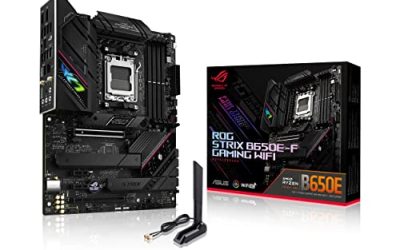
2. ASUS ROG Strix B650E-F Gaming WiFi
- WiFi 6E with the clean 6 GHz band for crowded homes
- PCIe 5.0 graphics slot and PCIe 5.0 M.2 slot
- 12 plus 2 power stage design with solid headroom
- Three M.2 slots and a USB 3.2 Gen 2×2 Type-C port
The ASUS ROG Strix B650E-F Gaming WiFi is the strongest all-rounder in this guide, balancing a modern feature set with the mature B650E chipset. Its 12 plus 2 power stage design feeds Ryzen processors cleanly. Storage is well covered with three M.2 slots, one running at PCIe 5.0 speed and two at PCIe 4.0, which is enough for an operating system drive plus a deep game library. Four DDR5 slots support large memory kits with AMD EXPO and Intel XMP profiles, and a USB 3.2 Gen 2×2 Type-C port anchors the rear panel.
Wireless networking runs on WiFi 6E, which adds the clean 6 GHz band to the familiar WiFi 6 foundation. In a crowded home network that 6 GHz band is the practical advantage: fewer neighboring networks compete for the same airwaves, so online sessions stay steadier during busy evenings. The board also carries 2.5G wired networking, and ASUS includes Q-Release for tool-free graphics card removal. Aura Sync lighting controls round out a board that behaves like a premium pick without the flagship chipset.
Pros
Cons
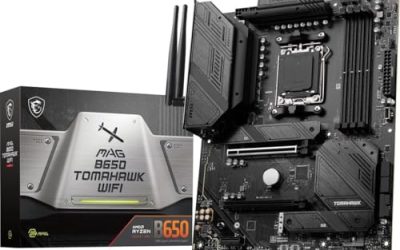
3. MSI MAG B650 Tomahawk WiFi
- Proven AM5 layout with a strong 14 plus 2 plus 1 phase VRM
- WiFi 6E plus Bluetooth 5.3 for controllers and headsets
- Three Gen 4 M.2 slots and ten rear USB ports
- 2.5Gbps wired networking for competitive sessions
The MSI MAG B650 Tomahawk WiFi has earned its place as a proven AM5 board, and it remains one of the most widely chosen WiFi boards for Ryzen gaming builds. It pairs the B650 chipset with DDR5 memory and Ryzen 9000, 8000, and 7000 series processors, and its 14 plus 2 plus 1 Duet Rail power design with 80A power stages handles demanding processors without strain. Three Gen 4 M.2 slots cover fast NVMe storage, and the rear panel carries ten USB ports for a headset, webcam, controller dongles, and external drives.
Wireless comes from a WiFi 6E module with Bluetooth 5.3, which covers both online play on the 6 GHz band and wireless controllers and headsets from the same radio. A 2.5Gbps wired port stands by for competitive sessions, and the board includes ALC4080 audio, which keeps headset sound clean without a separate sound card. The main trade-off against the picks above is PCIe 4.0 throughout, with no PCIe 5.0 graphics or storage support, which matters little for current graphics cards but gives the board a shorter horizon for upgrades.
Pros
Cons
4. GIGABYTE B650 AORUS ELITE AX
- WiFi 6E with the 6 GHz band at a value level
- Strong 14 plus 2 plus 1 phase VRM with 70A power stages
- Primary M.2 slot at PCIe 5.0 speed
- Q-Flash Plus BIOS updates without a processor installed
The GIGABYTE B650 AORUS ELITE AX is the value entry in this guide, and it shows how far WiFi 6E has spread down the AM5 range. It uses the B650 chipset with DDR5 memory and Ryzen 7000, 8000, and 9000 series processors, and its 14 plus 2 plus 1 phase digital VRM with 70A power stages is generous for this class. Three M.2 slots cover fast storage, with the primary slot at PCIe 5.0 speed, and the board carries 2.5GbE wired networking alongside its wireless radio.
The wireless module is WiFi 6E with Bluetooth, so this board gives the same 6 GHz band advantage as the stronger picks for online play in a busy household. GIGABYTE includes Q-Flash Plus for updating the BIOS without a processor installed, which simplifies pairing the board with a newer processor release. Builders should confirm the exact revision on the listing before ordering, since GIGABYTE sells both the original B650 AORUS ELITE AX and a V2 revision with a different VRM layout, and the two should not be treated as interchangeable.
Pros
Cons
Who Should Choose What
Builders starting a fresh AM5 system on a WiFi 7 router should choose the GIGABYTE X870 AORUS ELITE WIFI7, since it is the only board here that matches the newest wireless standard, and its four M.2 slots suit large game libraries. Builders who want the strongest all-rounder without the flagship chipset should choose the ASUS ROG Strix B650E-F Gaming WiFi, which pairs WiFi 6E with PCIe 5.0 graphics and storage. Builders who value a proven board with a deep USB set and strong audio should choose the MSI MAG B650 Tomahawk WiFi. Builders working to a tighter budget who still want WiFi 6E should choose the GIGABYTE B650 AORUS ELITE AX, which keeps the 6 GHz band and a strong VRM while trimming the extras. Anyone whose PC sits next to the router can ignore the wireless generation and choose on socket, storage, and layout instead, since a short cable beats any radio.
Common Mistakes
The most common mistake is buying a board without WiFi and then adding a USB adapter as an afterthought. USB adapters work, but they often lack a proper external antenna and can drop connection under load in exactly the moments that matter in a game. Built-in WiFi with a real antenna avoids all of that.
A second mistake is confusing WiFi 6 with WiFi 6E. The names look nearly identical, but only the 6E version opens the 6 GHz band, which is where the cleaner spectrum lives. Read the specification line rather than the headline.
A third mistake is hiding the antenna behind the case. The antenna needs a clear path toward the router, and tucking it behind a metal side panel or under a desk can cut the signal enough to cause stutter. Place it on the desk, high and clear.
A fourth mistake is forgetting Bluetooth. Many builders assume every WiFi board includes it, and most do, but a board without Bluetooth leaves wireless controllers and headsets needing a separate dongle. All four boards here include Bluetooth.
A final mistake is choosing the board before the processor. The motherboard, processor, and memory form a matched set, and a board bought first can force a processor compromise later. Settle the processor first, then pick the WiFi board that fits.
FAQ
Is WiFi fast enough for competitive online gaming?
Yes, on a modern board and a decent router. WiFi 6E and WiFi 7 both carry far more bandwidth than online games need, and the 6 GHz band keeps latency steadier by avoiding crowded spectrum. The remaining gap against a wired connection is consistency rather than raw speed, which is why every board here also carries a 2.5 gigabit Ethernet port.
Should a gaming build choose WiFi 7 or WiFi 6E?
Choose WiFi 7 for a new build on a WiFi 7 router, since it gives the widest channels and the lowest latency available today, and it keeps the board current the longest. Choose WiFi 6E when the router is WiFi 6E or older, or when the budget sits lower, since the 6 GHz band already covers the practical advantage for gaming. A WiFi 7 board works fine on an older router too.
Do all gaming motherboards include WiFi?
No. Many gaming boards ship without wireless networking, and the WiFi version of a board often sits beside a nearly identical model without it, sometimes with a single letter difference in the name. Always confirm the exact model name and the wireless specification on the listing.
Does built-in WiFi include Bluetooth?
On the boards in this guide, yes. The wireless module carries both WiFi and Bluetooth, so controllers, headsets, keyboards, and mice connect without a separate dongle. Bluetooth 5.3 on the MSI pick handles several devices at once.
Where should the WiFi antenna go for the best signal?
On the desk, as high as practical, with a clear line toward the router. Avoid placing it behind the metal case, under the desk, or inside a closed cabinet, since each barrier weakens the signal.
Can I use wired Ethernet on a WiFi motherboard?
Yes. Every board in this guide carries a 2.5 gigabit Ethernet port alongside its wireless radio, so a cable can be plugged in whenever it is available. Many builders run wireless day to day and switch to a cable for competitive sessions.
Conclusion
A gaming motherboard with built-in WiFi removes the cable problem without asking the builder to give up anything else. The GIGABYTE X870 AORUS ELITE WIFI7 leads for new builds on a WiFi 7 router, the ASUS ROG Strix B650E-F Gaming WiFi is the strongest all-rounder, the MSI MAG B650 Tomahawk WiFi is the proven AM5 choice, and the GIGABYTE B650 AORUS ELITE AX brings WiFi 6E to a value build. Match the wireless generation to the router, place the antenna where it can see the router, and keep the Ethernet port in mind for the sessions that matter most.
FAQ
Is WiFi fast enough for competitive online gaming?
Should a gaming build choose WiFi 7 or WiFi 6E?
Do all gaming motherboards include WiFi?
Does built-in WiFi include Bluetooth?
Where should the WiFi antenna go for the best signal?
Can I use wired Ethernet on a WiFi motherboard?
More from Amazon
Programs that pair well with the guide above. Offers and eligibility are set by Amazon and may change.
Free shipping on eligible items, Prime Video and more. Eligible new members can start with a free trial.
Start a Prime free trialAd-free music streaming. Eligible new subscribers can start with a free trial.
Try Music Unlimited freeA Prime membership for ages 18-24 with a trial period. Eligibility is set by Amazon.
See Prime for Young AdultsAudiobooks and podcasts to listen to on the go. Eligible new members can start with a free trial.
Try Audible freeAs an Amazon Associate we earn from qualifying purchases.