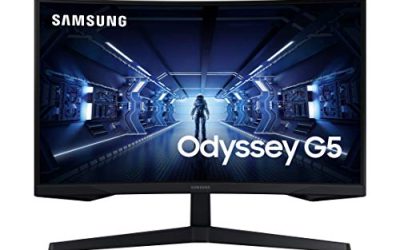
Our Top Picks
 LG 32GS60QC-B 32-inch UltraGear QHD 180Hz FreeSync Curved32 inch8.9 x 27.6 x 20 inches13 poundsCheck on Amazon

A curved monitor changes how a PlayStation 5 game feels on a desk. The panel wraps around your field of view, so wide landscapes and fast action fill more of what you see, and the edges of the screen sit closer to your eyes than they do on a flat panel. That wrap is the whole point of this guide. Every monitor below is a curved display with an HDMI input, a resolution the PS5 can drive, and a refresh rate that covers the console at its best.

Before choosing, it helps to know what the PS5 actually does. The console outputs a 16:9 image, so a standard 16:9 curved monitor fills the screen edge to edge, while a 21:9 ultrawide monitor shows black bars on the left and right. The PS5 supports up to 120Hz at 1080p and 1440p, and up to 4K at 120Hz in supported games over HDMI 2.1. A monitor with a higher refresh rate still works, but the console caps the signal at 120Hz. The PS5 has no DisplayPort output, so HDMI is the only connection that matters here, and variable refresh rate over HDMI helps keep motion smooth when frame rates move around.
The four monitors below cover the main shapes a PS5 owner is likely to want: two 32-inch 16:9 curved panels, one 27-inch 16:9 curved panel for smaller desks, and one 34-inch ultrawide curved OLED for players who want the deepest blacks and the widest view. All four are curved, all four take HDMI, and all four are built for gaming rather than office work.
What to Look For
Resolution comes first. The PS5 supports 1080p, 1440p and 4K output. A 1440p monitor is the sweet spot for most desks, because the console can drive it at up to 120Hz in supported games, and the image stays sharp at 27 and 32 inches. A 1080p panel on a 32-inch screen looks soft, so 1440p is the floor for a large curved display. A 4K panel is sharper still, but it needs HDMI 2.1 to reach 120Hz, and none of the curved picks here is 4K, so 1440p is the resolution this guide is built around.
Refresh rate comes second. The PS5 tops out at 120Hz, so a 165Hz or 180Hz monitor gives you headroom without waste: the panel can show every frame the console sends, and it stays useful if you later connect a PC. A 60Hz or 75Hz panel works, but it cannot show the 120Hz mode that many PS5 games now include, so it leaves performance on the table.
HDMI version matters more than most buyers expect. HDMI 2.0 carries 1440p at 120Hz, which covers every pick in this guide. HDMI 2.1 is only needed for 4K at 120Hz. Check that the monitor has at least one HDMI port that supports its full refresh rate at its native resolution, because some monitors reserve their top refresh rate for DisplayPort only. Every pick below lists HDMI among its inputs, and the PS5 connects through HDMI alone.
Panel type shapes the picture. VA panels are the common choice for curved gaming monitors: they deliver deep blacks and strong contrast, which suits dark game scenes, but their viewing angles are narrower than IPS. OLED panels go further, with true blacks and near-instant pixel response, and the one OLED pick here is the clear image-quality leader. IPS panels have wider viewing angles and steadier color, but curved IPS gaming monitors are rarer, and none made this list.
Curve depth is measured in R, and a smaller number means a tighter curve. A 1000R curve is deep and wraps the screen firmly around you, which suits a single-player setup where you sit centered. A 1500R curve is gentler and feels closer to a flat screen, while 1800R is gentler still. There is no correct number: a tighter curve feels more immersive at close range, and a gentler curve is easier to share with someone sitting beside you.
HDR support is worth a careful look. Many gaming monitors carry an HDR10 label, which means the panel accepts an HDR signal, but the actual HDR effect depends on brightness and local dimming. A VA panel with HDR10 gives a modest lift in bright highlights. An OLED panel with HDR True Black gives a far stronger HDR image, because each pixel controls its own light.
Response time and variable refresh rate round out the list. A 1ms MPRT figure means the panel is built to keep fast motion clear, and the OLED pick lists a 0.1ms gray-to-gray figure, which is effectively instant. FreeSync and HDMI Forum VRR both work with the PS5 over HDMI, and they reduce tearing when a game frame rate dips below the refresh rate. A monitor with VRR support is a better PS5 partner than one without it.
Size and desk space decide the rest. A 27-inch curved monitor fits a standard desk, a 32-inch curved monitor needs a deeper desk, and a 34-inch ultrawide needs the most room of all. Measure your desk depth before you commit to a size.
Samsung Odyssey G55C 32-Inch Curved Gaming Monitor
Samsung Odyssey G55C 32-Inch QHD 1000R Curved Gaming Monitor
The Samsung Odyssey G55C in its 32-inch form is the all-round pick of this guide. It pairs a 32-inch VA panel with 2560 x 1440 resolution, a 165Hz refresh rate, and a deep 1000R curve, which is the tightest curve among the 16:9 picks here. That combination makes it a natural fit for a PS5 desk setup: the console can drive 1440p at up to 120Hz, the panel has headroom above that, and the curve wraps the image around you at normal desk distance.
Samsung lists the panel at 1ms MPRT response, with HDR10 support and AMD FreeSync, and the listing gives a 2500:1 contrast ratio with 300 nits of brightness. Those figures describe a typical mid-range VA gaming panel: strong contrast for dark scenes, enough brightness for a lit room, and an HDR label that signals compatibility rather than high-end HDR performance. The monitor carries HDMI and DisplayPort inputs, and the PS5 connects over HDMI, where the panel reaches its full 1440p refresh range.
The 1000R curve is the defining feature. At 32 inches, a tight curve pulls the edges of the screen toward you, so the whole image sits at a more even distance from your eyes. In a story-driven game with wide scenery, that wrap adds a sense of place that a flat panel does not.
Fit for a PS5 setup is straightforward. The 16:9 aspect ratio fills the screen with no black bars, the 1440p resolution matches a PS5 output mode, and the 165Hz ceiling covers the console 120Hz mode with room to spare. The stand has tilt adjustment, and the panel is VESA mount compatible for an arm or wall mount. One honest limit: the stand does not give height adjustment on this model, so set the desk and chair height to match, or use a monitor arm if you need vertical movement.
LG UltraGear 32GS60QC-B 32-Inch Curved Gaming Monitor
LG UltraGear 32GS60QC-B 32-Inch QHD 180Hz Curved Gaming Monitor
The LG UltraGear 32GS60QC-B is the high-refresh pick of this guide. It is a 32-inch curved VA panel at 2560 x 1440 with a 180Hz refresh rate and a 1000R curve, which is the highest refresh rate among the 16:9 picks here. The PS5 caps at 120Hz, so the extra headroom does not change console play directly, but it means the panel never limits the console, and it stays fast if a PC joins the desk later.
LG lists a 1ms response time, HDR10 support, AMD FreeSync, and two HDMI inputs plus DisplayPort. The listing gives the model as 32GS60QC-B, and the panel is a borderless design with a tilt-only stand. The 1000R curve matches the Samsung G55C for depth, so the two 32-inch picks feel similar in wrap, and the choice between them comes down to refresh rate, ports, and the stand.
The second HDMI input is a practical advantage. A PS5 plus a second console, a streaming box, or a PC can stay connected at the same time, with no cable swapping.
Fit for a PS5 setup is strong. The 16:9 panel fills the screen, 1440p matches a PS5 output mode, and the 180Hz ceiling covers the console 120Hz mode. The tilt-only stand is the main limit, the same as the Samsung pick: plan the desk height or add a monitor arm. The panel is a VA type, so contrast is strong and viewing angles are narrower than an IPS panel, which matters only if you often watch from the side.
Samsung Odyssey G55C 27-Inch Curved Gaming Monitor
Samsung Odyssey G55C 27-Inch QHD 1000R Curved Gaming Monitor
The 27-inch version of the Samsung Odyssey G55C is the compact pick of this guide, and it shares the same core specification as its 32-inch sibling: a QHD 2560 x 1440 VA panel, a 165Hz refresh rate, 1ms MPRT response, HDR10, AMD FreeSync, and a 1000R curve. The difference is size and pixel density. At 27 inches, the same 1440p resolution packs pixels more tightly, so text and fine detail look sharper than on the 32-inch version, and the screen fits a smaller desk without dominating it.
That sharper image is the reason to choose the 27-inch model over the 32-inch one. If your desk is shallow, or you sit close to the screen, a 32-inch panel can feel too large, and you end up turning your head to follow action at the edges. The 27-inch panel keeps the whole image inside a comfortable field of view, and the 1000R curve still wraps the edges toward you. For competitive games where you watch the whole screen at once, the smaller size is an advantage.
Samsung lists the model as LS27CG552ENXZA, with HDMI and DisplayPort inputs and a tilt-adjustable stand. The PS5 connects over HDMI, and the panel reaches its full 1440p refresh range through that port. The listing describes the same eye-care features as the larger model, including an eye saver mode that reduces blue light output.
One caution belongs here, stated plainly. The evidence for this listing is mixed: a tracker site verified on November 28, 2026 that stock is available on Amazon, while a mirror listing crawled four days earlier showed the item as unavailable with no new-unit buy option. That conflict means you should confirm a new-unit buy option on the exact listing before ordering, and if the listing shows no new units, the 32-inch G55C above is the same panel in a larger size.
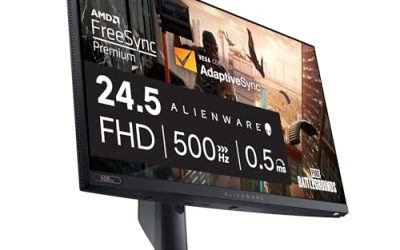
Alienware AW3423DWF 34-Inch Curved QD-OLED Gaming Monitor
Alienware AW3423DWF 34-Inch Curved QD-OLED Gaming Monitor
The Alienware AW3423DWF is the image-quality leader of this guide and the only ultrawide pick. It is a 34-inch QD-OLED panel with 3440 x 1440 resolution, a 165Hz refresh rate, a 0.1ms gray-to-gray response time, and an 1800R curve. The QD-OLED panel delivers true blacks, because each pixel makes its own light, and a 99.3 percent DCI-P3 color gamut, which is the widest color coverage in this guide. It also carries VESA DisplayHDR True Black 400 certification and AMD FreeSync Premium Pro.
The honest limit of this pick is the aspect ratio, and it needs stating clearly. The PS5 outputs a 16:9 image only, so on this 21:9 ultrawide panel the game appears with black bars on the left and right, and the image occupies the central 2560 x 1440 portion of the screen. You still get the OLED blacks and the fast response, and the image is larger than on a 27-inch 16:9 monitor, but you do not get a wider game view from the console. The ultrawide shape pays off when a PC is connected, where games can use the full 3440 x 1440 width, and for desktop work with two windows side by side.
For a PS5 owner who also plays on PC, that trade is worth making. The OLED panel makes dark game scenes look dramatically better than any VA panel in this guide, with no backlight glow in black areas and instant pixel response that keeps fast motion clean. It includes a three-year warranty that covers OLED burn-in. A November 4, 2026 source notes that Amazon itself sold this listing, and a roundup updated six days ago still lists it on Amazon, which is the strongest availability evidence in this guide.
The 1800R curve is gentler than the 1000R curve on the other picks, which suits the wider panel: a tighter curve on a 34-inch screen would bend the image more than most players want. The stand has height, tilt, and swivel adjustment, which is the most flexible stand in this guide. The panel has HDMI and DisplayPort inputs, and the PS5 connects over HDMI.
Comparison Table
| Monitor | Size and resolution | Curve | Refresh rate | Panel | HDMI |
|---|---|---|---|---|---|
| Samsung Odyssey G55C 32-Inch | 32 in, 2560 x 1440 | 1000R | 165Hz | VA | Yes |
| LG UltraGear 32GS60QC-B | 32 in, 2560 x 1440 | 1000R | 180Hz | VA | Yes, two ports |
| Samsung Odyssey G55C 27-Inch | 27 in, 2560 x 1440 | 1000R | 165Hz | VA | Yes |
| Alienware AW3423DWF | 34 in, 3440 x 1440 | 1800R | 165Hz | QD-OLED | Yes |
Frequently Asked Questions
Does the PS5 work with a curved monitor?
Yes. The PS5 connects to a curved monitor over HDMI exactly as it connects to a flat monitor or a television. The curve is a property of the panel, not of the signal, so the console needs no special setting. Set the console video output to match the monitor resolution, and enable 120Hz output in the console settings if the game supports it. A 16:9 curved monitor fills the screen, while a 21:9 ultrawide curved monitor shows black bars on the sides because the console outputs a 16:9 image only.
Can the PS5 use a 165Hz or 180Hz monitor?
Yes, and the monitor will run at the console limit. The PS5 supports up to 120Hz at 1080p and 1440p, so a 165Hz or 180Hz panel displays the console signal at up to 120Hz in supported games. The extra refresh headroom is not wasted: it means the panel never holds the console back, and the monitor stays fast if you later connect a PC that can drive higher frame rates. The monitor refresh rate is a ceiling, not a requirement, so any panel at 120Hz or above covers the console fully.
Is a 1440p curved monitor better than a 4K monitor for PS5?
It depends on what you value. A 1440p monitor lets the PS5 reach 120Hz over HDMI 2.0, which covers the fast mode in supported games, and 1440p looks sharp at 27 and 32 inches. A 4K monitor is sharper, but it needs HDMI 2.1 to reach 120Hz, and 4K panels cost more. For a desk setup where you sit close to the screen, a 1440p curved panel is the practical choice, and every pick in this guide is built on that reasoning.
How to Choose
Begin with size and desk depth. A 27-inch curved monitor suits a standard desk and a close seating position, and the 27-inch Samsung G55C is the pick for that setup, with the sharpest image of the 16:9 options. A 32-inch curved monitor suits a deeper desk, where you sit further back, and the choice between the 32-inch Samsung G55C and the LG 32GS60QC-B comes down to refresh rate and ports: the LG runs at 180Hz and has two HDMI inputs, while the Samsung is the established all-round option at 165Hz.
Next, weigh the ultrawide question honestly. The Alienware AW3423DWF has the best picture in this guide by a clear margin, with true OLED blacks and the quickest response, but the PS5 cannot use its full width, so the game appears with black bars on the sides. Choose it if you also play on PC or do color work on the same desk, where the ultrawide shape and the OLED panel both pay off. Choose a 16:9 panel if the PS5 is the only source and you want the screen filled edge to edge.
Then check the practical details. Confirm the monitor has an HDMI port that supports its full refresh rate at its native resolution, because the PS5 has no DisplayPort output. Confirm the stand suits your desk, since three of the four picks here give tilt only, and the Alienware is the only one with height adjustment.
A curved monitor does not change what the PS5 can do, but it changes how the game feels at your desk. The curve pulls the edges of the image toward you, the 1440p resolution keeps the picture sharp, and the high refresh rate keeps motion smooth at the console 120Hz limit. Pick the size that fits your desk, the panel that fits your games, and the curve that feels right at your seating distance.
Disclosure: As an Amazon Associate, we may earn a commission from qualifying purchases made through links in this article, at no additional cost to you.
FAQ
Does the PS5 work with a curved monitor?
Can the PS5 use a 165Hz or 180Hz monitor?
Is a 1440p curved monitor better than a 4K monitor for PS5?
More from Amazon
Programs that pair well with the guide above. Offers and eligibility are set by Amazon and may change.
Free shipping on eligible items, Prime Video and more. Eligible new members can start with a free trial.
Start a Prime free trialAd-free music streaming. Eligible new subscribers can start with a free trial.
Try Music Unlimited freeA Prime membership for ages 18-24 with a trial period. Eligibility is set by Amazon.
See Prime for Young AdultsAudiobooks and podcasts to listen to on the go. Eligible new members can start with a free trial.
Try Audible freeAs an Amazon Associate we earn from qualifying purchases.