Key takeaways
- Resolution and Frame Rate: 1080p at 30fps is the baseline for clean video; if you stream or record gaming content, look for 60fps options that keep motion smooth without blur or ghosting.
- Microphone Quality: Dual omnidirectional mics outperform single-mic designs for voice clarity and noise rejection, which matters most if you don’t use a dedicated USB or XLR microphone.
- Field of View: A wide-angle lens (90 to 110 degrees) is useful for group calls or showing your setup, but anything wider tends to introduce distortion that makes your face look stretched at the frame edges.
- Autofocus vs. Fixed Focus: Autofocus tracks movement well for presentations and walking around, but fixed-focus mini webcams avoid the annoying hunting and pulsing that budget autofocus systems are known for during close-up face cam use.
- Privacy and Mounting: A built-in privacy cover is now essential, and a rotatable clip or included mini tripod gives you flexible placement on monitors, laptop screens, or shelves without buying extra accessories.
What's inside
Finding a compact webcam that delivers crisp image quality without cluttering your desk setup is harder than it should be. Between inflated resolution claims, inconsistent autofocus, and microphones that sound like you’re broadcasting from inside a tin can, the budget webcam market is full of compromises that become obvious the moment you go live or join a call.
As an Amazon Associate we earn from qualifying purchases.


This guide cuts through the marketing noise and focuses on mini and compact webcams that actually perform. Whether you need a portable camera for daily video calls, a budget-friendly upgrade for game streaming on OBS or Twitch, or a plug-and-play option that works reliably across Zoom, Teams, and Skype, the models below cover the best combinations of image quality, microphone clarity, and value.
🛒 Best Price Today on Amazon
Prime members get fast, free shipping on everything above, plus member-only deals. New members get a 30-day free trial — cancel anytime.
Watch: Webcam Mini: Review & Buyer’s Guide — Video Review
How to Choose a Webcam Mini
- Resolution and Frame Rate: 1080p at 30fps is the baseline for clean video; if you stream or record gaming content, look for 60fps options that keep motion smooth without blur or ghosting.
- Microphone Quality: Dual omnidirectional mics outperform single-mic designs for voice clarity and noise rejection, which matters most if you don’t use a dedicated USB or XLR microphone.
- Field of View: A wide-angle lens (90 to 110 degrees) is useful for group calls or showing your setup, but anything wider tends to introduce distortion that makes your face look stretched at the frame edges.
- Autofocus vs. Fixed Focus: Autofocus tracks movement well for presentations and walking around, but fixed-focus mini webcams avoid the annoying hunting and pulsing that budget autofocus systems are known for during close-up face cam use.
- Privacy and Mounting: A built-in privacy cover is now essential, and a rotatable clip or included mini tripod gives you flexible placement on monitors, laptop screens, or shelves without buying extra accessories.
The Best Webcam Minis Reviewed
EMEET C960 2K Webcam
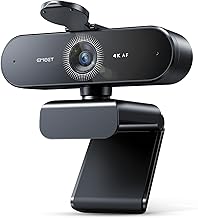
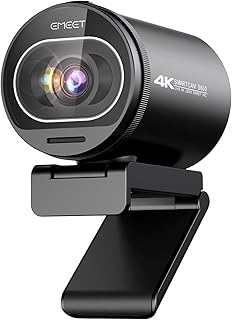
The standout pick for anyone who wants above-1080p clarity at a reasonable price. Its 2K sensor and PDAF autofocus produce noticeably sharper images than standard 1080p competitors, and the dual omnidirectional mics handle voice capture cleanly for everyday conferencing and YouTube use.
NexiGo N660P 1080p 60fps Webcam
The top choice for streamers and gamers. The 60fps frame rate makes motion look fluid on OBS and Twitch, software control lets you fine-tune exposure and color, and the autofocus is fast enough to keep up with movement without constant refocusing.
NexiGo N660 1080p Business Webcam
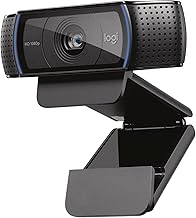
A reliable, no-nonsense workhorse for professionals. Dual microphones provide better voice isolation than most single-mic budget cams, and the plug-and-play USB setup gets you running on Zoom, Teams, or Webex in seconds with no driver headaches.
NexiGo N60 1080P Webcam
The best budget option for students and casual users. It keeps things simple with solid 1080p video, a serviceable built-in microphone, software controls for brightness and saturation adjustment, and a privacy cover included at a price that’s hard to beat.
1080P Webcam with Tripod and 110-Degree FOV
Great for group calls and wider desk shots. The 110-degree field of view captures more of the room without extreme distortion, and the included rotatable mini tripod gives you stable tabletop positioning that monitor-clip mounts simply can’t match.
Frequently Asked Questions
Is a mini webcam good enough for streaming?
Yes, provided you choose one with at least 1080p resolution and 30fps, though 60fps is ideal for gaming streams. The NexiGo N660P is specifically designed for this use case and handles OBS and Twitch broadcasting well.
Do I need a separate microphone if my webcam has one?
For casual calls, built-in mics are fine. For streaming, podcasting, or professional recording, a dedicated USB microphone will always sound significantly better, since webcam mics are tuned for convenience rather than richness and depth.
What does 60fps mean and does it matter?
60fps captures twice as many frames per second as the standard 30fps, resulting in smoother motion. It’s most noticeable when you move around on camera or stream fast-paced games where frame sharpness and fluidity are visible to viewers.
Are 4K mini webcams worth the premium?
For most users, no. Most platforms compress video to 720p or 1080p anyway, so a good 2K or 1080p sensor with solid optics and lighting will look better in practice than a cheap 4K camera with poor components.
Final Thoughts
For overall value and image quality, the EMEET C960 2K is the top pick thanks to its sharp sensor and reliable autofocus. Gamers and streamers should go straight for the NexiGo N660P, which delivers the 60fps performance and software control that live broadcasting demands. If you’re on a strict budget, the NexiGo N60 covers all the basics reliably without cutting corners on build quality.