Key takeaways
- A monitor with a built-in webcam solves a small but irritating problem: the cable clutter and clip-on camera that wobble on top of a screen.
A monitor with a built-in webcam solves a small but irritating problem: the cable clutter and clip-on camera that wobble on top of a screen. Pop the camera into the bezel, add a microphone array and a pair of speakers, and one USB or HDMI link handles your video calls, your documents, and your lunch-break videos. The trade-off is that you give up the freedom to swap the camera later, so the webcam’s resolution and placement matter as much as the panel itself.
This guide is for remote workers, students, and small-business owners who live on video calls and want a tidy desk. We compare nine monitors using only what the listings state: screen size, resolution, refresh rate, webcam megapixels, connection types, stand adjustments, and extras like USB-C power delivery. In 2026 most office monitors can double as a conferencing hub, but their cameras range from basic 2MP lenses to 5MP pop-up designs, and that range is the main reason to read the details.
Quick Picks
Our top picks





As an Amazon Associate we earn from qualifying purchases at no extra cost to you.
| Product | Best for | Key spec from the title |
|---|---|---|
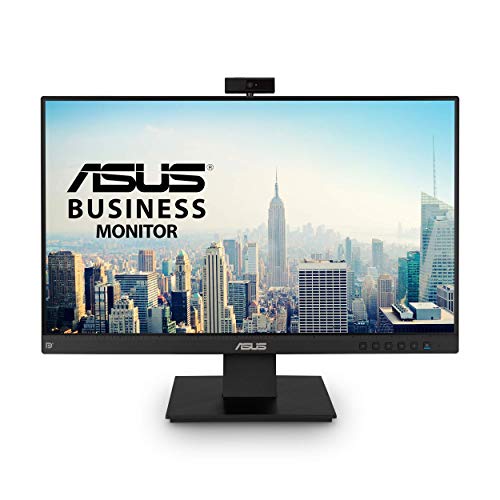
| ASUS BE24EQK | Compact eye-care desk | 24 inch 1080P IPS, 2MP webcam, mic array |
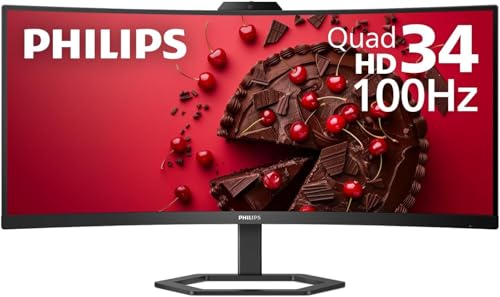
| Philips 34E1C5600HE | Ultrawide multitasking | 34 inch curved, 3440×1440, USB-C 65W PD |
| ASUS BE279QSK | Larger Full HD space | 27 inch 1080P IPS, 2MP webcam, speakers |
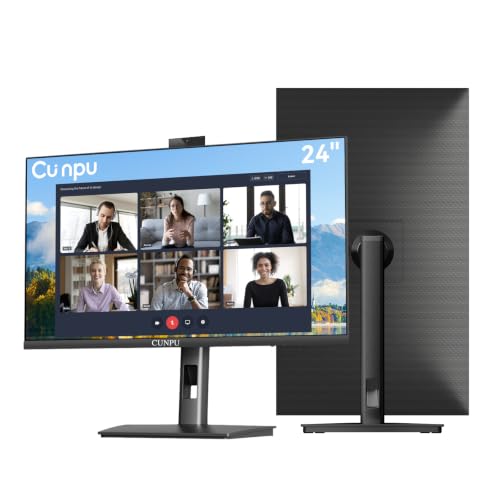
| CUNPU 27 Inch | Sharper webcam image | QHD, 5MP pop-up webcam, height adjustment |
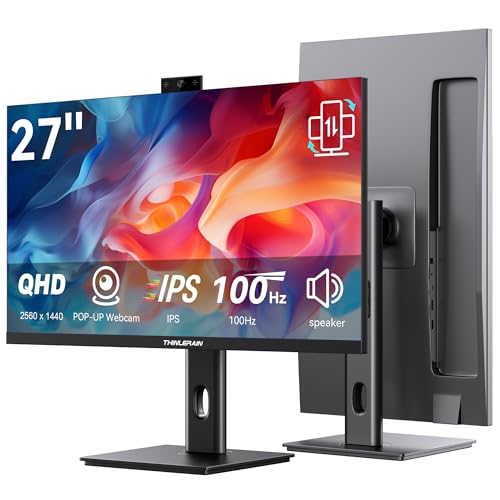
| Thinlerain 27 Inch | Vertical or pivot use | 2560×1440 IPS, 100Hz, 3MP pop-up webcam |
| Acer 24 Inch Conferencing | Adjustable stand | 1080P IPS, FHD webcam, FreeSync, 75Hz |
| SKitphrati 27 Inch | Higher refresh rate | 1080P IPS 120Hz, 3MP webcam |
| HP Series 5 Pro 24 Inch | Docking and privacy | FHD USB-C, 5MP pop-up webcam, USB expansion |
| ASUS BE249QFK | Smooth, frameless office use | 24 inch 1080P IPS 100Hz, height adjustable |
How to Choose
Webcam megapixels and design
The built-in camera is the weak spot of most conferencing monitors. A 2MP sensor gives a basic 1080p picture, whereas 3MP and 5MP cameras offer more cropping room and sharper faces. A pop-up design hides the lens when you do not use it, which is a simple privacy feature. Fixed bezel cameras cannot be tilted as freely, so check the stand’s range.
Panel size, resolution, and refresh rate
At 24 inches, 1080p looks fine, while 27 inches benefits from 2560×1440 for sharper text. A 34 inch ultrawide at 3440×1440 gives side-by-side window space, but it makes a poor camera angle on a short desk. Office users rarely need more than 75Hz, though 100Hz or 120Hz feels smoother when scrolling. IPS panels offer wide viewing angles, while VA panels give deeper contrast.
Ports and power
USB-C with power delivery lets a laptop charge and send video over one cable, and 65W is a typical figure for slim notebooks. HDMI and DisplayPort suit desktops, while a VGA port only matters for old equipment. A USB hub, like the one named on the HP, saves you from plugging a keyboard and mouse into the laptop directly.
Stand adjustment and what to ignore
Height, tilt, and swivel matter more with a webcam, because you want the lens at eye level. Pivot is useful for reading documents. Ignore speaker wattage claims, since small built-in speakers are meant for calls, not music. Be wary of budget panels with thin stands that sag, and remember that built-in microphones sit near the screen and pick up keyboard noise.
The 9 Best Options
ASUS BE24EQK 24 Inch
A good fit for a home office that wants a simple, tidy screen for daily calls. The title lists a 24 inch 1080P Full HD IPS panel, a 2MP webcam, a mic array, stereo speakers, eye care features, and HDMI, DisplayPort, and VGA inputs.
- The IPS panel offers consistent color from different seating angles.
- HDMI, DisplayPort, and VGA inputs connect almost any computer.
- Trade-off: a 2MP webcam gives a basic picture, with limited cropping headroom.
Skip it if you want a camera you can zoom into without losing detail. It suits a remote customer service agent who spends hours on calls and values eye care features during a long shift.
Philips 34E1C5600HE Curved Ultrawide
For multitaskers who want a call window beside spreadsheets and a chat app. The title lists a 34 inch curved VA panel, UWQHD 3440×1440 at 100Hz, a 21:9 ratio, USB-C with 65W power delivery, a webcam, speakers, and noise-canceling microphones.
- The 3440×1440 ultrawide panel offers a lot of workspace.
- USB-C with 65W PD charges a laptop and carries video over one cable.
- Trade-off: its size takes up most of a small desk, and the title omits the webcam’s resolution.
Skip it if you have a compact desk or want a clearly stated webcam spec. It is a strong pick for an analyst who keeps a call open beside a dashboard and a spreadsheet.
ASUS BE279QSK 27 Inch
The bigger sibling for people who want more room without a resolution jump. It lists a 27 inch 1080P Full HD IPS panel, a built-in 2MP webcam, a mic array, speakers, VGA, HDMI, and DisplayPort connections, and eye care technology.
- A 27 inch screen gives comfortable room for two windows.
- Eye care features appeal to long working days.
- Trade-off: Full HD stretched over 27 inches looks softer than 1440p.
Skip it if you read small text all day, since 1080p at this size shows pixels. It fits a teacher or tutor who wants a bigger picture on a desk and a basic built-in camera.
CUNPU 27 Inch QHD Monitor with Camera
Aimed at users who want a better camera image. The title lists a 27 inch QHD panel, a 5MP pop-up webcam, a mic and speakers, and height adjustment, swivel, and pivot.
- A 5MP pop-up camera is among the highest-resolution webcams in this group.
- Height, swivel, and pivot adjustments help you place the lens at eye level.
- Trade-off: the brand is lesser known, so support is harder to judge.
Skip it if you want a name-brand warranty. It suits a freelancer who is on camera with clients throughout the day and wants the sharpest built-in image available.
Thinlerain 27 Inch Monitor with Pop-Up Webcam
For creators and developers who like a tall screen. The title lists a 27 inch IPS panel at 2560×1440 with 100Hz, a vertical-capable design, and a built-in 3MP pop-up webcam with a microphone.
- 2K resolution at 27 inches gives sharp text.
- The pivot-friendly stand makes vertical coding or reading windows possible.
- Trade-off: its pop-up camera sits at 3MP, below the 5MP models.
Skip it if you plan to use it flat and want the best camera detail. It is a great match for a developer who reads long files on a portrait screen and joins stand-up calls between tasks.
Acer 24 Inch Conferencing Monitor
Built for office-style calls with a flexible stand. The title lists a 1080P IPS panel, adjustable height, swivel, and tilt, an FHD webcam, AMD FreeSync, built-in speakers, a 75Hz refresh rate, and an anti-glare coating.
- The adjustable stand lets you set the camera at eye level.
- Anti-glare treatment helps in bright rooms.
- Trade-off: the webcam is described only as FHD, with no megapixel count.
Skip it if you need a high-refresh gaming panel. It suits a hybrid worker with a window behind the desk who needs a screen that cuts reflections.
SKitphrati 27 Inch Business Webcam Monitor
For buyers who want a snappier panel in a conferencing monitor. The title lists a 27 inch 1080P IPS panel at 120Hz, an adjustable 3MP webcam, a mic array, speakers, and eye care features.
- 120Hz makes scrolling and cursor movement feel smoother.
- An adjustable 3MP webcam helps with framing.
- Trade-off: Full HD on a 27 inch screen appears less sharp than 1440p.
Skip it if text clarity is your top priority. It suits an office worker who also plays casual games after hours and wants a bit more speed.
HP Series 5 Pro 24 Inch Conferencing Monitor
The dock-friendly option for corporate desks. The title lists a 24 inch FHD panel with USB-C, a 5MP pop-up webcam, 4x3W speakers, 100mm VESA mount, DisplayPort, HDMI, and a USB expansion port.
- A 5MP pop-up webcam balances image quality and privacy.
- USB-C and a USB hub reduce the number of cables to the laptop.
- Trade-off: the title leaves out the USB-C power delivery wattage.
Skip it if you need a laptop charged at a specific wattage and cannot confirm it. It fits a manager who connects a notebook daily and wants a one-cable dock.
ASUS BE249QFK 24 Inch
For a user who wants a smooth, frameless look in a small package. The title lists a 24 inch 1080P FHD IPS panel at 100Hz, a webcam, a mic array, speakers, a frameless design, and a height-adjustable stand, plus HDMI, DisplayPort, and VGA.
- 100Hz refresh gives smoother motion than a standard 60Hz office screen.
- The height-adjustable stand helps lens placement.
- Trade-off: it carries no listed webcam megapixels.
Skip it if you want a detailed camera spec before you buy. It suits a student who wants a modern frameless screen for lessons, calls, and light entertainment.
Which One Fits Your Situation
You are on calls all day and need a sharp camera
The CUNPU 27 inch and the HP Series 5 Pro both list 5MP pop-up webcams, the highest figure here. Pick the CUNPU for the larger QHD canvas, or the HP if a USB-C docking connection matters more than screen size.
You work with a laptop and want one cable
The HP Series 5 Pro adds USB-C and a USB port, while the Philips ultrawide lists 65W power delivery. Compare your laptop’s charger rating with the figure before you count on a single cable to keep it topped up.
You want a vertical coding screen
The Thinlerain 27 inch lists a 2560×1440 IPS panel and a stand designed for portrait use. The CUNPU also lists pivot, so it is the alternate choice if you want a sharper 5MP camera in the same orientation.
You want a smaller footprint
The ASUS BE24EQK keeps a 24 inch panel and a basic 2MP camera on a compact desk. If you also want a taller stand and 100Hz, the BE249QFK shares the same size and adds both.
Common Mistakes
- Assuming every built-in webcam is high resolution.
- Choosing a 27 inch Full HD panel when you read small text.
- Ignoring stand adjustments that decide camera height.
- Forgetting that USB-C may not charge your laptop at the wattage it needs.
- Leaving the built-in microphone next to a loud keyboard.
Related guides
- Gaming Headsets For Competitive Fps Directional Audio
- Threadripper Vs Xeon Vs Core I9 For Workstations
- Compact Mini Itx Gaming Pcs For Small Desks
Frequently Asked Questions
Are built-in webcams as good as standalone ones?
Some 5MP pop-up models come close to a decent standalone camera. A basic 2MP lens will look more modest in low light.
Do I need USB-C on the monitor?
Only if you use a laptop and want a single cable. Desktops are fine with HDMI or DisplayPort.
Is a pop-up camera more private?
It hides the lens physically when retracted, which is reassuring when the monitor sits in a shared room. Still, the microphone may remain active, so mute it in your calling app or the system settings when you are not speaking.
What size should I buy for a small desk?
A 24 inch screen fits most compact desks. Move to 27 inches only if you have room and want 1440p.
FAQ
Are built-in webcams as good as standalone ones?
Do I need USB-C on the monitor?
Is a pop-up camera more private?
What size should I buy for a small desk?
More from Amazon
Programs that pair well with the guide above. Offers and eligibility are set by Amazon and may change.
Free shipping on eligible items, Prime Video and more. Eligible new members can start with a free trial.
Start a Prime free trialAd-free music streaming. Eligible new subscribers can start with a free trial.
Try Music Unlimited freeA Prime membership for ages 18-24 with a trial period. Eligibility is set by Amazon.
See Prime for Young AdultsAudiobooks and podcasts to listen to on the go. Eligible new members can start with a free trial.
Try Audible freeAs an Amazon Associate we earn from qualifying purchases.