Our Short List of 3

- Best for: Ranked players who hold tight angles and want the clearest motion at 1080p.
- Screen size: 24.5 inches
- Resolution: 1920 x 1080
- Refresh rate: 240Hz
- Response time: 1ms

- Best for: Players who want a sharp 1440p image with strong colour for Siege and everything else on the desk.
- Screen size: 27 inches
- Resolution: 2560 x 1440
- Refresh rate: 165Hz, 180Hz overclock
- Response time: 1ms GtG

- Best for: Players who want a well-rounded 1440p monitor with blur reduction, speakers and full stand adjustment.
- Screen size: 27 inches
- Resolution: 2560 x 1440
- Refresh rate: 165Hz, supports 144Hz
- Response time: 1ms MPRT
All 4 Picks at a Glance
| Product | Specs | Action |
|---|---|---|
| BenQ ZOWIE XL2546K |
| Check price on Amazon |
| LG UltraGear 27GP850-B |
| Check price on Amazon |
| ASUS TUF Gaming VG27AQ |
| Check price on Amazon |
 Samsung Odyssey G7 27-Inch |
| Check price on Amazon |
Our Top Picks
- ASUS TUF Gaming VG27AQ 27 Inch QHD 165Hz27” 2K WQHD IPS19.96 x 24.41 x 8.31 inches12.8 poundsCheck on Amazon
Rainbow Six Siege is won in doorways, stairwells and pixel-wide angles, where a defender holding a tight line meets an attacker swinging around a corner. In that half-second exchange, the monitor matters more than almost any other part of the setup: a slow panel smears the enemy into the wall, while a fast one shows the swing early enough to react. The real decision is not simply buying the highest refresh rate on the shelf, but matching panel speed, resolution and screen size to how you actually play Siege.
This guide is for ranked players who hold angles for whole rounds, for casual squads who want smoother gunfights without rebuilding their PC, and for players upgrading from a 60Hz office screen who wonder what the extra frames really buy. Every monitor below was chosen from the specifications on its Amazon listing, with refresh rate, response time, resolution and adaptive sync taken from the product page rather than from guesswork.
Quick Picks
As an Amazon Associate we earn from qualifying purchases
| Product | Best for | Key spec from title |
|---|---|---|
| BenQ ZOWIE XL2546K | Ranked players who want maximum motion clarity | 24.5-inch 240Hz, 1080p, 1ms, DyAc+ |
| Alienware AW2523HF | Competitive players chasing the fastest frame updates | 24.5-inch IPS, 1080p, 360Hz, 0.5ms |
| LG UltraGear 27GP850-B | Players who want sharp 1440p and strong colour | 27-inch QHD Nano IPS, 165Hz, 1ms |
| ASUS TUF Gaming VG27AQ | A balanced 1440p pick with blur reduction and speakers | 27-inch QHD, 165Hz, 1ms, ELMB Sync |
| Samsung Odyssey G7 27-Inch | Players who want a curved 1440p panel at 240Hz | 27-inch WQHD curved, 240Hz, 1ms, QLED |
How to Choose
Refresh rate decides how early you see the swing
Siege rewards the player who spots movement first, and refresh rate is the number that controls that. A 60Hz screen redraws the image 60 times per second, so an attacker crossing a doorway can appear in a single jump between frames. At 144Hz that motion breaks into smaller steps, and at 240Hz or 360Hz the swing becomes a smooth glide that your eyes can track. If your graphics card can push high frame rates at 1080p, a 240Hz or 360Hz panel is the single biggest upgrade you can make to your reactions. If your card tops out near 144 frames per second, paying for 360Hz buys nothing, because the monitor can only show the frames your PC actually renders.
Resolution is a trade between sharpness and frame rate
Most competitive Siege players still play at 1080p, and the reason is practical rather than nostalgic. At 1920 x 1080, a mid-range graphics card can hold the high frame rates that make a fast monitor worthwhile, and enemies at distance stay readable because Siege maps are compact and sightlines are short. Moving to 1440p sharpens textures, operator models and distant doorways, which helps on long angles in maps like Bank or Consulate, but it also asks far more of your graphics card. Choose 1080p if your priority is frame rate above everything else, and choose 1440p if your card comfortably holds triple-digit frame rates at that resolution and you also use the screen for other games or daily work.
Panel type shapes motion clarity and viewing angles
The three panel types in this guide behave differently when the action speeds up. TN panels like the BenQ respond quickly and keep fast motion crisp, which is why they still appear in esports setups, though their colours shift when you view the screen from the side. IPS panels like the Alienware and LG keep colours consistent across wide angles and look better in dark corners, which matters in Siege, where much of the map sits in shadow. VA panels like the Samsung curve deliver deep blacks that make dark rooms feel atmospheric, but some VA screens smear dark-to-dark transitions, so check the listed response time and blur-reduction features before buying a curved panel for ranked play.
Adaptive sync, ports and ergonomics finish the setup
A monitor that tears or stutters during a gunfight wastes the refresh rate you paid for, so match the adaptive sync to your graphics card: G-SYNC Compatible and FreeSync Premium both smooth out uneven frame delivery, and many panels in this guide support both standards. Check the ports before you order, because a 240Hz or 360Hz panel needs DisplayPort to reach its top refresh rate at full resolution, while HDMI on some models caps the frame rate. The stand matters more than it looks on a spec sheet: height, tilt, swivel and pivot adjustments let you set the screen at eye level for long sessions, and a VESA mount option keeps the desk clear for a wide mouse pad.
The 5 Best Options
BenQ ZOWIE XL2546K
- Best for: Ranked players who hold tight angles and want the clearest motion at 1080p.
- Screen size: 24.5 inches
- Resolution: 1920 x 1080
- Refresh rate: 240Hz
- Response time: 1ms
Ranked players who hold tight angles and want the clearest motion at 1080p.
The TN panel narrows viewing angles, so sit directly in front of the screen and expect colours that look flatter than an IPS panel.
The XL2546K is the monitor most often seen on competitive Siege desks, and its appeal is focus rather than spectacle. Its 24.5-inch 1080p TN panel runs at 240Hz with a 1ms response, and the DyAc+ blur reduction keeps fast strafing readable instead of smeared. Black eQualizer brightens dark corners without washing out the rest of the scene, which helps when an enemy hides in a shadowed hallway. The included side shields cut glare and distractions, and the S-Switch remote lets you change settings between rounds without fumbling through menus.
Watch out for: The TN panel narrows viewing angles, so sit directly in front of the screen and expect colours that look flatter than an IPS panel.
Alienware AW2523HF
The AW2523HF takes the same 24.5-inch 1080p size as the BenQ and pushes the refresh rate to 360Hz, which is the fastest panel in this guide. Its IPS screen keeps colours steady from off-centre viewing positions, and the 0.5ms response time pairs with AMD FreeSync to keep rapid peeks smooth. Because it is IPS rather than TN, dark rooms and operator outlines look richer, and the height, tilt, swivel and pivot stand adjusts easily for long ranked sessions. This is the pick for players whose graphics card already delivers very high frame rates and who want every frame the hardware can produce.
Specs
- Screen size: 24.5 inches
- Resolution: 1920 x 1080
- Refresh rate: 360Hz
- Response time: 0.5ms
- Panel: IPS LED
- Variable refresh: AMD FreeSync
- Stand: height, tilt, swivel and pivot adjustment
- Mounting: VESA compatible
- Ports: USB, HDMI
Best for: Competitive players with a strong graphics card who want the fastest refresh rate available at 1080p.
Watch out for: At 360Hz the benefit disappears if your PC cannot sustain frame rates near that level, so confirm your average Siege frame rate before paying for the extra speed.
LG UltraGear 27GP850-B
- Best for: Players who want a sharp 1440p image with strong colour for Siege and everything else on the desk.
- Screen size: 27 inches
- Resolution: 2560 x 1440
- Refresh rate: 165Hz, 180Hz overclock
- Response time: 1ms GtG
Players who want a sharp 1440p image with strong colour for Siege and everything else on the desk.
The 27-inch size at 1440p needs a graphics card that holds high frame rates at that resolution, so check your Siege frame rate at 1440p first.
The LG 27GP850-B is the pick for players who want Siege to look sharp as well as fast. Its 27-inch Nano IPS panel shows 2560 x 1440 at 165Hz, with an overclock option to 180Hz, and the 1ms GtG response keeps quick movements clean. Colour coverage of 98% of DCI-P3 and DisplayHDR 400 certification give maps a vivid, readable look, while FreeSync Premium and G-SYNC Compatible support cover variable refresh on both AMD and NVIDIA cards. The stand adjusts for height, tilt and pivot, and a USB hub on the back keeps peripherals within reach. It is the most versatile screen here for players who split time between Siege, story games and daily work.
Watch out for: The 27-inch size at 1440p needs a graphics card that holds high frame rates at that resolution, so check your Siege frame rate at 1440p first.
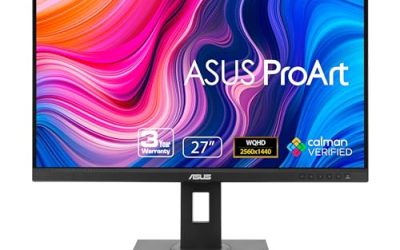
ASUS TUF Gaming VG27AQ
- Best for: Players who want a well-rounded 1440p monitor with blur reduction, speakers and full stand adjustment.
- Screen size: 27 inches
- Resolution: 2560 x 1440
- Refresh rate: 165Hz, supports 144Hz
- Response time: 1ms MPRT
Players who want a well-rounded 1440p monitor with blur reduction, speakers and full stand adjustment.
DisplayPort 1.2 and HDMI 2.0 limit future high-bandwidth signals, so this panel is a 1440p workhorse rather than a next-generation display.
The ASUS VG27AQ covers similar ground to the LG at a more modest feature set, and its headline trick is Extreme Low Motion Blur Sync, which runs blur reduction together with variable refresh instead of forcing you to choose between them. Its 27-inch IPS panel shows 2560 x 1440 at 165Hz with a 1ms MPRT response, and G-SYNC Compatible support keeps tearing away during uneven frame delivery. Built-in speakers handle casual audio without a headset, and the stand adjusts for height, tilt, swivel and pivot, with VESA mounting for an arm. HDR10 support adds tone mapping for HDR content, though this is an entry-level HDR panel rather than a showcase for it.
Watch out for: DisplayPort 1.2 and HDMI 2.0 limit future high-bandwidth signals, so this panel is a 1440p workhorse rather than a next-generation display.
Samsung Odyssey G7 27-Inch
- Best for: Players with a strong graphics card who want a curved, immersive 1440p panel that still runs at 240Hz.
- Screen size: 27 inches
- Resolution: 2560 x 1440
- Refresh rate: 240Hz
- Response time: 1ms
Players with a strong graphics card who want a curved, immersive 1440p panel that still runs at 240Hz.
The aggressive 1000R curve is a matter of taste and suits a single-monitor setup best, so try the curve in person if you have never used one before buying.
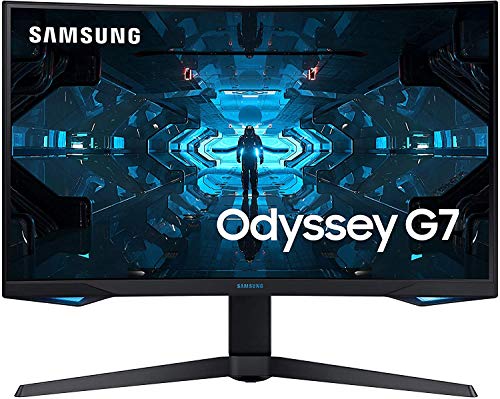
The Odyssey G7 is the only curved monitor in this guide, and its 1000R curve wraps the 27-inch QLED panel around your field of view in a way flat screens do not. It shows 2560 x 1440 at 240Hz with a 1ms response, pairing high refresh with the sharper resolution, and it supports both G-Sync and FreeSync Premium Pro. The VA panel delivers deep blacks that suit Siege’s shadowy interiors, and HDR600 support gives bright highlights more punch than a basic HDR panel. It is the most immersive option here, and the combination of 240Hz and 1440p makes it the pick for players whose graphics card can drive both at once.
Watch out for: The aggressive 1000R curve is a matter of taste and suits a single-monitor setup best, so try the curve in person if you have never used one before buying.
Which One Fits Your Situation
You play ranked most nights and want the clearest motion
Take the BenQ ZOWIE XL2546K. Its 240Hz panel and DyAc+ blur reduction keep fast peeks readable, and the 1080p resolution lets a mid-range graphics card hold the frame rates that make the panel worthwhile. The 24.5-inch size also keeps the whole screen inside your central vision, so you never have to turn your head to check a doorway at the edge of the frame.
Your PC pushes very high frame rates and you want every one of them
Take the Alienware AW2523HF. Its 360Hz IPS panel is the fastest in this guide, and the IPS screen keeps colours accurate while you track movement. This only pays off if your graphics card sustains frame rates near 360 in Siege, so it suits players with strong hardware who have already tuned their settings for maximum frames.
You want one monitor for Siege, other games and daily work
Take the LG UltraGear 27GP850-B or the ASUS TUF Gaming VG27AQ. Both are 27-inch 1440p IPS panels at 165Hz with wide colour and adaptive sync, so Siege looks sharp and other games benefit too. Choose the LG for stronger colour and HDR400, or the ASUS for its ELMB Sync blur reduction and built-in speakers.
You want immersion and the sharpest fast panel at 1440p
Take the Samsung Odyssey G7 27-Inch. Its curved 240Hz QLED panel combines the highest refresh rate at 1440p in this guide with deep blacks for dark maps. It needs a graphics card that can hold high frame rates at 1440p, and its curve suits a single-monitor desk where the screen sits directly in front of you.
Common Mistakes
- Buying a 360Hz monitor while your graphics card averages 120 frames per second in Siege, so the extra refresh rate never appears on screen.
- Connecting a 240Hz or 360Hz panel over HDMI and wondering why the refresh rate caps below the listed maximum, when DisplayPort is the port that reaches the top rate.
- Choosing 1440p for the sharper image without checking whether your graphics card holds triple-digit frame rates at that resolution in Siege.
- Leaving adaptive sync off in the graphics driver, which lets tearing return even on a monitor that supports G-Sync or FreeSync.
- Placing the monitor too high or too far away, which forces neck strain and slows your reactions during long ranked sessions.
Frequently Asked Questions
Is a 240Hz monitor worth it for Rainbow Six Siege?
Yes, if your graphics card can deliver frame rates near 240 in Siege. A 240Hz panel shows an attacker’s swing in smaller, smoother steps than a 144Hz screen, which makes fast peeks easier to track. If your card averages well below 200 frames per second, a 144Hz or 165Hz panel gives you the same visible result for less money.
Should I play Siege at 1080p or 1440p?
Play at 1080p if your priority is the highest frame rate and the clearest motion, because most graphics cards hold high frame rates more easily there. Play at 1440p if your card comfortably sustains triple-digit frame rates at that resolution and you want sharper operator models and distant doorways. Siege maps are compact, so the sharpness gain at 1440p is smaller than in open-world games.
Do I need G-Sync or FreeSync for Siege?
You need one of them if your frame rate varies during matches, which it usually does in Siege. Adaptive sync matches the monitor’s refresh to the frames your graphics card produces, removing tearing without the input lag of traditional vertical sync. Match the standard to your card: G-SYNC Compatible for NVIDIA cards and FreeSync Premium for AMD cards, though many panels support both.
Does a curved monitor hurt performance in Rainbow Six Siege?
No, a curved panel does not change your frame rate or input lag, and the 1000R curve of the Samsung G7 wraps the image around your view in a way some players find more immersive. The curve is a matter of preference rather than performance, so it suits a single-monitor setup where you sit centred in front of the screen. Players who share the screen or sit off-centre usually prefer a flat panel.
FAQ
Is a 240Hz monitor worth it for Rainbow Six Siege?
Should I play Siege at 1080p or 1440p?
Do I need G-Sync or FreeSync for Siege?
Does a curved monitor hurt performance in Rainbow Six Siege?
More from Amazon
Programs that pair well with the guide above. Offers and eligibility are set by Amazon and may change.
Free shipping on eligible items, Prime Video and more. Eligible new members can start with a free trial.
Start a Prime free trialAd-free music streaming. Eligible new subscribers can start with a free trial.
Try Music Unlimited freeA Prime membership for ages 18-24 with a trial period. Eligibility is set by Amazon.
See Prime for Young AdultsAudiobooks and podcasts to listen to on the go. Eligible new members can start with a free trial.
Try Audible freeAs an Amazon Associate we earn from qualifying purchases.