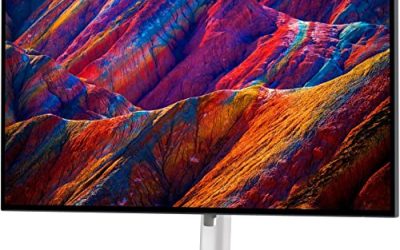
Our Short List of 3

- Best for: Drafters on a tighter outlay who still want verified color accuracy and a readable 1440p canvas.
- 27-inch WQHD (2560 x 1440) IPS panel
- 100% sRGB and Rec.709 coverage, Delta E under 2
- Calman Verified factory calibration
- DisplayPort, HDMI, DVI-D, Mini DisplayPort

- Best for: Laptop-first drafting desks that want one-cable 4K without extra hub features.
- 27-inch 4K UHD (3840 x 2160) display, 60Hz refresh rate
- 8ms grey-to-grey response time
- USB-C connectivity with power delivery
- Built-in dual 3W speakers

- Best for: Drafters who also present renders and 3D views and want wide-gamut color on the same screen.
- 27-inch UHD (3840 x 2160) IPS display
- VESA DisplayHDR 400
- 95% DCI-P3 color gamut
- USB-C with power delivery, HDMI, DisplayPort
All 4 Picks at a Glance
| Product | Specs | Action |
|---|---|---|
| ASUS ProArt Display PA278QV |
| Check price on Amazon |
| Dell S2722QC |
| Check price on Amazon |
| LG 27UP850-W |
| Check price on Amazon |
 BenQ PD3205U |
| Check price on Amazon |
Key takeaways
- Five color-accurate, high-resolution monitors for CAD drafting, from a factory-calibrated 4K designer display to a budget 1440p pick — compare and choose.
A drafting monitor decides whether a dimension reads correctly the first time or sends you zooming in for the third check. Thin lines, dense hatch patterns, and small annotation text punish soft panels and dishonest color, and a screen that drifts between what you see and what prints wastes hours across a project. The real choice is not refresh rate or gaming flair; it is sharpness at normal zoom, color you can trust against a print, and a panel that stays comfortable through an eight-hour drawing session.
This roundup is for architects laying out floor plans, engineers detailing parts, CAD students working through coursework, and freelancers who switch between 2D drawings and 3D models. Each monitor below was picked from the names and specifications on its Amazon listing, with resolution, color accuracy, screen size, and eye comfort doing the deciding.
Quick Picks
As an Amazon Associate we earn from qualifying purchases
| Product | Best for | Key spec from title |
|---|---|---|
| BenQ PD2705U | Factory-calibrated drafting with a mode-switching puck | 27-inch 4K UHD IPS, 99% sRGB |
| ASUS ProArt Display PA278QV | Accurate color on a tighter outlay | 27-inch WQHD IPS, 100% sRGB, Delta E under 2 |
| Dell S2722QC | Laptop-first drafting desks that want one-cable 4K | 27-inch 4K UHD, USB-C, dual 3W speakers |
| LG 27UP850-W | Drafting plus rendered views on one screen | 27-inch 4K UHD IPS, 95% DCI-P3, DisplayHDR 400 |
| BenQ PD3205U | Large-canvas drafting with two drawings side by side | 31.5-inch 4K UHD IPS, 99% sRGB and Rec.709 |
How to Choose
Resolution decides how much zooming your day involves
Resolution is the first specification that changes daily drafting, because CAD drawings are built from fine lines, small text, and dense hatch patterns. A 4K panel at 27 inches renders dimension strings and thin linework crisply enough to read without constant zooming, which keeps the whole floor plan or assembly visible while details stay legible. A 1440p panel shows the same drawing with larger, softer text, so it suits drafters who value readable menus over maximum canvas. Match the resolution to how often you zoom: if you live at 100 percent scale checking dimensions, 4K pays for itself in saved clicks and fewer misread numbers.
Color accuracy keeps the screen honest with the print
Drafting color is not decoration; layer colors, line weights, and print previews all depend on the screen telling the truth. Factory calibration with a stated Delta E figure, such as Delta E under 2 or under 3, means the panel was measured before it left the factory rather than merely tuned by eye. Full sRGB and Rec.709 coverage handles nearly all CAD color work, while wider DCI-P3 coverage matters more when the same desk also previews renders and presentation images. A monitor that ships with its own calibration report gives you a document to check, not a marketing claim to trust blindly.
Screen size and the stand shape long sessions
Screen size decides how much of a drawing stays visible beside tool palettes, property panels, and reference files. A 27-inch display is the practical starting point for drafting, large enough to hold a full plan with the ribbon open, yet small enough to fit a standard desk at a comfortable viewing distance. Larger 32-inch panels suit drafters who keep two drawings open side by side, but they demand a deeper desk so the corners stay in comfortable focus. Before choosing, measure the desk depth and check the stand adjustment range, because a screen that cannot sit at eye level will cost more in neck strain than any specification saves.
Ports and eye comfort matter as much as the panel
Drafting sessions run for hours, so the connection and the comfort features deserve the same attention as the panel. USB-C with power delivery turns a monitor into a single-cable dock for a laptop, carrying video and charging together, while DisplayPort and HDMI cover desktop towers and older machines. Eye comfort features such as flicker-free backlighting, a low blue light mode, and an anti-glare coating reduce fatigue when the screen stays lit from morning until evening. A height, tilt, swivel, and pivot stand lets the panel follow your posture instead of forcing your posture to follow the panel.
The 5 Best Options
BenQ PD2705U
BenQ built the PD2705U for people whose work lives or dies on accurate lines and trustworthy color, and that brief fits CAD drafting well. The 27-inch 4K panel renders thin lines, hatch patterns, and small dimension text with a crispness that a 1440p screen cannot match, so zooming in and out becomes a choice rather than a necessity. Factory calibration backed by Calman verification and Pantone validation means layer colors and print previews stay honest from the first day. A Hotkey Puck G2 switches display modes without menu diving, and the KVM switch lets one keyboard and mouse serve a desktop and a laptop through the same screen.
Specs
- 27-inch 4K UHD (3840 x 2160) IPS panel
- 99% sRGB and Rec.709 coverage, HDR10
- Factory-calibrated with AQCOLOR technology, Delta E of 3 or less
- USB-C with 65W power delivery, DisplayPort, HDMI, USB hub
- CAD/CAM mode, Darkroom mode, Animation mode
- Hotkey Puck G2 and KVM switch included
Best for: Architects and engineers who want a calibrated 4K drafting screen with a dedicated CAD/CAM mode.
Watch out for: The 60Hz refresh rate suits drafting and office work rather than fast-paced gaming, and the stand needs desk depth to use its full height range.
ASUS ProArt Display PA278QV
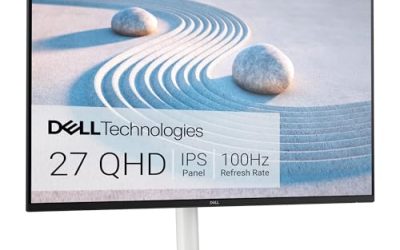
- Best for: Drafters on a tighter outlay who still want verified color accuracy and a readable 1440p canvas.
- 27-inch WQHD (2560 x 1440) IPS panel
- 100% sRGB and Rec.709 coverage, Delta E under 2
- Calman Verified factory calibration
- DisplayPort, HDMI, DVI-D, Mini DisplayPort
Drafters on a tighter outlay who still want verified color accuracy and a readable 1440p canvas.
The 1440p resolution shows less of a large drawing at once than a 4K panel, so expect more panning on dense floor plans.
The PA278QV proves accurate color does not require a 4K panel or a flagship outlay. Calman Verified factory calibration holds Delta E under 2, with full 100% coverage of sRGB and Rec.709, which covers the color work most CAD drawings ever need. The 1440p panel keeps menus, toolbars, and dimension text large and readable at 27 inches, a genuine comfort during long drafting sessions. A 75Hz refresh adds a touch of smoothness over basic office screens, and the port selection still includes DVI-D and Mini DisplayPort for older desktop towers that newer monitors have left behind.
Watch out for: The 1440p resolution shows less of a large drawing at once than a 4K panel, so expect more panning on dense floor plans.
Dell S2722QC
- Best for: Laptop-first drafting desks that want one-cable 4K without extra hub features.
- 27-inch 4K UHD (3840 x 2160) display, 60Hz refresh rate
- 8ms grey-to-grey response time
- USB-C connectivity with power delivery
- Built-in dual 3W speakers
Laptop-first drafting desks that want one-cable 4K without extra hub features.
The stand adjustments are more modest than a fully articulating arm, and there is no factory calibration report in the box, so color-critical print work may need a separate calibrator.
The S2722QC is the straightforward choice for a drafting desk built around a laptop. Its 27-inch 4K panel gives drawings, tool palettes, and reference documents plenty of sharp space, and the USB-C connection carries the picture while cutting the cable run to a single lead. Dual built-in speakers handle video calls without extra hardware on the desk, and the platinum silver finish suits a bright room without drawing attention to itself. For anyone who wants a large screen that simply works from the first morning, this Dell keeps the setup honest and uncluttered.
Watch out for: The stand adjustments are more modest than a fully articulating arm, and there is no factory calibration report in the box, so color-critical print work may need a separate calibrator.
LG 27UP850-W
- Best for: Drafters who also present renders and 3D views and want wide-gamut color on the same screen.
- 27-inch UHD (3840 x 2160) IPS display
- VESA DisplayHDR 400
- 95% DCI-P3 color gamut
- USB-C with power delivery, HDMI, DisplayPort
Drafters who also present renders and 3D views and want wide-gamut color on the same screen.
The wider DCI-P3 gamut can make standard sRGB drawings look more saturated than intended unless the sRGB mode is selected, so check the color mode before judging a print preview.
Choose the LG 27UP850-W when the day moves between flat drafting and rendered views. The 95% DCI-P3 coverage keeps materials and lighting previews consistent, the 4K resolution holds detail in both modes, and the borderless design keeps the focus on the model. USB-C with power delivery charges a laptop through the same cable that carries the picture, which clears the desk of a separate charger. Built-in stereo speakers cover calls and client walkthroughs, and the height, pivot, and tilt stand adapts the panel to a standing desk or a shared workstation.
Watch out for: The wider DCI-P3 gamut can make standard sRGB drawings look more saturated than intended unless the sRGB mode is selected, so check the color mode before judging a print preview.
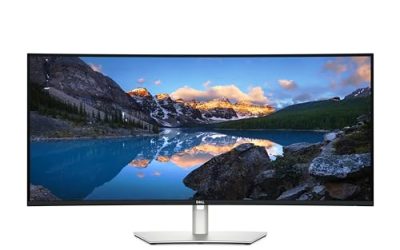
BenQ PD3205U
- Best for: Engineers and architects who draft with two drawings or a drawing plus reference files open all day.
- 31.5-inch 4K UHD (3840 x 2160) IPS panel
- 99% Rec.709 and sRGB coverage, HDR10
- Factory-calibrated, Delta E of 3 or less, with calibration report
- AQCOLOR technology, ICC Sync
Engineers and architects who draft with two drawings or a drawing plus reference files open all day.
The large panel needs a deep desk and a viewing distance of roughly an arm and a half, and its size and weight make a monitor arm upgrade worth checking before buying.
The PD3205U is the big-canvas answer when one drawing never fits beside its reference files. At 31.5 inches, the 4K panel holds a full plan, a property palette, and a PDF reference side by side without shrinking text to unreadable sizes. Factory calibration with a Delta E of 3 or less and an included calibration report keeps the color honest at this scale, and the CAD/CAM mode lifts contrast on fine linework. USB-C with 90W power delivery charges even a demanding laptop, while the KVM switch and Hotkey Puck G2 carry over from its smaller sibling for two-computer desks.
Watch out for: The large panel needs a deep desk and a viewing distance of roughly an arm and a half, and its size and weight make a monitor arm upgrade worth checking before buying.
Which One Fits Your Situation
You draft in AutoCAD or a similar CAD tool all day
Pick the BenQ PD2705U. Its dedicated CAD/CAM mode, factory calibration, and 4K sharpness are aimed squarely at linework, and the Hotkey Puck G2 lets you switch modes without breaking concentration. The 4K panel keeps dimension text legible at normal zoom, so checking a figure does not mean losing sight of the whole plan. The KVM switch is a bonus if a laptop and a desktop share the desk.
You want verified color without a flagship outlay
Pick the ASUS ProArt Display PA278QV. Delta E under 2 with Calman verification is the strongest accuracy claim in this roundup relative to its class, and the 1440p panel keeps text large and readable. It is the sensible pick when the drawings are mostly 2D and the desk does not need 4K density.
Your laptop is the main machine
Pick the Dell S2722QC or the LG 27UP850-W. The Dell keeps the setup simple with one-cable 4K and built-in speakers, while the LG adds wider DCI-P3 color and stronger USB-C charging for days that mix drafting with rendered previews. Either one clears the desk of a separate dock and a tangle of charging cables.
You keep two drawings open at once
Pick the BenQ PD3205U. The 31.5-inch 4K canvas is the only pick here that comfortably holds a full plan beside a reference file, and its calibration report backs the color at that scale. The KVM switch also lets a second machine share the same screen, which helps when reference files live on a laptop. Measure the desk first, because this panel rewards depth and punishes a cramped setup.
Common Mistakes
- Buying a gaming monitor for drafting and ending up with vivid, oversaturated color that misrepresents layers and prints.
- Choosing 1080p at 27 inches, where dimension text and hatch patterns turn soft enough to force constant zooming.
- Ignoring the stand adjustment range, then drafting for months with the screen too low and the neck paying for it.
- Picking a monitor with only HDMI and discovering the laptop needs USB-C or DisplayPort for its full resolution.
- Trusting a wide-gamut claim without checking whether the monitor has an sRGB mode for judging print-accurate color.
Frequently Asked Questions
What size monitor works best for drafting?
A 27-inch panel is the practical starting point, large enough to hold a full drawing with tool palettes open while fitting a standard desk. A 32-inch panel suits drafters who keep two drawings or a drawing plus reference files open side by side, but it needs a deeper desk so the corners stay in comfortable focus.
Is 4K necessary for CAD drafting?
4K is not strictly necessary, but it changes daily drafting more than any other specification. Fine lines, hatch patterns, and small dimension text stay legible at normal zoom, so you check dimensions without constantly zooming in and out. A 1440p panel still works well for drafting, especially on a tighter outlay, but expect larger pixels and more zooming during detail work.
Does refresh rate matter for drafting monitors?
Refresh rate matters far less for CAD than resolution or color accuracy, because drafting is mostly static linework rather than motion. A 60Hz panel handles panning and zooming perfectly well, while 120Hz makes scrolling through large drawings feel smoother. Treat a high refresh rate as a comfort bonus, not a drafting requirement, and never trade resolution for it.
What is Delta E, and how low should it be for drafting?
Delta E measures how far a displayed color sits from the intended color, with lower numbers meaning closer matches. A Delta E under 2 is excellent for color-critical work, while under 3 is still very good for drafting and print previews. Factory calibration with a stated Delta E figure and a calibration report is worth more than an unmeasured wide-gamut claim.
FAQ
What size monitor works best for drafting?
Is 4K necessary for CAD drafting?
Does refresh rate matter for drafting monitors?
What is Delta E, and how low should it be for drafting?
More from Amazon
Programs that pair well with the guide above. Offers and eligibility are set by Amazon and may change.
Free shipping on eligible items, Prime Video and more. Eligible new members can start with a free trial.
Start a Prime free trialAd-free music streaming. Eligible new subscribers can start with a free trial.
Try Music Unlimited freeA Prime membership for ages 18-24 with a trial period. Eligibility is set by Amazon.
See Prime for Young AdultsAudiobooks and podcasts to listen to on the go. Eligible new members can start with a free trial.
Try Audible freeAs an Amazon Associate we earn from qualifying purchases.