Our Short List of 3


All 5 Picks at a Glance
| Product | Specs | Action |
|---|---|---|
| 1. Dell UltraSharp 40 Curved Thunderbolt Hub Monitor U4025QW — Best Overall for a Banking Desk | Check price on Amazon | |
 2. LG 40WP95C-W 40-Inch UltraWide — Best 5K2K Alternative | Check price on Amazon | |
| 3. Dell UltraSharp 32 4K USB-C Hub Monitor U3223QE — Best 32-Inch 4K Pick | Check price on Amazon | |
 4. Dell UltraSharp 34 Curved Thunderbolt Hub Monitor U3425WE — Best 34-Inch Ultrawide Step Up | Check price on Amazon | |
 5. LG 38WN95C-W 38-Inch UltraWide — Best 38-Inch QHD+ Canvas | Check price on Amazon |
Our Top Picks
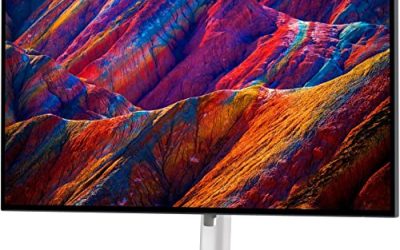
- Dell UltraSharp U4025QW 40" Class 5K2K WUHD Curved16.5" x 37.3" x 4.3"4.3 x 37.3 x 16.5 inches41.93 poundsCheck on Amazon
As an Amazon Associate we earn from qualifying purchases.
Investment banking work is not one window at a time. A typical desk runs a large financial model in a spreadsheet, a market data terminal, a trading or execution platform, email, chat, a browser full of filings, and often a slide deck being rebuilt against a deadline, all at once. A small mainstream monitor forces constant alt-tabbing, shrinking columns until numbers are hard to read, and scrolling sideways through models that were designed to be seen whole. The monitors that suit this work are a different class entirely: large 32-inch 4K panels and 34- to 40-inch ultrawides with high resolution, strong pixel density for crisp figures, docking connectivity that turns the monitor into the desk hub, and stands built for long, seated shifts.
This guide stays firmly in that large and ultrawide workstation pool. Every pick below is at least 31.5 inches, every pick offers either 4K, QHD+ ultrawide, or 5K2K resolution from the product listing, and every pick brings USB-C or Thunderbolt docking, with Picture-by-Picture or KVM support where the listing states it. Specifications are taken from the product listing and manufacturer documentation for each model, not from detailed research, and readers should recheck the live listing before ordering because configurations and availability change.
Affiliate disclosure: This article contains affiliate links. If you buy through a link on this page, the site may earn a commission at no extra cost to you. Product selections are based on published specifications and listing information, not on commissions.
What Investment Banking Actually Demands From a Monitor
Screen area is the first requirement, but raw size alone is not enough. A large panel at low resolution spreads the same number of pixels thinner, so spreadsheet text and terminal figures look soft. What matters is the combination of size and resolution: a 31.5-inch screen at 3840 x 2160, a 38-inch ultrawide at 3840 x 1600, or a 40-inch ultrawide at 5120 x 2160 keeps text density high while still opening enough horizontal space for three or four windows side by side. On a 5K2K ultrawide, a model can occupy the center, a terminal can sit to one side, and chat or email can hold the other side, with no bezel crossing the middle of the spreadsheet.
The second requirement is window management. Picture-by-Picture lets a monitor show two computer sources at once, which is useful when a bank laptop and a separate workstation both feed the same desk. A built-in KVM switch lets one keyboard and mouse control both sources. Several picks below include one or both features from the product listing, and for analysts who move between a locked-down work laptop and another machine, that can matter more than a small difference in brightness.
The third requirement is docking. Investment banking desks are cable-heavy, and a monitor that carries video, data, network, and laptop charging over a single USB-C or Thunderbolt cable reduces that clutter and makes hot-desking far simpler. The strongest picks here add an RJ45 Ethernet port in the monitor itself, so the wired network connection lives in the display rather than in a separate dongle that goes missing. Power delivery figures differ by model and are stated per pick below, taken from the product listing.
Finally, there is endurance. Long shifts reward height, tilt, and swivel adjustment, a matte or low-reflection surface under office lighting, and brightness headroom so the screen stays readable near windows without being pushed to its limit. None of the picks below is a small eye-care desktop monitor; all are large workstation displays with fully adjustable stands from the product listing.
The Picks at a Glance
For a single-screen desk that should replace a dual-monitor pair, start with the two 40-inch 5K2K ultrawides: the Dell UltraSharp U4025QW for the strongest hub and the highest refresh rate in this group, and the LG 40WP95C-W for the same 5120 x 2160 canvas in a curved Nano IPS design. For a more conventional 16:9 desk that may later grow to two screens, the Dell UltraSharp U3223QE in 31.5-inch 4K is the balanced choice. For a 34-inch ultrawide step up from a standard desk, the Dell UltraSharp U3425WE keeps the width more manageable. For the widest 38-inch QHD+ option with a fast panel, the LG 38WN95C-W closes the list.
1. Dell UltraSharp 40 Curved Thunderbolt Hub Monitor U4025QW — Best Overall for a Banking Desk
The U4025QW is the most complete single-screen answer in this guide. From the product listing, it is a 39.7-inch curved ultrawide with a 5120 x 2160 (5K2K) IPS Black panel, a 21:9 aspect ratio, a 120Hz refresh rate, and a 2000:1 contrast ratio. That resolution is the key figure for banking work: it provides substantially more horizontal pixels than a 3440 x 1440 ultrawide, so a wide financial model keeps more columns visible at a readable size, and two full application windows can sit side by side with room for a third narrower column for messages or a data feed.
The hub is equally strong. The listing describes Thunderbolt 4 connectivity with power delivery up to 140W, an RJ45 Ethernet connection rated at 2.5GbE, HDMI 2.1, DisplayPort 1.4, and a USB hub, together with KVM functionality. For a banking laptop that must stay on a wired network, having Ethernet, charging, video, and peripherals arrive through the monitor simplifies the desk to a degree a basic display cannot match. Picture-by-Picture style workflows and KVM switching also suit desks where a second source, such as a dedicated market data machine, shares the same screen and controls.
Brightness is listed at up to 600 nits for HDR content with a lower typical figure for everyday use, and the stand provides height, tilt, and swivel adjustment from the product listing. The curve helps keep the far edges of a 40-inch panel at a more consistent viewing distance, which matters when the corners hold live figures rather than decorative content. The trade-offs are desk depth, weight, and the need for a computer that can drive 5120 x 2160 properly; a laptop limited to lower external resolutions will not show this monitor at its best. Confirm the output limits of the exact work laptop before choosing any 5K2K display.
For an analyst or associate building a one-screen workstation around heavy multitasking, this is the pick to beat: the widest high-density canvas in the list, the fastest refresh rate here, and the most capable dock.
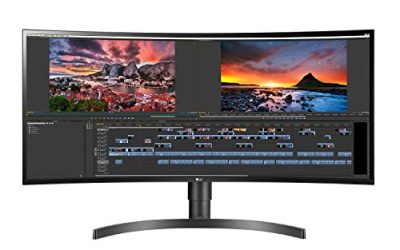
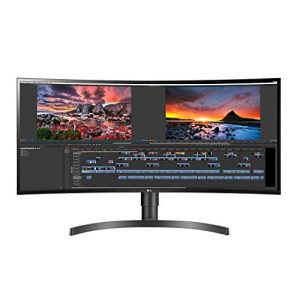
2. LG 40WP95C-W 40-Inch UltraWide — Best 5K2K Alternative
LG’s 40WP95C-W matches the Dell above on the headline canvas: a 39.7-inch curved ultrawide with 5120 x 2160 (5K2K) resolution in a 21:9 format, from the product listing. The panel technology differs — the listing describes a Nano IPS panel with DCI-P3 coverage stated at 98 percent (Typ.), HDR10 support, a 72Hz refresh rate, and a 5ms response time. For spreadsheet, terminal, and document work, 72Hz is entirely workable; the difference against the 120Hz Dell shows up mainly in how smooth window movement and scrolling feel, not in how much information the screen can hold.
Connectivity centers on Thunderbolt 4 with power delivery up to 96W from the product listing, alongside HDMI and DisplayPort inputs and a USB hub. That charging figure covers most thin work laptops, though a high-draw mobile workstation should be checked against it. The three-side virtually borderless design and the tilt, height, and swivel stand from the listing suit a tidy single-screen desk, and the gentle curve keeps a wide model readable across its full width without turning the head as far as a flat panel of this size would require.
Where this LG earns its place is for buyers who want the 5K2K workspace and prefer LG’s Nano IPS panel characteristics and design, or who find this model more readily available than the Dell. The banking use case is identical: a valuation model in the center, a terminal and research on one side, communications on the other, all at a pixel density that keeps small figures legible. As with any ultrawide at this resolution, verify that the work laptop supports 5120 x 2160 over a single cable, and plan the desk layout around the panel’s width and stand depth.
Between the two 40-inch picks, choose the Dell for the stronger hub, faster wired networking, and higher refresh rate, and choose this LG as the equally spacious 5K2K alternative with Thunderbolt docking of its own.
3. Dell UltraSharp 32 4K USB-C Hub Monitor U3223QE — Best 32-Inch 4K Pick
Not every banking desk should be an ultrawide. The U3223QE takes the other proven route: a 31.5-inch flat panel at 3840 x 2160, from the product listing, using IPS Black technology with a 2000:1 contrast ratio. At this size, 4K resolution gives very sharp text and figures, and the 16:9 shape suits desks that will eventually run two matching screens side by side — a common trading and banking arrangement where one display holds the model and the other holds the terminal and communications.
The hub specification is a major reason this model appears in professional shortlists. From the product listing, the monitor provides USB-C with power delivery up to 90W, an RJ45 Ethernet port, DisplayPort 1.4 with daisy-chain output for an additional 4K monitor, HDMI, and multiple USB ports, together with Picture-by-Picture, Picture-in-Picture, and KVM and Auto KVM modes for working across two computer sources with one keyboard and mouse. That daisy-chain output is particularly relevant in banking: a second 4K screen can be added later without replacing the first, growing a desk in stages.
Color coverage is listed at 100 percent sRGB and Rec.709 with 98 percent DCI-P3, plus DisplayHDR 400 support and a 60Hz refresh rate. None of that is aimed at gaming; it is aimed at accurate, stable document and data presentation across a long day. The stand adjusts for height, tilt, swivel, and pivot from the product listing, and pivot matters more than it first appears — a rotated second screen is a practical way to read long filings and term sheets.
Choose the U3223QE if the desk plan is one excellent 4K screen now with a clean path to two, or if a flat 16:9 layout fits the available space better than a wide curved panel. It gives up the seamless single-canvas width of the 40-inch picks, and in return gains density, flexibility, and one of the most complete USB-C hubs in this guide.
4. Dell UltraSharp 34 Curved Thunderbolt Hub Monitor U3425WE — Best 34-Inch Ultrawide Step Up
The U3425WE is the entry point into this large ultrawide pool for desks that cannot accommodate a 40-inch panel. From the product listing, it is a 34.1-inch curved ultrawide at 3440 x 1440 in a 21:9 format, with an IPS Black panel, a 120Hz refresh rate, and brightness listed at 300 nits. That resolution shows noticeably fewer columns than the 5K2K models above, and text is less dense, but the width still transforms spreadsheet work compared with a single standard monitor: a model and a browser can share the screen without either feeling squeezed, and horizontal scrolling drops sharply.
Docking is where this model punches above a typical 34-inch ultrawide. The listing describes Thunderbolt 4 with power delivery up to 90W, an RJ45 Ethernet port rated at 2.5GbE, HDMI 2.1, DisplayPort 1.4, multiple USB-A and USB-C ports, built-in speakers, and KVM-style multi-source working. In practical banking terms, the laptop connects with one cable, stays charged, joins the wired network through the monitor, and drives peripherals through the hub — the same clean-desk pattern as the larger Dell picks, in a smaller footprint.
Ergonomics follow the same pattern, with a height, tilt, and swivel adjustable stand from the product listing, and the curve is well matched to the 34-inch width. This is the right pick for an analyst whose desk depth or room layout rules out 38 to 40 inches, or for a home office that needs a genuine financial workstation without rebuilding the whole desk around the display. The honest limitation is resolution: anyone who routinely keeps three dense windows open, or who works in models with very wide column ranges, will use the extra pixels of the 5K2K picks every day and should stretch to them if the desk allows.
5. LG 38WN95C-W 38-Inch UltraWide — Best 38-Inch QHD+ Canvas
The 38WN95C-W occupies the middle ground between the 34-inch and 40-inch picks, and its resolution reflects that. From the product listing, it is a 38-inch curved ultrawide at 3840 x 1600 (QHD+) in a 21:9 format, using a Nano IPS display with Thunderbolt 3 connectivity, a 144Hz refresh rate, and a 1ms response time as listed. The extra vertical pixels over a 3440 x 1440 panel are quietly useful in finance: more spreadsheet rows and taller terminal windows fit without shrinking the interface, while the width still supports a model beside a data platform.
For banking work, the headline refresh rate is a comfort feature rather than a necessity — fast, smooth scrolling through long sheets and rapid window movement feel less fatiguing across a long shift — while the working advantages are the size, the resolution, and the single-cable Thunderbolt connection for a laptop desk. The listing describes height and tilt adjustment on the stand, and the white and silver finish suits brighter office setups where the black Dell models may look heavier.
Set expectations on docking by the listing rather than by the larger hub monitors above: this LG focuses on the display itself and a Thunderbolt connection, and it does not present the same built-in Ethernet and extensive hub story as the Dell UltraSharp picks. Desks that need wired networking in the monitor, KVM switching between two machines, or Picture-by-Picture from two sources should take one of the Dell models instead. Desks that need one wide, sharp, fast screen for a single powerful laptop, with the model, terminal, and deck visible together, are exactly what this monitor is for.
How to Choose Among These Five
Start with the desk, not the brand. Measure the available width and depth first: a 40-inch ultrawide needs a deep, stable desk, and placing it too close makes the edges harder to use. If the space fits, the two 5K2K models are the strongest banking choices because resolution, not just size, decides how much of a model stays visible. Choose the Dell U4025QW for the most complete Thunderbolt hub and networking, and the LG 40WP95C-W as the alternative 5K2K canvas.
If the plan involves two screens now or later, the 32-inch 4K U3223QE is the safer architecture, with daisy-chaining and KVM support from the product listing and a flat panel that pairs cleanly. If the desk is smaller but the workflow is still wide, the 34-inch U3425WE keeps the ultrawide layout and the docking discipline at 3440 x 1440. If a single laptop drives everything and screen width matters more than hub depth, the 38-inch LG 38WN95C-W delivers its canvas with the fastest panel in this guide.
Whichever model is chosen, check three things against the actual work laptop before ordering: the maximum external resolution it supports over USB-C or Thunderbolt, the charging wattage it expects, and whether the bank’s security policy permits the monitor’s hub and network features on its network. Those checks, all verifiable from the laptop’s own documentation and the product listing, prevent the most common workstation mistakes.
Final Verdict
Investment banking rewards monitors that show more, at a density that keeps figures sharp, through a connection that tidies the desk instead of complicating it. The Dell UltraSharp U4025QW is the best overall pick here for its 5K2K IPS Black canvas, 120Hz refresh, and Thunderbolt hub with fast wired networking. The LG 40WP95C-W is the closest alternative at the same resolution. The Dell U3223QE serves 4K and dual-screen desks best, the Dell U3425WE brings the same hub discipline to 34 inches, and the LG 38WN95C-W offers a wide, fast 38-inch canvas for a single-laptop setup. All five stay in the large and ultrawide workstation class this work demands — and that, more than any single specification, is the right filter for a banking desk.
More from Amazon
Programs that pair well with the guide above. Offers and eligibility are set by Amazon and may change.
Free shipping on eligible items, Prime Video and more. Eligible new members can start with a free trial.
Start a Prime free trialAd-free music streaming. Eligible new subscribers can start with a free trial.
Try Music Unlimited freeA Prime membership for ages 18-24 with a trial period. Eligibility is set by Amazon.
See Prime for Young AdultsAudiobooks and podcasts to listen to on the go. Eligible new members can start with a free trial.
Try Audible freeAs an Amazon Associate we earn from qualifying purchases.