Our Short List of 3
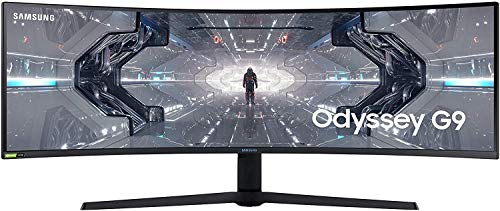
- Best for: Gamers and multitaskers who want two screens in one curved panel.
- 49-inch QLED VA panel with 1000R curvature
- Dual QHD resolution of 5120 x 1440, 32:9 aspect ratio
- 240Hz refresh rate with 1ms response time
- Typical brightness of 420 nits with 1000 nits peak

- Best for: Gamers who want the tightest curve on a standard-size desk.
- 34-inch VA panel with 1000R curvature
- WQHD resolution of 3440 x 1440, 21:9 aspect ratio
- 165Hz refresh rate with 1ms response time
- HDR10 support
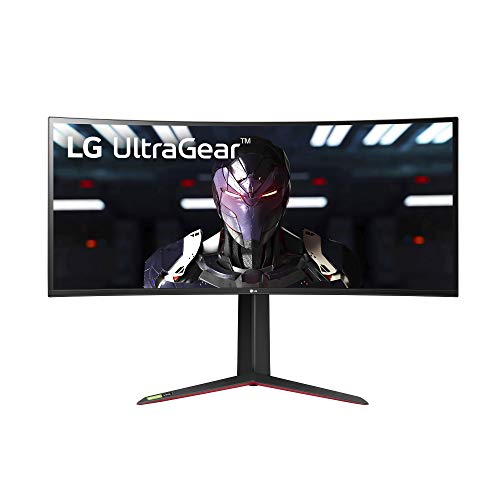
- Best for: Creators and gamers who need accurate colour and a gentle curve.
- 34-inch Nano IPS panel with 3800R curvature
- QHD resolution of 3440 x 1440, 21:9 aspect ratio
- 144Hz refresh rate, overclockable to 160Hz
- 1ms GtG response time
All 4 Picks at a Glance
| Product | Specs | Action |
|---|---|---|
| Samsung Odyssey G9 49-Inch |
| Check price on Amazon |
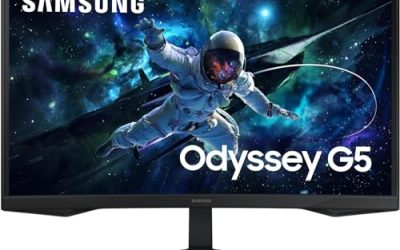
| Samsung Odyssey G5 34-Inch |
| Check price on Amazon |
| LG UltraGear 34GP83A-B |
| Check price on Amazon |
 GIGABYTE G34WQC A |
| Check price on Amazon |
Key takeaways
- Compare four large curved monitors for desk setups, from a 49-inch super ultrawide to 34-inch gaming ultrawides, and pick the right curve, size and panel.
A large curved monitor changes the real decision on a desk from how many screens to buy to how much of your work and play one screen can hold. A wide curved panel replaces a two-monitor setup, keeps the middle bezel out of your sightline, and wraps the edges of the picture toward you so a spreadsheet, a game world, and a chat window all sit within one glance. The wrong choice leaves you with a screen that dominates a small desk, a curve that distorts straight lines, or a panel that feels slow in fast games.
This guide is for desk gamers who want one immersive screen, home office workers who juggle several windows at once, and creators who need width for timelines and toolbars. Every monitor below is a large-format curved display, 34 inches or wider, with its size, curvature, resolution, and refresh rate taken from its Amazon product page.
Quick Picks
As an Amazon Associate we earn from qualifying purchases.
| Product | Best for | Key spec from title |
|---|---|---|
| Samsung Odyssey G9 49-Inch | Replacing two monitors with one screen | 49-inch 1000R curved QLED, Dual QHD, 240Hz |
| Samsung Odyssey G5 34-Inch | Tight-curve gaming on a wide desk | 34-inch 1000R curved screen, WQHD, 165Hz |
| LG UltraGear 34GP83A-B | Colour work plus fast gaming | 34-inch curved Nano IPS, QHD, 160Hz |
| GIGABYTE G34WQC A | A first large curved ultrawide | 34-inch 1500R curved screen, WQHD, 144Hz |
How to Choose
Match the size to your desk depth
A 34-inch ultrawide needs roughly an arm’s length of viewing distance to feel comfortable, while a 49-inch super ultrawide wants a deeper desk or a wall-mounted arm so the far edges stay in focus. Measure from where your eyes sit to the back edge of the desk before you commit, and check the stand footprint too, because wide feet can crowd a keyboard tray. If your desk is shallow, a 34-inch model with a slim stand or a VESA mount keeps the screen at a workable distance. A 49-inch panel on a narrow desk pushes the corners into your peripheral vision and turns a strength into a strain.
Read the curve number before the marketing
Curvature is quoted as a radius in millimetres, and a smaller number means a tighter bend. A 1000R curve wraps noticeably around your field of view and suits gaming and film, while a 1500R curve is gentler and easier to live with for documents and spreadsheets. A 3800R curve is barely visible at a glance and behaves almost like a flat panel with a slight wrap. Tighter curves make straight lines in design software look bowed at the edges, so creators who draw or edit photos should lean toward the gentler end. Gamers chasing immersion should lean the other way.
Resolution decides how much fits on screen
Every monitor here uses an ultrawide 21:9 layout or wider, so the question is how many pixels stretch across it. A 3440 x 1440 panel gives a 34-inch screen enough density for crisp text and room for two full windows side by side. The 49-inch model doubles that width to 5120 x 1440, which is effectively two 27-inch QHD screens joined together, and it needs a graphics card with enough output to drive it smoothly. Check that your graphics card has a DisplayPort output that matches the monitor, because ultrawide resolutions at high refresh rates ask more of the connection than a standard display does.
Refresh rate and panel type set the feel
A 144Hz refresh rate already makes motion look far smoother than a standard 60Hz office screen, and the 165Hz and 240Hz models here push that further for competitive play. VA panels deliver deep blacks and strong contrast, which suits dark game scenes and evening film watching, while Nano IPS panels hold colour accuracy across wider viewing angles and suit editing work. Response time matters for fast shooters, where a 1ms figure keeps moving objects sharp. Match the panel to your main use rather than chasing the highest number on the box.
The 4 Best Options
Samsung Odyssey G9 49-Inch
- Best for: Gamers and multitaskers who want two screens in one curved panel.
- 49-inch QLED VA panel with 1000R curvature
- Dual QHD resolution of 5120 x 1440, 32:9 aspect ratio
- 240Hz refresh rate with 1ms response time
- Typical brightness of 420 nits with 1000 nits peak
Gamers and multitaskers who want two screens in one curved panel.
The panel is very wide and heavy for its stand, so confirm your desk depth and consider a sturdy monitor arm.
The Odyssey G9 is the monitor for anyone who wants a desk dominated by a single screen that does the work of two. Its 49-inch panel spans the width of two 27-inch displays with no seam in the middle, and the tight 1000R curve pulls the far edges into your field of view so the whole width stays readable. At 240Hz it keeps fast motion fluid, and the QLED VA panel produces the deep blacks that make night scenes in games look convincing. It needs a deep desk and a strong graphics card, but nothing else here matches its sense of scale.
Watch out for: The panel is very wide and heavy for its stand, so confirm your desk depth and consider a sturdy monitor arm.
Samsung Odyssey G5 34-Inch
- Best for: Gamers who want the tightest curve on a standard-size desk.
- 34-inch VA panel with 1000R curvature
- WQHD resolution of 3440 x 1440, 21:9 aspect ratio
- 165Hz refresh rate with 1ms response time
- HDR10 support
Gamers who want the tightest curve on a standard-size desk.
There are no built-in speakers, so you will need separate audio.
The Odyssey G5 brings the same aggressive 1000R curve as its bigger sibling to a 34-inch ultrawide that fits a normal desk. Its WQHD panel spreads 3440 x 1440 pixels across a 21:9 layout, giving you room for a game plus a browser window or a full timeline beside your editing tools. A 165Hz refresh rate and 1ms response time keep competitive play responsive, while HDR10 support lifts bright highlights in supported games and films. It has no built-in speakers, so plan for headphones or desktop speakers, but as a pure gaming screen it is hard to fault at this size.
Watch out for: There are no built-in speakers, so you will need separate audio.
LG UltraGear 34GP83A-B
- Best for: Creators and gamers who need accurate colour and a gentle curve.
- 34-inch Nano IPS panel with 3800R curvature
- QHD resolution of 3440 x 1440, 21:9 aspect ratio
- 144Hz refresh rate, overclockable to 160Hz
- 1ms GtG response time
Creators and gamers who need accurate colour and a gentle curve.
The gentle 3800R curve feels close to flat, so immersion seekers may prefer a tighter bend.
The LG UltraGear 34GP83A-B is the pick for buyers who split their time between games and colour-sensitive work. Its Nano IPS panel keeps colours consistent when you lean to one side, which matters when you share the screen or sit off-centre, and the 98 percent DCI-P3 coverage gives editors a wide gamut to work with. The 144Hz refresh rate overclocks to 160Hz, and G-SYNC compatibility plus FreeSync Premium keep frames tearing-free with both major graphics card brands. The 3800R curve is gentle, so straight lines in design tools stay honest while games still gain a sense of depth.
Watch out for: The gentle 3800R curve feels close to flat, so immersion seekers may prefer a tighter bend.
GIGABYTE G34WQC A
- Best for: First-time ultrawide buyers who want a practical all-rounder.
- 34-inch VA panel with 1500R curvature
- Resolution of 3440 x 1440, 21:9 aspect ratio
- 144Hz refresh rate with 1ms MPRT response time
- 90 percent DCI-P3 colour gamut
First-time ultrawide buyers who want a practical all-rounder.
The stand adjusts for tilt and height only, with no swivel, so angle the whole monitor to face your seat.
The GIGABYTE G34WQC A is the straightforward way into a large curved ultrawide without overthinking the specification sheet. Its 34-inch VA panel uses a 1500R curve that adds immersion in games yet stays calm enough for documents, and the 144Hz refresh rate with a 1ms response time covers competitive play comfortably. Built-in speakers, a height-adjustable stand, and VESA DisplayHDR 400 certification round out a practical package for a mixed-use desk. It will not match the colour range of the Nano IPS model here, but for gaming and everyday work it covers the essentials well.
Watch out for: The stand adjusts for tilt and height only, with no swivel, so angle the whole monitor to face your seat.
Which One Fits Your Situation
You want one screen instead of two
Choose the Samsung Odyssey G9. Its 49-inch width holds two full windows side by side with no bezel between them, and the 240Hz panel keeps games smooth while you work. Give it a deep desk or a monitor arm so the edges stay within comfortable view. Measure the desk depth first, since a 49-inch panel needs room to sit back from your eyes.
You game on a standard desk
Choose the Samsung Odyssey G5. The 34-inch size fits a normal desk without crowding your keyboard, the 1000R curve wraps the picture around you, and the 165Hz refresh rate suits fast play in long sessions. Add speakers or headphones, since the monitor has none built in. The compact footprint leaves space for a keyboard, a mouse pad, and a drink.
You edit photos or video as well as play
Choose the LG UltraGear 34GP83A-B. The Nano IPS panel and wide colour gamut keep your edits trustworthy, the gentle curve keeps straight lines honest, and the 160Hz overclock still handles competitive games. It is the most balanced screen here for mixed creative work. Check the colour settings before your first edit, since a calibrated panel keeps tones consistent.
You are buying your first large curved monitor
Choose the GIGABYTE G34WQC A. The 1500R curve is immersive without being distracting, the stand adjusts for height, and the built-in speakers mean the monitor works on its own from day one. It is the simplest way to find out whether ultrawide suits your desk. Start with a 34-inch model, since it gives you the ultrawide feel without dominating the desk.
Common Mistakes
- Buying a 49-inch panel for a shallow desk, where the far edges fall outside comfortable view.
- Choosing the tightest curve for design work, then finding straight lines bow at the edges.
- Forgetting to check graphics card outputs, and ending with a monitor your card cannot drive at full resolution and refresh rate.
- Assuming every ultrawide has speakers, when several gaming models rely on headphones or external audio.
- Judging a monitor by size alone, when panel type and refresh rate shape the daily experience far more.
Frequently Asked Questions
Is a 34-inch curved monitor large enough for gaming?
Yes, for most desks a 34-inch ultrawide is the sweet spot. It is wide enough for a game plus a second window, and the curve pulls the edges toward you so the whole picture stays in view. A 49-inch model adds width, but it also demands a deeper desk and a stronger graphics card.
Does a tighter curve always mean better immersion?
A tighter curve wraps the picture further around your view, which suits games and films, but it also bends straight lines more visibly. For spreadsheets, coding, or photo editing, a gentler curve keeps lines honest while still adding depth. Pick the curve for your main use, not the smallest number.
Can one ultrawide monitor replace two screens?
Yes, a 34-inch ultrawide holds two usable windows side by side, and a 49-inch model holds the equivalent of two 27-inch screens. Window snapping tools help you split the screen cleanly. The trade-off is losing the physical separation of two displays, which some workers prefer for focus.
What should I check before buying a large curved monitor?
Measure your desk depth and the stand footprint, confirm your graphics card has a matching DisplayPort or HDMI output, and check whether the monitor has built-in speakers. Also confirm the VESA mount pattern if you plan to use an arm, since large curved panels are heavier than flat screens of the same width.
FAQ
Is a 34-inch curved monitor large enough for gaming?
Does a tighter curve always mean better immersion?
Can one ultrawide monitor replace two screens?
What should I check before buying a large curved monitor?
More from Amazon
Programs that pair well with the guide above. Offers and eligibility are set by Amazon and may change.
Free shipping on eligible items, Prime Video and more. Eligible new members can start with a free trial.
Start a Prime free trialAd-free music streaming. Eligible new subscribers can start with a free trial.
Try Music Unlimited freeA Prime membership for ages 18-24 with a trial period. Eligibility is set by Amazon.
See Prime for Young AdultsAudiobooks and podcasts to listen to on the go. Eligible new members can start with a free trial.
Try Audible freeAs an Amazon Associate we earn from qualifying purchases.