Our Short List of 3

- Best for: Everyday office work where smoother scrolling matters.
- 23-inch Full HD (1920 x 1080) IPS panel
- 100Hz refresh rate over HDMI, 60Hz over VGA
- HDMI and VGA ports
- VESA mount compatible

- Best for: Light gaming and everyday use on a tight desk.
- 23-inch Full HD (1920 x 1080) IPS panel
- 75Hz refresh rate with AMD FreeSync
- 1ms response time
- Zero Frame ultra-thin bezel

- Best for: A shared office desk where the screen must fit different people.
- 23-inch Full HD (1920 x 1080) IPS panel
- Ultrathin bezel design
- Height, pivot, swivel, and tilt stand
- HDMI, DisplayPort, and VGA ports
All 4 Picks at a Glance
| Product | Specs | Action |
|---|---|---|
| KOORUI 23 Inch Computer Monitor |
| Check price on Amazon |
| Acer SB230 Bbix |
| Check price on Amazon |
| Dell P2319H |
| Check price on Amazon |
 Dell E2318Hx |
| Check price on Amazon |
Key takeaways
- A true 23-inch monitor fits a tight desk without shrinking text. Compare five 1920x1080 IPS displays by panel, refresh rate, ports, and stand adjustment.
The real decision with a 23-inch monitor is desk fit, not screen size alone. A 23-inch panel is noticeably narrower than the 24-inch screens most desks hold, which matters when two displays share a small surface or a keyboard tray leaves little depth. Text stays readable at Full HD because the pixels pack slightly tighter, and the whole display draws less attention in a room where the desk doubles as a workspace and a living area.
This guide is for people setting up a compact home office, a dorm desk, or a second screen beside a laptop, and for anyone replacing an older display without rearranging furniture. Every pick below is a true 23-inch model named on its Amazon listing, with a 1920 by 1080 IPS panel, and each section notes the ports and stand movement that decide whether it fits your desk.
Quick Picks
As an Amazon Associate we earn from qualifying purchases.
| Product | Best for | Key spec from title |
|---|---|---|
| KOORUI 23 Inch Computer Monitor | Smooth everyday work at 100Hz | FHD 1080p 100Hz IPS display |
| Acer SB230 Bbix | Light gaming on a tight desk | 23-inch Full HD IPS FreeSync display |
| Dell P2319H | A fully adjustable office setup | 23-inch FHD IPS monitor with ultrathin bezel |
| Dell E2318Hx | A simple, reliable second screen | 23-inch FHD IPS monitor with anti-glare coating |
| Lenovo ThinkVision T23i-20 | Eye comfort through long workdays | 23-inch Full HD IPS monitor with Eye Comfort certification |
How to Choose
Start with the true size, not the size class
Shops often lump 23-inch and 23.8-inch monitors together, but the two sizes differ by nearly an inch of diagonal and roughly half an inch of width, which is enough to matter on a narrow desk. Check the screen size field on the Amazon listing itself and look for a plain 23-inch figure before you buy, since a model name that says 23 can still hide a 23.8-inch panel in the details. Measure the clear width of your desk, subtract space for speakers or a notebook, and confirm the monitor plus its stand base fits with room for the cables behind it.
Pick the panel for your eyes, not the brand
Every monitor in this guide uses an IPS panel, which keeps colors and contrast steady when you lean sideways or share the screen with someone sitting next to you. That matters more than the logo on the bezel, because a narrow viewing angle turns a spreadsheet into a washed-out sheet the moment you shift your chair. Look for a matte, anti-glare finish if your desk faces a window, and check the viewing angle in the listing rather than trusting a bright product photo. A panel that holds its image from the side is the difference between a screen you glance at and a screen you work on all day.
Match refresh rate to the work you actually do
A 60Hz screen is fine for documents, email, and video calls, and it is what most office monitors in this size still offer. Moving to 75Hz or 100Hz makes scrolling and dragging windows feel smoother, which you notice most when you read long pages or move between applications all day. Gamers should look for FreeSync or Adaptive Sync support so the refresh rate follows the graphics card instead of tearing, though a 23-inch screen at this size is better suited to light play than to competitive titles. Paying for a high refresh rate you never use is money spent on a number, not on comfort.
Check ports and the stand before you buy
A monitor is only useful if it connects to the computer you own, so list your outputs first: most laptops now offer HDMI or USB-C, while older desktops may still need VGA or DisplayPort. A model with two or three inputs lets you switch between a work laptop and a personal machine without crawling behind the desk to swap cables. The stand deserves the same attention, since tilt alone cannot fix a screen that sits too low. Height adjustment, pivot, and swivel turn a fixed display into one that fits your posture, and a VESA mount pattern keeps the door open to an arm later.
The 5 Best Options
KOORUI 23 Inch Computer Monitor
- Best for: Everyday office work where smoother scrolling matters.
- 23-inch Full HD (1920 x 1080) IPS panel
- 100Hz refresh rate over HDMI, 60Hz over VGA
- HDMI and VGA ports
- VESA mount compatible
Everyday office work where smoother scrolling matters.
Confirm it is still sold before buying. The 100Hz refresh rate only applies over HDMI, so a VGA connection runs at 60Hz.
The KOORUI is the smoothest everyday screen in this group, pairing a 100Hz refresh rate with an IPS panel that keeps text crisp while you scroll through long documents. Its edgeless design suits a two-screen row because the bezels almost disappear where the displays meet, and the tilt stand plus VESA mounting give you two ways to set the viewing angle. HDMI and VGA cover both modern laptops and older desktops, so it works as a main screen for a compact office or as the second panel beside a larger display.
Watch out for: Confirm it is still sold before buying. The 100Hz refresh rate only applies over HDMI, so a VGA connection runs at 60Hz.
Acer SB230 Bbix
- Best for: Light gaming and everyday use on a tight desk.
- 23-inch Full HD (1920 x 1080) IPS panel
- 75Hz refresh rate with AMD FreeSync
- 1ms response time
- Zero Frame ultra-thin bezel
Light gaming and everyday use on a tight desk.
Confirm it is still sold before buying. The stand tilts only, so add a monitor arm if you need height adjustment.
The Acer SB230 Bbix is the gaming-leaning pick here, with FreeSync smoothing out frame pacing in light titles and a 1ms response time that keeps fast motion readable. Its Zero Frame design makes the screen feel larger than its 23-inch diagonal, which helps on a desk where every inch counts, and the ultra-thin profile leaves room for a keyboard and a notebook in front of it. The 75Hz refresh rate sits between basic office screens and faster gaming panels, giving casual play a lift without demanding a powerful graphics card.
Watch out for: Confirm it is still sold before buying. The stand tilts only, so add a monitor arm if you need height adjustment.
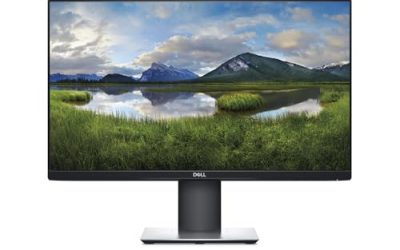
Dell P2319H
- Best for: A shared office desk where the screen must fit different people.
- 23-inch Full HD (1920 x 1080) IPS panel
- Ultrathin bezel design
- Height, pivot, swivel, and tilt stand
- HDMI, DisplayPort, and VGA ports
A shared office desk where the screen must fit different people.
Confirm it is still sold before buying. This is an older office model, so check the listing states the full stand adjustment for the exact unit you order.
The Dell P2319H is the most adjustable monitor in this guide, with a stand that moves in height, pivot, swivel, and tilt, so you can set the screen exactly at eye level or rotate it upright for long documents. Its ultrathin bezels suit a multi-monitor row, and the combination of HDMI, DisplayPort, and VGA means it connects to nearly any office machine without an adapter. The IPS panel holds color steady from the side, which matters when a colleague leans in to look at your work or you angle the screen across a shared desk.
Watch out for: Confirm it is still sold before buying. This is an older office model, so check the listing states the full stand adjustment for the exact unit you order.
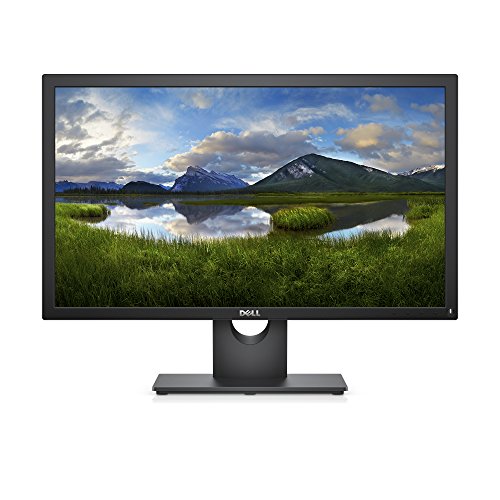
Dell E2318Hx
- Best for: A simple second screen or a basic office replacement.
- 23-inch Full HD (1920 x 1080) IPS panel
- 60Hz refresh rate
- Anti-glare hard coating
- HDMI and VGA ports
A simple second screen or a basic office replacement.
Confirm it is still sold before buying. The stand tilts only, and there is no DisplayPort input, so check your computer has HDMI or VGA.
The Dell E2318Hx is the straightforward choice for anyone who wants a dependable screen without extra features to configure. Its anti-glare coating cuts reflections from overhead lights, and the wide viewing angle keeps the image consistent when the monitor sits at the edge of a desk rather than dead center. HDMI and VGA cover the two most common office connections, and the slim profile leaves space for paperwork beside it. It is a sensible second screen for a laptop dock or a replacement for an aging display that has started to dim.
Watch out for: Confirm it is still sold before buying. The stand tilts only, and there is no DisplayPort input, so check your computer has HDMI or VGA.
Lenovo ThinkVision T23i-20
The Lenovo ThinkVision T23i-20 is built for long workdays, with Eye Comfort certification and an ergonomic stand that adjusts to the way you sit rather than forcing you to adapt to the screen. Its IPS panel delivers steady color for spreadsheets and video calls, while the USB connectivity helps tidy a desk by linking peripherals through the monitor. The near-edgeless bezels make it a natural partner in a dual-screen setup, and the 6ms response time is quick enough for video playback between tasks.
Specs
- 23-inch Full HD (1920 x 1080) IPS panel
- 6ms response time
- HDMI port with USB connectivity
- Ergonomic stand
- Eye Comfort certification
Best for: Long office days where eye comfort and posture matter most.
Watch out for: Confirm it is still sold before buying. Check the listing for the exact port layout, since business monitors in this line vary by region.
Which One Fits Your Situation
A cramped desk that holds two screens
Pick the KOORUI or the Acer SB230 Bbix. Both use slim, edgeless bezels that nearly vanish where two displays meet, and their 23-inch width leaves room for a keyboard and a notebook. The KOORUI adds a smoother 100Hz picture for scrolling, while the Acer brings FreeSync for light gaming after work.
A home office that runs all day
Pick the Lenovo ThinkVision T23i-20 or the Dell P2319H. The Lenovo focuses on eye comfort and an ergonomic stand for long sessions every day, while the Dell adjusts in every direction, so the screen fits whoever sits down. Either one handles documents, calls, and spreadsheets all day without demanding attention.
Light gaming after work
Pick the Acer SB230 Bbix. FreeSync and a 1ms response time keep casual titles smooth, and the 75Hz refresh rate is a clear step up from a basic 60Hz office screen. Pair it with the KOORUI as a second display if you want a wider view for strategy games and streaming.
A second screen beside a laptop
Pick the Dell E2318Hx or the KOORUI. The Dell is the simpler and more predictable companion for work, with anti-glare glass and the two ports most docks already provide. The KOORUI is the better choice if you scroll long pages all day and want the smoother motion that 100Hz brings.
Common Mistakes
- Buying a 23.8-inch monitor by mistake: check the screen size field on the listing, not just the model name, since shops group the two sizes together.
- Ignoring the stand: tilt alone cannot fix a screen that sits too low, so confirm height adjustment or a VESA pattern before you order.
- Matching the wrong port: count the outputs on your computer first, since a monitor with only VGA cannot connect to a laptop that offers only HDMI.
- Chasing refresh rate for office work: 60Hz is fine for documents, and the extra smoothness of 100Hz matters most for scrolling, not for typing.
- Forgetting desk depth: a deep stand base on a shallow desk pushes the screen too close, so measure the base footprint as well as the screen width.
Frequently Asked Questions
Is a 23-inch monitor big enough for everyday work?
Yes, for most desk work a 23-inch screen is enough, because Full HD text stays sharp at this size and two windows fit side by side without constant resizing. It suits documents, email, browsing, and video calls, though video editing or large spreadsheets feel roomier on a 27-inch display. Measure your desk first, since the compact size is the main reason to choose it.
What is the difference between a 23-inch and a 23.8-inch monitor?
A 23-inch monitor measures 23 inches diagonally, while a 23.8-inch model is nearly an inch larger and roughly half an inch wider. The difference sounds small, but it decides whether two screens fit on a narrow desk. Always check the screen size field on the Amazon listing, because model names and shop categories often blur the two sizes together.
Is 1080p sharp enough on a 23-inch screen?
Yes, 1920 by 1080 is sharp on a 23-inch panel because the pixels pack tighter than on a larger screen with the same resolution. Text edges look clean at a normal viewing distance, and the size keeps interface elements readable without scaling. A higher resolution only helps if you edit photos or work with fine detail all day.
Do I need a 100Hz monitor for office work?
No, a 60Hz monitor handles office work well, and most people never notice the difference while typing or reading a still page. A 100Hz screen earns its place if you scroll long documents, move between windows often, or play light games after work. Choose it for smoother motion, not because a higher number looks better on a spec sheet.
FAQ
Is a 23-inch monitor big enough for everyday work?
What is the difference between a 23-inch and a 23.8-inch monitor?
Is 1080p sharp enough on a 23-inch screen?
Do I need a 100Hz monitor for office work?
More from Amazon
Programs that pair well with the guide above. Offers and eligibility are set by Amazon and may change.
Free shipping on eligible items, Prime Video and more. Eligible new members can start with a free trial.
Start a Prime free trialAd-free music streaming. Eligible new subscribers can start with a free trial.
Try Music Unlimited freeA Prime membership for ages 18-24 with a trial period. Eligibility is set by Amazon.
See Prime for Young AdultsAudiobooks and podcasts to listen to on the go. Eligible new members can start with a free trial.
Try Audible freeAs an Amazon Associate we earn from qualifying purchases.