Our Short List of 3

- Best for: Immersive curved gaming and video on a single large screen.
- 32-inch QHD (2560 x 1440) VA panel
- 1000R curvature
- 165Hz refresh rate, 1ms response time (MPRT)
- HDR10 support

- Best for: Flat-screen gaming on a desk that also handles work and reading.
- 32-inch QHD (2560 x 1440) VA panel
- 165Hz refresh rate, 1ms Motion Blur Reduction
- HDR10 support
- sRGB 95 percent color gamut

- Best for: Sharp 4K text, photo and video work, and long reading sessions.
- 31.5-inch UHD 4K (3840 x 2160) IPS panel
- HDR10 compatibility
- DCI-P3 95 percent color gamut
- AMD FreeSync
All 3 Picks at a Glance
| Product | Specs | Action |
|---|---|---|
| Samsung 32″ Odyssey G5 G55C |
| Check price on Amazon |
| LG 32GN650-B UltraGear |
| Check price on Amazon |
| LG 32UN650-W UltraFine |
| Check price on Amazon |
Key takeaways
- Compare the best 32-inch computer monitors for gaming, work and everyday use. Three 32-inch QHD and 4K picks with the screen size and sharpness that matter.
A 32-inch monitor is a step up from the 27-inch screens most desks use, and the choice is not only about size. At this diagonal, resolution decides whether text stays crisp, the panel decides how colors and contrast hold up from the side, and refresh rate decides whether fast games feel smooth or smeared. Picking on size alone can leave you with soft text or choppy motion, so the panel, the resolution and the stand deserve as much attention as the diagonal.
Gamers who want a wide, immersive view, office workers who live in spreadsheets and documents, and creators who need accurate color all buy in this size, but they need different screens. The three picks below cover those groups: a curved QHD gaming monitor from Samsung, a flat QHD gaming monitor from LG with an adjustable stand, and a 4K IPS monitor from LG built for sharp text and color work. Each one fits a different desk.
Quick Picks
As an Amazon Associate we earn from qualifying purchases.
| Product | Best for | Key spec from title |
|---|---|---|
| Samsung 32″ Odyssey G5 G55C | Immersive curved gaming | 32-inch QHD, 165Hz, 1000R curved |
| LG 32GN650-B UltraGear | Flat-screen gaming with an adjustable stand | 32-inch QHD, 165Hz, 1ms MBR |
| LG 32UN650-W UltraFine | Sharp 4K work and creative use | 32-inch UHD 4K IPS, HDR10, DCI-P3 95 percent |
How to Choose
Resolution at 32 Inches
Resolution matters more at 32 inches than it does on a smaller screen, because the same number of pixels is stretched across a wider area. QHD at 2560 by 1440 is the common choice here and looks clean for gaming and general use, though text is softer than on a 27-inch QHD panel. A 4K panel at 3840 by 2160 keeps text and fine detail sharp at this size, which is why creators and heavy readers prefer it. Decide how much of your day is reading and detailed work versus gaming, then let that split choose between QHD and 4K.
Panel Type and Curve
Most 32-inch monitors use VA or IPS panels, and the difference shows up in everyday viewing. VA panels deliver deep blacks and strong contrast, which suits dark games and movies, but their colors and brightness can shift when viewed from an angle. IPS panels hold color and brightness steady from the side and suit shared desks and color work, though their blacks look lighter in a dark room. A curved screen wraps the edges toward you and feels immersive in games, while a flat screen is easier to share and simpler to line up beside a second monitor.
Refresh Rate and Adaptive Sync
Refresh rate decides how smooth motion looks, and it is the spec gamers notice first after size. A 165Hz panel redraws the picture far more often than a 60Hz office screen, so fast camera movement and scrolling look cleaner and more responsive. Adaptive sync, sold as FreeSync on these monitors, matches the refresh rate to the graphics card so tearing and stutter stay out of the picture. If your main use is documents, email and video, 60Hz is enough, but anyone who plays fast games should treat a high refresh rate as a requirement rather than a bonus.
Stand, Ports and Everyday Comfort
A 32-inch screen is heavy and wide, so the stand and the connections shape daily comfort more than most buyers expect. Height, tilt and pivot adjustment let you set the screen at eye level and turn it upright for long documents, while a tilt-only stand may force you to stack books under the base or buy a separate arm. Check for DisplayPort and HDMI inputs that match your computer and console, and look for a VESA mount pattern if you plan to use a monitor arm. Built-in speakers are a handy backup, but they rarely replace even basic desktop speakers.
The 3 Best Options
Samsung 32″ Odyssey G5 G55C
- Best for: Immersive curved gaming and video on a single large screen.
- 32-inch QHD (2560 x 1440) VA panel
- 1000R curvature
- 165Hz refresh rate, 1ms response time (MPRT)
- HDR10 support
Immersive curved gaming and video on a single large screen.
The stand adjusts tilt only, with no height or pivot adjustment, and there is no USB-C input or built-in USB hub.
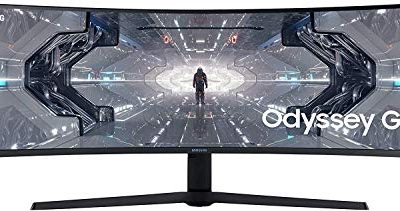
The Odyssey G5 G55C is the curved pick in this roundup, and its deep 1000R curve is the first thing you notice once it is on the desk. The VA panel gives dark scenes real depth, the QHD resolution keeps games sharp without demanding a top-end graphics card, and the 165Hz refresh rate keeps fast motion smooth. It is a straightforward gaming screen with no extra hub features, which keeps the focus on the picture itself. For a buyer who wants one large, immersive display for evening games and video, it is the most atmospheric choice of the three.
Watch out for: The stand adjusts tilt only, with no height or pivot adjustment, and there is no USB-C input or built-in USB hub.
LG 32GN650-B UltraGear
- Best for: Flat-screen gaming on a desk that also handles work and reading.
- 32-inch QHD (2560 x 1440) VA panel
- 165Hz refresh rate, 1ms Motion Blur Reduction
- HDR10 support
- sRGB 95 percent color gamut
Flat-screen gaming on a desk that also handles work and reading.
QHD stretched across 32 inches is softer for small text than a 4K panel, and there is no USB-C input.
The LG 32GN650-B is the flat-screen gaming pick, and it suits buyers who want a big fast panel without a curve. Its QHD resolution and 165Hz refresh rate match the Samsung on speed, while the VA panel keeps contrast strong in dark games. Where it pulls ahead is the stand, which adjusts for height, tilt and pivot, so the screen can be set at eye level or turned upright for reading long pages. It is a practical choice for a desk that mixes gaming with everyday computing, and the flat panel sits neatly beside a second monitor.
Watch out for: QHD stretched across 32 inches is softer for small text than a 4K panel, and there is no USB-C input.
LG 32UN650-W UltraFine
- Best for: Sharp 4K text, photo and video work, and long reading sessions.
- 31.5-inch UHD 4K (3840 x 2160) IPS panel
- HDR10 compatibility
- DCI-P3 95 percent color gamut
- AMD FreeSync
Sharp 4K text, photo and video work, and long reading sessions.
The 60Hz refresh rate is not suited to fast competitive gaming, and the white and silver finish may not match a dark desk setup.
The LG 32UN650-W is the work-first pick, and it is the only 4K screen in this roundup. Its IPS panel keeps colors steady from side angles, the UHD resolution makes text and fine detail crisp at this size, and the wide DCI-P3 color coverage suits photo and video work. The height and tilt adjustable stand helps set a comfortable eye-level position, and built-in speakers cover video calls and casual viewing without extra desk hardware. It runs at 60Hz, so it is not built for fast competitive play, but for reading, editing and design it is the sharpest screen here.
Watch out for: The 60Hz refresh rate is not suited to fast competitive gaming, and the white and silver finish may not match a dark desk setup.
Which One Fits Your Situation
You Play Fast and Immersive Games
Pick the Samsung Odyssey G5 G55C if games are the main reason for the upgrade. The 1000R curve pulls the edges of the picture toward you, the VA panel keeps dark scenes deep, and the 165Hz refresh rate with FreeSync keeps motion smooth when the action speeds up. It is the most cinematic screen of the three, and it suits a single-monitor gaming desk where immersion matters more than a second screen or a USB hub.
You Mix Gaming With Office Work
Pick the LG 32GN650-B if your desk has to do both jobs. The flat QHD panel and 165Hz refresh rate handle games well, while the height, tilt and pivot stand makes it easy to set a comfortable position for documents and to turn the screen upright for long reading. It is the most flexible of the three for a shared gaming and work setup, and the flat screen lines up cleanly next to a second monitor.
You Read, Edit Photos or Design
Pick the LG 32UN650-W if sharp text and accurate color are the priority. The 4K IPS panel keeps small text crisp across the full 32-inch width, colors stay steady from side angles, and the wide color coverage suits photo and video editing. Built-in speakers and a height-adjustable stand round out a desk built for long work sessions rather than fast play.
Common Mistakes
- Choosing a 32-inch screen on size alone without checking whether QHD or 4K fits your reading and gaming mix.
- Putting a 32-inch monitor on a shallow desk, where the screen sits too close and forces constant head movement.
- Buying a 60Hz screen for fast competitive games, then noticing choppy motion that a higher refresh rate would have avoided.
- Ignoring the stand and discovering the screen cannot reach eye level without a riser or a separate monitor arm.
- Using a single HDMI cable on an older graphics card and never getting the full refresh rate the panel supports.
Frequently Asked Questions
Is a 32-inch monitor too big for a normal desk?
A 32-inch monitor fits a normal desk when the desk is deep enough to sit about an arm’s length away from the screen. On a shallow desk the screen can feel overwhelming, because the edges sit in your peripheral vision and force head movement. Measure your desk depth first, and plan on a monitor arm if the screen would sit closer than a comfortable reading distance.
Is QHD or 4K better on a 32-inch monitor?
QHD is the better value for gaming, since it needs less graphics power to run at high refresh rates, and looks clean for general use. 4K is better for reading, photo editing and design, because text and fine detail stay sharper across the screen. If your day is mostly documents and creative work, choose 4K; if games come first, QHD at a high refresh rate is the smarter pick.
Do I need a curved monitor at 32 inches?
A curved monitor is not required, but the curve helps at this size by keeping the screen edges at an even distance from your eyes. It suits single-screen gaming and video, where immersion matters. A flat screen is better if you share the desk, sit off-center, or run two monitors side by side, since a flat panel lines up more cleanly and looks the same from any seat.
What refresh rate should a 32-inch gaming monitor have?
A 32-inch gaming monitor should have at least 144Hz for fast games, and the two gaming picks here run at 165Hz. Higher refresh rates make camera movement and scrolling look smoother and more responsive, especially in shooters and racing games. A 60Hz panel is fine for office work, video and slower games, but it will feel noticeably less smooth once you have used a faster screen.
FAQ
Is a 32-inch monitor too big for a normal desk?
Is QHD or 4K better on a 32-inch monitor?
Do I need a curved monitor at 32 inches?
What refresh rate should a 32-inch gaming monitor have?
More from Amazon
Programs that pair well with the guide above. Offers and eligibility are set by Amazon and may change.
Free shipping on eligible items, Prime Video and more. Eligible new members can start with a free trial.
Start a Prime free trialAd-free music streaming. Eligible new subscribers can start with a free trial.
Try Music Unlimited freeA Prime membership for ages 18-24 with a trial period. Eligibility is set by Amazon.
See Prime for Young AdultsAudiobooks and podcasts to listen to on the go. Eligible new members can start with a free trial.
Try Audible freeAs an Amazon Associate we earn from qualifying purchases.