Our Short List of 3

- Best for: A small meeting room where the lights stay on during the presentation.
- 3,600 lumens color and white brightness
- XGA resolution
- 3-chip 3LCD
- HDMI input

- Best for: A travelling presenter who needs a projector that runs on battery and fits in a bag.
- 1,000 lumens on screen
- Native WXGA resolution, 1080p supported
- DLP
- 4-hour battery (15,000mAh)

- Best for: A bright classroom or office where the projector runs daily.
- 4,000 lumens
- WXGA resolution (1280 x 800)
- For home and office use
- HDMI input
All 5 Picks at a Glance
| Product | Specs | Action |
|---|---|---|
| Epson EX3280 3-Chip 3LCD XGA Projector |
| Check price on Amazon |
| AAXA P6X Battery Pico Projector |
| Check price on Amazon |
| ViewSonic PA503W WXGA Projector |
| Check price on Amazon |
 ViewSonic PA503HD 1080p Projector |
| Check price on Amazon |
 BenQ MS535A SVGA Projector |
| Check price on Amazon |
Key takeaways
- Compare five affordable presentation projectors for meetings, classrooms, and small offices, with brightness, resolution, and portability from Amazon listings.
A presentation projector earns its place when the room stays lit and the slides stay readable. The buyer is not shopping for a home cinema — they need a machine that turns on fast, takes a laptop cable without a fight, and keeps text sharp while the lights are on and people are taking notes. That is the decision this guide helps with, and every pick below is a projector whose listing states presentation, meeting, or classroom use.
This guide is written for teachers, trainers, and small-business owners who present in ordinary rooms rather than darkened theatres. Each of the five projectors was chosen from its Amazon listing — its brightness, resolution, and connections come from the listing itself — so you can compare them on the same terms and pick the one that matches your room.
Quick Picks
As an Amazon Associate we earn from qualifying purchases
| Product | Best for | Key spec from title |
|---|---|---|
| Epson EX3280 3-Chip 3LCD XGA Projector | Lit meeting rooms | 3,600 lumens, XGA, 3LCD |
| AAXA P6X Battery Pico Projector | Presenting away from a desk | 1,000 lumens, WXGA, battery |
| ViewSonic PA503W WXGA Projector | Bright shared rooms | 4,000 lumens, WXGA |
| ViewSonic PA503HD 1080p Projector | Sharp slides and video | 4,000 lumens, Full HD 1080p |
| BenQ MS535A SVGA Projector | Simple meeting-room setups | 3,600 lumens, SVGA |
How to Choose
Brightness for Lit Rooms
Brightness decides whether your audience reads the slide or squints at a washed-out glow. A projector used in a room with the lights on needs enough output to hold contrast against ceiling lights and daylight from windows, and the figure to compare is the on-screen brightness, not a light-source number that never reaches the wall. The Epson EX3280 and BenQ MS535A both state 3,600 lumens, while the two ViewSonic models state 4,000 lumens, so a bright room is well covered by the mains-powered picks. The AAXA P6X states 1,000 lumens on screen, which suits a smaller or dimmer space rather than a large lit hall.
Resolution and Text Sharpness
Resolution decides whether small text and spreadsheet cells stay legible from the back row. A native Full HD 1080p image, like the ViewSonic PA503HD states, keeps fine detail crisp, while WXGA at 1280 x 800, as the AAXA P6X and ViewSonic PA503W state, is a sensible middle ground for slides and documents. SVGA and XGA are lower native resolutions that still handle large text and bullet slides well, which is why the BenQ MS535A and Epson EX3280 cost less while staying useful for meetings. A projector that says a resolution is “supported” can accept that signal without displaying it natively, so compare native figures only. If your slides are mostly charts and tables, step up a tier.
Connections and Setup
A projector that cannot take your laptop is a paperweight, so check the ports before anything else. HDMI is the connection most modern laptops offer, and all five projectors here state HDMI, while the ViewSonic PA503HD and BenQ MS535A also state USB inputs and the BenQ adds a second HDMI port. Vertical keystone, stated by the ViewSonic PA503W and the BenQ MS535A, corrects the image when the projector sits below or above the screen. The AAXA P6X adds wireless mirroring over WiFi and Bluetooth plus USB-C, so a phone or tablet can present without a cable. Bring the cable your laptop needs, and confirm the port list on the listing before you buy.
Portability and Lamp Life
How the projector moves matters as much as how it looks on the wall. A fixed meeting-room projector can be larger and heavier, but a trainer who visits different sites needs something that fits in a bag and runs without a socket. The AAXA P6X weighs 1.8 lbs and runs up to 4 hours on its battery, so it is the only pick here built for that kind of travel. Lamp life shapes the running cost too: the BenQ MS535A states up to 15,000 hours and the AAXA P6X states 30,000-hour LEDs, which means years of ordinary meeting use. If the projector lives in one room, favour brightness and resolution; if it travels, favour weight, battery, and quick setup.
The 5 Best Options
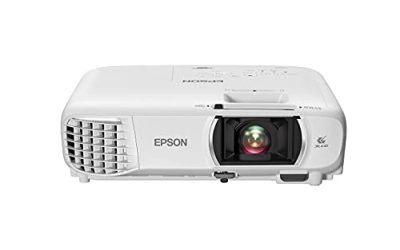
Epson EX3280 3-Chip 3LCD XGA Projector
- Best for: A small meeting room where the lights stay on during the presentation.
- 3,600 lumens color and white brightness
- XGA resolution
- 3-chip 3LCD
- HDMI input
A small meeting room where the lights stay on during the presentation.
XGA resolution is lower than WXGA or Full HD, so very small spreadsheet text may soften at the back of the room.
The Epson EX3280 is the pick for a meeting room where the lights stay on and the slides carry the meeting. Its 3-chip 3LCD design and 3,600 lumens of colour and white brightness keep charts and text readable in well-lit spaces, which is exactly the use its listing describes — crisp, detailed presentations, spreadsheets, and videos even where the room is bright. XGA resolution suits large text and standard slides rather than dense tables, and the built-in 2W speaker covers a small room without extra equipment. It is a straightforward mains-powered projector for a fixed room, with no battery or wireless tricks to set up.
Watch out for: XGA resolution is lower than WXGA or Full HD, so very small spreadsheet text may soften at the back of the room.
AAXA P6X Battery Pico Projector
- Best for: A travelling presenter who needs a projector that runs on battery and fits in a bag.
- 1,000 lumens on screen
- Native WXGA resolution, 1080p supported
- DLP
- 4-hour battery (15,000mAh)
A travelling presenter who needs a projector that runs on battery and fits in a bag.
At 1,000 lumens on screen it is dimmer than the mains-powered picks, so it suits smaller or darker rooms rather than large bright ones.
The AAXA P6X is the pick for presenting away from a desk, a socket, or a fixed meeting room. It is a pocket-size DLP projector with a battery that runs up to 4 hours, so a trainer can set it on a table and present without a power cable, and its listing calls it out for business use, presentations, meetings, and conferences. On-screen brightness is 1,000 lumens, which fits a small or dimmed room rather than a large lit hall, and native WXGA with 1080p supported keeps slides and video respectable at that scale. Wireless mirroring over WiFi and Bluetooth means a phone can present without a cable.
Watch out for: At 1,000 lumens on screen it is dimmer than the mains-powered picks, so it suits smaller or darker rooms rather than large bright ones.
ViewSonic PA503W WXGA Projector
- Best for: A bright classroom or office where the projector runs daily.
- 4,000 lumens
- WXGA resolution (1280 x 800)
- For home and office use
- HDMI input
A bright classroom or office where the projector runs daily.
No built-in speaker is stated in the listing, so plan on separate audio if the room needs sound.
The ViewSonic PA503W is the pick for a bright shared room where the projector earns its keep every day. It states 4,000 lumens, the highest brightness figure among the mains-powered picks here, and WXGA resolution at 1280 x 800, which keeps slides, documents, and web pages legible for a whole room. Its listing frames it for home and office use, and vertical keystone helps square the image when the projector cannot sit perfectly level with the screen. With an HDMI input and a simple feature set, it is a workhorse rather than a gadget — the kind of projector a school or office installs once and then forgets about.
Watch out for: No built-in speaker is stated in the listing, so plan on separate audio if the room needs sound.
ViewSonic PA503HD 1080p Projector
- Best for: Detailed slides, charts, and video in a meeting or training room.
- 4,000 lumens
- Full HD 1080p (1920 x 1080)
- 1.1x optical zoom
- 22,000:1 contrast
Detailed slides, charts, and video in a meeting or training room.
It is a mains-powered full-size projector, so it suits a fixed room better than a bag.
The ViewSonic PA503HD is the pick when the slides themselves carry detail — dense tables, small diagrams, or video clips that need to look sharp. Its native Full HD 1080p resolution at 1920 x 1080 is the highest in this guide, and with 4,000 lumens it holds that detail in a lit room. The 1.1x optical zoom gives some freedom in placement without moving the projector, and 22,000:1 contrast keeps text edges clean against the background. USB and HDMI inputs cover laptops and flash drives, and the listing describes it as ideal for home and business use, so it fits a meeting room that doubles as a training space.
Watch out for: It is a mains-powered full-size projector, so it suits a fixed room better than a bag.
BenQ MS535A SVGA Projector
- Best for: A meeting room that needs a dependable projector with a simple setup.
- 3,600 lumens
- SVGA native resolution, 1080p supported
- 15,000:1 contrast
- Vertical keystone
A meeting room that needs a dependable projector with a simple setup.
Native resolution is SVGA, not Full HD, so dense spreadsheets will look softer than on the 1080p pick.
The BenQ MS535A is the pick for a meeting room that wants a simple, reliable projector with nothing to learn. Its listing frames it for meeting rooms directly, promising simple and dependable performance, and it states 3,600 lumens with 15,000:1 contrast and a lamp life of up to 15,000 hours. Dual HDMI inputs let two sources stay connected, Infographic Mode is built in for charts and graphics, and vertical keystone plus a retractable adjustment foot make setup a matter of minutes. Native resolution is SVGA, which handles large text and bullet slides well, and the listing notes that 1080p is supported as an input rather than native.
Watch out for: Native resolution is SVGA, not Full HD, so dense spreadsheets will look softer than on the 1080p pick.
Which One Fits Your Situation
A Small Meeting Room With the Lights On
Choose the Epson EX3280 or the BenQ MS535A. Both state 3,600 lumens, which holds slides readable with the lights on, and both are mains-powered projectors built for a fixed room. The Epson adds a built-in 2W speaker for a small room, while the BenQ adds a second HDMI port and Infographic Mode for chart-heavy meetings.
A Classroom on a Tight Budget
Choose the ViewSonic PA503W. Its 4,000 lumens is the brightest figure in this guide, its WXGA resolution keeps documents legible, and vertical keystone squares the image when the projector sits on a cart rather than dead centre. It is a simple daily-use projector for a room that gets used hard.
Presenting From a Laptop on the Road
Choose the AAXA P6X. It weighs 1.8 lbs, runs up to 4 hours on its battery, and mirrors wirelessly over WiFi and Bluetooth, so a trainer can present from a phone or laptop without a cable or a socket. Keep the room small or dimmed, since its 1,000 lumens on screen suits a close audience.
A Bright Office With a Shared Screen
Choose the ViewSonic PA503HD. Native Full HD 1080p at 4,000 lumens keeps dense slides and video sharp in a lit room, and the 1.1x optical zoom helps when the projector cannot sit at the ideal distance from the screen. USB and HDMI inputs cover laptops and flash drives alike, so the room can share one projector between presenters.
Common Mistakes
- Comparing light-source lumens with on-screen lumens: the AAXA P6X states 1,000 lumens on screen, which is the figure that reaches the wall, not a higher light-source number.
- Treating “1080p supported” as native 1080p: the BenQ MS535A accepts a 1080p signal but its native resolution is SVGA.
- Ignoring throw distance and keystone: a projector placed too close or off-centre gives a small or skewed image no brightness figure can fix.
- Assuming every projector has a usable speaker: only the Epson EX3280 states a built-in speaker in this guide, so plan separate audio for the rest.
- Forgetting to check the laptop’s ports: bring the right cable or adapter for HDMI, USB-C, or wireless mirroring before the meeting starts.
Frequently Asked Questions
How bright should a presentation projector be for a lit room?
For a lit meeting room, look for a projector stating around 3,600 lumens or more, like the Epson EX3280 and BenQ MS535A, or 4,000 lumens like the two ViewSonic models. Brightness holds contrast against ceiling lights and daylight, so a dimmer projector suits only a small or darkened room.
Is native resolution or supported resolution the one that matters?
Native resolution is the one that matters, because it is what the projector actually displays. A projector that “supports” 1080p can accept that signal, but if its native resolution is SVGA, as with the BenQ MS535A, the image it shows is SVGA. Compare native figures only.
Can a pico projector replace a full-size meeting-room projector?
It can for a small audience in a dimmer room, but not for a large lit hall. The AAXA P6X runs on battery and fits in a bag, which a full-size projector cannot do, yet its 1,000 lumens on screen is far below the 3,600 to 4,000 lumens of the mains-powered picks. Choose by room size and light, not by size alone.
Do I need an external speaker for presentations?
It depends on the projector and the room. The Epson EX3280 states a built-in 2W speaker, which covers a small room, while the other picks here do not state a built-in speaker. For a larger room, or for video with dialogue, plan on separate speakers regardless of the projector.
FAQ
How bright should a presentation projector be for a lit room?
Is native resolution or supported resolution the one that matters?
Can a pico projector replace a full-size meeting-room projector?
Do I need an external speaker for presentations?
More from Amazon
Programs that pair well with the guide above. Offers and eligibility are set by Amazon and may change.
Free shipping on eligible items, Prime Video and more. Eligible new members can start with a free trial.
Start a Prime free trialAd-free music streaming. Eligible new subscribers can start with a free trial.
Try Music Unlimited freeA Prime membership for ages 18-24 with a trial period. Eligibility is set by Amazon.
See Prime for Young AdultsAudiobooks and podcasts to listen to on the go. Eligible new members can start with a free trial.
Try Audible freeAs an Amazon Associate we earn from qualifying purchases.