Our Short List of 3
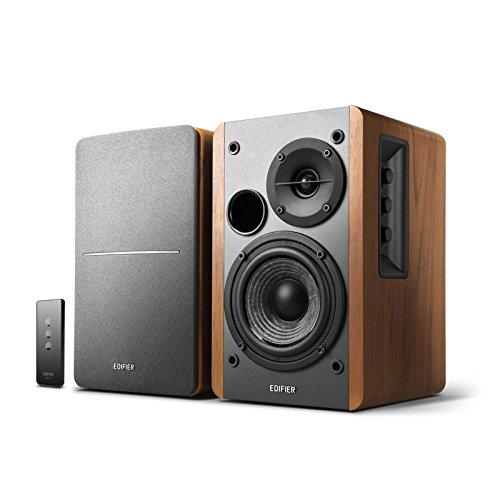
- Best for: Warm desktop listening in a small room, with a turntable or a computer as the main source.
- 42 watts RMS power, 21 watts per channel
- 13mm silk dome tweeter
- 4-inch driver
- Dual RCA inputs and 3.5mm AUX input

- Best for: A first home studio on a tight desk, where tuning controls and flexible inputs matter more than deep bass.
- 50 watts Class AB power, 25 watts per side
- 3.5-inch woven-composite woofer
- 1-inch silk-dome tweeter
- Frequency response 80 Hz to 20 kHz

- Best for: Mixing in an untreated room, where voicing modes and EQ combinations help the monitors adapt to the space.
- 5-inch woven Kevlar aramid fiber woofer
- 1-inch silk dome tweeter
- Frequency response 54 Hz to 30 kHz, plus or minus 3 dB
- Three voicing modes: Mix, Focus, and Create
All 5 Picks at a Glance
| Product | Specs | Action |
|---|---|---|
| Edifier R1280T Powered Bookshelf Speakers – 2.0 Active Near Field Studio Monitor Speaker – Wooden Enclosure – 42 Watts RMS Power |
| Check price on Amazon |
| PreSonus Eris 3.5 Studio Monitors, Pair — Powered, Active Monitor Speakers for Near Field Music Production, Desktop Computer, Hi-Fi Audio |
| Check price on Amazon |
| KRK RP5G5 ROKIT 5 Generation Five 5″ Powered Studio Monitor Pair |
| Check price on Amazon |
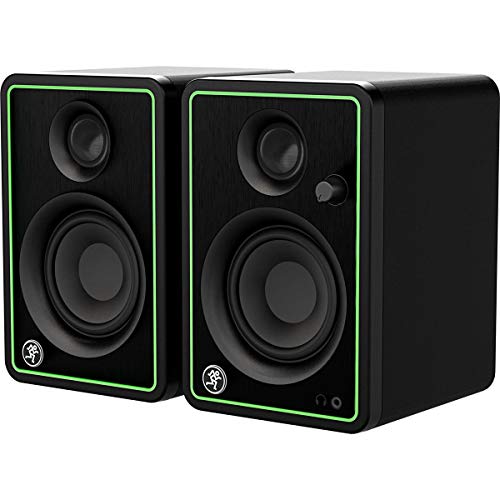 Mackie CR-X Series, 3.5-Inch Multimedia Monitors with Professional Studio-Quality Sound – Pair (CR3-X) |
| Check price on Amazon |
 (2) JBL 305P MkII 5″ 2-Way Active Powered Studio Reference Monitors Speakers |
| Check price on Amazon |
Key takeaways
- Five near-field studio monitors for desktop listening and mixing, with clear mids, honest bass, and compact cabinets that fit small rooms with ease.
Near-field monitors sit close to your ears on a desk, so small differences in tone, bass control, and stereo image matter more than they would on a distant pair of living-room speakers. The real decision is not which pair sounds most exciting in isolation, but which pair tells you the truth about a mix when the room is small, the walls are close, and the listening distance is only an arm length or two.
Home studio owners, podcast editors, video editors, and desktop listeners all want the same core qualities in different amounts. A producer needs clear mids and honest bass for mixing, an editor needs clean dialogue and a wide sweet spot, and a desktop listener needs a compact pair that fits beside a screen without crowding the workspace. The five pairs below cover those needs, from small 3.5-inch models to 5-inch pairs with room-tuning controls.
Quick Picks
As an Amazon Associate we earn from qualifying purchases
| Product | Best for | Key spec from title |
|---|---|---|
| Edifier R1280T Powered Bookshelf Speakers – 2.0 Active Near Field Studio Monitor Speaker – Wooden Enclosure – 42 Watts RMS Power | Warm desktop listening in a small room | 42 Watts RMS Power |
| PreSonus Eris 3.5 Studio Monitors, Pair — Powered, Active Monitor Speakers for Near Field Music Production, Desktop Computer, Hi-Fi Audio | First home studio on a tight desk | 3.5-inch powered pair |
| KRK RP5G5 ROKIT 5 Generation Five 5″ Powered Studio Monitor Pair | Mixing in an untreated room | 5-inch powered pair |
| Mackie CR-X Series, 3.5-Inch Multimedia Monitors with Professional Studio-Quality Sound – Pair (CR3-X) | Everyday multimedia and content creation | 3.5-inch multimedia pair |
| (2) JBL 305P MkII 5″ 2-Way Active Powered Studio Reference Monitors Speakers | Detailed mixing with a wide sweet spot | 5-inch 2-way active pair |
How to Choose
Match the Woofer Size to Your Room
A 3.5-inch woofer suits a small desk and a close listening position, because it keeps bass output modest and avoids overloading a tiny room with low-end energy that the walls then throw back at you. A 5-inch woofer reaches lower and gives a fuller sense of bass in a mix, which helps when you need to hear kick drums and bass lines with more weight. Measure the desk depth and the distance to the wall behind the monitors before you choose, and leave room for the cabinets to breathe. In a very small room, the smaller pair often sounds cleaner, while the larger pair earns its place when you have more space and more distance.
Look for Honest Mids and Controlled Bass
Near-field monitors exist to reveal problems, not to hide them, so the midrange matters most. Vocals, guitars, keyboards, and dialogue all live in the mids, and a monitor that scoops or boosts that range will lead you to mix decisions that fall apart on other speakers. Bass should feel firm and defined rather than boomy, because loose bass masks detail in the lower mids and makes level judgments harder. Look for a silk dome tweeter and a woofer built for clean transient response, and pay attention to any tuning controls that let you trim the highs or lows to suit a bright or dull room.
Check Inputs Against Your Interface
Your audio interface, mixer, or computer output decides which inputs you need, so check the connection list before you settle on a pair. Balanced TRS and XLR inputs resist hum and interference on longer cable runs, which matters when cables pass near a computer, a screen, or a power strip. Unbalanced RCA and 3.5mm inputs work well for short runs from a laptop or a phone, and a front-panel aux input makes it easy to plug in a second device for a quick listen. A front headphone output is also useful in a shared room, because it lets you switch to private listening without reaching around the back of a cabinet.
Plan Placement Before You Buy
Placement shapes what you hear as much as the monitor itself, so plan the desk layout before the pair arrives. Put the two cabinets at equal distance from your head and angle them inward so the tweeters point toward your ears, forming an even triangle with your listening seat. Keep the monitors away from corners when you can, because corners reinforce bass and make the low end sound heavier than it is. A pair of foam isolation pads or a sturdy desk stand can reduce vibration transfer into the desk surface, and a small amount of space behind each cabinet helps the rear port breathe.
The 5 Best Options
Edifier R1280T Powered Bookshelf Speakers – 2.0 Active Near Field Studio Monitor Speaker – Wooden Enclosure – 42 Watts RMS Power
- Best for: Warm desktop listening in a small room, with a turntable or a computer as the main source.
- 42 watts RMS power, 21 watts per channel
- 13mm silk dome tweeter
- 4-inch driver
- Dual RCA inputs and 3.5mm AUX input
Warm desktop listening in a small room, with a turntable or a computer as the main source.
The bass stays modest in a large room, so a bigger space may leave low-end detail less clear than a 5-inch pair would.
The Edifier R1280T brings a warm, relaxed sound to a desktop, with a wooden enclosure that looks at home beside books, a screen, or a turntable. Its side-panel controls put volume, bass, and treble within easy reach, and the included remote lets you adjust volume from across the room without leaning over the desk. Dual RCA inputs accept two devices at once, so a computer and a turntable can stay connected together, and the 4-inch driver pairs with a 13mm silk dome tweeter for smooth highs and a full midrange that suits long listening sessions.
PreSonus Eris 3.5 Studio Monitors, Pair — Powered, Active Monitor Speakers for Near Field Music Production, Desktop Computer, Hi-Fi Audio
- Best for: A first home studio on a tight desk, where tuning controls and flexible inputs matter more than deep bass.
- 50 watts Class AB power, 25 watts per side
- 3.5-inch woven-composite woofer
- 1-inch silk-dome tweeter
- Frequency response 80 Hz to 20 kHz
A first home studio on a tight desk, where tuning controls and flexible inputs matter more than deep bass.
Low-end output rolls off below 80 Hz, so deep bass in a mix may need a larger pair or a careful check on headphones.
The PreSonus Eris 3.5 Gen 2 pair packs studio tools into a compact cabinet that fits on almost any desk. Its 3.5-inch woven-composite woofer and 1-inch silk-dome tweeter deliver clear mids and articulate highs, while 50 watts of Class AB power give the pair enough headroom for mixing at moderate volume without strain. Low and high frequency tuning controls on the rear panel let you adjust the response to a desk pushed against a wall, and the front aux input and headphone output make daily use simple for producers, gamers, and content creators alike.
KRK RP5G5 ROKIT 5 Generation Five 5″ Powered Studio Monitor Pair
- Best for: Mixing in an untreated room, where voicing modes and EQ combinations help the monitors adapt to the space.
- 5-inch woven Kevlar aramid fiber woofer
- 1-inch silk dome tweeter
- Frequency response 54 Hz to 30 kHz, plus or minus 3 dB
- Three voicing modes: Mix, Focus, and Create
Mixing in an untreated room, where voicing modes and EQ combinations help the monitors adapt to the space.
The DSP menu and app setup add a learning curve, so allow time to set the voicing and EQ before you judge the sound.
The KRK RP5G5 ROKIT 5 Generation Five pair is built for rooms that are less than ideal, with onboard DSP tools that help you shape the sound to the space. Three voicing modes, Mix, Focus, and Create, give you a flat response for critical mixing, a mid-focused view for vocal detail, and a more inspiring voicing for writing and producing. Its 5-inch woven Kevlar woofer and 1-inch silk dome tweeter cover a wide range with clean detail, while 25 boundary and tuning EQ combinations help tame problems caused by walls, corners, and desk reflections in a home studio.
Mackie CR-X Series, 3.5-Inch Multimedia Monitors with Professional Studio-Quality Sound – Pair (CR3-X)
- Best for: Everyday multimedia and content creation on a desk that needs simple controls and flexible inputs.
- 50 watts total power
- 3-inch monitors with a silk dome tweeter
- Front-panel headphone output and volume control
- Balanced 1/4-inch TRS, 1/8-inch stereo, and RCA inputs
Everyday multimedia and content creation on a desk that needs simple controls and flexible inputs.
The small cabinet keeps bass output modest, so mixes with heavy low-end content may sound thinner than on a 5-inch pair.
The Mackie CR3-X pair suits a desk that does a little of everything, from music and video to gaming and video calls. Its brushed-metal front panel and compact cabinet fit neatly beside a screen, while the front-panel volume knob and headphone output keep daily control within reach. Flexible rear inputs cover balanced TRS, stereo aux, and RCA, so an interface, a laptop, and a phone can all connect without swapping cables, and the included cables in the box mean the pair is ready to use as soon as it is unpacked and placed.
(2) JBL 305P MkII 5″ 2-Way Active Powered Studio Reference Monitors Speakers
- Best for: Detailed mixing with a wide sweet spot, where stable imaging and clean bass matter most.
- Dual 41-watt Class-D amplifiers
- 5-inch woofer and 1-inch tweeter
- Frequency range 43 Hz to 24 kHz, minus 10 dB
- Frequency response 49 Hz to 20 kHz, plus or minus 3 dB
Detailed mixing with a wide sweet spot, where stable imaging and clean bass matter most.
The pair needs a balanced output from an interface or mixer to sound its best, so a simple laptop headphone jack is not the ideal source.
The JBL 305P MkII pair is a reference choice for detailed mixing, with a patented Image Control Waveguide that widens the sweet spot and keeps stereo imaging stable when you move your head. Dual 41-watt Class-D amplifiers drive the 5-inch woofer and 1-inch tweeter as a bi-amplified pair, so lows stay defined and highs stay crisp at a wide range of volumes. Boundary EQ and HF Trim controls let you adjust the response for placement near a wall or in a corner, and balanced XLR and TRS inputs connect directly to a standard audio interface for a clean signal path.
Which One Fits Your Situation
A Small Desk in a Shared Room
A small desk in a shared room calls for a compact pair with a front headphone output and simple volume control. The PreSonus Eris 3.5 and Mackie CR3-X both fit this role, because their small cabinets leave room for a keyboard, a screen, and a notebook, while their tuning and input options keep setup easy. Place them close to your ears, keep the volume moderate, and use headphones late at night so the room stays quiet for others.
Mixing Music in a Home Studio
Mixing music in a home studio calls for a pair that stays honest across the midrange and gives you tools to handle a room with no acoustic treatment. The KRK RP5G5 pair fits here, with voicing modes and EQ combinations that help you adapt to walls and corners, while the JBL 305P MkII pair offers a wide sweet spot and detailed imaging. Choose the KRK pair for room correction, and the JBL pair for imaging.
Editing Podcasts and Video
Editing podcasts and video calls for clear dialogue, a stable stereo image, and controls that are easy to reach during a long session. The JBL 305P MkII pair delivers crisp highs and a wide sweet spot that keeps voices clear, while the Edifier R1280T pair offers a warm, relaxed sound for long editing days. Keep the monitors at ear height, angle them toward your seat, and check dialogue at a moderate volume so small clicks stay easy to hear.
Listening to Music at Your Desk
Listening to music at your desk calls for a pair that sounds pleasant for hours and looks good beside a screen. The Edifier R1280T pair fits this role with its wooden enclosure, remote control, and dual inputs for a computer and a turntable, while the Mackie CR3-X pair adds a compact footprint and simple front-panel controls. Pick the Edifier pair for a warm, classic look and easy remote volume, and the Mackie pair for a smaller cabinet and flexible inputs.
Common Mistakes
- Placing monitors in corners or hard against a wall, which boosts bass and hides detail in the lower mids.
- Setting the left and right monitors at different heights or angles, which pulls the stereo image to one side.
- Choosing a large woofer for a tiny room, where excess low-end energy makes mixes sound muddy and unclear.
- Connecting a balanced monitor to an unbalanced laptop output with a long cable, which can invite hum and noise.
- Judging a pair in the first hour, before placement, voicing, and EQ settings have had time to settle into the room.
Frequently Asked Questions
What does near-field mean for studio monitors?
Near-field means the monitors are designed to be heard at close range, usually on a desk a few feet from your ears. At that distance, the direct sound from the speakers reaches you before most room reflections do, which gives a clearer picture of the mix. That is why near-field pairs work well in small rooms where distant speakers would let the room color the sound too much.
Do I need an audio interface for these monitors?
An audio interface helps, but it is not required for every pair in this guide. Pairs with RCA and 3.5mm inputs can connect directly to a computer or a phone, while pairs with balanced XLR and TRS inputs sound best from an interface or mixer. If you plan to record or mix often, an interface gives a cleaner signal and better volume control than a laptop headphone jack.
Can I place near-field monitors against a wall?
You can, but the wall will reinforce bass and make the low end sound heavier than it is. Leave a gap behind each cabinet when you can, and use tuning, boundary EQ, or HF trim controls to compensate for the placement. If the pair must sit close to a wall, choose a smaller woofer or a model with room-tuning controls, and check mixes on headphones too.
Are 3.5-inch monitors enough for mixing music?
A 3.5-inch pair can be enough for mixing when the room is small and the listening distance is short. These pairs reveal mids and highs clearly, which is where most mix decisions happen, and their tuning controls help them adapt to a desk against a wall. Deep bass below 80 Hz will be less clear, so check low-end decisions on headphones or a larger pair before you finish a mix.
FAQ
What does near-field mean for studio monitors?
Do I need an audio interface for these monitors?
Can I place near-field monitors against a wall?
Are 3.5-inch monitors enough for mixing music?
More from Amazon
Programs that pair well with the guide above. Offers and eligibility are set by Amazon and may change.
Free shipping on eligible items, Prime Video and more. Eligible new members can start with a free trial.
Start a Prime free trialAd-free music streaming. Eligible new subscribers can start with a free trial.
Try Music Unlimited freeA Prime membership for ages 18-24 with a trial period. Eligibility is set by Amazon.
See Prime for Young AdultsAudiobooks and podcasts to listen to on the go. Eligible new members can start with a free trial.
Try Audible freeAs an Amazon Associate we earn from qualifying purchases.