Our Short List of 3

- Best for: BIM and CAD users who want one large 4K screen instead of a dual-monitor pair.
- 31.5-inch 4K UHD display, 3840 x 2160 resolution
- IPS panel with HDR support
- 99% sRGB and 99% Rec.709 color coverage
- Delta E ≤ 3 with factory calibration report included

- Best for: Laptop-based architects who want the monitor to act as the docking station.
- 27-inch 4K UHD display, 3840 x 2160 resolution
- IPS Black panel with 2000:1 contrast ratio
- 400 cd/m² brightness with DisplayHDR 400
- 100% sRGB and 98% DCI-P3 coverage, Delta E < 2
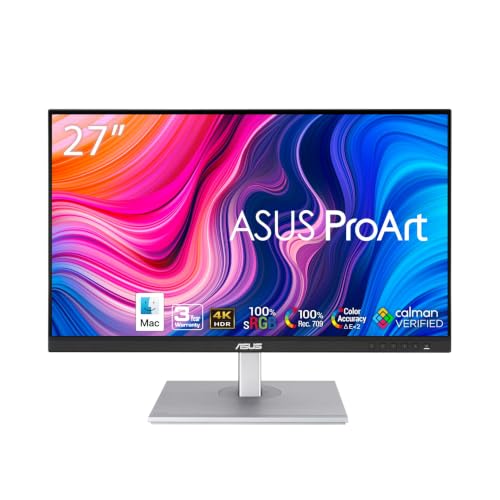
- Best for: Architects whose renders and boards are checked against printed output.
- 27-inch 4K UHD display, 3840 x 2160 resolution
- IPS panel with 178-degree viewing angles
- 100% sRGB and 100% Rec.709 color coverage
- Delta E < 2, Calman Verified
All 4 Picks at a Glance
| Product | Specs | Action |
|---|---|---|
| BenQ PD3205U |
| Check price on Amazon |
| Dell UltraSharp U2723QE |
| Check price on Amazon |
| ASUS ProArt PA279CV |
| Check price on Amazon |
 Dell S3425DW |
| Check price on Amazon |
Our Top Picks
An architecture monitor has to do two jobs that pull in opposite directions. It must show a full floor plan with thin linework, hatch patterns and small annotation text still legible, and it must render materials, daylight and finishes with color you can trust when a client compares the screen against a printed sheet. Most buyers end up choosing which job matters more: maximum drawing area, or the tightest color figures on the listing.
This guide is for architects, drafters and BIM users choosing a primary work display. Every pick below was chosen from its Amazon listing name and stated figures: screen size and resolution, panel type, gamut coverage such as 99% sRGB or 95% DCI-P3, Delta E accuracy, and the USB-C power figure where one is listed.
Quick Picks
As an Amazon Associate we earn from qualifying purchases
| Product | Best for | Key spec from title |
|---|---|---|
| BenQ PD3205U | Full plans and BIM models on one big screen | 32-inch 4K IPS, 99% sRGB |
| BenQ PD2705U | A listed CAD/CAM mode in a 27-inch 4K panel | 27-inch 4K IPS, Delta E ≤ 3 |
| Dell UltraSharp U2723QE | One-cable laptop docking with deep contrast | 27-inch 4K IPS Black, 2000:1 |
| ASUS ProArt PA279CV | The tightest accuracy figure in this list | 27-inch 4K IPS, Delta E < 2 |
| Dell S3425DW | Drawings, schedules and palettes side by side | 34-inch 3440×1440 curved VA |
How to Choose
Screen Size and Resolution for Drawings
A drawing is only useful at the size you can read it. A 27-inch 4K panel packs 3840×2160 pixels tightly enough that dimension strings and 6-point notes stay sharp without zooming, while a 32-inch 4K screen shows the same pixels larger, which suits full sheets and BIM models with the project browser open. The 34-inch ultrawide below trades vertical pixels for width: 3440×1440 spreads a plan beside schedules and palettes. Match the format to the sheet sizes you open daily, not to the biggest number on the box.
Color Gamut and Factory Calibration
Renders and material boards live or die on color. Listings state gamut coverage as a percentage of a named space: sRGB for documents and web output, DCI-P3 for wider, more saturated color in visualizations. Just as useful is the Delta E figure, which describes how far displayed color sits from the target; lower is tighter, and the picks here state Delta E ≤ 3 or Delta E < 2. A factory calibration report in the box, named on two listings below, means the panel was measured before shipping rather than left at default settings.
Panel Type and Viewing Angles
IPS panels hold color steady when you lean sideways to discuss a detail with a colleague, and every 4K pick here uses IPS or Dell’s IPS Black variant, which doubles the stated contrast to 2000:1 for darker shadow detail in renderings. The ultrawide uses a VA panel instead: its 3000:1 contrast makes dark interface themes look deep, but VA color shifts more at side angles. If clients gather around your screen for sign-off, panel behavior off-axis matters as much as the headline gamut figure.
USB-C Power, Hubs and the Stand
Architecture desks collect devices: a laptop, a drawing tablet, external drives, a second machine for rendering. A USB-C input with power delivery, 65W or 90W on these listings, carries the picture and charges the laptop over one cable, and a built-in hub or KVM switch lets two computers share the screen. Stand adjustment matters over long drafting days too: height and pivot travel let you raise the panel to eye level or turn it upright for a tall elevation sheet.
The 5 Best Options
BenQ PD3205U
- Best for: BIM and CAD users who want one large 4K screen instead of a dual-monitor pair.
- 31.5-inch 4K UHD display, 3840 x 2160 resolution
- IPS panel with HDR support
- 99% sRGB and 99% Rec.709 color coverage
- Delta E ≤ 3 with factory calibration report included
BIM and CAD users who want one large 4K screen instead of a dual-monitor pair.
Measure your desk depth first; a 32-inch panel needs more viewing distance than a 27-inch one, and the listing’s stand footprint is larger.
The PD3205U is the pick for architects whose workday is one large model: full floor plans, Revit views with the project browser docked, or a drawing sheet beside its schedules. The 32-inch 4K IPS panel keeps the same pixel count as the 27-inch options but spreads it over a larger area, so interface text and annotation stay readable without heavy scaling. Its listing leads with color: 99% sRGB and Rec.709 coverage, Delta E ≤ 3, a factory calibration report, and ICC Sync, which keeps the color profile matched between monitor and computer.
BenQ PD2705U
Choose the PD2705U if you want BenQ’s designer feature set in the sharper 27-inch 4K format. Its listing names a CAD/CAM mode among its color modes, alongside Darkroom and Animation modes, which speaks directly to drafting work with dark backgrounds and fine linework. The color figures match its larger sibling: 99% sRGB and Rec.709 coverage, Delta E ≤ 3, factory calibration with a report, and AQCOLOR uniformity. USB-C power delivery is lower at 65W, and the HotKey Puck G2 plus a KVM switch carry over, so a laptop and a desktop can share the panel.
Specs
- 27-inch 4K UHD display, 3840 x 2160 resolution
- IPS panel with HDR10
- 99% sRGB and 99% Rec.709 color coverage
- Delta E ≤ 3, factory calibrated with calibration report
- CAD/CAM mode listed among the color modes
- USB-C with 65W power delivery
- DisplayPort 1.4 and HDMI 2.0
- KVM switch and HotKey Puck G2
Best for: Drafters who want a dedicated CAD/CAM color mode and 4K sharpness at 27 inches.
Watch out for: Confirm a live buying option on the listing before ordering, since availability on this model has fluctuated; also check that 65W covers your laptop’s charging needs.
ASIN: B096B3PBFZ — View on Amazon
Dell UltraSharp U2723QE
- Best for: Laptop-based architects who want the monitor to act as the docking station.
- 27-inch 4K UHD display, 3840 x 2160 resolution
- IPS Black panel with 2000:1 contrast ratio
- 400 cd/m² brightness with DisplayHDR 400
- 100% sRGB and 98% DCI-P3 coverage, Delta E < 2
Laptop-based architects who want the monitor to act as the docking station.
The listing does not name built-in speakers, so plan on separate audio for calls and presentations.
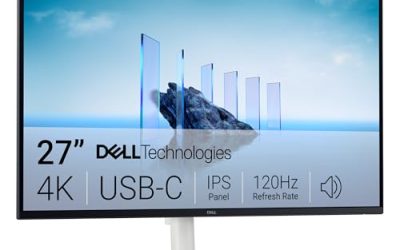
The U2723QE suits the architect who works from a laptop and docks all day. One USB-C cable delivers the 4K picture, up to 90W of charging, the built-in hub and even wired network through the RJ45 port, so the monitor replaces a separate dock. Its IPS Black panel is the difference you see in renderings: the listing states a 2000:1 contrast ratio, double a standard IPS figure, with 400 cd/m² brightness for bright offices. Color coverage is listed at 100% sRGB and 98% DCI-P3 with Delta E < 2, and the stand adjusts for height, tilt, swivel and pivot.
ASUS ProArt PA279CV
- Best for: Architects whose renders and boards are checked against printed output.
- 27-inch 4K UHD display, 3840 x 2160 resolution
- IPS panel with 178-degree viewing angles
- 100% sRGB and 100% Rec.709 color coverage
- Delta E < 2, Calman Verified
Architects whose renders and boards are checked against printed output.
Check the 65W USB-C figure against your laptop’s charging requirement; larger mobile workstations may still need their own adapter connected.
The PA279CV is the accuracy-first 27-inch option. Its listing states 100% sRGB and 100% Rec.709 coverage with Delta E < 2, the tightest accuracy figure in this guide, and Calman Verified status, which means an independent calibration tool confirmed the panel’s color performance. That combination fits presentation boards and printed sets, where the screen has to agree with what leaves the plotter. The IPS panel holds color across 178-degree viewing angles for desk-side discussions, and connectivity covers USB-C with 65W power delivery, DisplayPort, HDMI and a USB hub, all on a fully adjustable stand.
Dell S3425DW
- Best for: Architects who keep drawings, schedules and palettes open at the same time.
- 34-inch WQHD display, 3440 x 1440 resolution
- Curved 21:9 VA panel with 1800R curve
- 3000:1 contrast ratio
- 99% sRGB and 95% DCI-P3 color coverage
Architects who keep drawings, schedules and palettes open at the same time.
VA panels shift color at wide side angles, so check your seating position before using this screen for final color sign-off with clients beside you.
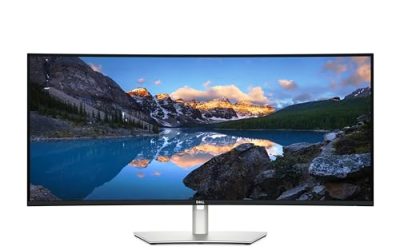
The S3425DW answers a different problem: not enough width. Its 34-inch curved screen runs 3440×1440 in a 21:9 format, so a plan view can sit in the middle while a schedule, a material palette and a properties panel stay open at the sides without a second monitor or a bezel down the middle. The VA panel states a 3000:1 contrast ratio with 99% sRGB and 95% DCI-P3 coverage, and the refresh figure reaches 120Hz, which keeps panning and orbiting in 3D views smooth. USB-C with 65W power delivery and integrated speakers round out a tidy single-screen desk.
Which One Fits Your Situation
You Model in BIM All Day
Pick the BenQ PD3205U. A 32-inch 4K screen holds a Revit or ArchiCAD model, the project browser and a properties panel without constant window shuffling, and its factory calibration report plus ICC Sync keep the colors of exported views consistent between your machine and the screen. It is the closest thing here to a drawing board that happens to be a monitor.
Your Laptop Is Your Whole Office
Pick the Dell UltraSharp U2723QE. Its USB-C input charges at 90W, the hub takes your tablet and drives, the RJ45 port covers wired network, and the KVM switch lets a second computer share the panel. The IPS Black contrast also flatters evening render checks in a dim home office or studio.
Your Boards Go to Print
Pick the ASUS ProArt PA279CV. The listing’s Delta E < 2 figure and Calman Verified status are the strongest accuracy signals in this guide, and full sRGB plus Rec.709 coverage matches the spaces most print and document workflows target. If a client compares your screen against a plotted sheet, this is the panel built for that moment.
You Juggle Plans, Schedules and Palettes
Pick the Dell S3425DW. The 21:9 width is the feature: drawings in the center, supporting documents at the edges, no bezel gap and no second stand eating desk space. Its 95% DCI-P3 coverage keeps visualizations lively, and the 120Hz refresh makes orbiting a model feel responsive while you work through revisions.
Common Mistakes
- Buying on screen size alone, then finding that a big low-resolution panel shows fewer drawing details than a smaller 4K one.
- Ignoring the gamut and Delta E figures on the listing, then wondering why renders shift between the screen and printed boards.
- Running a 27-inch 4K panel at full native size with no scaling, which makes CAD toolbars and annotation text painfully small.
- Choosing a VA ultrawide for group sign-off sessions without checking how its color behaves at side viewing angles.
- Overlooking stand adjustment, then spending long drafting days with the panel below eye level or no pivot for tall elevation sheets.
Frequently Asked Questions
Is 4K Necessary for Architectural Drawings?
Not strictly, but it is the clearest upgrade for linework. At 3840×2160, thin lines, hatch patterns and small annotation text stay legible at normal viewing distance, and you zoom less often. Four of the five picks here are 4K; the ultrawide trades some vertical resolution for width, which suits a different way of laying out your workspace.
Which Gamut Should I Care About, sRGB or DCI-P3?
Both, for different outputs. sRGB governs documents, PDFs and web sharing, so full sRGB coverage is the baseline every pick here meets. DCI-P3 is wider and matters for rich visualizations and client presentations; several panels in this guide state 95 to 98% DCI-P3. If your work is mostly line drawings and plotted sets, sRGB plus a low Delta E figure matters more.
One Ultrawide or Two 27-Inch Monitors?
An ultrawide gives one continuous canvas with no center bezel, simpler cabling and one stand, which suits a plan flanked by palettes. Two 27-inch 4K panels give more total pixels and let you turn one screen upright for tall sheets or long schedules. Choose by layout habit: continuous workspace, pick the ultrawide; mixed orientations, pick the pair.
Do I Need a Monitor With USB-C?
Only if a laptop is your main machine. USB-C with power delivery, 65W or 90W on these listings, sends the picture, charges the laptop and connects the hub over one cable, which keeps a hot-desk or home setup tidy. Desktop workstation users with DisplayPort and a separate hub gain little, and can judge purely on panel size, resolution and color figures instead.
FAQ
Is 4K Necessary for Architectural Drawings?
Which Gamut Should I Care About, sRGB or DCI-P3?
One Ultrawide or Two 27-Inch Monitors?
Do I Need a Monitor With USB-C?
More from Amazon
Programs that pair well with the guide above. Offers and eligibility are set by Amazon and may change.
Free shipping on eligible items, Prime Video and more. Eligible new members can start with a free trial.
Start a Prime free trialAd-free music streaming. Eligible new subscribers can start with a free trial.
Try Music Unlimited freeA Prime membership for ages 18-24 with a trial period. Eligibility is set by Amazon.
See Prime for Young AdultsAudiobooks and podcasts to listen to on the go. Eligible new members can start with a free trial.
Try Audible freeAs an Amazon Associate we earn from qualifying purchases.