Key takeaways
- Five large monitors from 32 inches up for office work, with 4K and ultrawide options, USB-C docking, KVM switching and height-adjustable stands compared.
The real decision with a large work monitor is not raw size alone, but whether one screen can replace a cramped laptop display and a tangle of side windows without forcing constant zooming, scrolling, and cable swapping. A 32-inch 4K panel keeps spreadsheet columns and document text readable side by side, while a 34-inch ultrawide stretches timelines and code across a wider canvas. Getting that choice right at the start saves months of small daily friction at your desk.


This guide is for office workers, analysts, writers, and developers who spend the day in documents, spreadsheets, browsers, and chat tools. Every pick is 32 inches or larger, and selections come only from product names and specifications stated on the Amazon listing for each model, including size, resolution, panel type, and ports.
Quick Picks
As an Amazon Associate we earn from qualifying purchases
| Product | Best for | Key spec from title |
|---|---|---|
| Dell UltraSharp U3223QE | Laptop docking with wired network | 4K UHD USB-C Hub Monitor |
| Dell UltraSharp U3425WE | Wide multitasking on one curved screen | 34-inch Curved Thunderbolt Hub Monitor |
| LG UltraWide 34WQ73A-B | Two computers sharing one ultrawide | QHD Curved Monitor with Built-In KVM |
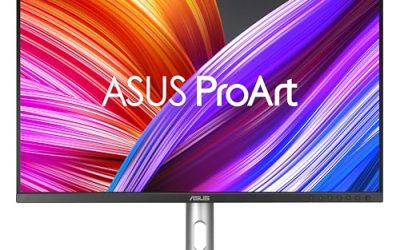
| ASUS ProArt Display PA329CV | Colour-sensitive document and design work | 32-inch 4K HDR Monitor with USB-C |
| Samsung ViewFinity S8 S80UD | Everyday 4K office work with speakers | 4K UHD IPS HDR10 Monitor with USB-C |
How to Choose
Pick 32-inch 4K or 34-inch ultrawide by layout
Start with how your windows actually sit during the day. A 32-inch 4K screen in a 16:9 shape suits stacked documents, tall spreadsheets, and a browser beside a word processor, because vertical space stays generous. A 34-inch ultrawide at 3440 by 1440 favours side-by-side work, such as a code editor next to its output, or three chat and email columns in a row. Neither shape is universally better. Measure your desk depth too, since larger panels sit closer to your eyes than many buyers expect, and curved ultrawides need width more than depth.
Match resolution to text size, not just inches
Resolution decides whether the extra inches produce extra usable space or simply bigger pixels. On a 32-inch panel, 3840 by 2160 keeps small spreadsheet figures and footnotes sharp even when two windows share the screen. On a 34-inch ultrawide, 3440 by 1440 gives comfortable horizontal room, though text is less dense than on a 4K panel of similar height. If you read fine print all day, prioritise pixel density over sheer width. If your work is mostly wide timelines, dashboards, and tables, the ultrawide layout often feels more natural despite the lower vertical count.
Treat USB-C power and hub ports as the docking decision
For laptop users, the monitor can either replace a separate dock or leave the desk full of adapters. Look for USB-C that carries video and charges the laptop in the same cable, and check the wattage figure in the listing against what your laptop expects. Extra USB ports on the monitor keep a keyboard, mouse, and headset receiver plugged in permanently. An Ethernet port matters if your home office connection is unreliable over wireless. A built-in KVM switch is worth seeking out when a work laptop and a personal desktop share the same screen and peripherals.
Check the stand and your viewing distance
A large panel magnifies poor ergonomics, because the top corners sit higher and wider than on a smaller screen. Height adjustment is the feature that matters most, letting the upper third of the display sit near eye level during long document sessions. Tilt helps with window light, while pivot can suit long contracts or code files read in portrait. Confirm the listed adjustments before buying rather than assuming every large monitor includes them. If the stand is fixed, leave room in your setup plan for a separate arm and check the mounting pattern stated for the model.
The 5 Best Options
Dell UltraSharp U3223QE
This is the pick for a laptop-centred desk where the monitor also has to act as the dock. Its 4K panel gives enough density for two documents and a spreadsheet to share the screen without shrinking text into guesswork, and the hub layout means peripherals and a wired network connection can stay attached to the display. It suits professionals who plug in once each morning and expect the keyboard, mouse, and network to follow the laptop, rather than anyone chasing fast motion or built-in sound for calls and media playback.
Specs
- Screen size: 32 inches as listed in the product name, 31.5-inch class panel
- Resolution: 3840 x 2160, 4K UHD
- Panel type: IPS Black
- Refresh rate: 60 Hz
- Connectivity: USB-C with up to 90W power delivery, HDMI, DisplayPort, Ethernet, USB hub ports
- Features: KVM support listed for this model
Best for: Laptop users who want one-cable docking with Ethernet and shared peripherals.
Watch out for: The listing for this model does not present built-in speakers as a headline feature, so plan on separate audio for calls.
ASIN: B09TVZHV4W
Dell UltraSharp U3425WE
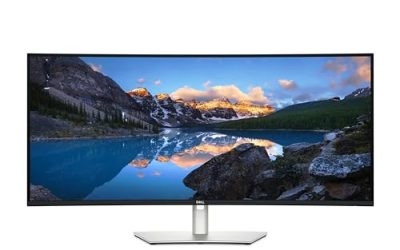
Choose this curved ultrawide when your day is a horizontal procession of windows rather than tall pages. The wide 21:9 canvas lets a spreadsheet, a browser, and a messaging column sit together without the bezel break of two separate screens, and the curve keeps the far edges at a more even distance. It fits analysts, project coordinators, and developers who live in timelines and dashboards. The hub design, ambient light sensor, and picture-by-picture support listed for the model suit desks shared between a laptop and a second computer.
Specs
- Screen size: 34.1 inches
- Resolution: 3440 x 1440, listed as QHD 1440p ultrawide
- Aspect ratio: 21:9
- Panel shape: Curved screen
- Features: Ambient Light Sensor, Picture by Picture, Digital Daisy Chain, Locking Stand
Best for: Multitaskers who want one wide curved screen instead of two separate monitors.
Watch out for: Vertical space is shorter than on a 32-inch 4K panel, so tall documents need more scrolling.
ASIN: B0D63Y6WYJ
LG UltraWide 34WQ73A-B
This LG ultrawide is aimed squarely at desk work shared between two machines. The listing highlights a built-in KVM and Dual Controller support, so one keyboard and mouse can move between a work laptop and a desktop while both use the same wide screen. The IPS panel and 3440 by 1440 resolution keep text and colour consistent across the curve, which helps when a document and a reference page sit at opposite edges. It is a practical choice for hybrid workers who alternate computers through the day and dislike re-plugging peripherals each time they switch.
Specs
- Screen size: 34 inches
- Resolution: 3440 x 1440, QHD Ultra Wide
- Panel type: IPS, curved
- Aspect ratio: 21:9
- Refresh rate: 60 Hz
- Response time: 5 milliseconds
- Brightness: 300cd as listed
- Colour: sRGB 99 percent coverage with HDR 10 as listed
- Connectivity: HDMI, DisplayPort, USB Type-C with up to 90 watts of power delivery, 4 USB ports
- Features: Built-in KVM, height and tilt adjustment via One Click Stand
Best for: Workers switching between two computers on one ultrawide screen.
Watch out for: The listing shows no built-in speakers for this model in its comparison table, so check your audio setup.
ASIN: B0B924GWLJ
ASUS ProArt Display PA329CV

Pick the ProArt when the work itself is colour-sensitive, such as preparing client documents, marketing assets, or product images alongside everyday office tasks. The listing presents the panel as factory-checked for colour accuracy, with full sRGB and Rec.709 coverage, which gives shared files a more predictable appearance across screens. The 4K resolution on a 32-inch panel keeps fine detail visible when a layout and its source material sit side by side. A C-clamp design and height adjustment in the product name also suit desks where a conventional stand base would crowd the workspace.
Specs
- Screen size: 32 inches
- Resolution: 3840 x 2160, UHD 4K
- Panel type: IPS
- Colour: 100 percent sRGB and Rec.709 as listed, Delta E less than 2, Calman Verified
- Connectivity: USB-C with power delivery, DisplayPort, HDMI, USB 3.1 Hub
- Stand: Height adjustable, C-clamp included as listed
Best for: Creators and office workers who need dependable colour on a large 4K screen.
Watch out for: Confirm the USB-C charging wattage on the listing matches your laptop before relying on a single cable.
ASIN: B09D7JCT5Y
Samsung ViewFinity S8 S80UD

The ViewFinity S8 is the straightforward large 4K option for a mixed office day of documents, calls, and browser work. Its listing includes built-in speakers, which removes one extra device from the desk for meetings, and a built-in KVM switch for moving between sources. The IPS panel, matte finish, and ergonomic stand with height, tilt, swivel, and pivot adjustments suit shared or long-hour desks where the screen position changes between sitting tasks. Intelligent Eye Care and Eye Saver Mode appear in the listing, which will appeal to readers who spend most of the day in text-heavy applications.
Specs
- Screen size: 32 inches
- Resolution: 3840 x 2160, 4K UHD
- Panel type: IPS
- Refresh rate: 60 Hz
- Brightness: 350 candela as listed
- Contrast ratio: 1,000:1 as listed
- Features: HDR10, built-in speakers, built-in KVM switch, Intelligent Eye Care
- Connectivity: USB-C, HDMI, DisplayPort, USB hub as listed
- Stand: Ergonomic stand with height adjustment, tilt, swivel, and pivot
Best for: Everyday office workers who want 4K, speakers, and full stand adjustment in one screen.
Watch out for: Check the exact port count on the listing for your model variant before ordering cables and hubs.
ASIN: B0F7J3KHND
Which One Fits Your Situation
You dock a laptop and want the cleanest desk
Choose the Dell UltraSharp U3223QE. Its USB-C hub approach keeps charging, peripherals, and a wired network connection flowing through the monitor, so the laptop connects with a single cable each morning. That matters most in a small home office where a separate dock, its power brick, and loose adapters would compete for the same limited desk surface and power outlets throughout the working week.
You live in wide spreadsheets, timelines, and dashboards
Choose the Dell UltraSharp U3425WE if horizontal room is your bottleneck, or the LG UltraWide 34WQ73A-B if you also switch between two computers. Both stretch work across a 21:9 canvas without a centre bezel. The Dell adds an ambient light sensor and daisy chain support in its listing, while the LG emphasises its built-in KVM and Dual Controller for shared peripherals.
You prepare colour-sensitive files for clients
Choose the ASUS ProArt Display PA329CV. Its listing leads with colour accuracy credentials, full sRGB and Rec.709 coverage, and a calibration verification claim, which are the details that matter when a presentation, catalogue page, or image set must look consistent for someone else. The 4K panel also keeps tool panels and the canvas itself readable at the same time during detailed editing sessions.
You want one large screen for documents and daily calls
Choose the Samsung ViewFinity S8 S80UD. Built-in speakers cover meeting audio without extra hardware, the ergonomic stand adjusts in several directions as your posture changes through the day, and the KVM switch helps if a second computer joins the desk later. It is the least specialised option here, which is exactly why it fits a general office workload built around documents, email, and video meetings.
Common Mistakes
- Buying by inches alone and ignoring resolution, so a large panel shows the same amount of content as a smaller one, only bigger and less sharp.
- Assuming every USB-C port charges a laptop at full speed, without checking the wattage figure stated in the listing against the laptop requirement.
- Forgetting desk depth, then sitting too close to a 32-inch or wider screen and turning your head constantly to reach the corners.
- Overlooking stand adjustments and discovering after setup that the panel sits too high for comfortable document work all day.
- Choosing an ultrawide for mostly tall documents, when a 16:9 4K panel would show more lines of a contract or report at once.
Frequently Asked Questions
Is a 32-inch monitor too big for a normal desk?
For most desks it is manageable, provided you can sit far enough back that the corners stay in comfortable view. Depth matters more than width here. A deeper desk or a stand that pushes the panel back helps considerably. If your desk is shallow, a 32-inch 4K model still works, but expect to arrange windows toward the centre rather than using every corner all day.
Should I choose 4K or ultrawide for office work?
Choose 4K on a 32-inch panel if your work is document-heavy, because the taller 16:9 shape and denser pixels suit reading, writing, and vertical spreadsheets. Choose a 34-inch ultrawide if your day is built around side-by-side windows, wide tables, and timelines. The deciding factor is window layout, not fashion, so picture your three most-used applications open at once before deciding.
Do I need USB-C on a work monitor?
You need it if a laptop is your main computer and you want one cable to handle the picture and charging while the monitor hosts your keyboard and mouse. Desktop users gain less, since their machine stays plugged in permanently. Even for laptop users, confirm the charging wattage in the listing, because a lower figure may charge slowly or only while the laptop is lightly loaded.
Can one large monitor replace two smaller ones?
Often, yes, especially with a 34-inch ultrawide or a 32-inch 4K panel that holds two full windows comfortably. What you give up is the physical separation of a second screen for a permanent reference document or call window. Window management tools on the monitor or in your system software close much of that gap, but workers who keep one application isolated all day may still prefer a second display.
FAQ
Is a 32-inch monitor too big for a normal desk?
Should I choose 4K or ultrawide for office work?
Do I need USB-C on a work monitor?
Can one large monitor replace two smaller ones?
More from Amazon
Programs that pair well with the guide above. Offers and eligibility are set by Amazon and may change.
Free shipping on eligible items, Prime Video and more. Eligible new members can start with a free trial.
Start a Prime free trialAd-free music streaming. Eligible new subscribers can start with a free trial.
Try Music Unlimited freeA Prime membership for ages 18-24 with a trial period. Eligibility is set by Amazon.
See Prime for Young AdultsAudiobooks and podcasts to listen to on the go. Eligible new members can start with a free trial.
Try Audible freeAs an Amazon Associate we earn from qualifying purchases.