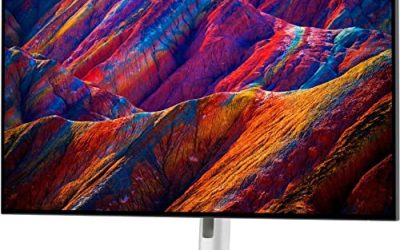
Our Short List of 3

- Best for: Buyers who want genuine 5K Retina-class sharpness in a Mac-focused design
- 27-inch IPS display, 5120×2880 5K UHD
- DCI-P3 99% color gamut
- 500 nits brightness
- Thunderbolt 3 port with macOS compatibility

- Best for: 16-inch MacBook Pro owners and mixed Mac/PC desks that need a real dock
- 27-inch display, 3840×2160 4K UHD
- IPS Black panel with 3000:1 contrast ratio
- 120Hz refresh rate
- 450 cd/m² brightness

- Best for: Office and hybrid workers who value ports, Ethernet and 120Hz over 4K or 5K
- 27-inch display, 2560×1440 QHD
- IPS Black panel
- 120Hz refresh rate
- 98% DCI-P3 color
All 3 Picks at a Glance
| Product | Specs | Action |
|---|---|---|
| LG UltraFine 5K 27MD5KL-B |
| Check price on Amazon |
| Dell UltraSharp U2725QE |
| Check price on Amazon |
| Dell UltraSharp U2724DE |
| Check price on Amazon |
Key takeaways
- Four monitors picked for MacBook Pro owners: true 5K panels for Retina-sharp text and Thunderbolt hubs with the wattage a 14- or 16-inch Pro needs.
A MacBook Pro is pickier about external monitors than most laptops, and the real decision is not panel size. It is whether the display scales the way macOS expects, and whether one cable can carry the picture, your peripherals and enough wattage to keep a 14-inch or 16-inch Pro charged while it works hard. A monitor that fails either test turns an expensive laptop into a desk of dongles and a battery that drains during a video call.
This shortlist is written for MacBook Pro owners who dock at a desk most days: developers, designers, writers and analysts who want text that looks like it does on the built-in screen. Every pick below connects over Thunderbolt or USB-C, and the specs quoted for each one come from its Amazon product listing, including the power delivery figure that matters most for the larger Pro models.
Quick Picks
As an Amazon Associate we earn from qualifying purchases.
| Product | Best for | Key spec from title |
|---|---|---|
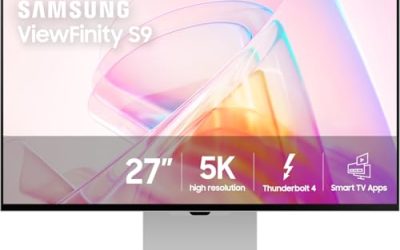
| Apple Studio Display | The full Apple-native experience | 27-inch 5K Retina, Thunderbolt 3, 96W power delivery |
| LG UltraFine 5K 27MD5KL-B | 5K sharpness built for macOS | 27-inch 5K IPS, Thunderbolt 3, DCI-P3 99% |
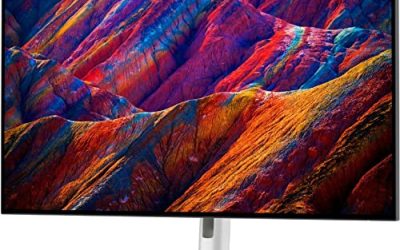
| Dell UltraSharp U2725QE | One-cable docking with the strongest charging | 27-inch 4K IPS Black, 120Hz, Thunderbolt 4, 140W PD |
| Dell UltraSharp U2724DE | A 120Hz hub monitor for office work | 27-inch QHD IPS Black, 120Hz, Thunderbolt 4, 90W PD |
How to Choose
Match the resolution to how macOS scales
macOS renders its interface at a fixed logical size and scales it to the panel, so pixel density decides whether text looks printed or merely acceptable. A 27-inch 5K panel at 5120×2880 runs at the same density as the MacBook Pro’s own Retina screen, which is why the two 5K picks here feel native. A 27-inch 4K panel still looks sharp in the default scaled mode most people use. A 27-inch QHD panel gives you more screen room than the laptop but visibly softer text, a trade-off that suits spreadsheets better than long writing days.
Check power delivery against your MacBook Pro model
The wattage a monitor pushes back over the cable is the spec buyers most often get wrong. A 14-inch MacBook Pro ships with a 96W adapter in its faster configurations, and the 16-inch model fast-charges at 140W, so a display that only supplies 65W will charge slowly under load and may not keep up during heavy compiles or exports. For a single-cable desk, look for at least 90W for a 14-inch machine. Owners of the 16-inch Pro who want full-speed charging should look at the Dell U2725QE’s 140W figure or plan to keep the Apple adapter plugged in as well.
Decide whether you need a Thunderbolt hub, not just a picture
A basic USB-C monitor shows a picture and charges the laptop; a Thunderbolt hub monitor replaces a separate dock. The difference shows up in the port list: downstream Thunderbolt ports for a second display or fast storage, USB-A ports for receivers and drives, and wired Ethernet for stable calls. If your desk already has a dock you like, a simpler display such as the Studio Display or the LG is enough. If the monitor is the dock, the two Dell models here carry the deeper port selection, including RJ45 Ethernet on the U2724DE’s listing.
Weigh panel quality and refresh rate for your actual work
Color coverage decides whether photo and design work on the external screen matches the MacBook’s own P3 display. All four monitors here list DCI-P3 or Display P3 coverage, so the practical differences are brightness, contrast and motion. The Studio Display lists 600 nits, the brightest here, while Dell’s IPS Black panels list a 3000:1 contrast ratio on the U2725QE for deeper blacks in dim rooms. Refresh rate splits the list too: the two Dells run at 120Hz, close to the ProMotion feel of the laptop screen, while both 5K panels run at 60Hz.
The 4 Best Options
Apple Studio Display
If you want the external screen to behave like it was cut from the same cloth as your MacBook Pro, this is the default answer. The 5K Retina panel matches Apple’s own scaling exactly, brightness and volume controls work from the Mac keyboard, and the built-in camera, microphone array and speakers are good enough to retire a separate webcam for calls. It is the pick for Mac-only desks where integration matters more than port count, refresh rate or a height-adjustable stand at the base configuration.
Specs
- 27-inch 5K Retina display, 5120×2880
- 600 nits brightness, P3 wide color, support for one billion colors
- 12MP Ultra Wide camera with Center Stage
- Studio-quality three-mic array
- Six-speaker sound system with Spatial Audio
- One Thunderbolt 3 port and three USB-C ports
- 96W power delivery to charge a Mac notebook
- Tilt-adjustable stand, standard glass
Best for: Mac-only users who want exact Retina scaling and Apple integration
Watch out for: The base stand only tilts; height adjustment is a different configuration, and there is no HDMI or DisplayPort input for a second computer
ASIN: B0DZDDWSBG
LG UltraFine 5K 27MD5KL-B
- Best for: Buyers who want genuine 5K Retina-class sharpness in a Mac-focused design
- 27-inch IPS display, 5120×2880 5K UHD
- DCI-P3 99% color gamut
- 500 nits brightness
- Thunderbolt 3 port with macOS compatibility
Buyers who want genuine 5K Retina-class sharpness in a Mac-focused design
It is a Thunderbolt 3 generation display at 60Hz, and listings vary, so confirm the exact variant and condition on the product page before ordering
LG built this panel with Apple in mind, and it remains the most direct alternative to the Studio Display for owners who want true 5K without the Apple badge. macOS controls its brightness from the keyboard, the built-in camera and speakers cover everyday calls, and the Thunderbolt 3 connection carries picture and charging over one cable. It suits MacBook Pro owners whose priority is pixel density and color for photo, layout and text work, and who do not need the higher refresh rates or the deep hub features of the Dell models below.
Dell UltraSharp U2725QE
- Best for: 16-inch MacBook Pro owners and mixed Mac/PC desks that need a real dock
- 27-inch display, 3840×2160 4K UHD
- IPS Black panel with 3000:1 contrast ratio
- 120Hz refresh rate
- 450 cd/m² brightness
16-inch MacBook Pro owners and mixed Mac/PC desks that need a real dock
At 4K rather than 5K, macOS uses a scaled mode; text is sharp but not the pixel-perfect Retina match of the two 5K panels
This is the strongest one-cable dock in the list. The listing’s headline figure is up to 140W of USB-C power delivery, the only monitor here that can fast-charge a 16-inch MacBook Pro, delivered through a Thunderbolt 4 hub that also drives your peripherals. The 4K IPS Black panel runs at 120Hz with a listed 3000:1 contrast ratio, so scrolling and window movement feel closer to the laptop’s ProMotion screen than any 60Hz panel. It fits MacBook Pro owners who also plug in a work PC, or who simply want the monitor to replace a separate docking station.
Dell UltraSharp U2724DE
- Best for: Office and hybrid workers who value ports, Ethernet and 120Hz over 4K or 5K
- 27-inch display, 2560×1440 QHD
- IPS Black panel
- 120Hz refresh rate
- 98% DCI-P3 color
Office and hybrid workers who value ports, Ethernet and 120Hz over 4K or 5K
QHD at 27 inches is the softest text in this list on macOS; if you read and write all day, step up to a 4K or 5K pick
Think of this one as the productivity hub of the group. The QHD panel will not match a Retina display for text crispness, but the listing pairs a 120Hz IPS Black screen with the deepest wired connectivity here: two Thunderbolt ports, wired Ethernet and a full set of USB ports, with 90W charging that covers a 14-inch MacBook Pro. It is the sensible pick for office-style work — documents, browsers, chat and calls all day — where smooth motion, a wired network and one-cable docking matter more than pixel density.
Which One Fits Your Situation
You want the desk screen to feel like a bigger MacBook
Choose between the two 5K panels. The Studio Display adds the better camera, speakers and brightness, plus controls that work exactly like the laptop’s. The LG UltraFine 5K delivers the same pixel density and macOS brightness control in an older Thunderbolt 3 design. Either way, interface elements land at the same size and sharpness you are used to, with no scaling compromises to think about after setup.
You run a 16-inch MacBook Pro hard and hate cable clutter
The Dell U2725QE is the only monitor here whose listing promises 140W of power delivery, enough to fast-charge the big Pro while it exports, compiles or renders. Its Thunderbolt 4 hub absorbs the drives, receiver and second screen that would otherwise need a dock. You give up the pixel-perfect 5K scaling of the Apple and LG panels, and in return the whole desk runs off a single cable.
You split the desk between a MacBook Pro and a Windows PC
Take the Dell U2724DE. Its port list reads like a docking station, the Ethernet jack keeps calls stable, and 90W charging is plenty for a 14-inch Pro or most Windows laptops. The 120Hz refresh makes switching between machines feel equally smooth on both. Just go in knowing QHD text on the Mac side is a step down from the laptop’s own screen, fine for office apps and less ideal for design proofing.
You do color-sensitive work and present on calls all day
The Studio Display is the safest single purchase: P3 color at 600 nits for proofing, a 12MP Center Stage camera that keeps you framed, and a six-speaker system that removes the need for desktop speakers. If the work is color-first but the desk also needs a hub, the U2725QE’s Display P3 coverage and 120Hz panel is the practical compromise, paired with a separate webcam.
Common Mistakes
- Buying a 27-inch QHD monitor and expecting Retina-sharp text; macOS scaling makes 5K at 27 inches the true match for a MacBook Pro screen.
- Ignoring the power delivery figure, then wondering why a 16-inch MacBook Pro charges slowly or loses charge under load on a 65W monitor.
- Assuming every USB-C cable is equal; full charging speeds and Thunderbolt features need the cable rated for them, ideally the one in the monitor’s box.
- Forgetting that macOS handles daisy-chaining differently from Windows; a second display usually needs its own Thunderbolt port rather than a splitter.
- Paying for a height-adjustable stand twice, or not at all: stand configurations differ between listings of the same display, so check which stand the listing actually includes.
Frequently Asked Questions
Does a 4K monitor look sharp enough with a MacBook Pro?
Yes, for most people. A 27-inch 4K panel in macOS’s default scaled mode looks noticeably sharper than QHD and close to the laptop screen at normal viewing distance. It is not the exact pixel-for-pixel match a 5K panel gives, so designers who proof fine detail all day may still prefer 5K, but for coding, writing and office work 4K is a comfortable step up.
How much power delivery does a MacBook Pro actually need?
A 14-inch MacBook Pro is well served by 90W or more, which keeps it charged at full speed under load. The 16-inch model fast-charges at 140W and works fine at lower wattages, just more slowly, and it can still drain during sustained heavy work on a weak supply. If you want one cable to do everything on a 16-inch machine, pick a monitor listing 140W delivery.
Can I connect two external monitors to one MacBook Pro?
It depends on the chip. Base-model Apple silicon MacBook Pros have historically supported fewer external displays than the Pro and Max chip variants, and macOS does not use the same MST daisy-chaining as Windows. The reliable route is one display per Thunderbolt port, or a monitor with a downstream Thunderbolt port. Check your exact model’s display support on Apple’s spec page before buying a second screen.
Is Thunderbolt better than plain USB-C for a MacBook Pro monitor?
For a simple picture and moderate charging, USB-C with DisplayPort Alt Mode is enough. Thunderbolt adds the hub behavior that makes a one-cable desk work: downstream ports for storage and a second display, faster data, and on these Dell models, wired Ethernet. If the monitor is replacing your dock, Thunderbolt is the version to buy; if you already own a dock, plain USB-C can save money.
FAQ
Does a 4K monitor look sharp enough with a MacBook Pro?
How much power delivery does a MacBook Pro actually need?
Can I connect two external monitors to one MacBook Pro?
Is Thunderbolt better than plain USB-C for a MacBook Pro monitor?
More from Amazon
Programs that pair well with the guide above. Offers and eligibility are set by Amazon and may change.
Free shipping on eligible items, Prime Video and more. Eligible new members can start with a free trial.
Start a Prime free trialAd-free music streaming. Eligible new subscribers can start with a free trial.
Try Music Unlimited freeA Prime membership for ages 18-24 with a trial period. Eligibility is set by Amazon.
See Prime for Young AdultsAudiobooks and podcasts to listen to on the go. Eligible new members can start with a free trial.
Try Audible freeAs an Amazon Associate we earn from qualifying purchases.