Key takeaways
- Laptop screens are fine until you try to hold a game guide, a chat window, and a browser next to a running game on one 15-inch panel.
Laptop screens are fine until you try to hold a game guide, a chat window, and a browser next to a running game on one 15-inch panel. An external monitor fixes that, but the phrase covers two very different products: a slim portable display that lives in your bag, and a conventional desktop monitor that stays plugged in at home. The right choice depends on whether your second screen travels, how your laptop outputs video, and whether you want a spare display for a console as well.
This roundup is written for laptop owners who want extra screen space for gaming sessions, streaming overlays, or study and work. Seven of the eight listings are portable monitors in the 14-inch to 15.6-inch range, and one is a 22-inch desktop panel with a higher refresh rate. Every comparison below is based on the specs printed in the listing titles, so use it to narrow your list and then confirm ports and cables against your own laptop.
Quick Picks
Our top picks
 InnoView Portable Monitor
- [Portable Monitor Laptop] InnoView laptop screen extender is…
- [Plug and Play] The travel monitor for laptop…
- [IPS FHD USB C Monitor] 15.6 inch portable…
 KYY Portable Monitor 15.6" 1080P Computer Monitor
- [ FHD 1080P PORTABLE MONITOR ]: KYY using…
- [ WIDE COMPATIBILITY ]: KYY portable monitor for…
- [ ULTRA-SLIM PORTABLE DISPLAY ]: KYY USB C…
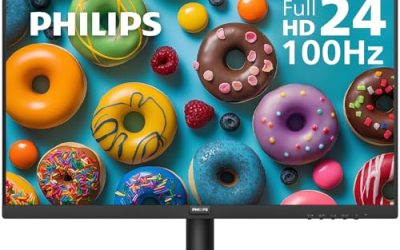
 Philips 22 Inch Computer Monitor FHD 100Hz
- This 22 inch class (21.5″ viewable) Philips V…
- 100Hz brings your favorite movies and video games…
- Adaptive-Sync technology ensures fluid action sequences and rapid…
| Product | Key specs | |
|---|---|---|
| InnoView Portable Monitor | [Portable Monitor Laptop] InnoView laptop screen extender is… [Plug and Play] The travel monitor for laptop… [IPS FHD USB C Monitor] 15.6 inch portable… | Check price |
| KYY Portable Monitor 15.6" 1080P Computer Monitor | [ FHD 1080P PORTABLE MONITOR ]: KYY using… [ WIDE COMPATIBILITY ]: KYY portable monitor for… [ ULTRA-SLIM PORTABLE DISPLAY ]: KYY USB C… | Check price |
| Philips 22 Inch Computer Monitor FHD 100Hz | This 22 inch class (21.5″ viewable) Philips V… 100Hz brings your favorite movies and video games… Adaptive-Sync technology ensures fluid action sequences and rapid… | Check price |
 Laptop Screen Extender 1.87lbs Ultra-Portable & Ultra Laptop Screen Extender 1.87lbs Ultra-Portable & Ultra | 【200% Productivity Increased】Turn your laptop into a double… 【1.87lbs Ultra-Portable Design】Designed as an ultra-portable & ultra-thin,… 【Effortless Setup, No Driver Required】Our portable laptop monitor… | Check price |
 Anyuse 15.6" FHD IPS USB-C HDMI Portable Anyuse 15.6" FHD IPS USB-C HDMI Portable | 15.6" FHD Portable Monitor - Featuring a 1920*1080P… Double Type-C Port -For Plug & Play -… Portable & Light Weight - At just 1.37lbs… | Check price |
 cocopar Portable Monitor 15.6 Inch 1080P FHD cocopar Portable Monitor 15.6 Inch 1080P FHD | Portable Monitor for Laptops: Cocopar laptop screen extender… Plug and Play USB-C Monitor: Cocopar portable laptop… FHD Portable Monitor VESA Mountable: Featuring a 1080P… | Check price |
 WGK 15.6 inch Portable Monitor 1080P FHD WGK 15.6 inch Portable Monitor 1080P FHD | Check price | |
 APILDELLA 14'' Dual Laptop Screen Extender APILDELLA 14'' Dual Laptop Screen Extender | 2026 New upgrade- This 2026 14‘’ laptop monitor… Widely Compatible- 14'' extra screen comes with USB-C+A… 1080P FHD IPS Monitor- APILDELLA 14'' full HD… | Check price |
As an Amazon Associate we earn from qualifying purchases at no extra cost to you.
| Product | Best for | Key spec from the title |
|---|---|---|
| InnoView 15.6-inch Portable | One screen shared by laptop, phone, and consoles | 15.6 inch FHD 1080P, HDMI and USB-C |
| KYY 15.6-inch Portable | Protected travel with a cover included | 15.6 inch 1080P IPS, USB-C and HDMI, cover |
| Philips 221V8LB | A fixed home desk second screen | 22 inch FHD, 100Hz VA, Adaptive Sync |
| Laptop Screen Extender 14.2-inch | Light bag weight and clip-on convenience | 1.87 lbs, 14.2 inch FHD, for 14 to 17.3 inch laptops |
| Anyuse 15.6-inch Portable | Slim IPS screen for mixed devices | 15.6 inch FHD IPS, 60Hz, USB-C and HDMI |
| cocopar 15.6-inch Portable | Built-in sound plus color coverage | 60Hz, 85% sRGB, speaker |
| WGK 15.6-inch Portable | Basic travel display for several devices | 1080P FHD, HDMI and USB-C |
| APILDELLA 14-inch Extender | Smaller laptops with a compact second screen | 14 inch 1080P FHD with speaker, for 13 to 16 inch laptops |
How to Choose
Check how your laptop sends video
Most portable monitors accept a signal over USB-C or HDMI, but the USB-C route only works if your laptop port supports video output (often called DisplayPort Alt Mode). Many gaming laptops include a full-size HDMI port, which is the safest connection and avoids the question entirely. If your laptop has only a charging-style USB-C port, look for a monitor listing HDMI as well, and bring a mini or micro HDMI cable if needed. A quick way to verify is to look for a small DisplayPort or Thunderbolt symbol beside the USB-C port, or to search your laptop model’s spec page for the phrase video output. If your laptop lacks both options, a docking adapter is a workable fix, though it adds one more item to carry.
Match screen size to the laptop in your bag
A 15.6-inch portable monitor suits laptops from 14 to 17.3 inches when placed beside them, while the 14-inch extenders pair naturally with smaller 13 to 16-inch machines. Remember that a second screen of the same size doubles your desk footprint. For backpack travel, check the listed weight; the 14.2-inch model here states 1.87 lbs, which is a useful reference point for what counts as light. If you already carry a 15-inch laptop and a charger, adding a second screen that weighs more than the laptop itself quickly becomes tiresome, so judge the combined load rather than the monitor alone. Also think about how you will prop the screen up: a folding cover that doubles as a stand is handy on a train table, but a flat desk gives you more freedom to angle it.
Look for 1080P, IPS, and a sensible refresh rate
Full HD at 1080P is the sensible resolution at 14 to 16 inches; going higher only raises power draw and cost for a secondary screen. IPS panels give wider viewing angles, which matters when the screen sits at an angle beside your laptop. Most portable options here run at 60Hz, fine for chat, guides, and video, while the 22-inch desktop option lists 100Hz, which feels smoother for scrolling and casual games. Color claims such as 85% sRGB suggest a standard office-grade panel, not a creator display.
Ignore marketing extras and watch where budget models cut corners
Speaker features help in a pinch, but laptop or headset audio is usually better. Budget portable monitors tend to cut corners on brightness, stand quality, and cable length, so look for a cover or kickstand and confirm what ships in the box. Compatibility lists naming consoles and phones are useful if you plan to share the screen, but they do not make every device work without a compatible power source. Phones and consoles in particular may need a wall adapter to power the screen, because they cannot always supply enough current through a single cable. For a gaming laptop, remember that the second screen draws from the same battery if it is powered over USB-C, which shortens unplugged runtime.
The 8 Best Options
InnoView 15.6-inch Portable Monitor
This portable panel targets buyers who want one extra screen for many devices. The title lists 15.6 inch FHD 1080P, HDMI, USB-C, and compatibility with laptops, desktops, MacBooks, phones, tablets, and several consoles.
- Strength: the wide device list makes it a flexible choice if you also game on a console.
- Strength: the 15.6-inch size gives a comfortable amount of extra room beside a laptop.
- Trade-off: the title does not state refresh rate, so assume standard 60Hz behavior.
Skip it if you need a high-refresh panel for fast-paced gaming on the second screen.
KYY 15.6-inch Portable Monitor
KYY pitches a 15.6-inch 1080P IPS screen that comes with a cover and offers both USB-C and HDMI. It describes itself as a screen extender, which fits travelers and students.
- Strength: the included cover adds protection when the screen goes in a bag.
- Strength: IPS and 1080P are the right pairing for a clear side screen.
- Trade-off: the title gives no refresh rate or brightness detail, so check the full spec sheet.
Skip it if you want a built-in speaker or a stand-style desktop setup.
Philips 221V8LB
The odd one out is a desktop monitor, not a portable. The title lists a 22-inch FHD VA panel at 100Hz with 4ms GtG, Adaptive Sync, HDMI 1.4, flicker-free technology, a low blue mode, and tilt adjustment.
- Strength: the larger 22-inch screen and 100Hz refresh feel noticeably smoother than 60Hz portables.
- Strength: Adaptive Sync support can reduce tearing during games.
- Trade-off: it needs a wall outlet and a fixed spot, so it will not travel with you.
Skip it if you move between locations often or have limited desk space.
Laptop Screen Extender, 14.2-inch
This ultra-slim, plug-and-play extender weighs 1.87 lbs per the title and is made for 14 to 17.3 inch laptops. The dual-style design is aimed at people who want a travel monitor with minimal bulk.
- Strength: the stated weight is low for a screen of this size.
- Strength: the broad laptop size range gives flexibility if you upgrade later.
- Trade-off: 14.2 inches is smaller than the 15.6-inch alternatives.
Skip it if you want the largest portable canvas or a built-in speaker.
Anyuse 15.6-inch Portable Monitor
Anyuse lists a 15.6-inch FHD IPS screen at 1080P and 60Hz with USB-C and HDMI, described as ultra-slim, and compatible with PCs, Macs, phones, and consoles.
- Strength: the refresh rate and IPS panel are stated clearly, so there are fewer unknowns.
- Strength: slim construction fits easily alongside a laptop in a bag.
- Trade-off: it does not list speakers, so audio must come from the source device.
Skip it if you want built-in sound or a very large desktop-style panel.
cocopar 15.6-inch Portable Monitor
cocopar lists 1080P FHD at 60Hz with 85% sRGB, a speaker, HDMI, and USB-C, and names laptops, MacBooks, Surface, PCs, and consoles as targets.
- Strength: the built-in speaker means sound without extra cables for casual use.
- Strength: the stated color coverage helps buyers compare it against other budget panels.
- Trade-off: 85% sRGB is modest, so color-critical work needs a better display.
Skip it if you edit photos or video and need wide color accuracy.
WGK 15.6-inch Portable Monitor
This travel display lists 15.6-inch 1080P FHD with HDMI and USB-C, and works with laptops, desktops, phones, PlayStation, Mac, Xbox, and Switch.
- Strength: it covers the standard portable feature set at a budget-minded tier.
- Strength: broad compatibility suits shared use across devices.
- Trade-off: little detail beyond the basics, so brightness and stand quality are unknown.
Skip it if you want a spec sheet that spells out panel type or refresh rate in the title.
APILDELLA 14-inch Dual Laptop Screen Extender
This 14-inch 1080P FHD extender includes a speaker, is plug and play, and targets 13 to 16 inch laptops.
- Strength: the smaller size suits compact laptops and tighter desks.
- Strength: speaker support and plug-and-play setup add convenience.
- Trade-off: less screen area than the 15.6-inch picks.
Skip it if you pair it with a 17-inch laptop or want maximum extra space.
Which One Fits Your Situation
You commute or work from cafes
The 14.2-inch Laptop Screen Extender is the lightest option on paper at 1.87 lbs. The KYY adds a protective cover if scratches worry you. Either one slides into a laptop sleeve or backpack compartment without much planning, and the KYY lists both USB-C and HDMI, so you are not tied to a single cable type.
You game on a console as well as a laptop
The InnoView and WGK both list PlayStation, Xbox, and Switch compatibility, which makes them natural shared screens.
Your laptop stays on a desk all year
The Philips 221V8LB gives you a larger screen and 100Hz refresh, since portability does not matter. It also suits households where one monitor must serve a laptop during the day and a console or desktop PC at night, because the 22-inch panel is easy to see from a few feet back. If your desk is crowded, check the footprint of the stand first.
You want a second screen with sound and decent color
The cocopar combines a built-in speaker with a stated 85% sRGB coverage. The APILDELLA is a close alternative with a speaker and a more compact 14-inch frame, which helps if your laptop is on the small side and you want the pair to look balanced on a narrow desk.
Common Mistakes
- Assuming every USB-C port on a laptop supports video output without checking the manual.
- Buying a screen larger than your bag or desk can comfortably handle.
- Expecting high refresh rates from 60Hz portable panels during fast games.
- Forgetting that some portable monitors need a power source beyond a single laptop port.
- Overpaying for speakers or colorful marketing while ignoring panel type and stand quality.
Related guides
- Gaming Headsets For Competitive Fps Directional Audio
- Compact Mini Itx Gaming Pcs For Small Desks
- Threadripper Vs Xeon Vs Core I9 For Workstations
Frequently Asked Questions
Can I use any external monitor with my laptop?
Almost any monitor works if your laptop has a matching video output, usually HDMI or USB-C with video support. Check the ports on your laptop and use the right cable. The only real limits are the signal your laptop can send and the resolution it supports, so a very old laptop may cap you at a lower resolution than the monitor can show.
Is 1080P enough for a portable monitor?
Yes. At 14 to 15.6 inches, 1080P is sharp enough for browsers, guides, and chat windows, and it keeps cost and power use down.
Are portable monitors good for gaming in 2026?
They are good as companion screens for chat, maps, and streaming tools. For competitive play, a higher-refresh desktop panel like the Philips listed here is the better fit.
Does a laptop screen extender need its own power?
That depends on your laptop port. Some models draw power from the connected laptop, while others need a separate adapter, so read the power notes in the full listing.