Key takeaways
- Find the best monitors under 100 for gaming, work, and everyday use — four Full HD picks with fast refresh, IPS and VA panels, and VESA mounting.
Introduction
A good monitor does not have to drain a build budget. The budget end of the monitor market has improved a lot in recent years, and a modest spend now buys a sharp Full HD panel, a sensible set of ports, and a refresh rate that keeps everyday motion smooth.

This guide focuses on monitors that sit at the affordable end of the market. Every pick below is a 24-inch class Full HD display, which is a proven sweet spot for this kind of budget: text stays crisp, games render at a resolution most graphics cards handle comfortably, and the panel fits on a normal desk without dominating the room. Larger panels at this budget usually mean compromises elsewhere, so the picks here stay close to the size where Full HD looks its best.
The four monitors in this guide cover the main ways people use a budget display: two high-refresh gaming panels with adaptive sync, built for fast-paced play, and two calm, eye-care focused office panels with IPS color and wide viewing angles, built for long work sessions, study, and general use. All four share the same basics: Full HD resolution, a slim bezel design that suits single or dual-monitor setups, and standard mounting support for arms and wall brackets.
Before choosing, think about how the monitor will spend most of its hours. A competitive gamer benefits most from a higher refresh rate and a fast response time. Someone who works from home all day benefits more from an IPS panel, flicker-free backlighting, and a low blue light mode. A household screen shared between homework, streaming, and light gaming benefits from a balance of the two.
At a Glance
| Monitor | Panel and Size | Resolution | Refresh Rate | Best For |
|---|---|---|---|---|
| Sceptre E248B-FPT168 | 24-inch IPS | Full HD 1920 x 1080 | 165Hz | Fast-paced gaming on a budget |
| Acer Nitro KG241Y Sbiip | 23.8-inch VA | Full HD 1920 x 1080 | 165Hz | Gaming with deep contrast |
| ASUS VA24EHE | 23.8-inch IPS | Full HD 1920 x 1080 | 75Hz | Office work and long sessions |
| AOC 24B2XH | 23.8-inch IPS | Full HD 1920 x 1080 | 75Hz | Everyday home and office use |
Sceptre E248B-FPT168
The Sceptre E248B-FPT168 is a 24-inch IPS gaming monitor that puts refresh rate first. Its Full HD panel runs at up to 165Hz over DisplayPort, which gives fast-paced games a noticeably smoother feel than a standard 60Hz or 75Hz screen. Motion stays clean during quick turns and rapid camera movement, and the IPS panel keeps colors consistent when viewed from an angle, so the image holds up even if the screen is not dead center in front of the viewer.
Adaptive sync support is built in through AMD FreeSync, which matches the monitor refresh to the graphics card output and helps reduce tearing and stuttering in games. The listing also includes dedicated FPS and RTS display modes that adjust the picture for first-person shooters and strategy titles, plus an eye care mode for longer sessions. Built-in speakers are included, which is handy for a secondary setup or a desk where separate speakers would take up space the user would rather keep free.
Connectivity covers the essentials: DisplayPort and HDMI inputs, so the monitor can sit on a PC over DisplayPort at full refresh while a console or laptop takes the HDMI port. The stand is a simple tilt design, and the panel supports standard VESA mounting for anyone who prefers an arm or a wall bracket.
View the Sceptre E248B-FPT168 on Amazon
Listing Features
- 24-inch IPS panel with Full HD 1920 x 1080 resolution
- Up to 165Hz refresh rate over DisplayPort
- AMD FreeSync adaptive sync support
- FPS and RTS display modes plus eye care settings
- DisplayPort and HDMI inputs
- Built-in speakers
- Standard VESA mounting support
Considerations
- The refresh rate over HDMI is lower than over DisplayPort, so a DisplayPort connection is the way to get the full 165Hz.
- The stand adjusts tilt only, with no height adjustment, so a monitor arm is worth considering for a more flexible setup.
- The built-in speakers are basic and best suited to system sounds and casual listening rather than as a main audio setup.
- The glossy panel finish can pick up reflections in a bright room, so placement away from direct window light helps.
Acer Nitro KG241Y Sbiip
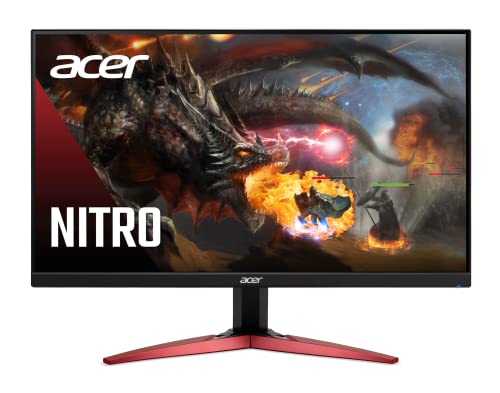
The Acer Nitro KG241Y Sbiip is a 23.8-inch gaming monitor built around a VA panel, which is the pick in this guide for anyone who values deep blacks and strong contrast. VA panels typically show darker scenes with more depth than IPS panels at this level, which suits moody single-player games and movie watching in a dim room. The Full HD resolution keeps the picture sharp at this size, and the ZeroFrame design keeps the bezels slim for a clean look on the desk.
Speed is the other half of the story here. The panel runs at up to 165Hz with a 1ms visual response time setting, and AMD FreeSync Premium support keeps frames synced with the graphics card for smooth, tear-free play. HDR support is listed as well, giving compatible games and video a wider range of brightness to work with. The monitor also includes several gaming display modes with different color profiles for genres such as action, racing, and sports, so the picture can be tuned without digging through deep menus.
Ports are generous for a budget panel: one DisplayPort and two HDMI inputs, with an HDMI cable included in the box. That makes it easy to keep a PC and a console connected at the same time. The stand tilts from minus five degrees to plus fifteen degrees, and the panel is VESA mounting compliant for arms and brackets.
View the Acer Nitro KG241Y Sbiip on Amazon
Listing Features
- 23.8-inch Full HD 1920 x 1080 VA panel
- Up to 165Hz refresh rate with 1ms visual response time setting
- AMD FreeSync Premium adaptive sync
- HDR-ready display with multiple gaming modes
- ZeroFrame slim-bezel design
- One DisplayPort and two HDMI inputs, HDMI cable included
- VESA mounting compliant with tilt adjustment
Considerations
- No built-in speakers are listed, so external speakers or headphones are needed for sound.
- VA panels can show some smearing in very fast dark-to-light transitions, which is a known trade-off of the panel type.
- The stand adjusts tilt only, so height and swivel adjustments need a separate monitor arm.
- The listed brightness and color settings are tuned for gaming first, so office users may want to adjust the picture for document work.
ASUS VA24EHE
The ASUS VA24EHE is the calm, work-first pick in this guide. Its 23.8-inch IPS panel delivers Full HD resolution with wide 178-degree viewing angles, so text and images look consistent from the side as well as head-on. That matters on a shared desk, in a dual-monitor setup, or anywhere the screen is viewed from more than one position during the day.
The panel runs at 75Hz with Adaptive-Sync support, which is a step up from a basic 60Hz office screen and keeps scrolling and window movement feeling smooth. The real focus here is comfort: the monitor carries flicker-free backlighting and a low blue light filter, both certified by TÜV Rheinland, which help reduce eye strain during long sessions. A frameless design on three sides keeps the footprint tidy and makes it a natural choice for side-by-side dual monitors.
Connectivity is broader than most budget office panels, with HDMI, DVI-D, and D-Sub VGA inputs, so the monitor works with older desktops and laptops as well as current machines. The stand tilts from minus five degrees to plus twenty-three degrees, the panel is VESA wall mountable, and ASUS backs the monitor with a three-year warranty.
View the ASUS VA24EHE on Amazon
Listing Features
- 23.8-inch Full HD 1920 x 1080 IPS panel with 178-degree viewing angles
- 75Hz refresh rate with Adaptive-Sync support
- Flicker-free technology and low blue light filter
- Frameless design on three sides for multi-display setups
- HDMI, DVI-D, and D-Sub VGA inputs
- VESA wall mountable with tilt adjustment
- Three-year manufacturer warranty
Considerations
- The 75Hz refresh rate suits office work and casual play but is not aimed at competitive gaming.
- The response time is slower than the gaming panels in this guide, so fast competitive titles are not its strength.
- No built-in speakers are listed, so audio needs headphones or external speakers.
- The included stand is tilt-only, with no height adjustment.
AOC 24B2XH

The AOC 24B2XH is a straightforward 23.8-inch IPS monitor for everyday home and office use. Its Full HD panel covers the basics well: sharp text, clear video, and consistent color from wide viewing angles thanks to the IPS panel. The three-sided frameless design and ultra-slim profile keep it looking neat on a desk, and the minimal bezels make it a good match for a dual-monitor arrangement.
The panel runs at 75Hz, which keeps everyday motion smooth for browsing, documents, and streaming. AOC includes its Low Blue Mode and flicker-free backlighting, both aimed at comfortable viewing during long sessions. Inputs are HDMI and VGA, covering modern laptops and desktops as well as older machines that still rely on VGA. A headphone output is included for private listening, and the monitor is VESA compatible for mounting on an arm or bracket.
This is the most understated monitor in the guide, and that is its appeal: there is little here to configure or go wrong, and the slim stand takes up minimal desk space. For a home office, a study desk, or a second screen added to an existing setup, it covers the essentials without fuss.
Listing Features
- 23.8-inch Full HD 1920 x 1080 IPS panel
- 75Hz refresh rate
- Three-sided frameless and ultra-slim design
- Low Blue Mode and flicker-free backlighting
- HDMI and VGA inputs
- Headphone output
- VESA compatible mounting
Considerations
- The 75Hz refresh rate is suited to everyday use rather than competitive gaming.
- Only HDMI and VGA inputs are provided, with no DisplayPort, so check the available outputs on the computer first.
- No built-in speakers are listed, so audio needs headphones or external speakers.
- The stand adjusts tilt only, with no height or swivel adjustment.
How to Choose
Start with the main job the monitor will do. For competitive gaming, refresh rate and response time matter most: a 165Hz panel with adaptive sync makes fast games feel smoother and more responsive than a 75Hz panel. For office work, study, and general use, panel type and eye comfort matter more: an IPS panel with wide viewing angles, flicker-free backlighting, and a low blue light mode is easier to live with for eight hours a day.
Panel type is the next decision. IPS panels provide wide viewing angles and consistent color, which suits shared desks, photo work, and dual-monitor setups. VA panels deliver deeper blacks and stronger contrast, which suits movie watching and atmospheric games in a dim room, though they can smear slightly in very fast motion.
Resolution and size go together. Full HD at 24 inches is a proven combination: text is crisp, interface elements are a comfortable size, and most graphics cards drive it easily. A larger panel at the same resolution would make individual pixels more visible, so staying near 24 inches keeps the picture sharp.
Ports deserve a check before buying. Count the outputs on the computer and any console that will connect. A monitor with both DisplayPort and HDMI covers a PC and a console at once, while a monitor with VGA or DVI-D is useful for older hardware. High refresh rates need the right connection too: DisplayPort is the reliable route to the full refresh rate on the gaming picks in this guide.
Finally, think about the stand. Most budget monitors adjust tilt only, with no height adjustment. That is fine if the desk and chair already put the screen at eye level, but anyone who shares a desk, or who wants the screen higher or lower, should budget for a monitor arm. All four picks in this guide support standard VESA mounting, so an arm is an easy upgrade later.
Fit and Installation
Measure the desk before the monitor arrives. A 24-inch class monitor with its stand needs roughly 21 inches of width and around 8 inches of depth, plus room for the keyboard in front. Leave a little space behind the screen for cables, and check that the desk is deep enough to keep the screen at a comfortable viewing distance, roughly an arm’s length away.
Assembly is simple on all four picks: the stand attaches with a few screws or a clip, and the panel sits on the desk in minutes. Keep the box and packing for a while after setup in case the monitor needs to be returned or moved.
Cabling is the next step. Use DisplayPort for a gaming PC to reach the full refresh rate, and HDMI for consoles and most laptops. Route cables behind the desk or through a cable tray so they do not pull on the ports. If the monitor will sit on an arm, check the VESA hole pattern and the weight limit of the arm before mounting, and tighten all bolts before letting go of the panel.
For a dual-monitor setup, matching the height and angle of the two screens matters more than matching the brand. A monitor arm makes alignment far easier than two tilt-only stands. Place the primary screen directly in front of the seating position and the secondary screen to the side, angled slightly inward.
Set the operating system display settings after connecting: confirm the resolution is set to Full HD and the refresh rate is set to the monitor’s maximum in the display settings. Many systems default to a lower refresh rate, so a 165Hz panel will not show its advantage until this is changed. Then adjust brightness to suit the room rather than leaving it at maximum, which is easier on the eyes and often looks better.
Frequently Asked Questions
Is Full HD enough on a 24-inch monitor?
Yes. At 24 inches, Full HD gives a pixel density where text is crisp and interface elements sit at a comfortable size. Higher resolutions suit larger panels, where Full HD pixels would become visible. For gaming, Full HD also keeps the workload on the graphics card modest, which helps a budget or mid-range PC hold smooth frame rates.
Is a 75Hz monitor enough for casual gaming?
Yes, for casual play. A 75Hz panel with adaptive sync handles single-player games, strategy titles, and relaxed multiplayer well, and it feels smoother than a standard 60Hz screen. Competitive players who play fast shooters benefit more from a 165Hz panel, where the extra refresh rate makes tracking fast movement easier.
What is the difference between IPS and VA panels?
IPS panels keep colors consistent across wide viewing angles, which suits shared desks and multi-monitor setups. VA panels produce deeper blacks and stronger contrast, which suits movies and atmospheric games in darker rooms. Neither is strictly better; the right choice depends on whether viewing angles or contrast matter more for the way the monitor will be used.
Do any of these monitors have built-in speakers?
The Sceptre E248B-FPT168 lists built-in speakers. The other three picks do not list built-in speakers, so they need headphones or external speakers for sound. For many desks, a separate set of speakers or a headset sounds better anyway, but anyone setting up a minimal desk should keep this in mind.
Conclusion
The best monitors at the affordable end of the market are no longer a compromise on the basics. All four picks in this guide deliver a sharp Full HD picture on a 24-inch class panel, with slim bezels and mounting support that suit a modern desk.
For gaming, the Sceptre E248B-FPT168 and the Acer Nitro KG241Y Sbiip stand out: both run at up to 165Hz with adaptive sync, with the Sceptre leaning on its IPS panel and built-in speakers and the Acer leaning on its VA contrast and extra HDMI input. For work and everyday use, the ASUS VA24EHE and the AOC 24B2XH are the calmer choices, with IPS color, eye-care features, and a simple setup that just works.
Match the monitor to the main job, check the ports on the computer before ordering, and set the refresh rate in the display settings after connecting.
As an Amazon Associate, we earn from qualifying purchases.
FAQ
Is Full HD enough on a 24-inch monitor?
Is a 75Hz monitor enough for casual gaming?
What is the difference between IPS and VA panels?
Do any of these monitors have built-in speakers?
More from Amazon
Programs that pair well with the guide above. Offers and eligibility are set by Amazon and may change.
Free shipping on eligible items, Prime Video and more. Eligible new members can start with a free trial.
Start a Prime free trialAd-free music streaming. Eligible new subscribers can start with a free trial.
Try Music Unlimited freeA Prime membership for ages 18-24 with a trial period. Eligibility is set by Amazon.
See Prime for Young AdultsAudiobooks and podcasts to listen to on the go. Eligible new members can start with a free trial.
Try Audible freeAs an Amazon Associate we earn from qualifying purchases.