Our Top Picks
Choosing a monitor resolution is really a matching problem: the pixel count has to suit your screen size, your graphics hardware, and the work or games you run every day. A sharper panel is wasted if your PC cannot drive it, while a low pixel count looks coarse on a large screen and makes long reading sessions harder than they need to be.


This guide is for gamers weighing frame rates against detail, home office users reading text all day, and creators who need room for timelines and toolbars. Each pick below was chosen from the names and specifications on its Amazon product page, and together the four monitors cover the 1080p, 1440p, and 4K classes so you can compare the main options directly.
Quick Picks
As an Amazon Associate we earn from qualifying purchases.
| Product | Best for | Key spec from title |
|---|---|---|
| LG 27GS50F-B UltraGear Gaming Monitor | Fast 1080p gaming on a 27-inch screen | FHD 1920 x 1080, 180Hz |
| LG 27GS75Q-B UltraGear Gaming Monitor | Balanced 1440p gaming with an adjustable stand | QHD 2560×1440, 180Hz |
| Samsung Odyssey G5 Series Gaming Monitor | Immersive curved 1440p play | WQHD 2560×1440, Curved, 144Hz |
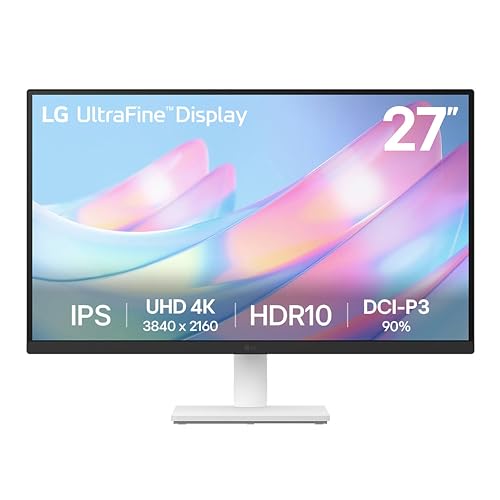
| LG 27US500-W UltraFine Monitor | 4K clarity for work and media | 4K UHD 3840×2160, HDR10, IPS |
How to Choose
Match Resolution to Screen Size
Resolution only feels sharp when the pixels are packed tightly enough for the panel in front of you. At 24 inches, 1080p still looks reasonably crisp for games and everyday browsing. Stretch that same pixel count across 27 inches and individual pixels become easier to spot, especially in text. Stepping up to 1440p at 27 inches restores fine detail, while 4K earns its keep at 27 inches and above, where menus, spreadsheets, and photo work benefit from the extra density. Start with the screen size you actually have room for, then pick the resolution class that keeps text edges clean at your normal viewing distance.
Weigh Frame Rates Against Pixel Count
Every extra pixel is extra work for your graphics card, so resolution and frame rate pull in opposite directions. A 1080p panel lets modest hardware chase the high refresh rates listed on fast gaming monitors, which suits competitive titles where motion clarity matters most. Moving to 1440p roughly doubles the pixel load, and 4K doubles it again, so the same PC will render fewer frames per second at each step. Check the refresh rate printed beside the resolution you are considering, and be honest about the games you play: a smooth 1440p picture usually beats a stuttering 4K one.
Check Panel Type and Extra Features
Two monitors can share a resolution yet behave very differently. IPS panels, like the ones in the LG picks below, hold their colors when you view the screen from an angle, which helps shared desks and creative work. Curved screens, such as the Samsung Odyssey G5 in this guide, wrap the edges of a wide image toward you for a more enclosed feel during play. HDR support, adaptive sync, and stand adjustment also vary by model, so read the feature list on the product page rather than assuming a resolution class guarantees any of them.
Confirm Ports, Cables, and Desk Fit
A new resolution only works if your connections support it. Higher resolutions and refresh rates generally call for DisplayPort or a recent HDMI connection, so confirm which ports the monitor offers and which cables your PC or console can supply. Check the stand footprint and whether height or pivot adjustment is included, because a 27-inch screen that sits too low will strain your neck long before its pixels disappoint you. VESA mounting matters if you plan to use an arm later. Finally, measure your desk depth, since larger panels need more viewing distance to stay comfortable.
The 4 Best Options
LG 27GS50F-B UltraGear Gaming Monitor
This 27-inch LG shows what the 1080p class still does well: a high 180Hz refresh rate paired with a resolution that most gaming PCs can drive without strain. It suits players who want smooth motion in fast titles and would rather spend on refresh speed than pixel density. The three-side virtually borderless design also makes it a tidy candidate for a two-screen desk, and AMD FreeSync support is listed for keeping motion smooth when frame rates vary during play.
Specs
- Screen size: 27 inches
- Resolution: FHD 1920 x 1080
- Refresh rate: 180Hz
- Response feature: 1ms MBR
- HDR: HDR10
- Adaptive sync: AMD FreeSync
- Ports: HDMI, DisplayPort
- Design: 3-side virtually borderless, black
Best for: Competitive players who want high refresh rates at 1080p on a 27-inch screen.
Watch out for: At 27 inches, 1080p text is visibly softer than 1440p, so check your viewing distance if you read documents all day.
ASIN: B0D1VW3JBM
LG 27GS75Q-B UltraGear Gaming Monitor
For many desks, this is the balanced pick in the guide: a 27-inch QHD panel that sharpens text and game detail over 1080p while keeping the pixel load far below 4K. The listing states an IPS panel with a 180Hz refresh rate that overclocks to 200Hz, plus NVIDIA G-SYNC compatibility and AMD FreeSync. Its tilt, height, and pivot stand also makes it easier to set a healthy screen position than fixed-stand models, which matters for anyone mixing long work sessions with evening gaming.
Specs
- Screen size: 27 inches
- Resolution: QHD 2560×1440
- Panel: IPS
- Refresh rate: 180Hz, overclockable to 200Hz
- Response time: 1ms
- HDR: HDR10
- Sync support: NVIDIA G-SYNC Compatible, AMD FreeSync
- Stand: Tilt, height, and pivot adjustable
- Ports: HDMI, DisplayPort
Best for: Gamers and hybrid workers who want one 1440p screen for both play and office tasks.
Watch out for: Confirm your graphics card and cable can deliver QHD at the refresh rate you plan to use before ordering.
ASIN: B0DFZZHK6X
Samsung Odyssey G5 Series Gaming Monitor
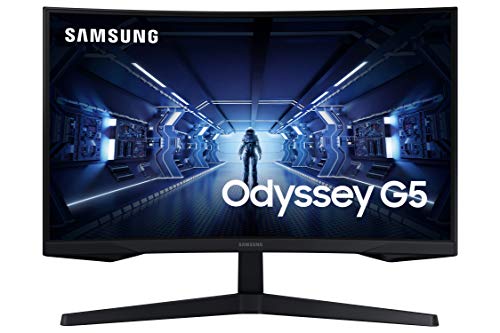
Samsung takes the same 1440p class in a different direction with a curved 27-inch panel, built for players who like the screen to wrap slightly around their field of view. The listing pairs WQHD resolution with a 144Hz refresh rate, a 1ms response figure, and FreeSync Premium, so it targets immersive single-player and racing titles rather than flat-desk productivity. If you have been curious about curved gaming screens but want to stay in the popular 27-inch QHD size, this is the representative option in this guide.
Specs
- Screen size: 27 inches
- Resolution: WQHD 2560×1440
- Refresh rate: 144Hz
- Response time: 1ms
- Shape: Curved screen
- Adaptive sync: FreeSync Premium
- Ports: HDMI, DisplayPort
- Model: LC27G55TQWNXZA
Best for: Players who want a curved 1440p screen for immersive gaming sessions.
Watch out for: A curved panel can distort straight lines near the edges, so think twice if precise layout or design work is your main use.
ASIN: B08FF3F5HR
LG 27US500-W UltraFine Monitor
The 4K representative here is aimed at clarity first: a 27-inch UltraFine panel with 3840×2160 resolution, an IPS screen, and HDR10 support, finished in white with a borderless design. That pixel density keeps small text and fine image detail clean, which suits photo work, document-heavy days, and media viewing. Reader Mode and Flicker Safe features are listed for long reading sessions. Gaming takes a back seat in this class, so treat this pick as the sharp, calm option for work-focused desks that occasionally play.
Specs
- Screen size: 27 inches
- Resolution: 4K UHD 3840×2160
- Panel: IPS
- Refresh rate: 60Hz
- Response time: 5ms
- HDR: HDR10
- Design: Borderless design, white
- Features: Reader Mode, Flicker Safe, Switch App
- Ports: HDMI, DisplayPort
Best for: Office users and creators who want the sharpest text and image detail at 27 inches.
Watch out for: Your operating system scaling settings will likely need adjustment, since 4K at 27 inches renders interface elements very small by default.
ASIN: B0D9R7Q449
Which One Fits Your Situation
You Play Fast Competitive Games
Frame rate should lead your decision, and that points to the 1080p LG 27GS50F-B. Its 180Hz refresh rate is the easiest in this guide for a mid-range gaming PC to feed, and the lower pixel count keeps demanding titles responsive. You give up some fine detail compared with the 1440p models, yet for shooters and esports-style play, smooth motion usually matters more than extra pixels on a 27-inch screen.
You Want One Screen for Work and Play
Choose the 1440p LG 27GS75Q-B, because it splits the difference in both directions. Text stays sharp enough for full workdays, games gain visible detail over 1080p, and the adjustable stand helps you set one comfortable position for both uses. It is the least compromising route in this guide, provided your graphics hardware is comfortable driving QHD resolution in the titles you play most often at home.
You Love Immersive Single-Player Worlds
The curved Samsung Odyssey G5 fits your setup best. Its 1440p panel wraps the scene slightly toward you, which suits racing games, flight titles, and story-driven adventures played in a dim room. You still get a 144Hz refresh rate and FreeSync Premium from the listing, so motion stays fluid while the curve adds the sense of enclosure that flat panels in this size class do not provide.
Your Days Are Mostly Documents and Photos
Go straight to the 4K LG 27US500-W. Spreadsheets, long documents, and photo libraries all benefit from the extra pixels, and the listed Reader Mode and Flicker Safe features support long sessions. Competitive gaming features matter less in this routine, so the trade is sensible: you exchange high refresh rates for the cleanest text and the most screen detail available among the four picks compared here.
Common Mistakes
- Buying 4K for a large screen without checking whether your graphics card can run your games or software smoothly at 3840×2160.
- Choosing 1080p at 32 inches or larger, then blaming the panel when text looks grainy at a normal desk distance.
- Ignoring the ports on both the monitor and your computer, and discovering the included cable cannot carry the resolution and refresh rate you wanted.
- Comparing resolution alone while skipping panel type, stand adjustment, and adaptive sync, which shape daily comfort just as much.
- Forgetting operating system scaling at 4K, leaving interface text tiny instead of adjusting display settings after setup.
Frequently Asked Questions
Is 1440p noticeably sharper than 1080p on a 27-inch monitor?
Yes, most people see the difference right away in text and fine game detail. A 27-inch 1440p panel packs considerably more pixels into the same space, so edges look cleaner and you gain usable room for windows side by side. The LG 27GS75Q-B and Samsung Odyssey G5 in this guide both sit in that class, while the 1080p LG trades that sharpness for easier high-refresh gaming.
Can my PC handle a 4K monitor for everyday work?
For documents, browsing, video, and photo viewing, almost any recent PC or laptop can output 4K to a monitor like the LG 27US500-W without trouble. Gaming is the demanding case, because rendering games at 3840×2160 takes far more graphics power than office tasks. Check that your machine has an HDMI or DisplayPort output that supports 4K, and expect to adjust scaling so text stays readable.
Which resolution is best for console gaming?
It depends on the console and the games you play. Many console titles target 1440p or 4K output, so a QHD screen like the LG 27GS75Q-B or a 4K screen like the LG 27US500-W both make sense. Check the monitor listing for the HDMI support your console needs, and remember that a curved 1440p model such as the Samsung Odyssey G5 can suit racing and adventure games especially well.
Does a higher resolution make a small monitor pointless?
Not pointless, but the gains shrink as screens get smaller. At 24 inches, 1080p already looks fairly dense, so moving to 1440p mainly helps text clarity and workspace room. The bigger jumps in this guide happen at 27 inches, where each class is easy to tell apart. Match the resolution to the size you are actually buying instead of chasing the highest number on the box.
FAQ
Is 1440p noticeably sharper than 1080p on a 27-inch monitor?
Can my PC handle a 4K monitor for everyday work?
Which resolution is best for console gaming?
Does a higher resolution make a small monitor pointless?
More from Amazon
Programs that pair well with the guide above. Offers and eligibility are set by Amazon and may change.
Free shipping on eligible items, Prime Video and more. Eligible new members can start with a free trial.
Start a Prime free trialAd-free music streaming. Eligible new subscribers can start with a free trial.
Try Music Unlimited freeA Prime membership for ages 18-24 with a trial period. Eligibility is set by Amazon.
See Prime for Young AdultsAudiobooks and podcasts to listen to on the go. Eligible new members can start with a free trial.
Try Audible freeAs an Amazon Associate we earn from qualifying purchases.