Our Short List of 3
All 4 Picks at a Glance
| Product | Specs | Action |
|---|---|---|
 1. Dell S3222DGM | Check price on Amazon | |
 2. Samsung Odyssey G7 LC32G75TQSNXZA | Check price on Amazon | |
 3. GIGABYTE M32U | Check price on Amazon | |
 4. Dell UltraSharp U3223QE | Check price on Amazon |
Key takeaways
- Looking for the best large monitors? Compare five 32-inch and 34-inch screens for gaming, work, and movies, with the size, resolution, and specs that matter.
A big screen changes how a desk feels. The best large monitors give you room to spread out a timeline, keep two documents side by side, or fill your field of view in a game without a second display. This guide covers five 32-inch and 34-inch monitors that earn their size, from fast curved gaming panels to a color-accurate 4K screen for work and a wide ultrawide for multitasking.
Large does not mean the same thing for everyone. A 32-inch 16:9 screen is a big step up from a 27-inch display, while a 34-inch ultrawide trades height for width. Before you pick one, think about your desk depth, your graphics card, and what you do most on the screen. The five picks below cover those angles, and each one is a distinct screen with its own strengths.
What to Look For
Screen size and shape. A 32-inch 16:9 monitor is the sweet spot for most desks: big enough to feel roomy, small enough to see the whole screen without turning your head. A 34-inch 21:9 ultrawide is wider and shorter, which suits side-by-side windows and cinematic games. Measure your desk depth first; a 32-inch screen wants roughly an arm’s length of viewing distance.
Resolution. At 32 inches, a 1440p panel can look soft if you sit close, while 4K stays crisp. A 34-inch ultrawide at 3440 x 1440 sits between the two. Match resolution to your graphics card as well, because 4K asks much more of a GPU than 1440p.
Refresh rate. A 60Hz panel is fine for office work and movies. Gamers should look for 144Hz or higher, which makes motion smoother and aiming feel more connected. A 100Hz ultrawide is a middle ground for mixed use.
Panel type. IPS panels give wide viewing angles and steady colors. VA panels give deeper blacks and stronger contrast, which suits dark rooms and movies. The panel type matters more than the brand name on the bezel.
Color coverage. If you edit photos or video, look for wide color coverage such as near-full sRGB or a wide DCI-P3 gamut. For gaming and general use, accurate-enough color out of the box is what matters, plus a mode that keeps skin tones natural.
Curve. A 1000R curve wraps the screen around your view and suits gaming and movies. An 1800R curve is gentler and works well for mixed use. Flat panels suit work where straight lines matter, such as spreadsheets and design.
Connectivity. HDMI 2.1 matters for consoles and high refresh 4K. DisplayPort is the standard link for a PC. A USB-C port with power delivery lets a laptop drive the monitor and charge from one cable, which keeps a desk tidy.
Ergonomics and mounting. A big monitor is heavy, so check height, tilt, swivel, and pivot adjustment. A VESA mount pattern lets you put the screen on an arm, which frees desk space and makes it easier to set the right eye level.
Top Picks
1. Dell S3222DGM
The Dell S3222DGM is a 31.5-inch curved gaming monitor that brings a big screen to a modest budget tier. Its VA panel runs at 2560 x 1440 with a 165Hz refresh rate and a 1ms MPRT response, and the 1800R curve pulls the edges of the image gently toward you. That curve suits racing games and open-world adventures, where a wide field of view adds to the sense of place. FreeSync Premium keeps frames smooth when the frame rate moves around, and the wide sRGB coverage keeps colors lively without looking artificial.
Contrast is the strength here. VA panels reach around 3000:1 static contrast, so dark scenes in games and movies hold detail instead of washing out to gray. The panel reaches 350 nits of brightness, which is enough for a bright room as long as the screen does not face a window directly. Two HDMI 2.0 ports and one DisplayPort 1.2 cover a PC and a console at the same time, and a headphone jack sits on the back for late sessions.
The stand adjusts for height and tilt, and the screen is VESA compatible if you want an arm later. At 1440p, this monitor is also a kind fit for mid-range graphics cards, since it does not demand the horsepower a 4K panel does. If your main goal is a large, curved gaming screen that stays easy on the eyes for long sessions, the S3222DGM is a solid place to start. Its one clear limit is resolution: sit very close and you may notice the pixel structure, so give it a little desk depth.
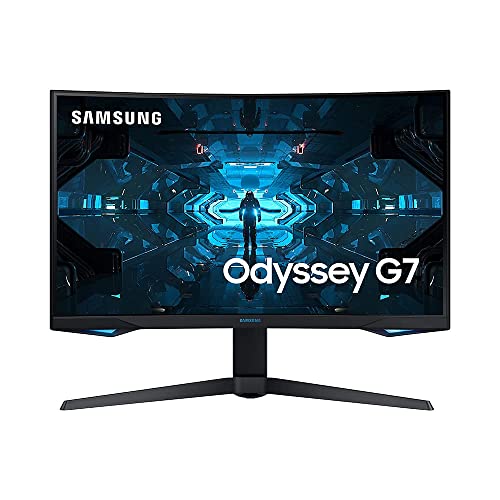
2. Samsung Odyssey G7 LC32G75TQSNXZA
The Samsung Odyssey G7 in its 32-inch form is one of the most aggressive gaming monitors in this size class. Its QLED VA panel curves at 1000R, which is a deep curve that wraps the screen around your view. The panel runs at 2560 x 1440 with a 240Hz refresh rate and a 1ms response time, and it supports both G-Sync Compatible and FreeSync Premium Pro modes. DisplayHDR 600 certification means bright highlights in HDR games stand out from the darker parts of the scene.
Speed is the point of this monitor. At 240Hz, motion stays clean in fast shooters, and the deep curve helps your eyes track the action at the edges of the screen. The QLED layer adds color volume, so bright reds and greens stay saturated even at high brightness. Connectivity covers HDMI and DisplayPort, plus a USB hub for a mouse, keyboard, or headset dongle.
The 1000R curve is not for everyone. It feels dramatic at first, and it suits a single-screen gaming setup better than a multi-monitor row, where the curve can fight the alignment of the next screen. The stand is sturdy and adjusts for height, tilt, and swivel. If you play fast competitive games and want the largest curved screen that still fits a normal desk, the G7 is built for exactly that. Check the stock status on the listing before you commit, because availability of this model has varied between sellers.
3. GIGABYTE M32U
The GIGABYTE M32U is the 4K pick in this roundup: a 32-inch SS IPS panel at 3840 x 2160 with a 144Hz refresh rate. That combination is hard to find at this size, and it makes the M32U a strong all-rounder. Text stays sharp, 4K video looks clean, and games run at high detail if your graphics card can keep up. The panel covers a wide DCI-P3 gamut and carries DisplayHDR 400, so HDR content gets a visible lift over a standard panel.
Connectivity is a highlight. HDMI 2.1 ports support 4K at high refresh from a console or a modern PC, DisplayPort 1.4 handles the PC link, and a USB-C port with KVM lets you share one keyboard and mouse between two computers. That KVM function is handy if you run a work laptop and a gaming PC on the same desk. The stand adjusts for height, tilt, swivel, and pivot, so you can turn the screen vertical for reading long documents or code.
The 1ms MPRT response keeps motion tidy, and FreeSync Premium Pro smooths variable frame rates. The one thing to plan for is graphics power: 4K at 144Hz asks a lot from a GPU, so pair this monitor with a strong card or be ready to turn down a few settings in demanding games. For a single large screen that handles work, movies, and gaming without compromise, the M32U is the most versatile pick here.
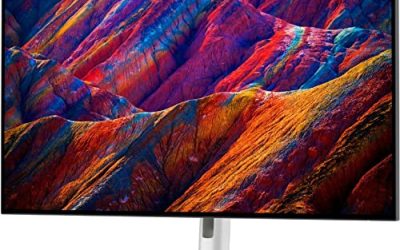
4. Dell UltraSharp U3223QE
The Dell UltraSharp U3223QE is the work-first pick in this roundup. It is a 31.5-inch 4K monitor built around an IPS Black panel, a panel type that keeps the wide viewing angles of IPS while reaching deeper blacks than a standard IPS screen. The resolution is 3840 x 2160, and the color coverage reaches full sRGB and Rec. 709, which suits photo editing, design work, and anyone who wants colors to look right without fiddling with settings.
The real draw is the built-in hub. A USB-C port delivers up to 90W of power to a laptop while carrying video, audio, and data over one cable. The monitor also has an RJ45 Ethernet port and several USB-A ports, so a laptop can dock to a full desk setup with a single connection. DisplayHDR 400 adds a modest HDR lift for video. The stand adjusts for height, tilt, swivel, and pivot, and the thin bezels suit a dual-screen arrangement if you add a second monitor later.
At 60Hz, this is not a gaming monitor, and fast games will feel less fluid than on the 144Hz and 240Hz picks here. That is a fair trade for a screen aimed at work: what you get is a sharp, color-accurate, well-connected 32-inch display that turns a laptop into a desktop with one cable. If your desk is mostly spreadsheets, documents, calls, and creative work, the U3223QE is the most practical large monitor in this guide.
5. Samsung ViewFinity S65UA
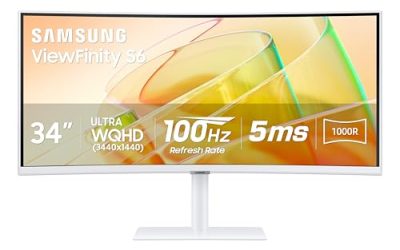
The Samsung ViewFinity S65UA is the ultrawide pick: a 34-inch 21:9 screen at 3440 x 1440 with a 1000R curve. The extra width replaces a second monitor for many people. You can keep a document open next to a browser, run a timeline beside a video window, or watch a movie in a wide frame that fills your view. The 100Hz refresh rate is smooth enough for casual gaming and video, and HDR10 support adds depth to movies.
One detail to know: Samsung’s own documentation describes this as a VA panel, while the Amazon listing has at times labeled it as IPS. The VA construction fits the stated 3000:1 to 4000:1 contrast range, which gives dark scenes more depth than a typical IPS screen. The panel covers a billion colors, and TUV-certified eye care features reduce flicker and blue light for long sessions.
Connectivity includes HDMI, DisplayPort, and a USB-C port with 90W power delivery, so a laptop can charge and drive the display from one cable. The height-adjustable stand makes it easy to set the screen at eye level, and the matte finish resists glare in a bright room. At 100Hz this is not a competitive gaming screen, but for multitasking, movies, and everyday work on one wide display, the S65UA is a strong fit.
Comparison at a Glance
| Monitor | Size | Resolution | Refresh Rate | Panel |
|---|---|---|---|---|
| Dell S3222DGM | 31.5-inch | 2560 x 1440 | 165Hz | VA, 1800R curved |
| Samsung Odyssey G7 | 32-inch | 2560 x 1440 | 240Hz | VA QLED, 1000R curved |
| GIGABYTE M32U | 32-inch | 3840 x 2160 | 144Hz | SS IPS, flat |
| Dell UltraSharp U3223QE | 31.5-inch | 3840 x 2160 | 60Hz | IPS Black, flat |
| Samsung ViewFinity S65UA | 34-inch | 3440 x 1440 | 100Hz | VA, 1000R curved |
FAQ
What size counts as a large monitor?
Most buyers call 32 inches and above large. A 27-inch screen is the common standard, so a 32-inch panel is a clear step up, and a 34-inch ultrawide is larger still. Desk depth matters as much as the number: sit about an arm’s length away so you can see the whole screen without moving your head.
Is 4K worth it on a 32-inch monitor?
Yes, if your graphics card can drive it. At 32 inches, 4K keeps text and fine detail crisp at normal viewing distances, while 1440p can look soft up close. If you mostly play fast games on a mid-range card, 1440p at a high refresh rate is the better balance.
Should I choose a curved or a flat large monitor?
A curve suits gaming and movies, where it pulls the edges of the image into your view and adds a sense of depth. A flat screen suits work with straight lines, such as spreadsheets, code, and design, and it lines up more neatly in a multi-monitor setup.
Do large monitors need a special mount?
Not always, since the included stands on these models adjust for height and tilt. A monitor arm helps if your desk is shallow or you want the screen at an exact eye level. Check the VESA pattern before you buy an arm; most 32-inch and 34-inch monitors use a 100 x 100 mm pattern.
Conclusion
The best large monitors are not just bigger versions of small screens; each one is built for a different kind of desk. The Dell S3222DGM is the friendly curved gaming pick, the Samsung Odyssey G7 is the fastest screen here, the GIGABYTE M32U is the most versatile 4K all-rounder, the Dell UltraSharp U3223QE is the work-first hub monitor, and the Samsung ViewFinity S65UA is the wide screen for multitasking. Pick the one that matches what you do most, measure your desk, and make sure your graphics card can drive the resolution you choose.
Disclosure: As an Amazon Associate, pcgamingsite.com earns from qualifying purchases.
FAQ
What size counts as a large monitor?
Is 4K worth it on a 32-inch monitor?
Should I choose a curved or a flat large monitor?
Do large monitors need a special mount?
More from Amazon
Programs that pair well with the guide above. Offers and eligibility are set by Amazon and may change.
Free shipping on eligible items, Prime Video and more. Eligible new members can start with a free trial.
Start a Prime free trialAd-free music streaming. Eligible new subscribers can start with a free trial.
Try Music Unlimited freeA Prime membership for ages 18-24 with a trial period. Eligibility is set by Amazon.
See Prime for Young AdultsAudiobooks and podcasts to listen to on the go. Eligible new members can start with a free trial.
Try Audible freeAs an Amazon Associate we earn from qualifying purchases.