Our Short List of 3
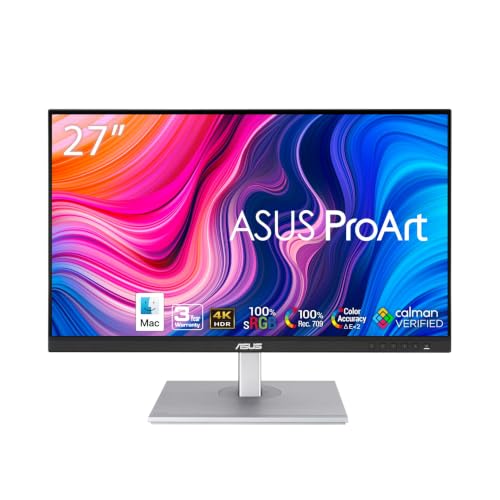
- Best for: colour-conscious desk work on a screen several people share and reposition.
- Screen size: 27 inches
- Resolution: 3840 x 2160 (4K UHD)
- Panel: IPS with 178-degree viewing angles
- Colour: 100% sRGB and 100% Rec. 709, Delta E < 2, Calman Verified

- Best for: fast Full HD play with a portrait companion screen in the same setup.
- Screen size: 27 inches
- Resolution: 1920 x 1080 (Full HD)
- Refresh rate: 200Hz
- Response time: 0.3ms MPRT as listed
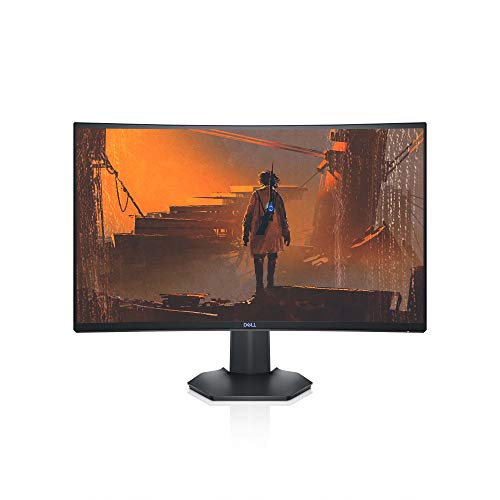
- Best for: curved 1080p gaming on a compact desk with a mid-range graphics card.
- Screen size: 27 inches
- Resolution: 1920 x 1080 (Full HD)
- Screen shape: 1500R curved with 3-sided ultrathin bezel
- Refresh rate: 144Hz
All 3 Picks at a Glance
| Product | Specs | Action |
|---|---|---|
| ASUS ProArt PA279CV |
| Check price on Amazon |
| AOC 27G4H |
| Check price on Amazon |
| Dell S2721HGF |
| Check price on Amazon |
Key takeaways
- Compare five monitors with height, tilt, swivel and pivot stands, from a 4K desk screen to a 300Hz gaming panel, with stand ranges from the listings.
A monitor that only tilts forces the rest of your desk to do the adjusting: books under the base, a hunched neck, a screen that sits too low for your chair. The real decision in this guide is how much movement the included stand gives you before you spend anything on an arm. Height travel matters most, because eye level changes with every chair and desk pairing, and pivot matters if you read documents or code in portrait.
This guide serves gamers who sit for long sessions, office workers sharing desks, and anyone replacing a fixed-stand screen. Every pick below earned its place because its own Amazon listing prints the stand movements in plain words: height, tilt, swivel or pivot, quoted exactly as the maker lists them. Panel size, resolution and refresh figures also come from those listings, so you can match the movement you need to the screen you want.
Quick Picks
As an Amazon Associate we earn from qualifying purchases
| Product | Best for | Key spec from title |
|---|---|---|
| ASUS ProArt PA279CV | Colour work at a shared desk | Tilt Pivot Swivel Height Adjustable |
| LG UltraGear 27GL83A-B | QHD gaming without an arm | Tilt/Height/Pivot Adjustable Stand |
| AOC 27G4H | Fast play plus a portrait screen | Height Adjustable stand |
| AOC CQ27G4ZH | Curved high-refresh immersion | Height Adjustable Stand |
| Dell S2721HGF | Curved 1080p gaming, simple stand | Height- and tilt-adjustability |
How to Choose
Height Travel Comes First
Height is the adjustment you will use every day, because the top of the screen should sit near eye level whatever chair you own. A stand that only tilts leaves you stacking books or buying a riser. Look for the words height adjustable in the listing title or feature list, as every pick here prints them. Generous travel also helps in households where two people of different heights share one desk, since each person can raise or lower the panel in seconds instead of compromising on a middle position neither of them finds comfortable.
Tilt and Swivel for Shared Desks
Tilt handles glare and viewing angle: a panel that leans back slightly suits a low desk, while forward tilt helps when the screen sits on a shelf above eye level. Swivel turns the whole screen left or right without moving the base, which matters on shared desks, in meeting corners, and when a second person pulls up a chair to look at the same chart. The ASUS ProArt below prints all three movements plus height, while the Dell gaming pick prints height and tilt only, so decide which motions your room actually demands before choosing.
Pivot for Portrait Work
Pivot rotates the panel ninety degrees into portrait orientation. Coders gain longer files on screen, writers see a full page at once, and a pivoted second monitor makes an excellent home for chat windows, playlists and reference documents during gaming sessions. Not every adjustable stand pivots: the LG UltraGear and both AOC models here print pivot or a full height, pivot, swivel and tilt set, while the curved Dell does not claim it. If portrait mode is part of your plan, treat pivot as a hard requirement rather than a bonus.
Check the Footprint and VESA Pattern
A moving stand needs room to move. Height-adjustable columns usually sit on wider, heavier bases, so measure your desk depth and leave space behind the panel for the tilt arc. Every pick here is VESA mountable as listed, which gives you an exit route: if the included stand still falls short, a 100 x 100 mm arm can take over later without replacing the monitor. Also check the listed ports before ordering, because a stand upgrade cannot fix a missing DisplayPort for high-refresh gaming or a missing USB-C input for a laptop desk.
The 5 Best Options
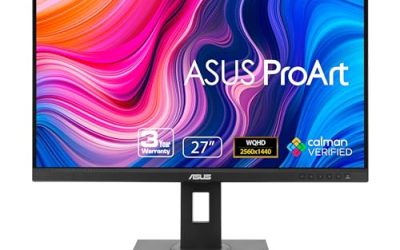
ASUS ProArt PA279CV
- Best for: colour-conscious desk work on a screen several people share and reposition.
- Screen size: 27 inches
- Resolution: 3840 x 2160 (4K UHD)
- Panel: IPS with 178-degree viewing angles
- Colour: 100% sRGB and 100% Rec. 709, Delta E < 2, Calman Verified
colour-conscious desk work on a screen several people share and reposition.
the 60Hz-class panel is built for work, so competitive players should look at the gaming picks below instead.
This is the pick for readers whose desk time is mostly documents, design work and video calls, with gaming as an evening extra. Its listing prints the full movement set in the title itself: tilt, pivot, swivel and height adjustable, wrapped around a 27-inch 4K IPS panel with a USB-C input that carries the picture and charges a laptop at 65W as listed. That combination suits a hot-desking household where the screen must swing toward whoever sits down, rise for a standing break, and turn portrait for a long contract or spreadsheet.
LG UltraGear 27GL83A-B
Gamers who want one screen to do everything usually land on a 27-inch QHD panel, and this UltraGear pairs that format with a stand its title describes as tilt, height and pivot adjustable. The listing prints a 144Hz refresh rate and 1ms response on an IPS panel, so the picture stays quick while the stand handles comfort. Portrait pivot makes it a strong second screen later if you upgrade, and the maker notes the base adjusts to change tilt, height and pivot so you can play in a more comfortable position.
Specs
- Screen size: 27 inches
- Resolution: 2560 x 1440 (QHD)
- Panel: IPS
- Refresh rate: 144Hz
- Response time: 1ms (GtG) as listed
- Adaptive sync: NVIDIA G-SYNC Compatible and AMD FreeSync
- Stand: tilt, height and pivot adjustable
- Mounting: VESA 100 x 100 mm, HDMI and DisplayPort inputs
Best for: QHD gaming at a desk where the screen also handles daytime work.
Watch out for: the listing does not print swivel, so plan to rotate the whole base when a second viewer pulls up a chair.
ASIN: B07YGZL8XF — View on Amazon
AOC 27G4H
- Best for: fast Full HD play with a portrait companion screen in the same setup.
- Screen size: 27 inches
- Resolution: 1920 x 1080 (Full HD)
- Refresh rate: 200Hz
- Response time: 0.3ms MPRT as listed
fast Full HD play with a portrait companion screen in the same setup.
Full HD on a 27-inch panel shows softer text than the QHD picks, so heavy spreadsheet work feels less crisp.
The 27G4H is the movement maximalist of this group: its listing states plainly that the included stand is height, pivot, swivel and tilt adjustable, the full set, on a 27-inch Full HD panel running at 200Hz. That makes it the natural choice for a two-screen battlestation where one display stays landscape for games and the other turns portrait for guides, chat and system readouts. The quick release stand in the listing also means swapping to a VESA arm later takes minutes rather than a full teardown of your setup.
AOC CQ27G4ZH
Curved panels wrap the picture around your field of view, and this AOC wraps a 27-inch QHD VA panel at a 1500R curve with a 300Hz refresh rate through DisplayPort. The title prints a height adjustable stand, which is the movement that matters most on a curved gaming screen because the sweet spot is narrow: raise or lower the panel until the curve centres on your eyes and the image stays even from edge to edge. Flicker-Free and low blue light technologies are listed for longer sessions in a dim room.
Specs
- Screen size: 27 inches
- Resolution: 2560 x 1440 (QHD)
- Panel: VA, 1500R curved
- Refresh rate: 300Hz via DisplayPort, 144Hz via HDMI
- Response time: 0.3ms MPRT as listed
- Eye care: Flicker-Free and low blue light technologies
- Ports: DisplayPort 1.4, 2x HDMI 2.0, earphone out
- Stand: height adjustable, VESA compatible
Best for: immersive single-player and racing games on a desk with one fixed seat.
Watch out for: HDMI tops out at 144Hz as listed, so connect a PC by DisplayPort to reach the full 300Hz.
ASIN: B0DPXWJW7L — View on Amazon
Dell S2721HGF
- Best for: curved 1080p gaming on a compact desk with a mid-range graphics card.
- Screen size: 27 inches
- Resolution: 1920 x 1080 (Full HD)
- Screen shape: 1500R curved with 3-sided ultrathin bezel
- Refresh rate: 144Hz
curved 1080p gaming on a compact desk with a mid-range graphics card.
there is no pivot in the listing, so this screen cannot turn portrait for documents or a vertical second display.
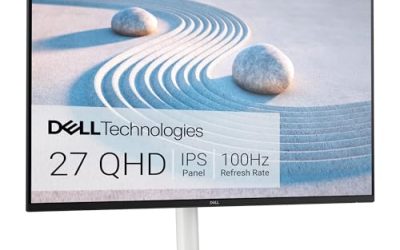
Dell’s curved gaming monitor keeps the stand story simple: the listing’s own words are that the height- and tilt-adjustability lets you game in comfort for extended periods, and its feature list prints Height Adjustment and Tilt Adjustment. Around that stand sits a 27-inch Full HD 1500R curved screen at 144Hz with a 1ms MPRT response, aimed at players who want immersion without a QHD graphics card. The tapered stand in the listing has a small footprint, which helps on narrow desks where a wide ergonomic base would crowd the keyboard.
Which One Fits Your Situation
You Game for Hours at One Desk
Comfort over a long session comes from height travel first, so the LG UltraGear and the AOC CQ27G4ZH both fit: each lifts its panel to your eye line and pairs that with a high refresh rate. Choose the LG for flat QHD clarity and pivot in reserve, or the AOC when a curved screen and the fastest listed refresh rate matter more than portrait mode.
You Split the Day Between Work and Play
A shared home desk needs a stand the whole household can live with. The ASUS ProArt prints all four movements and adds USB-C for a laptop, so it swings, rises and turns for whoever sits down next. The AOC 27G4H covers similar ground for players, with a full movement set and a quick release stand if an arm joins the setup later.
You Read, Code or Edit in Portrait
Pivot is non-negotiable here, and three picks print it: the ASUS ProArt, the LG UltraGear and the AOC 27G4H. The ASUS suits document-heavy creative work at 4K, the LG suits a gaming desk that doubles for study, and the AOC is the one to pick when the portrait screen is a second display beside a main gaming monitor.
Your Desk Is Shallow or Shared with Family
On a narrow desk, footprint and tilt matter more than exotic movement. The Dell S2721HGF lists a slim tapered stand and covers the two motions a small desk needs, height and tilt, while its curve keeps a single viewer centred. Measure the depth behind the panel before ordering any pick here, because a tilting screen needs clearance at the back edge.
Common Mistakes
- Buying on panel specs alone, then discovering the stand only tilts and the screen sits two inches too low for your chair.
- Assuming adjustable means all four movements; some listings print height and tilt only, so read the stand line before ordering.
- Forgetting the space behind the desk, where a tilting or pivoting panel needs clearance from the wall.
- Choosing a curved screen for a shared desk, where viewers off to the side see a distorted edge instead of the sweet spot.
- Skipping the VESA pattern check, which decides whether a monitor arm can rescue the setup if the included stand falls short.
Frequently Asked Questions
How much height adjustment do I actually need?
Enough to place the top of the screen at or just below eye level in your own chair. The listings here print height adjustable stands without a single shared travel figure, so check the model page for its range and compare it with the gap between your current screen height and your seated eye line before ordering.
Is pivot worth paying for on a gaming monitor?
Pivot earns its place when the screen doubles as a reading, coding or chat display, or when it will become a portrait second monitor after your next upgrade. The LG UltraGear and AOC 27G4H print pivot alongside high refresh rates, so you do not have to give up gaming speed to get the rotation.
Can I add a monitor arm later if the stand disappoints?
Yes, provided the panel is VESA mountable, and every pick in this guide lists VESA compatibility. Keep the listed pattern in mind, 100 x 100 mm on the LG, when shopping for an arm. An arm adds reach and frees desk space, but it cannot fix a panel whose size or resolution was wrong for the desk.
Does an adjustable stand help with neck and eye strain?
A stand that lifts and tilts the panel lets you line the screen up with your natural line of sight instead of bending toward a fixed screen, which is the main comfort gain these listings sell. Pair that position with regular breaks and sensible room lighting; the stand solves geometry, not every source of fatigue.
FAQ
How much height adjustment do I actually need?
Is pivot worth paying for on a gaming monitor?
Can I add a monitor arm later if the stand disappoints?
Does an adjustable stand help with neck and eye strain?
More from Amazon
Programs that pair well with the guide above. Offers and eligibility are set by Amazon and may change.
Free shipping on eligible items, Prime Video and more. Eligible new members can start with a free trial.
Start a Prime free trialAd-free music streaming. Eligible new subscribers can start with a free trial.
Try Music Unlimited freeA Prime membership for ages 18-24 with a trial period. Eligibility is set by Amazon.
See Prime for Young AdultsAudiobooks and podcasts to listen to on the go. Eligible new members can start with a free trial.
Try Audible freeAs an Amazon Associate we earn from qualifying purchases.