Our Short List of 3


All 3 Picks at a Glance
| Product | Specs | Action |
|---|---|---|
| 2. Samsung ViewFinity S9 27-Inch 5K — Best 5K Value for Mac and PC | Check price on Amazon | |
| 3. Dell UltraSharp 40 U4025QW 5K2K Curved — Best Ultrawide 5K Monitor | Check price on Amazon | |
| 4. Samsung Odyssey Neo G9 57-Inch Dual 4K — Best Ultra-High-Resolution Gaming Monitor | Check price on Amazon |
Our Top Picks
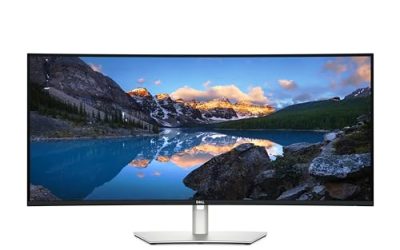
- Dell UltraSharp U4025QW 40" Class 5K2K WUHD Curved16.5" x 37.3" x 4.3"4.3 x 37.3 x 16.5 inches41.93 poundsCheck on Amazon
The best 5K and 8K monitors deliver a level of sharpness that a standard 4K screen simply cannot match. Text looks printed rather than rendered, photos reveal detail you did not know was there, and timelines in video editing software stretch out with room to spare. If you spend your days editing photos, cutting video, designing interfaces, or simply staring at dense spreadsheets, the jump to 5K or 8K resolution is one of the most noticeable upgrades you can make to a desk setup.
There is a catch, though. True 8K monitors are still rare, expensive, and demanding on graphics hardware. The market for ultra-high-resolution displays is small, and several once-famous 8K models have quietly disappeared from store shelves. That makes choosing carefully more important here than in almost any other monitor category. This guide explains what 5K and 8K actually mean in practice, how to pick the right panel for your work, and which models are genuinely available to buy right now.
What 5K and 8K Really Mean
Resolution labels can be confusing, so it helps to pin down the numbers. A 5K monitor typically packs 5120 by 2880 pixels, which is about 14.7 million pixels in total. That is roughly 77 percent more pixels than a 4K display. An 8K monitor, in the classic 16:9 sense, packs 7680 by 4320 pixels, or about 33.2 million pixels, which is four times the pixel count of 4K.
In practice, those extra pixels do two things. First, they make everything sharper. At 27 inches, a 5K panel reaches around 218 pixels per inch, which is the density where individual pixels effectively vanish at normal viewing distance. Text looks like print, and fine lines in CAD drawings or photo edits stay crisp when you zoom in. Second, they give you more usable workspace. A 5K screen can show a full 4K video preview at native resolution with room left over for editing tools, while an ultrawide 5K2K panel can replace a dual-monitor setup entirely.
The 8K side of the market is thinner. As of late 2026, there is essentially one true 16:9 8K professional monitor line widely discussed, and its Amazon availability is limited. The older Dell 8K model from 2017 has been discontinued. That is why this guide also covers a 7680-pixel-wide ultrawide display: it matches 8K horizontally and is the most practical way to get that many pixels on a desk today, even though its vertical resolution is lower than true 8K.
How to Choose a 5K or 8K Monitor
Match the Resolution to Your Work
For photo editing, graphic design, and general productivity, a 27-inch 5K display is the sweet spot. The pixel density is superb, the screen size fits a normal desk, and most modern laptops can drive it over a single cable. For video editing, a 40-inch 5K2K ultrawide is often more useful because the extra width holds long timelines. For gaming or immersive work, the 57-inch dual-4K ultrawide offers an unmatched field of view, but it demands a powerful graphics card.
Check Your Graphics Card and Ports
Driving millions of pixels takes bandwidth. A 5K display generally needs Thunderbolt, USB-C with DisplayPort Alt Mode, or DisplayPort 1.4. True 8K needs DisplayPort 2.1 or dual DisplayPort connections. Before buying, confirm that your computer can output the full resolution at 60Hz. Many laptops can drive 5K over Thunderbolt without trouble, but older machines may cap out at 4K, which would waste the panel you paid for.
Prioritize Color Accuracy for Creative Work
Resolution is only half the story for creators. Look for wide color gamut coverage, ideally 99 percent of DCI-P3, plus factory calibration and a low Delta E value. A monitor that shows accurate color out of the box saves hours of correction work and avoids unpleasant surprises when a project goes to print or to a client screen. HDR support is a bonus for video work, with higher peak brightness making highlights pop.
Consider Refresh Rate Honestly
Most 5K and 8K monitors run at 60Hz, which is fine for creative work and office use. A 120Hz or 240Hz panel is smoother and better for gaming, but it is rare in this resolution class and usually appears only on ultrawide gaming models. Do not pay extra for a high refresh rate if your work is mostly static content, and do not expect a 60Hz creative display to feel like a gaming monitor.
Think About the Desk
These are not small screens. A 27-inch 5K monitor fits almost anywhere, but a 40-inch ultrawide needs a deep desk, and a 57-inch curved display needs a very sturdy desk and a lot of clearance. Measure your space, check the weight and the stand footprint, and make sure your monitor arm, if you use one, is rated for the load.
Look at the Extras
Built-in webcams, speakers, USB hubs, and KVM switches can replace several desk accessories. A monitor that charges your laptop over the same cable that carries video turns a cluttered desk into a one-cable setup. These features matter more at this price level, where the monitor is often the centerpiece of a workspace.
Top Picks
1. Apple Studio Display 27-Inch 5K — Best Overall 5K Monitor
The Apple Studio Display remains the reference point for 27-inch 5K monitors. Its 5120 by 2880 Retina panel delivers 218 pixels per inch, 600 nits of brightness, support for one billion colors, and P3 wide color with True Tone. Text is razor sharp, photos look superb, and the factory calibration is excellent for color-critical work.
The 2026 version adds a 12MP Center Stage camera with Desk View, upgraded speakers, and Thunderbolt 5 ports, which future-proofs the connection for newer Macs. The standard glass version with the tilt-adjustable stand is the most sensible configuration for most buyers, and it connects to a Mac with a single Thunderbolt cable that also charges the laptop.
This display is built for the Apple ecosystem. It works best with a Mac, where scaling is handled beautifully and the camera and speaker features integrate with macOS. Windows users can drive the panel, but they lose some of the integration that makes it special. The 60Hz refresh rate is the main limitation, and it is a fair trade for the pixel density and color quality at this size. If you edit photos or design on a Mac and want the sharpest 27-inch screen available, this is the pick.
Check the Apple Studio Display on Amazon
2. Samsung ViewFinity S9 27-Inch 5K — Best 5K Value for Mac and PC
The Samsung ViewFinity S9 is the strongest alternative to the Apple Studio Display, offering the same 27-inch 5120 by 2880 matte 5K panel at a considerably lower cost. It covers 99 percent of the DCI-P3 color gamut, includes a 4K SlimFit camera, and connects over Thunderbolt 4, DisplayPort, or USB-C.
Where the ViewFinity S9 stands apart is versatility. It works equally well with Mac and Windows, includes Smart TV apps and AirPlay for use as a standalone display, and has a matte finish that handles bright rooms better than glossy glass. The slim metal design looks at home next to premium laptops, and the built-in Gaming Hub adds casual entertainment value.
The S9 is a 60Hz panel aimed at creators and professionals rather than competitive gamers. Its color accuracy and sharpness are excellent for photo editing, coding, and office work, and the matte screen is easier on the eyes during long sessions under office lighting. For buyers who want 5K sharpness without committing to the Apple ecosystem or the Apple price, this is the most sensible choice.
Check the Samsung ViewFinity S9 on Amazon
3. Dell UltraSharp 40 U4025QW 5K2K Curved — Best Ultrawide 5K Monitor
The Dell UltraSharp U4025QW takes a different approach to high resolution. Its 40-inch curved panel runs at 5120 by 2160, which is 5K resolution stretched across a 21:9 ultrawide aspect ratio. The result is a single screen that can comfortably replace two monitors side by side, with a 120Hz refresh rate that keeps motion smooth.
The IPS Black panel delivers deeper blacks and better contrast than a standard IPS display, with 600 nits of brightness and wide color coverage for creative work. Thunderbolt 4 connectivity with generous power delivery turns it into a docking station: one cable connects a laptop, charges it, and links peripherals through the built-in hub. The 2.5GbE Ethernet port, KVM switch, and picture-by-picture modes make it easy to run two computers on one screen.
This is the pick for video editors, developers, financial analysts, and anyone who lives in timelines and spreadsheets. The curve is gentle enough to keep the edges readable, and the 120Hz refresh rate is a genuine advantage over 60Hz creative displays. The trade-off is desk space: at 40 inches wide, it needs a large, deep desk and a strong mount or its included stand.
Check the Dell UltraSharp U4025QW on Amazon
4. Samsung Odyssey Neo G9 57-Inch Dual 4K — Best Ultra-High-Resolution Gaming Monitor
The Samsung Odyssey Neo G9 G95NC is the most extreme display in this guide. Its 57-inch curved panel spans 7680 by 2160 pixels, which is the horizontal pixel count of 8K spread across a 32:9 aspect ratio. In effect, it is two 4K monitors fused into a single seamless screen, with a 1000R curve that wraps the image around your field of view.
The specifications are uncompromising: a 240Hz refresh rate, 1ms response time, Quantum Mini LED backlight with 2,392 local dimming zones, DisplayHDR 1000 certification, and DisplayPort 2.1 input. AMD FreeSync Premium Pro keeps fast games tear-free, and the sheer width of the display is transformative for simulation games, multitasking, and video timelines.
There are real demands attached to this monitor. Driving 16.6 million pixels at high frame rates requires a top-tier graphics card with DisplayPort 2.1, and the display is over 52 inches wide, so it dominates any desk. It is also a VA panel, so viewing angles and color accuracy are not quite at the level of the IPS creative displays above. For gamers and power users who want the widest, highest-resolution gaming canvas available, nothing else comes close.
Check the Samsung Odyssey Neo G9 on Amazon
Comparison Table
| Monitor | Resolution | Size | Panel | Refresh Rate | Best For |
|---|---|---|---|---|---|
| Apple Studio Display | 5120 x 2880 (5K) | 27-inch | IPS | 60Hz | Mac creators, photo editing |
| Samsung ViewFinity S9 | 5120 x 2880 (5K) | 27-inch | IPS | 60Hz | 5K value, Mac and PC |
| Dell UltraSharp U4025QW | 5120 x 2160 (5K2K) | 40-inch curved | IPS Black | 120Hz | Ultrawide productivity, video editing |
| Samsung Odyssey Neo G9 | 7680 x 2160 (Dual 4K) | 57-inch curved | VA Mini LED | 240Hz | Immersive gaming, multitasking |
Frequently Asked Questions
Is a 5K monitor worth it over a 4K monitor?
For most creative and productivity work, yes. A 5K panel shows noticeably sharper text and finer detail than a 4K panel of the same size, and the extra pixels give editing software more room for tools around a full-resolution preview. The difference is most obvious at 27 inches, where 5K reaches the pixel density of a printed page. For casual browsing and video streaming, the improvement is subtler, and a good 4K monitor may be enough.
Can I buy a true 8K 16:9 monitor today?
Barely. The true 8K monitor market is extremely thin. The pioneering Dell 8K model from 2017 has been discontinued, and the newer professional 8K displays are specialty products with limited retail availability. The Samsung Odyssey Neo G9 in this guide matches 8K horizontally with 7680 pixels across, but its vertical resolution is 2160, so it is not a true 8K 16:9 panel. If you need genuine 7680 by 4320 resolution, expect a professional-grade purchase through specialist channels rather than a mainstream listing.
What graphics card do I need for 5K or 8K?
For 5K at 60Hz, most modern laptops and desktops with Thunderbolt, USB-C DisplayPort Alt Mode, or DisplayPort 1.4 can drive the display for desktop and creative work. Gaming at 5K needs a strong discrete graphics card. For the 7680 by 2160 ultrawide at high refresh rates, you need a high-end card with DisplayPort 2.1 to reach the full resolution and refresh rate. Always check your specific graphics card and port specifications before buying.
Do 5K monitors work with Windows PCs?
Yes. The Samsung ViewFinity S9 and Dell UltraSharp U4025QW work well with Windows, and Windows scaling handles 5K resolution competently. The Apple Studio Display also works with Windows over Thunderbolt or DisplayPort, but some features, such as the Center Stage camera controls and firmware updates, are designed around macOS. If you use Windows exclusively, a non-Apple 5K display is the better fit.
Is 60Hz enough for a 5K monitor?
For photo editing, writing, coding, design, and office work, 60Hz is perfectly fine. The vast majority of 5K creative displays run at 60Hz because their priority is pixel density and color accuracy, not motion smoothness. If you also game on the same display, look at the 120Hz Dell ultrawide or the 240Hz Samsung Neo G9 instead, and accept the trade-offs in size and panel type that come with them.
Conclusion
The best 5K and 8K monitors are specialist tools, and the right one depends entirely on what you do at your desk. For Mac-based creators who want the sharpest 27-inch screen, the Apple Studio Display sets the standard. The Samsung ViewFinity S9 delivers the same 5K sharpness with broader compatibility and better value. The Dell UltraSharp U4025QW is the productivity champion, replacing a dual-monitor setup with a single curved 5K2K panel. And the Samsung Odyssey Neo G9 is the only way to get 7680 pixels of width in a gaming display you can actually buy.
Whichever you choose, confirm your computer can drive the full resolution over a single cable before ordering, measure your desk, and remember that resolution is only one part of image quality. Color accuracy, brightness, and panel quality matter just as much once the pixels are on the screen. Pick the display that matches your work, and the extra sharpness will pay for itself every day.
Disclosure: As an Amazon Associate, we earn from qualifying purchases.
FAQ
Is a 5K monitor worth it over a 4K monitor?
Can I buy a true 8K 16:9 monitor today?
What graphics card do I need for 5K or 8K?
Do 5K monitors work with Windows PCs?
Is 60Hz enough for a 5K monitor?
More from Amazon
Programs that pair well with the guide above. Offers and eligibility are set by Amazon and may change.
Free shipping on eligible items, Prime Video and more. Eligible new members can start with a free trial.
Start a Prime free trialAd-free music streaming. Eligible new subscribers can start with a free trial.
Try Music Unlimited freeA Prime membership for ages 18-24 with a trial period. Eligibility is set by Amazon.
See Prime for Young AdultsAudiobooks and podcasts to listen to on the go. Eligible new members can start with a free trial.
Try Audible freeAs an Amazon Associate we earn from qualifying purchases.