Key takeaways
- Latency and Polling Rate: Wired keyboards run natively at 1000Hz (1ms). Top 2.4GHz wireless models like the Redragon S101M-KS and Redragon S107KS now match that 1000Hz rate, with real-world added latency of only 1-3ms — undetectable for most players outside pro-level esports.
- Battery and Charging: Wired is always powered. Wireless needs charging every 1 to 3 weeks depending on use; the TECKNET Wireless Gaming Keyboard and Redragon K521KS both pack a 4000mAh battery for 35+ hours with backlighting and fast USB-C recharging in 3 to 4 hours.
- Connectivity and Compatibility: Wired is plug-and-play via USB. Wireless tri-mode adds flexibility — use 2.4GHz for low-latency gaming, Bluetooth for tablets, phones, or laptops, and USB-C wired to keep playing while charging.
- Desk Setup and Portability: Wireless eliminates cable drag and makes 60% layouts like the Redragon 60% Wireless Combo truly portable for LANs and small desks. Wired requires cable routing but avoids dongle management.
- Price to Performance: At the same feature level, wireless costs $15 to $30 more. Budget-friendly wireless combos like the CHONCHOW RGB Combo keep the gap small, while premium tri-mode mechanical-feel boards command a premium.
- Reliability: Wired has no risk of wireless interference, dropouts, or dead batteries mid-match. Modern 2.4GHz is very stable, but crowded Wi-Fi environments and low battery can still cause occasional hiccups.
Choosing between wireless and wired for gaming in 2026 is no longer about whether wireless is good enough — it is. Modern 2.4GHz wireless and tri-mode keyboards now offer true 1000Hz polling and sub-2ms input latency, matching wired performance in blind tests. The real difference comes down to convenience, maintenance, and price.
Wireless gives you a cleaner setup, portability between devices, and freedom from cable drag, while wired still wins for absolute reliability, lower cost, and zero charging. In this comparison we break down latency, battery life, and real-world gaming feel using current 2026 standouts like the Redragon S107KS, Redragon K521KS, TECKNET Wireless Gaming Keyboard, and CHONCHOW Wireless Gaming Keyboard and Mouse Combo to show where each type actually makes sense.
Our top picks
 CHONCHOW USB Wireless Gaming Keyboard and Mouse
- 2.4Ghz Wireless Connection----Both the LED wireless gaming mouse…
- Rainbow LED Backlit Keyboard----The rainbow LED gaming keyboard…
- Rechargeable & Long Battery Life----The gaming keyboard is…
 Redragon S101M-KS Gaming Keyboard and Mouse Wireless
- 【Wireless Gaming Keyboard and Mouse Combo】Get rid of…
- 【RGB Gaming Keyboard and Mouse】Turely RGB Backlight with…
- 【4800 DPI Adjustable Gaming Mouse】There are 5 DPI…
 Redragon S107KS Wireless Gaming Keyboard and Mouse
- 【Tri-Mode Wireless Gaming Keyboard and Mouse】The S107KS supports…
- 【DPI Adjustable Gaming Mouse】This wireless gaming mouse supports…
- 【Professional Customised Software Support】S107KS gaming keyboard and mouse…
| Product | Key specs | |
|---|---|---|
| CHONCHOW USB Wireless Gaming Keyboard and Mouse | 2.4Ghz Wireless Connection----Both the LED wireless gaming mouse… Rainbow LED Backlit Keyboard----The rainbow LED gaming keyboard… Rechargeable & Long Battery Life----The gaming keyboard is… | Check price |
| Redragon S101M-KS Gaming Keyboard and Mouse Wireless | 【Wireless Gaming Keyboard and Mouse Combo】Get rid of… 【RGB Gaming Keyboard and Mouse】Turely RGB Backlight with… 【4800 DPI Adjustable Gaming Mouse】There are 5 DPI… | Check price |
| Redragon S107KS Wireless Gaming Keyboard and Mouse | 【Tri-Mode Wireless Gaming Keyboard and Mouse】The S107KS supports… 【DPI Adjustable Gaming Mouse】This wireless gaming mouse supports… 【Professional Customised Software Support】S107KS gaming keyboard and mouse… | Check price |
 Redragon Wireless Gaming Keyboard and Mouse Combo Redragon Wireless Gaming Keyboard and Mouse Combo | 【Tri-Mode Connection & Wide Compatibility】Support Bluetooth 5.0, 2.4G… 【Long-Lasting Rechargeable Battery & Power Saving】Built-in 4000mAh keyboard… 【16.8M RGB Lighting 】Boast 16.8 million RGB colors,… | Check price |
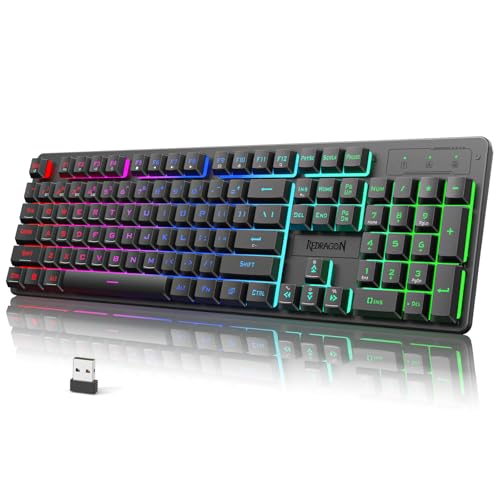 Redragon K521KS Wireless Gaming Keyboard Redragon K521KS Wireless Gaming Keyboard | 【Tri-Mode Connection & 4000 mAh Battery】The K521KS red… 【Fully Programmable Software】The programmable software can edit the… 【RGB Backlit Gaming Keyboard】The K521KS PC Gaming Keyboard… | Check price |
 TECKNET Wireless Gaming Keyboard TECKNET Wireless Gaming Keyboard | 【Switch Between Wired & 2.4G Wireless】Simply plug the… 【4000mAh Rechargeable Battery for Extended Play】Equipped with a… 【15-Zone Rainbow Backlit Keyboard】With 11 backlight modes and… | Check price |
 Redragon K526 PRO Wireless RGB Membrane Gaming Redragon K526 PRO Wireless RGB Membrane Gaming | Check price | |
 TECKNET Wired Gaming Keyboard TECKNET Wired Gaming Keyboard | 【Ergonomic Design, Enhanced Typing Experience】Improve your typing experience… 【15-Zone Rainbow Backlit Keyboard】Customize your PC gaming keyboard… 【Whisper Quiet Design】Experience near-silent operation with our whisper-quiet… | Check price |
As an Amazon Associate we earn from qualifying purchases at no extra cost to you.
⚡ Save on Your Next PC — Amazon Prime
Prime members get fast free shipping on the systems above, plus early access to Prime Day & Black Friday PC deals. New members get a 30-day free trial.
Watch: Wireless vs Wired Keyboard for Gaming — Video Review
Quick Verdict
If you want a clean, flexible setup for gaming, work, and living-room play, go wireless. Tri-mode models like the Redragon S107KS and Redragon K521KS let you switch between 2.4GHz, Bluetooth, and wired USB-C without repairing, and 4000mAh batteries now deliver 30 to 40 hours with RGB on or up to 200+ hours with lighting off. If you want the lowest price, zero maintenance, and guaranteed tournament-stable performance, a dedicated wired or wired-first combo is still the smarter buy — you will never think about battery, dongles, or interference.
Key Differences
- Latency and Polling Rate: Wired keyboards run natively at 1000Hz (1ms). Top 2.4GHz wireless models like the Redragon S101M-KS and Redragon S107KS now match that 1000Hz rate, with real-world added latency of only 1-3ms — undetectable for most players outside pro-level esports.
- Battery and Charging: Wired is always powered. Wireless needs charging every 1 to 3 weeks depending on use; the TECKNET Wireless Gaming Keyboard and Redragon K521KS both pack a 4000mAh battery for 35+ hours with backlighting and fast USB-C recharging in 3 to 4 hours.
- Connectivity and Compatibility: Wired is plug-and-play via USB. Wireless tri-mode adds flexibility — use 2.4GHz for low-latency gaming, Bluetooth for tablets, phones, or laptops, and USB-C wired to keep playing while charging.
- Desk Setup and Portability: Wireless eliminates cable drag and makes 60% layouts like the Redragon 60% Wireless Combo truly portable for LANs and small desks. Wired requires cable routing but avoids dongle management.
- Price to Performance: At the same feature level, wireless costs $15 to $30 more. Budget-friendly wireless combos like the CHONCHOW RGB Combo keep the gap small, while premium tri-mode mechanical-feel boards command a premium.
- Reliability: Wired has no risk of wireless interference, dropouts, or dead batteries mid-match. Modern 2.4GHz is very stable, but crowded Wi-Fi environments and low battery can still cause occasional hiccups.
Wireless Gaming Keyboards: Cable-Free and Versatile
Wireless gaming keyboards in 2026 are built for flexibility without sacrificing speed. The best examples use tri-mode connectivity so you are never stuck. The Redragon S107KS offers wired, 2.4GHz, and Bluetooth with an ultra-lightweight 65g mouse up to 10,000 DPI and a 25-key anti-ghosting keyboard, while the Redragon S101M-KS provides reliable 2.4GHz wireless with RGB and 4800 DPI mouse precision for entry-level setups. The Redragon K521KS goes further with a massive 4000mAh battery, dedicated multimedia keys, and mechanical-feel switches that hold up for long sessions.
The trade-off is maintenance. You will need to charge every couple of weeks, keep track of a small USB dongle, and occasionally manage Bluetooth pairing. For most gamers this is minor — the TECKNET Wireless Gaming Keyboard and CHONCHOW Wireless Combo both charge via USB-C and can be used while plugged in, so a dead battery does not mean downtime. If you value a minimal desk, multi-device use, or gaming from the couch, wireless is the more convenient daily driver.
Wired Gaming Keyboards: Maximum Reliability for Less
Wired gaming keyboards remain the benchmark for consistency. There is no latency variance, no battery anxiety, and no interference from routers, headsets, or neighboring dongles. You plug in via USB and get stable 1000Hz polling every time, which is why many competitive players and tournament organizers still prefer wired for ranked and LAN play.
Wired also stretches your budget further. Many wireless combos like the CHONCHOW, Redragon S107KS, and Redragon 60% Wireless Combo include a wired mode precisely for this reason — you get wired-grade stability when you need it and can switch to wireless when you want freedom. If your PC stays in one place, you play fast-paced shooters or MOBAs where every millisecond matters, or you simply do not want to think about charging, a wired or hybrid board used in wired mode is the most dependable choice.
Which Should You Buy?
- Choose the Redragon S107KS or Redragon K521KS wireless if you want tri-mode versatility, long battery life, and a full gaming combo that moves easily between PC, laptop, and tablet.
- Choose the TECKNET Wireless Gaming Keyboard if you want maximum battery life and quiet, comfortable typing with gaming-ready responsiveness and simple USB-C charging.
- Choose the CHONCHOW Wireless Gaming Keyboard and Mouse Combo if you want affordable wireless freedom with RGB and 2.4GHz stability without spending for premium features.
- Choose the Redragon 60% Wireless Combo if you have a small desk or travel to LANs and want a compact, portable layout that still performs in 2.4GHz mode.
- Stick with wired mode if you play competitively, stream for hours daily, or want the lowest cost and zero maintenance — even most wireless boards are best used wired during long ranked sessions.
Frequently Asked Questions
Is wireless latency noticeable in 2026?
For 99 percent of players, no. Good 2.4GHz wireless now polls at 1000Hz with total system latency within 2 to 4ms of wired. Only pro esports players on 240Hz+ monitors playing at the highest level might consistently feel a difference, and even then many pros now use wireless.
How often do I need to charge a wireless gaming keyboard?
It depends on backlighting. With RGB at full brightness, expect 30 to 45 hours on a 4000mAh board like the Redragon K521KS or TECKNET. With lighting off or at 30 percent brightness, that jumps to 120 to 250 hours. Most users charge once every 2 to 4 weeks with average daily gaming of 3 to 5 hours.
Are wireless keyboards less reliable for competitive gaming?
Wired is still technically more reliable because it cannot suffer interference or battery failure. In practice, modern 2.4GHz is extremely stable within 10 meters with clear line of sight. For tournaments or long competitive sessions, use the included USB-C wired mode as a backup.
Can I use a wireless keyboard as a wired keyboard?
Yes. All the tri-mode models compared here — the Redragon S107KS, Redragon K521KS, and Redragon 60% Wireless Combo — and most 2.4GHz combos like the CHONCHOW and TECKNET, support USB-C wired operation. Plugging in charges the battery and switches to zero-latency wired input automatically.
Final Verdict
In 2026, wireless has closed the performance gap and is the better all-around pick for most gamers thanks to tri-mode flexibility, long-lasting 4000mAh batteries, and true 1000Hz wireless performance. Models like the Redragon S107KS and Redragon K521KS give you wireless freedom when you want it and wired reliability when you need it. If you prioritize absolute consistency, lowest price, or never charging, go wired or simply run your wireless board in wired mode for competitive play. Either way, you no longer have to sacrifice responsiveness for convenience.