Key takeaways
- Ecosystem and OS: Pick macOS if you live in Apple’s ecosystem and use iPhone continuity features, or Windows 11 if you need broader game compatibility and legacy x86 software.
- Performance Tier: An HX-class Intel chip suits heavy multitasking and gaming, Apple’s M2 Pro handles creative workloads, while a base M4 or Ryzen 3500U is plenty for everyday office tasks.
- Memory and Storage: 16GB of unified memory or RAM is the realistic minimum for smooth performance; consider 32GB if you run VMs, edit video, or want serious headroom for future-proofing.
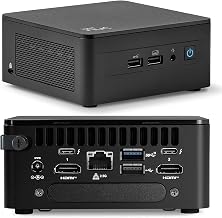
- Port Selection: Count your display and peripheral needs. Multiple HDMI or DisplayPort outputs enable triple 4K setups, while a Gigabit Ethernet port matters more than WiFi 6 for stable large file transfers.
- Renewed vs New: A renewed Mac mini can save money but may carry shorter warranties and older silicon. If you need the latest instruction set or AI processing, buy new, otherwise the renewed route offers strong value.
What's inside
Choosing between a Mac mini and a Windows mini PC has never been more complicated. Apple’s transition to its own silicon completely reshaped the compact desktop market, delivering desktop-class performance in a footprint smaller than a sandwich. But Windows manufacturers have fired back with high-performance mini PCs featuring Intel’s latest mobile processors and AMD’s budget-friendly APUs, giving buyers a wide spread of options for gaming, productivity, and everything in between.
As an Amazon Associate we earn from qualifying purchases.


This guide breaks down the best Mac mini models and Windows mini PCs currently available, comparing them across performance, value, connectivity, and ecosystem lock-in. Whether you need a silent home office machine, a 4K media driver, or a compact workstation that handles real gaming workloads, these picks cover the spectrum.
🛒 Best Price Today on Amazon
Prime members get fast, free shipping on everything above, plus member-only deals. New members get a 30-day free trial — cancel anytime.
Watch: Mini Mac Vs Pc: Full Comparison — Video Review
How to Choose a Mini Mac Vs Pc
- Ecosystem and OS: Pick macOS if you live in Apple’s ecosystem and use iPhone continuity features, or Windows 11 if you need broader game compatibility and legacy x86 software.
- Performance Tier: An HX-class Intel chip suits heavy multitasking and gaming, Apple’s M2 Pro handles creative workloads, while a base M4 or Ryzen 3500U is plenty for everyday office tasks.
- Memory and Storage: 16GB of unified memory or RAM is the realistic minimum for smooth performance; consider 32GB if you run VMs, edit video, or want serious headroom for future-proofing.
- Port Selection: Count your display and peripheral needs. Multiple HDMI or DisplayPort outputs enable triple 4K setups, while a Gigabit Ethernet port matters more than WiFi 6 for stable large file transfers.
- Renewed vs New: A renewed Mac mini can save money but may carry shorter warranties and older silicon. If you need the latest instruction set or AI processing, buy new, otherwise the renewed route offers strong value.
The Best Mini Mac Vs Pcs Reviewed
Apple 2024 Mac mini M4
Apple’s newest compact desktop brings the M4 chip with a 10-core CPU and 10-core GPU, plus 16GB of unified memory as the new baseline. It is the most efficient and responsive mini Mac yet, ideal for creative professionals and anyone who wants top-tier macOS performance under $700.
Apple 2023 Mac mini M2 Pro
The M2 Pro variant steps up to 16 GPU cores and 512GB of storage, making it the pick for serious video editors, developers, and 3D artists. It outclasses similarly sized Windows machines in sustained workloads and remains whisper-quiet under full load.
ACEMAGIC M5 Mini PC
This Windows 11 Pro machine runs an Intel Core 14500HX at 55W, hitting 4.9GHz on its performance cores. With 32GB of RAM, 1TB of storage, and triple 4K display support, it is the best mini PC here for raw multitasking throughput and the closest Windows alternative to a Mac in raw compute power.
Apple 2024 Mac mini M4 (Renewed)
For buyers who want the M4’s architecture without paying full retail, this renewed silver model delivers near-new performance at a reduced price. It is a smart entry point into Apple silicon if you can accept a shorter return window and potential cosmetic wear.
Getorli Mini PC Ryzen 5 3500U
At the budget end, the Getorli packs a Ryzen 5 3500U with 16GB of DDR4 RAM and a 512GB NVMe SSD, offering solid everyday productivity and light 4K streaming capability. It will not run modern AAA titles at high settings, but for a compact, affordable home office PC it gets the job done.
Frequently Asked Questions
Can a Mac mini be used for gaming?
Apple’s M-series chips have capable GPUs, but macOS game library remains limited compared to Windows. For AAA gaming, a Windows mini PC with an HX-class Intel processor or an AMD APU is the better choice, while the Mac mini shines in casual and cloud-based gaming.
What is the difference between unified memory and regular RAM?
Unified memory in Apple silicon is built directly into the processor package, giving the CPU and GPU fast access to the same memory pool. Windows mini PCs use standard DDR4 or DDR5 RAM, which is upgradeable in some models but cannot match Apple’s memory bandwidth efficiency.
Is a renewed Mac mini worth buying?
A renewed Mac mini can be an excellent value if you buy from a reputable refurbisher offering a warranty. You get the same silicon as a new unit, though battery health and cosmetic condition vary, so check the seller’s return policy before purchasing.
Do mini PCs support multiple 4K monitors?
Most modern mini PCs, including the ACEMAGIC M5 and Apple M4 Mac mini, support at least two 4K displays. The ACEMAGIC M5 goes further with triple 4K output via HDMI and DisplayPort, making it ideal for multi-monitor productivity or digital signage setups.
Final Thoughts
For pure macOS performance and efficiency, the Apple 2024 Mac mini M4 is the clear winner, while the Apple 2023 Mac mini M2 Pro remains the best option for power users who need extra GPU and storage headroom. On the Windows side, the ACEMAGIC M5 Mini PC is the standout, offering desktop-class Intel HX processing power that rivals Apple’s silicon for demanding workloads.