The NVIDIA RTX 5090 is the most powerful consumer graphics card ever produced, and its massive physical footprint combined with extreme thermal output means that not just any PC case will do. Buyers in 2026 face a genuinely difficult challenge: finding a chassis that offers enough GPU clearance for a card that stretches well past 330mm, enough airflow to dissipate the kind of heat a 600W+ board can generate under sustained load, and enough radiator support to keep a high-end CPU properly cooled alongside it. Too many builders learn this lesson the hard way, cramming a flagship card into a mid-tower that looked spacious on paper but turns into a thermal choke point the moment the GPU ramps up.
Our top picks
 NZXT H9 Flow RGB
- Separates main components from the PSU and drives…
- Perforated steel panels and angled front-right fans ensure…
- Includes one F420 RGB Core single-frame fan unit…
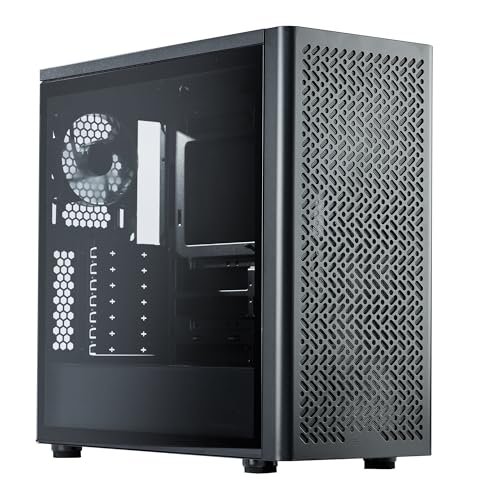 Cooler Master Elite 502 Lite ATX High
- Perfect Fit for Minimalist Setup: Explore a roomy…
- Spacious GPU Clearance: Accommodating GPUs up to 410mm,…
- Stay Cool Under Pressure: Experience 410mm liquid cooler…
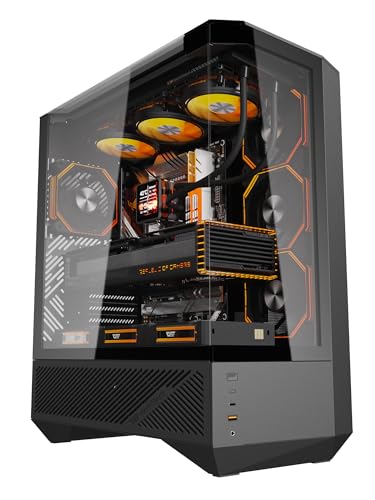 darkFlash DY460 ATX Full Tower PC Case
- 330° Full-View Tempered Glass Panels (ATX Full-Tower Design):…
- Pre-installed 4× darkFlash INF34 ARGB PWM Fans: Ships…
- High-Airflow Layout & 360mm Radiator Support: Top 360mm…
| Product | Key specs | |
|---|---|---|
| NZXT H9 Flow RGB | Separates main components from the PSU and drives… Perforated steel panels and angled front-right fans ensure… Includes one F420 RGB Core single-frame fan unit… | Check price |
| Cooler Master Elite 502 Lite ATX High | Perfect Fit for Minimalist Setup: Explore a roomy… Spacious GPU Clearance: Accommodating GPUs up to 410mm,… Stay Cool Under Pressure: Experience 410mm liquid cooler… | Check price |
| darkFlash DY460 ATX Full Tower PC Case | 330° Full-View Tempered Glass Panels (ATX Full-Tower Design):… Pre-installed 4× darkFlash INF34 ARGB PWM Fans: Ships… High-Airflow Layout & 360mm Radiator Support: Top 360mm… | Check price |
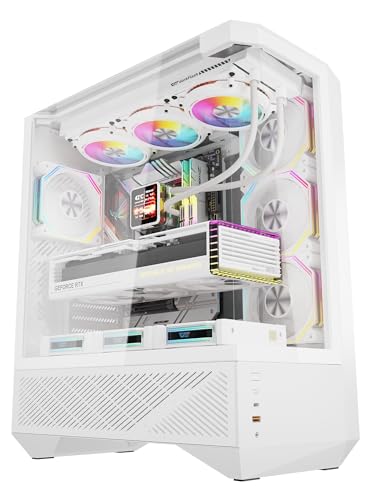 darkFlash DY460 ATX Full Tower PC Case darkFlash DY460 ATX Full Tower PC Case | Diamond-Cut Aesthetic & 330° Panoramic View: Featuring a… Next-Gen GPU & BTF Motherboard Ready: Engineered for… Pre-installed 4× INF34 ARGB PWM Fans: Ships with… | Check price |
 Shiny Snake G600 Compact MATX Case with Shiny Snake G600 Compact MATX Case with | 【Wood & Glass Design, Optional 11.3" Auxiliary Screen】… 【Flagship Hardware Without Compromise】 - Fits up to… 【Lab-Verified High-Airflow Cooling】 - Choose your own cooling… | Check price |
 SAMA V62 Curved Glass ATX Gaming PC SAMA V62 Curved Glass ATX Gaming PC | 7 ARGB PWM Infinity Mirror Fans Included with… Curved Tempered Glass Panoramic ATX Gaming Case Design Supports 445mm GPU and Multiple 360mm Radiator Configurations | Check price |
 Cooler Master NR200P V2 Mini-ITX PC Case Cooler Master NR200P V2 Mini-ITX PC Case | Compact ITX Design: Unleash top-tier performance with a… Strictly SFX Fit: Engineered for SFX only power… Vertical Mounting: Designed for vertical GPU setups, supporting… | Check price |
 darkFlash DY460 ATX Full Tower PC Case darkFlash DY460 ATX Full Tower PC Case | Diamond-Cut Aesthetic & 330° Panoramic View: Featuring unique… Fan-Free Design: The Ultimate DIY Canvas: Designed for… Next-Gen Compatibility: RTX 5090 & BTF Ready: Engineered… | Check price |
As an Amazon Associate we earn from qualifying purchases at no extra cost to you.
This guide cuts through the marketing noise to identify the cases that genuinely handle a 5090 without compromise. We have evaluated each option on three hard metrics: verified GPU clearance, real-world airflow configuration, and radiator compatibility for builders running custom loops or large AIOs. Whether you are building a showcase rig with wraparound glass, a minimalist high-airflow workstation, or a compact mATX build that still wants flagship power, these are the chassis that will let your 5090 breathe.
🛒 Best Price Today on Amazon
Prime members get fast, free shipping on everything above, plus member-only deals. New members get a 30-day free trial — cancel anytime.
Watch: Best Case For 5090 — Video Review
How to Choose a Case For 5090 (2026)
- GPU Clearance: The 5090’s reference and partner cards regularly exceed 350mm. Verify that the case lists a GPU clearance of at least 360mm, and preferably 400mm or more, so you are not forced to remove front fans or sacrifice a radiator to make the card fit.
- Airflow Design: Look for cases with dedicated front and bottom intake paths, mesh or perforated panels, and enough fan mounts to establish positive pressure. A sealed glass front panel may look striking but will starve a 600W GPU of the fresh air it needs under sustained gaming loads.
- Radiator Support: If you plan to cool your CPU with a 360mm or 420mm AIO, confirm the case supports that radiator size in a location that does not conflict with the GPU. Top mounting is usually safest; front mounting can eat into the GPU clearance you need.
- Thermal Headroom: Consider the total system heat output, not just the GPU. A 5090 paired with a high-end CPU can dump 800W or more into the case. Prioritize cases with 10-fan support or dual-chamber designs that physically separate heat sources.
- Build Quality and Access: A heavy GPU needs a sturdy PCIe slot assembly and preferably a GPU support bracket. Also look for toolless tempered glass panels, front-facing USB-C at 10Gbps or faster, and a cable management system that will not collapse under the cable bulk of a flagship build.
The Best Case For 5090 (2026)s Reviewed
NZXT H9 Flow RGB
This dual-chamber flagship ships with a pre-installed 420mm RGB fan unit and supports a matching 420mm radiator, making it one of the few cases on the market that can handle a 5090 and a massive CPU cooler simultaneously without airflow compromise. The wraparound tempered glass turns a flagship build into a genuine showcase piece.
Cooler Master Elite 502 Lite
A minimalist high-airflow chassis with a verified 410mm GPU clearance that swallows even the largest 5090 partner cards, plus 360mm AIO support and front intake grills that keep fresh air moving. It proves you do not need gimmicks or RGB to handle a flagship GPU, just smart engineering and honest thermal design.
darkFlash DY460 (Black)
The 330-degree panoramic glass and four pre-installed ARGB PWM fans make this a striking showcase case, while the 400mm GPU clearance and 10-fan support give a 5090 the room and airflow it actually needs. The included USB-C 10Gbps front panel keeps connectivity modern without inflating the price.
darkFlash DY460 (White)
Identical to the black DY460 in every structural spec that matters for a 5090, this white version delivers the same 400mm GPU clearance, 360mm radiator support, and 10-fan capacity in a finish that pairs beautifully with white 5090 partner cards. It is the strongest aesthetic option for builders chasing a clean, monochrome look.
Shiny Snake G600
A compact mATX case that punches far above its weight class with 400mm GPU clearance, 360mm AIO readiness, and a built-in screen that adds a functional tech accent. The wood front panel and flexible PSU mounting make it the most distinctive option here for builders who want flagship performance in a smaller footprint.
Frequently Asked Questions
Will any mid-tower case fit an RTX 5090?
No. Many mid-towers advertise GPU clearance of 320mm to 340mm, which is too tight for most 5090 partner cards. You need a case that explicitly lists 360mm or greater GPU clearance, and even then you should check whether that number accounts for front-mounted fans or radiators.
Is liquid cooling necessary for a 5090 build?
For the GPU itself, no, the 5090’s stock air cooler is designed to handle its thermal load. However, a 360mm or 420mm AIO for your CPU is strongly recommended in a 5090 system because the GPU will dump significant ambient heat into the case, making it harder for a tower air cooler to keep the processor in check.
Do I need a full tower for a 5090?
Not necessarily. Cases like the darkFlash DY460 and Shiny Snake G600 are technically mid-tower or mATX designs but still offer 400mm GPU clearance. The relevant metric is clearance and airflow configuration, not the tower classification. A well-engineered mid-tower will outperform a poorly designed full tower every time.
How many case fans does a 5090 build need?
Plan for at least six fans in a push-pull configuration: three front intake, two top exhaust, and one rear exhaust. Cases that support 10 fans, like the darkFlash DY460, give you headroom to add bottom intake fans that feed the GPU directly, which can meaningfully lower temperatures under sustained load.
Final Thoughts
For most builders, the NZXT H9 Flow RGB is the top pick thanks to its dual-chamber design, pre-installed 420mm fan unit, and premium build quality that makes a 5090 build feel as expensive as it should. The Cooler Master Elite 502 Lite is the value and airflow champion, proving that straightforward engineering at a lower price point can handle a flagship GPU just as well. And for builders who want a showpiece, the darkFlash DY460 in either black or white delivers panoramic glass and 10-fan support without sacrificing the 400mm clearance a 5090 demands.