Finding the best PC case in 2026 means balancing airflow, GPU clearance, motherboard compatibility, and cable management in a market saturated with options. Modern graphics cards are longer and thicker than ever, often pushing 400mm in length with massive triple-slot coolers, which immediately rules out dozens of compact mid-towers that looked promising on paper. Buyers also face a fragmented landscape of new motherboard standards, from reverse-connection designs like ASUS BFG and MSI Project Zero to hidden-connector boards from Gigabyte, all of which demand cases engineered with specific cutouts and routing channels. Then there is the question of thermal performance: with next-gen GPUs drawing well over 400W and high-core-count CPUs hitting similar peaks, a case that starves your components of fresh air will throttle performance and ramp fans to unbearable noise levels.
Our top picks
 Lian Li V100-ATX Mid-Tower PC Case-Black-V100RX
- Comes with 4x pre-installed PWM-controlled 120mm ARGB fans,…
- Integrated 26-LED ARGB strip offers full spectrum color…
- Supports ATX, Micro-ATX, Mini-ITX, and back-connect ATX or…
 CORSAIR 4000D RS ARGB Frame Modular Mid-Tower
- FRAME Modular Case System - The revolutionary FRAME…
- 3x CORSAIR RS ARGB PWM Fans - High-performance…
- CORSAIR InfiniRail Fan Mounting System - This steel…
 Cooler Master HAF II 500 ATX PC
- Oversized Mighty40 cooling system with two 220 x…
- Low airflow resistance design uses large front and…
- Split-level cable management optimizes routing space and creates…
| Product | Key specs | |
|---|---|---|
| Lian Li V100-ATX Mid-Tower PC Case-Black-V100RX | Comes with 4x pre-installed PWM-controlled 120mm ARGB fans,… Integrated 26-LED ARGB strip offers full spectrum color… Supports ATX, Micro-ATX, Mini-ITX, and back-connect ATX or… | Check price |
| CORSAIR 4000D RS ARGB Frame Modular Mid-Tower | FRAME Modular Case System - The revolutionary FRAME… 3x CORSAIR RS ARGB PWM Fans - High-performance… CORSAIR InfiniRail Fan Mounting System - This steel… | Check price |
| Cooler Master HAF II 500 ATX PC | Oversized Mighty40 cooling system with two 220 x… Low airflow resistance design uses large front and… Split-level cable management optimizes routing space and creates… | Check price |
 CORSAIR 3500X RS ARGB Panoramic Mid-Tower PC CORSAIR 3500X RS ARGB Panoramic Mid-Tower PC | The following product only includes 3x Pre-Installed Fans A Great Build with a Great View: The… R ARGB Fans - Enjoy high-performance cooling and… | Check price |
 MUSETEX ATX PC Case 7 PWM ARGB MUSETEX ATX PC Case 7 PWM ARGB | 【MUSETEX presents the K2 gaming pc case】both a… 【Tower Case Powerful Space Layout】The internal structure of… 【Upgrade High Speed IO Panel】1 x Type-C, 2… | Check price |
 Okinos Aqua UNO Micro ATX Case Okinos Aqua UNO Micro ATX Case | 【Air Cooling Only Design】 Designed exclusively for air… 【3 Pre-Installed ARGB Fans】 Comes with 3 x… 【Multiple Color Options】 Including standard colors and eye-catching… | Check price |
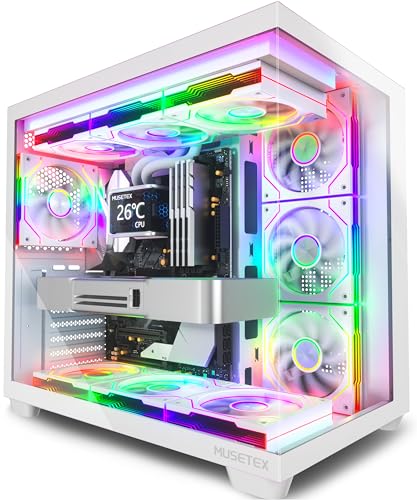 MUSETEX Y6 PC Case MUSETEX Y6 PC Case | MUSETEX offers a standout Y6 white ATX PC… PC Case Optimized Space Layout: The internal of… ATX Case I/O Port Configuration: 1 x Type-C,… | Check price |
 Cooler Master Q300L V1 Micro-ATX PC Case Cooler Master Q300L V1 Micro-ATX PC Case | Ample Interior: Explore ample interior space for Micro-ATX… Components Clearance: Accommodates CPU coolers with a max… Versatile Cooling: Maximize cooling performance with a 240mm… | Check price |
As an Amazon Associate we earn from qualifying purchases at no extra cost to you.
This guide cuts through the marketing noise and focuses on the cases that actually deliver on airflow, build quality, and hardware support for 2026 high-end builds. We have selected six options ranging from panoramic glass showpieces to dual-fan airflow monsters, each excelling in a specific category. Whether you are assembling a flagship gaming rig, a silent workstation, or a compact micro-ATX build, the recommendations below cover the spectrum, and the comparison cards that follow highlight current pricing and ratings.
🛒 Best Price Today on Amazon
Prime members get fast, free shipping on everything above, plus member-only deals. New members get a 30-day free trial — cancel anytime.
Watch: Best PC Case 2026 — Video Review
How to Choose a PC Case 2026
- Airflow Design: Prioritize cases with mesh front panels or large intake fans. A solid glass front may look striking, but it traps heat and forces your GPU and CPU coolers to work harder, which directly impacts boost clocks and longevity.
- GPU Clearance: Verify maximum graphics card length and thickness. Flagship GPUs in 2026 frequently exceed 350mm and occupy four slots, so a case rated for 400mm or more gives you headroom for current and future upgrades without hitting the side panel.
- Motherboard Compatibility: Check for reverse-connection or hidden-connector support if you are using an ASUS BTF, MSI Zero, or Gigabyte Stealth board. These require relocated cutouts and front-facing connectors that only certain cases provide.
- Pre-Installed Fans: Factor in the value of included ARGB or PWM fans. Cases shipping with three or more quality fans save you money and simplify the build, but confirm the controller supports your motherboard’s RGB standard.
- Cable Management Space: Look for at least 25mm of clearance behind the motherboard tray plus a hinged or removable side panel. Tight routing channels lead to crushed cables, blocked airflow, and frustrating build experiences.
The Best PC Case 2026s Reviewed
Lian Li V100-ATX
Lian Li’s V100-ATX pairs a tempered-glass display platform with four pre-installed 120mm ARGB PWM fans and an integrated RGB strip, making it the top pick for builders who want a showcase aesthetic without sacrificing thermal headroom.
Corsair 4000D RS ARGB
The 4000D RS ARGB refines a proven chassis with three RS fans and the InfiniRail mounting system, delivering excellent airflow and full compatibility with reverse-connection motherboards from ASUS, MSI, and Gigabyte at a competitive price.
Cooler Master HAF II 500
For raw airflow and GPU capacity, the HAF II 500 is unmatched. Its dual 220mm and 180mm fans move massive volume quietly while supporting 430mm graphics cards, four dual-slot GPUs, and 360mm AIOs, making it ideal for AI workstations and flagship gaming builds.
Corsair 3500X RS ARGB
The panoramic 3500X RS ARGB offers a spacious interior, three pre-installed fans, a built-in GPU anti-sag bracket, and reverse-connection motherboard compatibility in a clean white finish that suits builders prioritizing both looks and practical support.
MuseTex K2
MuseTex’s K2 ships with seven pre-installed PWM ARGB fans and a Type-C front panel behind dual tempered-glass panels, giving budget-conscious builders exceptional value and out-of-the-box cooling without needing immediate fan upgrades.
Frequently Asked Questions
What is the most important feature in a 2026 PC case?
GPU clearance and airflow top the list. Next-gen graphics cards are longer, thicker, and hotter than ever, so a case must physically fit your GPU and supply it with fresh air to prevent thermal throttling under sustained load.
Are reverse-connection motherboards worth it?
They produce a cleaner build with no visible cables on the front side, but only if your case supports the standard. Cases like the Corsair 4000D RS ARGB are engineered for these boards, so check compatibility before buying.
How many fans do I need pre-installed?
Three front intake fans and at least one rear exhaust cover baseline cooling. Cases with five or more pre-installed fans, like the MuseTex K2, eliminate the need for immediate aftermarket purchases and simplify the build process.
Can I fit a 360mm AIO in every case here?
No. The Okinos Aqua UNO and other compact micro-ATX cases specifically omit radiator support to save space. If you plan to liquid-cool your CPU, prioritize cases like the Cooler Master HAF II 500 or Corsair 3500X RS ARGB with confirmed 360mm radiator mounts.
Final Thoughts
The best PC case for 2026 depends on your build priorities, but the Cooler Master HAF II 500 stands out for flagship GPU cooling and workstation capacity, the Corsair 4000D RS ARGB delivers unmatched value with reverse-connection support, and the Lian Li V100-ATX leads the field for builders who want a premium showcase chassis with strong out-of-the-box thermals.