
Key takeaways
- Initial Hardware Investment: Bluetooth functionality is often built directly into modern PC motherboards ($0 additional cost). If an external receiver is needed, standalone Bluetooth 5.4 adapters range from $10 to $12. Controllers bundling 2.4GHz receivers usually carry a slight premium, costing between $30 and $70 for high-performance units.
- Replacement & Loss Risks: Proprietary 2.4GHz dongles are uniquely coded to their specific gamepad models. If a dongle is lost under living room rugs, damaged by vacuum cleaners, or chewed by pets, replacing it typically costs $15 to $25—or requires replacing the entire controller if spare dongles aren’t sold separately. Universal Bluetooth adapters ($10 to $15) can be replaced instantly without rendering your controller obsolete.
- Energy Consumption & Charging Cycles: High-polling 2.4GHz connections consume internal controller battery power faster than Bluetooth Low Energy (BLE) modes. Over 5 years, frequent battery drain cycles slightly accelerate internal lithium-ion battery degradation, potentially shortening total controller lifespan by 6 to 12 months under heavy daily use.
What's inside
Designing an intentional home office or living room entertainment center requires balancing clean visual aesthetics with reliable performance. As PC gaming seamlessly bridges the gap between dedicated desk setups and living room media consoles, choosing how your gamepad connects to your computer is a surprisingly vital decision. When comparing a 2.4GHz dongle vs Bluetooth for PC controller latency, the debate extends beyond simple millisecond response times. It impacts cable management, furniture placement, USB port organization, and how cleanly your hardware integrates into your home in 2026.
While wireless freedom eliminates ugly cord clutter stretching across hardwood floors or woven area rugs, not all wireless connections handle structural barriers and signal noise equally. Understanding how input lag, signal stability, and room layout intersect helps you build a streamlined setup that looks tailored to your interior space while remaining responsive during fast-paced play.
As an Amazon Associate we earn from qualifying purchases at no extra cost to you. Product prices and availability are accurate as of the date shown and are subject to change.


Quick Verdict
For high-performance gaming and living room setups where the PC sits more than 8 feet away from the couch, a 2.4GHz wireless dongle is the clear winner. It delivers consistent sub-5ms input latency, higher polling rates, and greater resistance to radio frequency interference from home Wi-Fi networks.
For minimalists, modern home offices, and multi-device multitaskers who prioritize a clean desk without extra USB attachments, Bluetooth is the superior lifestyle choice. While its input latency averages higher (typically 10ms to 25ms depending on the controller and driver stack), Bluetooth eliminates external dongle clutter and allows single controllers to instantly pair across laptops, tablets, and desktop systems.
Side by Side
| Feature / Attribute | 2.4GHz Wireless Dongle | Bluetooth Connection |
|---|---|---|
| Average Input Latency | 1 ms to 5 ms | 8 ms to 25 ms |
| Maximum Polling Rate | Up to 1000 Hz | 125 Hz to 250 Hz |
| Obstacle Penetration | Strong through wooden desks and glass tabletops | Moderate; prone to line-of-sight drops |
| Desk / Room Clutter | Requires open USB port & small physical dongle | Zero external hardware needed (if PC has BT) |
| Multi-Device Portability | Requires physically moving the USB adapter | Software switching across multiple paired devices |
| Setup & Driver Maintenance | Plug-and-play driverless pairing | Requires OS pairing menus & driver updates |
| Interference Vulnerability | Low (uses channel-hopping proprietary protocols) | Moderate (shares crowded 2.4GHz band with Wi-Fi) |
| Average Hardware Cost | Included with pad or $15–$30 for replacement receivers | $10–$15 for universal USB Bluetooth adapters |
| Best For Home Layout | Living room couch-to-TV setups & competitive desks | Sleek, minimalist floating desks & compact spaces |
Where 2 4ghz Dongle Wins
The primary advantage of a dedicated 2.4GHz RF (Radio Frequency) dongle comes down to raw speed and uncompromised bandwidth. Proprietary USB receivers bypass the generic operating system Bluetooth stack, establishing a direct hardware bridge between the gamepad and the PC. This dedicated pipeline allows controllers to support elevated polling rates up to 1000 Hz, meaning the PC checks for button inputs every single millisecond. Feature-rich controllers like the 8Bitdo Ultimate 2C Wireless Controller for Windows PC and Android take full advantage of this bandwidth, combining ultra-fast reporting with hardware enhancements like Hall Effect joysticks and remappable bumpers without suffering input throttling.
From an interior layout perspective, 2.4GHz dongles excel in spacious environments like living rooms or basement media dens. If your desktop tower is tucked inside a ventilated solid wood media console or positioned 12 to 15 feet away behind a heavy marble coffee table, proprietary 2.4GHz signals penetrate physical obstacles far more reliably than Bluetooth. The connection remains rock-solid even when household members walk between the couch and the display screen, ensuring your movement inputs never drop mid-game.
Furthermore, proprietary dongles avoid the crowded handshake procedures common to universal wireless protocols. When you power on the gamepad from your sofa, connection establishment is instantaneous—no navigating Windows Settings menus or troubleshooting disconnected Bluetooth devices required.
Where Bluetooth for Pc Controller Latency Wins
While 2.4GHz leads in raw transmission speed, Bluetooth reigns supreme in interior aesthetics, minimalist organization, and hardware versatility. Modern home office designs frequently favor clean, cable-free floating desks, minimalist laptop docks, and ultra-compact mini-PCs mounted behind monitors. Inserting multiple bulky USB adapters into visible front ports disrupts clean architectural lines and consumes precious I/O ports.
Connecting via Bluetooth requires no additional physical hardware if your motherboard already features integrated wireless cards. If your custom PC build lacks onboard Bluetooth, adding a sleek adapter like the TP-Link USB Bluetooth Adapter for PC – Bluetooth 5.4 USB Dongle Receiver adds versatile connectivity in a thumb-sized profile. Alternatively, multi-function upgrades such as a WiFi Bluetooth Adapter for Desktop PC, USB Dual Band 2.4G/5GHz 900Mbps WiFi 6 Wireless Dongle with Bluetooth 5.4 handle both high-speed internet and gamepad connections through a single expansion slot, drastically reducing back-of-PC wire clutter.
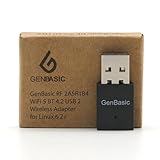
For custom workstation builds, media servers, or specialized home theater PCs running non-Windows operating systems, universal adapters like the GenBasic WiFi 5 Bluetooth BT4 USB Mini Wireless Network Dongle Adapter for Linux 6.2+ offer wide kernel support. This allows home builders to control retro emulation rigs without managing proprietary USB receivers for every individual gamepad.
Bluetooth also offers unmatched lifestyle flexibility. A single Bluetooth controller can seamlessly transition from an afternoon gaming session at your home office desk to a smartphone or tablet during travel, eliminating the risk of losing small, easy-to-misplace proprietary dongles during room reshuffles.
Cost Over 5 Years
Calculating the true long-term value of your wireless setup involves looking past initial purchase prices to consider adapter replacement costs, energy usage, and hardware longevity across a 5-year timeline.
- Initial Hardware Investment: Bluetooth functionality is often built directly into modern PC motherboards ($0 additional cost). If an external receiver is needed, standalone Bluetooth 5.4 adapters range from $10 to $12. Controllers bundling 2.4GHz receivers usually carry a slight premium, costing between $30 and $70 for high-performance units.
- Replacement & Loss Risks: Proprietary 2.4GHz dongles are uniquely coded to their specific gamepad models. If a dongle is lost under living room rugs, damaged by vacuum cleaners, or chewed by pets, replacing it typically costs $15 to $25—or requires replacing the entire controller if spare dongles aren’t sold separately. Universal Bluetooth adapters ($10 to $15) can be replaced instantly without rendering your controller obsolete.
- Energy Consumption & Charging Cycles: High-polling 2.4GHz connections consume internal controller battery power faster than Bluetooth Low Energy (BLE) modes. Over 5 years, frequent battery drain cycles slightly accelerate internal lithium-ion battery degradation, potentially shortening total controller lifespan by 6 to 12 months under heavy daily use.
Overall, a quality Bluetooth setup carries a 5-year operational cost of roughly $30 to $80 (including controller lifecycle), whereas a dedicated 2.4GHz setup averages $45 to $100 due to potential dongle replacements and slightly higher hardware costs.
Which One for Your Home
Small Apartment or Studio Desk Setup
In compact living spaces where your gaming desk doubles as your work-from-home workstation, space efficiency is king. High-density apartment buildings are heavily saturated with competing 2.4GHz Wi-Fi signals from neighboring units, which can occasionally cause signal hopping stutter on proprietary receivers. A modern Bluetooth 5.4 setup reduces hardware footprint, keeps physical USB ports open for work accessories, and delivers low-latency performance when seated just 2 to 3 feet from your monitor.
Family Room or Shared Living Space with Kids and Pets
Living rooms demand high durability and robust signal range. With distance spanning 10 to 15 feet between the sofa and the television cabinet—plus visual line-of-sight obstructions like coffee tables, footstools, and active family members—a 2.4GHz dongle is non-negotiable. It guarantees fast, reliable input latency regardless of room movement. To protect physical equipment from being bumped by children or pets, plug the dongle into rear USB ports or use a short extension cable tucked safely inside your media console.
Rental Home or Flexible Workspace
If you regularly shift your gaming setup between a bedroom desk, a living room TV, and a dining table workstation, convenience and portability take priority. Bluetooth eliminates the hassle of unplugging tiny USB dongles and transporting them across rooms. Paired controllers memory profiles allow quick reconnects across different screens without crawling behind furniture to access PC backpanels.
Dedicated Gaming Room or Long-Term Home Office
In a dedicated sanctuary built for high-performance gaming, every millisecond counts. A 2.4GHz wireless dongle paired with high-polling-rate gamepads delivers near-zero input delay that rivals traditional wired connections. To maintain clean cable management, install an under-desk USB hub or route an extension cable directly beneath your primary display monitor, placing the receiver within direct line-of-sight of your seating area while hiding wires beneath your desk setup.
FAQ
How much does physical distance across a living room affect input lag?
Distance impacts Bluetooth far more noticeably than proprietary 2.4GHz signals. Beyond 10 feet, Bluetooth input latency can spike from 12ms up to 35ms or drop frames entirely if furniture or human bodies block direct line-of-sight. Proprietary 2.4GHz dongles maintain tight 2ms to 5ms response rates up to 25 feet away, even through minor physical barriers.
Can home Wi-Fi routers interfere with 2.4GHz controller dongles?
Yes. Both home Wi-Fi routers (operating on the 2.4GHz band) and controller dongles share overlapping radio frequencies. Placing a wireless router directly next to your PC or controller dongle can cause intermittent lag spikes. For best results, keep your Wi-Fi router at least 3 to 5 feet away from your PC’s wireless dongles.
Do Bluetooth 5.4 adapters reduce input lag compared to older Bluetooth versions?
Bluetooth 5.4 improves bandwidth efficiency, connection stability, and power management rather than dramatically decreasing base input latency. While Bluetooth 5.4 reduces random latency spikes and packet drops caused by local signal noise, standard transmission delays remain around 8ms to 15ms due to operating system audio and input queuing.
What is the best way to hide USB dongles in a minimalist desk setup?
To keep your desk visually clean without sacrificing latency, use a short USB extension cable taped to the underside or back edge of your wooden desk. Alternatively, plug the dongle into a rear-facing USB port on your monitor’s built-in hub, tucking the receiver completely out of view while keeping it close to your controller.


