
Key takeaways
- Ten monitors compared for PS5 4K 120Hz play, from 27-inch Fast IPS panels to 32-inch curved VA screens, with a checklist for confirming a real HDMI 2.1 port.
For a PS5 running at 4K and 120Hz, the picks that state HDMI 2.1, 4K resolution and 120Hz or higher in the title are the ones to shortlist, and the ASUS TUF Gaming VG27UQ1A and the CUNPU 27-inch are the two that call out console use by name. The remaining listings cover cheaper 27-inch IPS screens and two 32-inch curved VA monitors. One 1440p model is included as a labeled runner-up. This guide draws on listing titles and published specifications only.
Short list by need
Our top picks



As an Amazon Associate we earn from qualifying purchases at no extra cost to you.
- Console named in the title: ASUS TUF Gaming VG27UQ1A and CUNPU 27-inch
- Bigger screen: Amzfast 32-inch or CRUA 32-inch, both curved 4K
- Dual-mode for PC and console: Amzfast AMZG27F6U and SANSUI 27-inch
- Office and gaming mix: Dell S2725QS with USB-C
- Lower-resolution runner-up: Hikers 27-inch 1440p
How the ten compare
| Model | Key point from the title | Best for |
|---|---|---|
| ASUS TUF VG27UQ1A | 27-inch 4K 160Hz, G-SYNC, ELMB Sync, 95% DCI-P3 | Console named by ASUS |
| CUNPU 27-inch | 4K 160Hz Fast IPS, HDMI 2.1, full ergonomic stand | Adjustable desk setups |
| Amzfast AMZG27F6U | 4K 160Hz or FHD 320Hz dual mode, Fast IPS | Shared PC and console |
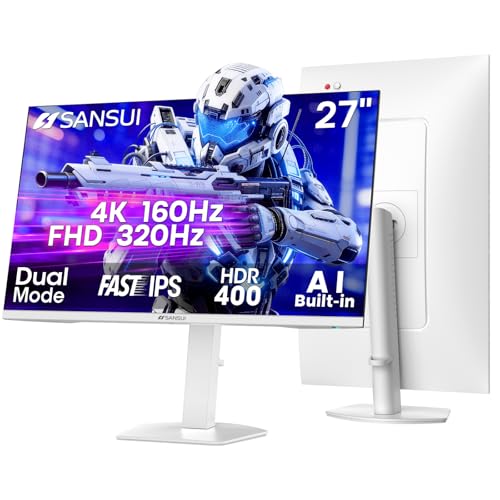
| SANSUI 27-inch dual mode | 4K 120/160Hz or FHD 240/320Hz, 2x HDMI 2.1, white | Two consoles, rotating stand |
| ZZA 27-inch | 4K 144Hz flat, HDMI 2.1, tilt only | Wall mounting |
| LXZ 27-inch | 4K 144Hz IPS, HDMI 2.1, height adjustable | Budget 27-inch IPS |
| Dell S2725QS | 4K IPS 120Hz, USB-C, HDMI version not stated | Mixed work and play |
| Amzfast 32-inch curved | 4K 120Hz curved, HDMI 2.1 (VRR), 300 nits | Big-screen immersion |
| CRUA 32-inch curved | 4K 160Hz VA, 1500R, speakers | Large screen, speakers |
| Hikers 27-inch curved | 1440p 170Hz, 2x HDMI 2.1, not 4K | Runner-up for high refresh |
The ten monitors
ASUS TUF Gaming VG27UQ1A: 27-inch 4K, 160Hz
ASUS lists this as a 27-inch 4K 160Hz G-SYNC monitor with ELMB Sync, a 1ms response claim, 95% DCI-P3, FreeSync Premium and DisplayWidget Center, and the title says it is for PS5 and Xbox. It is the best-known brand among these ten, and its title is also the clearest about console use.
- Pros: Title states PS5 and Xbox as targets
- Pros: Wide colour coverage claim
- Cons: The title does not list the HDMI version
- Cons: No brightness or HDR figure in the title
Who it’s for: Console players who want a recognisable brand and a documented 4K 120Hz path.
CUNPU 27-inch 4K 160Hz Fast IPS
CUNPU’s title promises 4K UHD, 160Hz, Fast IPS with a 1ms claim, G-Sync Compatible and FreeSync, 99% DCI-P3, HDR400, HDMI 2.1 for PS5 and Xbox at 4K 120Hz, and a full ergonomic stand. The stand is rare at this price level and helps with eye height.
- Pros: Full ergonomic stand
- Pros: HDMI 2.1 and console wording in the title
- Cons: Lesser-known brand
- Cons: HDR400 is an entry-level HDR tier
Who it’s for: Players who want height, tilt and swivel adjustment without a separate monitor arm.
Amzfast AMZG27F6U: 4K 160Hz or FHD 320Hz
This 27-inch Fast IPS model has a dual mode: 4K at 160Hz or Full HD at 320Hz. The title adds 1ms, Adaptive Sync, HDR400, 126% sRGB, HDMI 2.1, DP 1.4 and a height-adjustable VESA stand. The 320Hz mode is a PC-oriented feature rather than a console one.
- Pros: Switches between sharp and fast modes
- Pros: Height-adjustable stand
- Cons: The 320Hz mode needs a strong PC graphics card
- Cons: The title ends mid-phrase, so read the full listing
Who it’s for: Households with both a PS5 and a gaming PC.
SANSUI 27-inch 4K dual mode, white
The SANSUI title lists 4K at 120Hz or 160Hz, plus Full HD at 240Hz or 320Hz, Fast IPS, two HDMI 2.1 ports, two DP 1.4 ports, speakers, PIP/PBP, HDR400 and a rotating, height-adjustable white stand. Two HDMI 2.1 inputs are useful if you own a console and a second HDMI source.
- Pros: Two HDMI 2.1 inputs per the title
- Pros: White finish and rotating stand
- Cons: A crowded feature list that is hard to verify
- Cons: White colour may not suit a dark setup
Who it’s for: Setups with two devices on HDMI and a lighter colour scheme.
ZZA 27-inch 4K 144Hz flat
ZZA offers a flat 27-inch 4K panel at 144Hz with Adaptive Sync, HDMI 2.1 and DP 1.4. The stand only tilts and the title mentions wall mounting, so the listing is better suited to a bracket or arm than to a height-flexible desk.
- Pros: HDMI 2.1 and DP 1.4 both stated
- Pros: Wall mountable
- Cons: Tilt-only stand
- Cons: Panel type is not named in the title
Who it’s for: Buyers who plan to mount the screen and just need the ports and the resolution.
LXZ 27-inch 4K 144Hz IPS
The LXZ title gives a 27-inch 4K IPS panel at 144Hz, with FreeSync and G-Sync Compatible, HDMI 2.1, DP 1.4, a height-adjustable stand and wall-mount support. It is a close cousin of the ZZA monitor but swaps in IPS and a better stand.
- Pros: IPS panel and adjustable height
- Pros: Both HDMI 2.1 and DP 1.4 listed
- Cons: Little-known brand
- Cons: No panel brightness figure in the title
Who it’s for: Shoppers who want a simple 4K 144Hz IPS screen with working ergonomics.
Dell S2725QS: 27-inch 4K IPS, 120Hz
Dell’s title lists 4K UHD IPS, 120Hz, 5ms, FreeSync Premium, 350 cd/m2, 1,500:1 contrast, 99% sRGB and USB-C, plus a height-adjustable, swivel and pivot stand. It names HDMI but not the version. For a PS5, confirm HDMI 2.1 on the product page before buying.
- Pros: USB-C and a fully adjustable stand
- Pros: Well-known brand
- Cons: HDMI version is not stated in the title
- Cons: 5ms is slower than the 1ms claims elsewhere
Who it’s for: Anyone who splits time between a work laptop and a console.
Amzfast 32-inch 4K 120Hz curved
The title shows a 32-inch curved 4K panel at 120Hz, 1500R curve, PIP/PBP, Adaptive Sync, 131% sRGB, 3000:1 contrast, HDR with 300 nits, HDMI 2.1 (VRR), DP 1.4, built-in speaker and a VESA mount. The 120Hz maximum matches the console limit, though PC buyers may want more.
- Pros: Large 32-inch screen
- Pros: HDMI 2.1 with VRR written in the title
- Cons: 300 nits is dim for HDR
- Cons: Fixed 120Hz ceiling
Who it’s for: Console-first players who want the biggest screen on this page.
CRUA 32-inch 4K 160Hz curved VA
CRUA lists a 32-inch 4K UHD VA panel at 160Hz, 1500R curve, AMD FreeSync, 120% sRGB, built-in speakers, HDMI 2.1 and DP 1.4, plus a 75x75mm wall-mount pattern. VA panels favour contrast, but viewing angles are narrower than on the IPS models.
- Pros: 32-inch 4K at 160Hz
- Pros: Speakers built in
- Cons: VA panels usually trail IPS for viewing angle
- Cons: Not branded for console use in the title
Who it’s for: People who sit directly in front of the screen and like deep blacks.
Hikers 27-inch curved 1440p 170Hz (not 4K)
This one is not a 4K monitor. The title says 2K 1440P, 170Hz and 144Hz, two HDMI 2.1 ports, one DP 1.4, a fast VA panel with 4000:1 contrast and an included HDMI 2.1 cable. It is listed as a runner-up because it is a different resolution from the topic.
- Pros: Two HDMI 2.1 ports and a cable included
- Pros: Lower resolution is easier to drive from a PC
- Cons: Not 4K, so it is not what the topic asks for
- Cons: Curved VA with narrower viewing angles
Who it’s for: Only for players who value high refresh at a lower resolution and a cheaper price.
How these were chosen
We began with monitors in the product feed whose titles mention 4K, a high refresh rate and HDMI 2.1, then added one 1440p model as a comparison point. Notes come from published specifications, manufacturer documentation and buyer reviews, plus the wording of each title. Nobody on the team used or measured these units. Whenever a title is vague or cuts off, we say so instead of filling in details.
What to look for in a PS5 4K 120Hz monitor
HDMI 2.1 on the right port
The port version is the whole point. A listing can say HDMI 2.1 and still have only one such port while the rest are older. For the console cable, use one that is certified for 4K 120Hz.
Panel type and room lighting
Fast IPS panels hold colour better from the side. VA panels, like CRUA and Amzfast 32-inch, give deeper blacks in a dark room. If you share a screen with someone sitting to the side, lean toward IPS.
Size and sitting distance
At 27 inches a 4K panel is very sharp; at 32 inches it is larger but a little less dense. A curved 1500R model works best at desk distance. For wall-mounted viewing from a couch, flat 27-inch models with a VESA pattern are easier to place.
On brightness, HDR400 and 300 nits are entry-level. They accept an HDR signal but will not look like a dedicated HDR display. Treat HDR as a bonus and do not pay extra for the label alone.
Cable and console settings
The console output settings have to match the screen too. After connecting, open the video output menu and check whether 120Hz and VRR show as available. If the options are greyed out, the usual culprits are the wrong HDMI port, an older cable, or a monitor setting that keeps the input in a compatibility mode. Change one thing at a time so you can tell which fixed it.
Pre-purchase checklist
- HDMI 2.1 version written in the technical details, not just the title.
- 4K at 120Hz stated for that input.
- VRR or Adaptive Sync listed.
- Stand adjustment fits your desk, or a VESA bracket is on hand.
- Cable in the box, or a 4K 120Hz certified cable already ordered.
For the console side of the desk, our M.2 SSD for PS5 guide covers storage, and the 4K prebuilt gaming PC page helps if a PC will share the monitor.
Mistakes buyers make
- Buying on the headline refresh rate and forgetting the console tops out at 120Hz.
- Trusting “HDMI” without a version, as in the Dell listing.
- Using the old HDMI cable that came with a previous device.
- Choosing a curved screen for a wall mount or a shared couch.
- Expecting built-in speakers to replace headphones or a soundbar.
Verdict
The ASUS TUF Gaming VG27UQ1A is the safest brand-and-wording choice here, with CUNPU close behind for its full stand. Pick a 32-inch curved model if you want a bigger view, and treat the Hikers 1440p screen as an alternative rather than a match. Whatever you buy, verify the HDMI 2.1 detail on the product page first, keep the receipt handy for the return window, and plug the console in straight away so any port or cable mismatch shows up early.
Related guides
- Gaming Headsets For Competitive Fps Directional Audio
- Threadripper Vs Xeon Vs Core I9 For Workstations
- Compact Mini Itx Gaming Pcs For Small Desks
Frequently asked questions
Is HDMI 2.1 required to run a PS5 at 4K 120Hz?
Yes. The console sends 4K at 120Hz over an HDMI 2.1 connection, so the monitor input and the cable both need to support it. An HDMI 2.0 port tops out lower for 4K. Look for the version number in the listing, and confirm which of the monitor’s ports are the 2.1 ones.
Does a 160Hz monitor give the PS5 extra speed?
No. The console outputs up to 120Hz, so the extra headroom on 144Hz and 160Hz panels only helps when a PC is plugged in. It is still a fair bonus for a screen you plan to share between a PS5 and a gaming PC, but it should not decide the purchase.
Is VRR the same as FreeSync or G-SYNC?
They are related. Variable refresh rate lets the screen change its refresh rate to follow the frame rate, and FreeSync, G-SYNC Compatible and Adaptive Sync are the labels sellers use. Whether the console actually engages it depends on the monitor over HDMI, so check the listing for a stated VRR line.
Is a curved monitor a good idea for console play?
It depends on the room. A 1500R curve on a 32-inch panel suits a desk where you sit about an arm’s length away, while a flat 27-inch screen is easier for sharing a view or for wall mounting. Three listings here are curved (both 32-inch models and the Hikers 1440p screen); the others do not mention a curve.
What does the Dell S2725QS listing leave out?
Its title names 4K UHD, 120Hz, FreeSync Premium, USB-C and an adjustable stand, but it says only HDMI, with no version number. Before relying on it for 4K 120Hz from a PS5, open the listing’s technical details or the manufacturer page and look for the HDMI version and the number of ports that carry it.









