
Key takeaways
- An RGB mouse pad is two products in one: a tracking surface and a light show. The light show is the easy part.
An RGB mouse pad is two products in one: a tracking surface and a light show. The light show is the easy part, because nearly every listing promises a dozen or more modes. The surface is the part that decides whether your aim feels consistent, so the smart way to shop for the best RGB gaming mouse pad is to treat the lighting as a bonus and judge the pad on size, thickness, base grip, and material first. A beautiful glow does not fix a pad that slides around or curls at the edges.
This guide is for gamers who want a lit-up desk, streamers building a setup that looks good on camera, and anyone who wants one big mat under both keyboard and mouse. The eight options here are mostly extended 31.5 inch mats, plus one premium cloth pad from Razer and one oddball that adds a wireless charging area and a phone stand. Several listings carry only a short generic title, so the notes say plainly what each one states and what it leaves out. Think of 2026 as the year to expect a USB cable for the lights, and to plan the desk around it.
Quick Picks
Our top picks
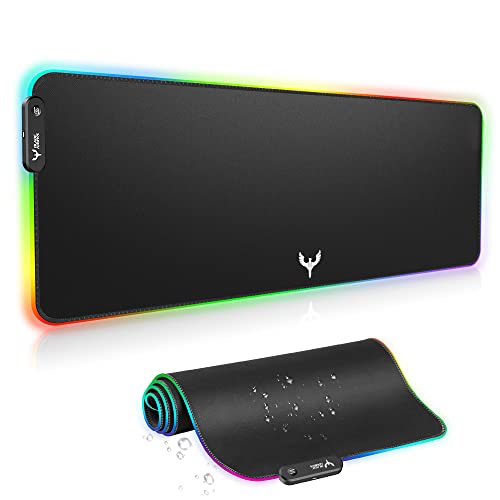
 RGB Mousepad Led Mouse Pad
- 【14Lighting Modes】This gaming mouse pad features 14 lighting…
- 【Gaming Mouse Pad Large】The 31.5 x 12x 0.3…
- 【Easy to use】 This extended mouse pad has…


As an Amazon Associate we earn from qualifying purchases at no extra cost to you.
| Product | Best for | Key spec from the title |
|---|---|---|
| Generic RGB LED Mouse Pad, Large | Simple lit mat | LED, large mouse mat |
| BladeHawks RGB Extended Pad | Keyboard plus mouse | 31.5 x 12 in, 14 lighting modes |
| Razer Goliathus Extended Chroma | Cloth feel, Razer sync | Soft cloth, Chroma RGB, non-slip rubber |
| TIDALSOIL RGB Desk Mat | Remembering your lighting | 31.5 x 11.8 in, 12 modes with memory |
| Generic RGB LED Mouse Pad, White | Light-themed desks | LED, large mouse mat, white |
| Generic RGB LED Desk Pad | Basic large pad | RGB LED, large pad for desk |
| HUADO RGB Gaming Mouse Pad | Thin, waterproof desk mat | 0.16 in thick, 14 modes, waterproof |
| RGB Wireless Charging Desk Mat | Phone charging at the desk | 800x350x4mm, 15 modes, phone stand |
How to Choose
Size: pad or full desk mat
The extended models listed at 31.5 inches wide cover both a keyboard and a mouse, which gives a unified, tidy desk. The 800x350x4mm model is about the same footprint, roughly 31.5 by 13.8 inches. If your desk is shallow, a 12 inch depth is easier to fit than a deeper mat. Smaller pads are cheaper and lighter but cannot carry a keyboard.
Thickness and base
Thickness affects comfort and flatness. The HUADO lists 0.16 inch, which is about 4mm, the same as the 4mm figure on the wireless-charging mat. A thicker mat feels more cushioned under a wrist but needs a stable base. Look for anti-slip rubber, listed on the BladeHawks and the Razer, so that the pad does not creep during fast swipes.
Lighting modes and control
Listings mention 12, 14, or 15 modes, plus a memory function on the TIDALSOIL that keeps your last choice. Do not pay extra for a long list of effects you will not cycle through. A pad that remembers its setting and powers on in the right mode saves you from pressing a button every session. Razer’s Chroma lighting is the one title here that names a software ecosystem for syncing with other gear.
Surface, safety, and where budget pads cut corners
Waterproof surfaces, noted on the HUADO and the wireless-charging mat, help with spills and easy cleaning. Cheaper RGB pads can have uneven lighting, edges that fray, or a cable that is stiff and short. Wireless charging pads built into a desk mat add a charger that must align with your phone, so check compatibility. If your priority is tracking, a soft cloth surface from a gaming brand is generally the safer bet.
The 8 Best Options
Generic RGB LED Mouse Pad, Large
This listing is bare: a large LED mouse mat with RGB lighting and little else in the visible title. It suits a buyer who wants an inexpensive lit surface and is happy to accept a few unknowns. Because the visible title is short, it is wise to read the full listing for dimensions and thickness, since size is the main factor in whether a mat fits a desk.
- A large size offers room for movement.
- LED lighting adds color to a setup without extra equipment.
- Trade-off: the title gives no dimensions, thickness, or material details.
Skip it if you need to know exact size, base material, or lighting modes before buying, or if you plan to rely on the listing alone to judge quality.
BladeHawks RGB Extended Pad
BladeHawks lists a 31.5 by 12 inch extended black pad with 14 lighting modes, an anti-slip rubber base, and coverage for both keyboard and mouse. It suits a gamer who wants a full desk mat with a clear spec sheet. Knowing the exact footprint and mode count up front makes it easier to plan a desk layout than with the vaguer listings here.
- Dimensions and modes are stated clearly.
- An anti-slip rubber base is listed.
- Trade-off: the title does not name the surface material.
Skip it if your desk is narrower than 31.5 inches or you want a soft cloth feel confirmed, because the title does not spell out the texture.
Razer Goliathus Extended Chroma
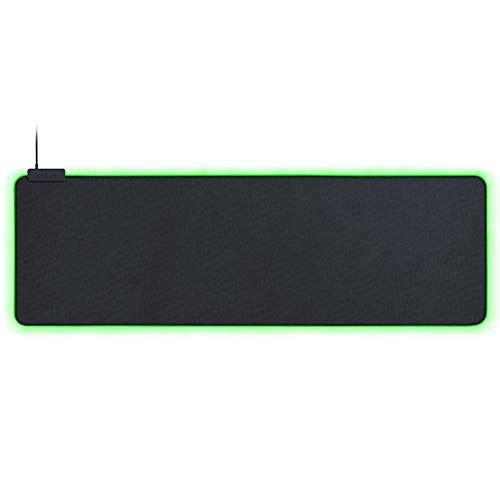
The Goliathus Extended Chroma is the brand-name pick, with a soft cloth material, customizable Chroma RGB lighting, balanced control and speed, and a non-slip rubber base. It suits players who want a trusted gaming surface and lighting that syncs with other compatible gear. For a player who already uses a Razer mouse or keyboard, matching effects across devices is part of the appeal.
- A soft cloth surface with balanced control and speed suits many play styles.
- Customizable Chroma lighting is named, which implies software control.
- Trade-off: the visible title does not give dimensions, so confirm the size you need.
Skip it if you want a clearly stated size in the title or a budget-tier pad, since a branded cloth pad typically sits above the generic mats in this group.
TIDALSOIL RGB Desk Mat
TIDALSOIL lists 31.5 by 11.8 inches, a black extended LED desk mat, and 12 dynamic and static light modes with a memory function. It suits someone who wants to set a mode once and have it return after power-off. That small convenience matters on a desk where the pad is switched off with the PC every night.
- A memory function saves your last lighting selection.
- The size suits keyboard-and-mouse setups.
- Trade-off: 12 modes is fewer than some rivals, though most users cycle through only a few.
Skip it if you want more lighting presets or a specified thickness, since the visible title lists neither a thickness nor a surface material.
Generic RGB LED Mouse Pad, White
The white colorway of a generic large LED mouse mat. It suits a light-themed desk or a setup built around white peripherals where a black mat would clash. Matching colors across a desk can matter as much as the lighting itself for a clean look on camera.
- White finish pairs well with white keyboards and monitors.
- Large size and RGB lighting are mentioned.
- Trade-off: the title offers no size, base, or surface details, and white surfaces show dirt readily.
Skip it if you want dimension details or a mat that hides stains, since pale surfaces show wear sooner than black.
Generic RGB LED Desk Pad
This listing describes an RGB LED gaming mouse pad, desk pad, and large computer mat. It suits a buyer who wants a large surface for a keyboard and mouse and does not need a named brand. It is the sort of listing where reading the full description matters more than the headline.
- A desk-pad description suggests a wide mat.
- RGB LED lighting is included.
- Trade-off: the visible title gives no numbers for size, thickness, or light modes.
Skip it if you prefer a listing with full specifications.
HUADO RGB Gaming Mouse Pad
HUADO lists a 0.16 inch thickness, a 31.5 by 11.8 inch size, 14 light modes, and waterproof material for PC, laptop, office, and gaming use. It suits someone who wants a thin, wide desk mat that handles spills. A thin profile also helps keep the wrist at a natural height beside a low-profile keyboard.
- Waterproof material is useful for desk drinks.
- 14 light modes and a large footprint are listed.
- Trade-off: a thin pad gives less cushioning than a thicker one.
Skip it if you want a thick, padded surface or a brand with software lighting control, since the title mentions no companion app.
RGB Wireless Charging Desk Mat
The odd one out adds a wireless charging area and a foldable phone stand to a large LED gaming mat sized 800x350x4mm, with 15 light modes and waterproof construction. It suits a desk where the phone lives beside the keyboard.
- Charging and a phone stand add everyday utility.
- Sized for keyboard and mouse, with 15 lighting modes.
- Trade-off: the integrated charger adds complexity and possible compatibility limits.
Skip it if you want a pure mouse pad or have a phone that does not support wireless charging.
Which One Fits Your Situation
You want a clear specification before buying
The BladeHawks RGB Extended Pad and the TIDALSOIL RGB Desk Mat both state size and lighting-mode counts in the title.
You use other Razer gear
The Razer Goliathus Extended Chroma names Chroma lighting, which is built to work with the brand’s ecosystem.
You spill drinks at your desk
The HUADO RGB Gaming Mouse Pad and the wireless-charging desk mat both list waterproof construction.
You want to charge your phone at the desk
The RGB Wireless Charging Desk Mat adds a charging area and foldable phone stand to the lit surface. It also reduces cable clutter by merging a charger and a pad into one product.
Common Mistakes
- Choosing by number of lighting modes instead of surface and base.
- Buying a 31.5 inch mat for a desk that is too narrow.
- Forgetting that RGB pads need a USB connection for power.
- Assuming a generic listing includes details the title never states.
- Putting a wireless-charging mat next to a phone case that blocks charging.
Related guides
- Gaming Headsets For Competitive Fps Directional Audio
- Compact Mini Itx Gaming Pcs For Small Desks
- Threadripper Vs Xeon Vs Core I9 For Workstations
Frequently Asked Questions
Does RGB lighting affect mouse tracking?
Not directly, but the surface material does. Choose a pad with a uniform, matte texture for steady tracking, and treat the lights as decoration.
How are RGB mouse pads powered?
Most connect by USB to a computer or a charger to light the LEDs. Check the length of the cable against your desk layout before you buy.
What size mat is best?
A 31.5 inch extended mat covers a keyboard and mouse, while a smaller pad suits tight desks. Pick the size based on your sensitivity and desk width.
Can I turn the lights off?
Most RGB pads include a button or software to change modes or switch off. Confirm this on the listing if you want the option to use it as a plain mat.









