Key takeaways
- The best gaming keyboard and mouse for Xbox plugs into your console and works in supported games. Here are five combo sets for couch and desk play.
As an Amazon Associate we earn from qualifying purchases.
A keyboard and mouse can change how Xbox feels in the games that support them. Aiming with a mouse and moving with a keyboard gives you a different kind of control than a controller, and for some players it is the only way they want to play. But buying a set for Xbox is not the same as buying one for a PC. The console decides which games accept keyboard and mouse input, and the set you pick decides whether the hardware works the moment you plug it in.
This guide covers five keyboard and mouse combo sets that work with Xbox. Every pick below is a matched set — one keyboard and one mouse in the same box — so you do not have to pair two separate devices or wonder whether they will play nicely together. The sets cover the main ways people actually use an Xbox: a wireless set built for the couch, wired sets that plug straight into a USB port, and compact wireless sets that travel well between rooms.
One fact shapes every recommendation here. Xbox supports keyboard and mouse only in games where the publisher has enabled it. Plugging a set in does not make every title accept it. Before you buy, check that the games you play support keyboard and mouse on Xbox. The hardware in this guide handles the connection; the game handles the rest.
How to Choose a Keyboard and Mouse Set for Xbox
Start with the game list, not the hardware. If your main game does not support keyboard and mouse on Xbox, no set will fix that. Once you know your games support it, the choice comes down to connection, size, and where you play.
Wired sets are the simplest option. They draw power from the console, they never need charging, and there is no wireless signal to drop. A wired set suits a desk setup where the console sits close by and the cables can run neatly to the keyboard and mouse. The trade-off is the cable itself, which limits how far you can sit from the console.
Wireless sets suit the couch. A single USB receiver handles both the keyboard and the mouse, so you use one port on the console and keep the living room free of cables. The trade-off is battery life: the keyboard and the mouse both need charging, and a dead mouse mid-match is a real annoyance. Look for sets with large batteries and a clear way to charge, such as a USB-C cable you already own.
Size matters more on a console than on a PC. A full-size board with a number pad is comfortable at a desk but crowds a lap tray. A compact board — tenkeyless or 75 percent — leaves room for the mouse beside it, which matters when you are aiming from the couch. If you play at a desk, full size is fine. If you play from the couch, compact is usually the better call.
Also think about the mouse. A gaming mouse with adjustable sensitivity lets you tune aim to your taste, and extra buttons can carry actions you would otherwise reach for on the keyboard. A set that pairs a decent board with a weak mouse is a poor deal, because the mouse does most of the aiming work.
Finally, remember that Xbox has a limited number of USB ports. A set that runs both devices from one receiver leaves your other ports free for a headset, an external drive, or a controller charger. A wired set uses two ports, one per device, unless it shares a single cable — check the listing before you buy.
1. Razer Turret Wireless Mechanical Gaming Keyboard and Mouse Combo

The Razer Turret is the only set in this guide built specifically for Xbox. It was designed with the console in mind, and it shows in the details: a dedicated Xbox key on the keyboard, lighting that syncs with Xbox games, and a retractable magnetic mouse mat built into the keyboard itself, so the mouse always has a surface even when you are playing from the couch.
Both halves are wireless and connect through a single USB receiver, which keeps the setup to one port. The keyboard is a tenkeyless mechanical board, and the mouse uses a high-sensitivity optical sensor with adjustable sensitivity up to 16,000 DPI. The battery is rated for up to 40 hours, which covers long sessions without a mid-game charge.
The couch design is the real draw. The keyboard has a built-in wrist rest and the mouse mat slides out from under the board, so the whole set works on your lap without a desk. If you play Xbox from the sofa, no other set here is as purpose-built for that.
One honest note: the Turret is older hardware, first launched for Xbox One, and it remains compatible with Xbox Series X and S. Because it is an older set, confirm the listing is a complete new unit — keyboard, mouse, receiver, and charging cable — before ordering.
Specs
- Connection: wireless, single USB receiver for keyboard and mouse
- Keyboard: tenkeyless mechanical, mid-height keys, 50 g actuation
- Mouse: 5G optical sensor, up to 16,000 DPI, 1,000 Hz polling
- Battery: up to 40 hours
- Lighting: Chroma RGB with Xbox Dynamic Lighting
- Mouse mat: retractable magnetic mat built into the keyboard
- Compatibility: Xbox One, Xbox Series X and S, PC
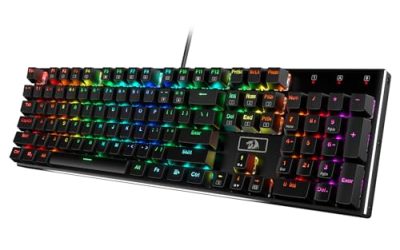
2. Redragon S101-3 PRO Gaming Keyboard and Mouse Combo

The Redragon S101-3 PRO is a wired set that keeps things simple: plug both devices into USB ports and play. There is no battery to charge and no receiver to pair, which makes it a good first set for someone moving from a controller to keyboard and mouse on Xbox.
The keyboard is backlit with RGB lighting, and the set includes software for programming keys and recording macros, so you can assign actions to keys you can reach easily. The mouse adjusts up to 7,200 DPI, which gives you room to tune aim sensitivity. A wrist rest is included with the keyboard, and multimedia keys handle volume and playback without leaving the game.
Note that the S101 line also sells in a larger bundle that adds a headset and a mouse pad under a different listing. The set covered here is the keyboard-and-mouse set only, in white.
Specs
- Connection: wired USB
- Keyboard: RGB backlit, programmable with software, macro record keys, multimedia keys, wrist rest
- Mouse: up to 7,200 DPI
- Compatibility: PC and Xbox via USB
- Color: white
3. AULA T102 Gaming Keyboard and Mouse Combo

The AULA T102 is a full-size wired set built around a sturdy all-metal top panel, which is unusual at this end of the market and gives the board a solid feel under your hands. It is the set to pick if you play at a desk and want a full layout with a number pad, plus a mouse with real sensitivity adjustment.
The keyboard uses quiet membrane keys with a short 2.0 mm keystroke, so late-night sessions stay quiet. Anti-ghosting covers 26 keys, which means simultaneous presses — movement keys plus modifiers — register without dropped inputs. The rainbow backlight runs in three modes (constant, breathing, heartbeat) across three brightness levels, and it can be switched off entirely. Twelve multimedia keys sit on the top row for volume and playback.
The mouse cycles through four sensitivity steps from 1,200 to 7,200 DPI, so you can switch between precise aiming and fast turns without opening any software. The set sleeps after five minutes of inactivity and wakes instantly with a keypress.
Specs
- Connection: wired USB
- Keyboard: 104 keys, full-size, all-metal top panel, membrane keys, 2.0 mm keystroke
- Anti-ghosting: 26 keys
- Backlight: rainbow, 3 modes, 3 brightness levels, can be switched off
- Multimedia keys: 12 (FN + F1–F12)
- Mouse: 4 DPI steps, 1,200 / 2,400 / 4,800 / 7,200 DPI
- Compatibility: PC, PS4, Xbox, Mac, iOS
- Color: black keycaps with black panel
4. Redragon S155-PRO Wireless Gaming Keyboard and Mouse Combo
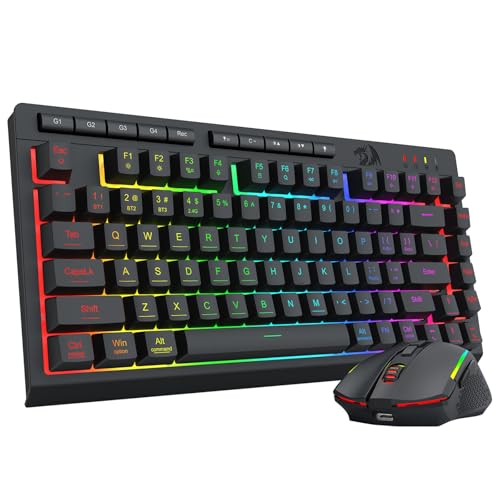
The Redragon S155-PRO is the long-battery wireless set in this guide. Its keyboard carries a 4,000 mAh battery rated for up to 50 hours with the lighting on and up to 300 hours with the lighting off, and the mouse has its own 700 mAh battery. That is the kind of battery life that lets you forget about charging between sessions.
Both devices connect three ways: Bluetooth, a shared 2.4 GHz receiver, or a USB-C cable. The shared receiver matters on Xbox, where it means one port covers both devices. The keyboard is a compact 75 percent layout with quiet membrane keys, which leaves plenty of room for the mouse on a small desk or a lap tray. The mouse is a seven-button design with sensitivity up to 12,800 DPI and software for tuning it.
The lighting offers a wide range of colors with eight effects and six custom modes, and the keyboard stays quiet enough for shared rooms. If you want a wireless set you rarely have to think about, this is the one.
Specs
- Connection: Bluetooth 5.0, 2.4 GHz wireless, USB-C wired
- Keyboard: 75 percent layout, quiet membrane keys, RGB backlit
- Keyboard battery: 4,000 mAh, up to 50 hours with RGB on, up to 300 hours with RGB off
- Mouse battery: 700 mAh
- Mouse: 7 buttons, up to 12,800 DPI, 125–1,000 Hz polling
- Lighting: 16.8 million colors, 8 effects, 6 custom modes
- Compatibility: PC, Mac, tablet, phone, PS and Xbox
5. CHONCHOW RGB Gaming Keyboard and Mouse Combo
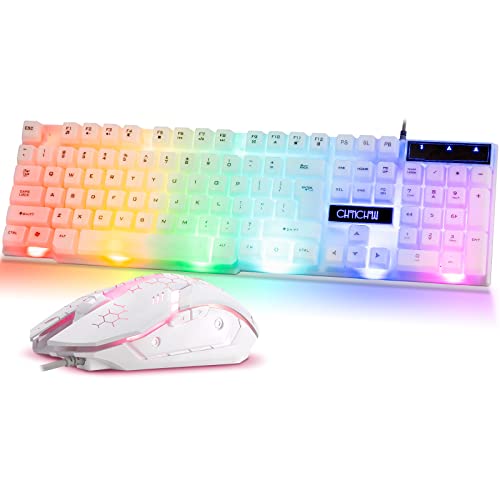
The CHONCHOW RGB combo is a straightforward wired set that does the basics well. It plugs into USB, it lights up, and it works with Xbox — the listing names Xbox among its compatible devices, alongside PC, PS4, laptop, and iMac.
The keyboard is a full-size 104-key board with RGB backlighting in static and breathing modes, switched with the FN and light keys. Twelve multimedia keys handle volume and playback, 19 keys are conflict-free so simultaneous presses register, and the Windows key can be locked to stop accidental presses from pulling you out of a game. Thin keycaps and an integrated wrist rest keep typing comfortable, and the floating-key design is built to resist spills.
The mouse is a six-button wired design with four sensitivity levels — 1,200, 1,800, 2,400, and 3,200 DPI — and its backlight can be switched on or off with the DPI key. Its ergonomic shape and skin-friendly surface suit long sessions.
Specs
- Connection: wired USB
- Keyboard: 104 keys, QWERTY, RGB backlit, static and breathing modes
- Multimedia keys: 12, Windows key lock, 19 conflict-free keys
- Mouse: 6 buttons, 4 DPI levels, 1,200 / 1,800 / 2,400 / 3,200 DPI
- Item weight: 1.86 pounds
- Compatibility: PC, PS4, Xbox, laptop, iMac
How the Five Sets Compare
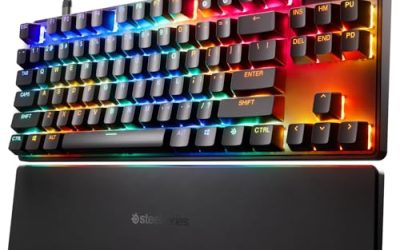
The Razer Turret is the only set designed for Xbox from the ground up, and its built-in mouse mat makes it the best couch option. The Redragon S155-PRO is the wireless pick for people who hate charging, with the biggest battery in the guide and three ways to connect. The AULA T102 is the desk pick, with a full layout, a metal panel, and a mouse that covers a wide sensitivity range. The Redragon S101-3 PRO is the simple wired starter set with programmable keys and a wrist rest. The CHONCHOW RGB combo is the plain, dependable wired set that plugs in and works.
If you play from the couch, choose between the Turret and the S155-PRO: the Turret for its lap-friendly design, the S155-PRO for battery life and compact size. If you play at a desk, choose between the AULA T102 and the CHONCHOW set: the T102 for build and features, the CHONCHOW for simplicity. If you are new to keyboard and mouse on Xbox and want the lowest-friction start, the wired Redragon S101-3 PRO asks the least of you.
What to Check Before You Buy
First, confirm your games support keyboard and mouse on Xbox. Support is decided game by game, and a set that works perfectly in one title may do nothing in another. Check the game itself or the publisher’s notes for keyboard and mouse support.
Second, count your USB ports. A wireless set with a shared receiver uses one port. A wired set uses two, one for the keyboard and one for the mouse. If you also use a headset or an external drive, make sure you have ports to spare, or plan to use a USB hub.
Third, think about where you sit. Couch play favors compact wireless sets and boards with a built-in mouse surface. Desk play favors full-size wired sets with a number pad. Buying the wrong size for your space is the most common regret with console keyboard sets.
Fourth, for the Razer Turret specifically, confirm the listing is a complete new unit with the receiver and charging cable included, since it is older hardware and incomplete used units do circulate.
Finally, keep expectations honest. A keyboard and mouse set will not make an unsupported game accept it, and it will not replace practice. What it does is give you the control scheme you are comfortable with, in the games that allow it, with hardware that fits how and where you play.
FAQ
Does Xbox support any keyboard and mouse, or only certain sets?
Xbox accepts standard USB and wireless keyboards and mice, but only in games where the publisher has enabled keyboard and mouse support. The sets in this guide connect through USB or a USB receiver and are listed as Xbox compatible, so the hardware side is covered. Whether a game responds to them depends on the game itself.
Do keyboard and mouse work in every Xbox game?
No. Support is decided game by game. Some games support keyboard and mouse fully, some support only the keyboard for chat and menus, and some do not support them at all. Check the game you play before buying a set, and do not assume a set will work everywhere on the console.
Is a wireless combo or a wired combo better for Xbox?
It depends on where you play. Wireless suits the couch, since one receiver covers both devices and there are no cables between you and the console, but you have to keep the keyboard and mouse charged. Wired suits a desk, since the set draws power from the console and never needs charging, but the cables limit how far you can sit. Both work the same in supported games once connected.
Can I use a keyboard and mouse combo on the couch with my Xbox?
Yes, and some sets are built for exactly that. The Razer Turret has a retractable mouse mat built into the keyboard so the mouse works on your lap, and compact wireless sets like the Redragon S155-PRO fit on a lap tray with room to aim. A full-size wired set is harder to use on the couch, so pick a compact or couch-friendly set if the sofa is your main spot.
Final Thoughts
The best gaming keyboard and mouse for Xbox is the set that matches how you play: the Turret if you live on the couch, the S155-PRO if you want wireless without constant charging, the AULA T102 if you play at a desk and want a full board, the S101-3 PRO if you want a simple wired start, or the CHONCHOW set if you want a plain wired combo that just works. Check your games support keyboard and mouse, count your USB ports, and pick the set that fits your space. Then plug it in and play.
FAQ
Does Xbox support any keyboard and mouse, or only certain sets?
Do keyboard and mouse work in every Xbox game?
Is a wireless combo or a wired combo better for Xbox?
Can I use a keyboard and mouse combo on the couch with my Xbox?
More from Amazon
Programs that pair well with the guide above. Offers and eligibility are set by Amazon and may change.
Free shipping on eligible items, Prime Video and more. Eligible new members can start with a free trial.
Start a Prime free trialAd-free music streaming. Eligible new subscribers can start with a free trial.
Try Music Unlimited freeA Prime membership for ages 18-24 with a trial period. Eligibility is set by Amazon.
See Prime for Young AdultsAudiobooks and podcasts to listen to on the go. Eligible new members can start with a free trial.
Try Audible freeAs an Amazon Associate we earn from qualifying purchases.