Key takeaways
- Pro: RTX 5060 listed
- Pro: 165Hz IPS display
- Pro: 16GB RAM
- Con: 512GB SSD fills quickly
- Con: Cooling and ports not listed
The best gaming laptops under $1300 are the Lenovo LOQ 15.3 with an RTX 5060 for the strongest listed GPU, the MECHREVO Aurora 16X for its 2.5K 180Hz screen, and the HP Victus with an RTX 4050 for the lowest entry point. Every pick below lists 16GB of RAM.
This tier sits between the entry RTX 4050 laptops and the pricier 16-inch models, so the choice is mostly about GPU generation, screen quality and storage. Gaming laptops under $1300 can include RTX 4050, 5050 and 5060 graphics, and the listings differ widely on panel, cooling and SSD size.
Every model below is compared from listing specifications, and no benchmark numbers are claimed. Streaming, 1440p and student use are covered in the buying section and the FAQ, so you can match the laptop to what you do with it.
Quick Comparison
| Model | Key specs per listing | Best for |
|---|---|---|
| Lenovo LOQ 15.3 RTX 5060 | Ryzen 7 250, RTX 5060, 16GB RAM, 512GB SSD, 15.3 inch WUXGA IPS 165Hz | Highest GPU tier in the list |
| MECHREVO Aurora 16X RTX 5060 | i7-14650HX, RTX 5060, 16GB DDR5, 512GB SSD, 16 inch 2.5K 180Hz IPS | Sharper, faster display |
| ASUS TUF Gaming F16 (2025) RTX 5050 | Core i5-13450HX, RTX 5050, 16GB DDR5, 512GB PCIe Gen4, 16 inch FHD+ 165Hz | Buyers who want a known brand |
| Acer Nitro V 16 ANV16-72-73EW RTX 5050 | Core 7 240H, RTX 5050, 16GB DDR5, 1TB Gen4 SSD, 16 inch WUXGA 180Hz IPS | Storage and a 180Hz screen |
| Lenovo LOQ RTX 4050 Ryzen 5 7235HS | Ryzen 5 7235HS, RTX 4050, 16GB DDR5, 512GB SSD, 15.6 inch FHD 144Hz | Ports and a simple entry |
| HP Victus 15.6 RTX 4050 Ryzen 7 7445HS | Ryzen 7 7445HS, RTX 4050, 16GB DDR5, 512GB SSD, 15.6 inch FHD 144Hz, USB hub bundle | Lowest entry point here |
The table uses only what each listing states: GPU, processor, RAM, storage and display. Listings do not give wattage limits, battery life or cooling data, so those are marked as not listed in the picks below.
Lenovo LOQ 15.3 RTX 5060
As an Amazon Associate we earn from qualifying purchases at no extra cost to you.

Spec line: 15.3 inch WUXGA IPS 165Hz display, AMD Ryzen 7 250, NVIDIA GeForce RTX 5060, 16GB RAM, 512GB SSD, Luna Grey.
The LOQ 15.3 is the strongest GPU on paper in this list, because the listing names an RTX 5060 alongside a Ryzen 7 250, 16GB of RAM and a 512GB SSD. The 15.3 inch WUXGA IPS panel runs at 165Hz, which is a smoother refresh than the 144Hz panels on the cheaper picks, and the taller 16:10 shape suits work as well as games. The trade-off is storage: 512GB fills quickly with modern games, so plan an extra drive. The listing does not give wattage, cooling, battery or port details, so check the maker page before relying on them. It is a good fit for buyers who want the newest GPU generation within the ceiling.
- Pro: RTX 5060 listed
- Pro: 165Hz IPS display
- Pro: 16GB RAM
- Con: 512GB SSD fills quickly
- Con: Cooling and ports not listed
MECHREVO Aurora 16X RTX 5060

Spec line: 16 inch 2.5K 180Hz 16:10 IPS display, 100% sRGB, Intel Core i7-14650HX, NVIDIA RTX 5060, 16GB DDR5, 512GB SSD, RGB keyboard, Ice Shark cooling, Windows 11 Home.
MECHREVO is the pick for anyone who wants a sharper, faster screen. The listing names a 16 inch 2.5K 180Hz IPS panel with 100% sRGB, which is the best display described in this list, paired with a Core i7-14650HX and an RTX 5060. It also names a cooling design called Ice Shark and an RGB keyboard. This is the least familiar brand here, so warranty handling and parts availability deserve a look before buying. The 512GB SSD is small for a library of big games. If you want the display-first choice at this ceiling, this is it, and the 2.5K panel is the only one here described above a 1080p-class resolution.
- Pro: 2.5K 180Hz panel with 100% sRGB
- Pro: Core i7-14650HX and RTX 5060
- Pro: Cooling design named
- Con: Less familiar brand
- Con: 512GB SSD is small
ASUS TUF Gaming F16 (2025) RTX 5050
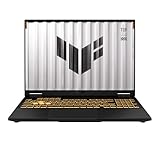
Spec line: 16 inch FHD+ 165Hz 16:10 display, Intel Core i5-13450HX, NVIDIA GeForce RTX 5050, 16GB DDR5, 512GB PCIe Gen4 SSD, Wi-Fi 6E, Windows 11 Home.
The TUF F16 offers a brand most buyers know, along with a 16:10 FHD+ 165Hz display, a Core i5-13450HX, an RTX 5050, 16GB of DDR5 and a PCIe Gen4 SSD. Wi-Fi 6E is a useful extra for online games and streaming uploads. It costs more than the HP and Lenovo RTX 4050 models but sits below the RTX 5060 picks in the GPU tier, so it is a middle option. The listing does not mention battery life, weight or cooling details, and 512GB of storage is limited. It suits someone who values a well-known brand and a taller screen above chasing the top GPU.
- Pro: Known brand
- Pro: 16:10 165Hz FHD+ display
- Pro: Wi-Fi 6E listed
- Con: RTX 5050 sits below the 5060 picks
- Con: 512GB storage
Acer Nitro V 16 ANV16-72-73EW RTX 5050

Spec line: 16 inch WUXGA IPS 180Hz display, Intel Core 7 240H, NVIDIA GeForce RTX 5050, 16GB DDR5, 1TB Gen 4 SSD, Wi-Fi 6, backlit keyboard.
The Nitro V 16 stands out for storage and refresh rate. The listing names a 1TB Gen 4 SSD, which is twice the capacity of most picks here, and a 16 inch WUXGA IPS panel at 180Hz, along with a Core 7 240H, an RTX 5050 and 16GB of DDR5. It is the most expensive pick in the guide and sits close to the ceiling, so the extra cost is largely for the larger SSD and faster screen. The Wi-Fi 6 standard is older than Wi-Fi 6E on the ASUS. Weight and battery details are not in the listing, so verify before buying. It is a good fit if you hate managing storage.
- Pro: 1TB Gen 4 SSD
- Pro: 180Hz IPS display
- Pro: Backlit keyboard
- Con: Close to the price ceiling
- Con: Wi-Fi 6 rather than 6E
Lenovo LOQ RTX 4050 Ryzen 5 7235HS

Spec line: 15.6 inch FHD 144Hz display, AMD Ryzen 5 7235HS, GeForce RTX 4050, 16GB DDR5, 512GB SSD, Wi-Fi 6, Ethernet, USB-C, HDMI, backlit keyboard, Windows 11 Home.
The LOQ with an RTX 4050 is the practical, balanced entry. The listing names a Ryzen 5 7235HS, 16GB of DDR5, a 512GB SSD and a 15.6 inch FHD 144Hz display, and unlike many listings it also names the ports: Ethernet, USB-C and HDMI. A wired Ethernet port is useful for online games and for streaming uploads. The RTX 4050 is the previous generation, so you give up some GPU tier compared with the 5060 models, and the 144Hz screen is a step below the 165Hz and 180Hz panels. It is a good pick for a student who wants a known brand and a wide port selection.
- Pro: Ethernet, USB-C and HDMI named
- Pro: RTX 4050 and 16GB DDR5
- Pro: Backlit keyboard
- Con: Previous-generation GPU
- Con: 144Hz is the slowest panel
HP Victus 15.6 RTX 4050 Ryzen 7 7445HS
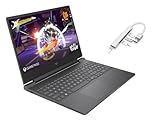
Spec line: 15.6 inch FHD 144Hz display, AMD Ryzen 7 7445HS, NVIDIA GeForce RTX 4050, 16GB DDR5, 512GB SSD, backlit keyboard, Mica Silver, Windows 11 Home, bundled with a USB 3.0 hub.
The HP Victus is the lowest-priced model in the guide, at the bottom of the tier. The listing names a Ryzen 7 7445HS, an RTX 4050, 16GB of DDR5 and a 512GB SSD, with a 15.6 inch FHD 144Hz display and a USB 3.0 hub bundled in. The Ryzen 7 CPU is a step above the Ryzen 5 in the LOQ 4050, which is useful if you also stream or edit. The bundle is a seller combination, so check what is actually included. Battery life and weight are not listed. It is the right pick when budget matters more than the newest GPU generation.
- Pro: Lowest entry in the guide
- Pro: Ryzen 7 7445HS processor
- Pro: USB hub bundled
- Con: RTX 4050 is the previous generation
- Con: Bundle contents need checking
What This Price Tier Buys
In this range a laptop is judged on four things: the GPU generation, the refresh rate and panel type, the size of the SSD and the cooling design. The listings above fall into three GPU groups: RTX 4050 at the lowest entry, RTX 5050 in the middle and RTX 5060 at the top. Each step up in GPU generally means higher settings or smoother frame rates in the same game, though the listings give no benchmark data.
Memory is a quieter factor. Every pick here names 16GB of RAM, which is a sensible minimum for modern games, and the ASUS, Acer and Lenovo models list DDR5. Storage is the weak point, because most picks ship with a 512GB SSD that holds only a handful of large titles, so plan an upgrade or an external drive.
Finally, remember that the numbers on a listing are maximum figures, and gaming laptops throttle when they are hot. Check reviews of the specific model for temperatures and fan noise, because the listings give no such data.
How to Choose Gaming Laptops Under $1300
GPU generation and tier
Treat an RTX 5060 as the performance target and an RTX 4050 or 5050 as an entry GPU. If you play new titles at high settings, spend toward the 5060 models, and if you play esports titles and older games, the RTX 4050 laptops are enough.
Display refresh and resolution
Look for 144Hz at minimum and 165Hz or higher if you play shooters. The MECHREVO is the only listed panel above 1080p-class, at 2.5K. For true 1440p gaming at a smooth frame rate, a laptop in this range usually needs lower settings, so keep expectations modest.
Streaming, students and home office
For gaming laptops for streaming, pick 16GB of RAM or more and a Ryzen 7 or Core i7 processor, such as the HP Victus or MECHREVO. For students, gaming laptops for students should balance weight and ports, so the LOQ with Ethernet, USB-C and HDMI is a practical fit.
Storage, cooling and the $1300 ceiling
At a $1300 ceiling, spend on a bigger SSD if you can, because 512GB is tight. Look for a stated cooling design and a Wi-Fi 6 or 6E radio. If a listing does not name them, treat them as unknowns and read reviews before you commit.
FAQ
Is an RTX 5060 laptop worth it over an RTX 4050?
It is a newer generation with a higher tier, so it should handle higher settings. The cost is usually higher, so choose it if you play demanding new games.
Can these laptops game at 1440p?
The MECHREVO has a 2.5K panel, but the GPU tier means you may need lower settings. Most others have 1080p-class panels.
Are gaming laptops good for students?
Yes, if you accept more weight and shorter battery life than an ultrabook. Look for good ports and a backlit keyboard.
Are these laptops good for streaming?
A Ryzen 7 or Core i7 with 16GB of RAM and a recent RTX GPU handles streaming software well. Check cooling and noise.
Should I upgrade the SSD?
If it has only 512GB, an extra drive is useful for games. Check whether the model has a second M.2 slot before you buy.
Last updated: November 2026
FAQ
Is an RTX 5060 laptop worth it over an RTX 4050?
Can these laptops game at 1440p?
Are gaming laptops good for students?
Are these laptops good for streaming?
Should I upgrade the SSD?
More from Amazon
Programs that pair well with the guide above. Offers and eligibility are set by Amazon and may change.
Free shipping on eligible items, Prime Video and more. Eligible new members can start with a free trial.
Start a Prime free trialAd-free music streaming. Eligible new subscribers can start with a free trial.
Try Music Unlimited freeA Prime membership for ages 18-24 with a trial period. Eligibility is set by Amazon.
See Prime for Young AdultsAudiobooks and podcasts to listen to on the go. Eligible new members can start with a free trial.
Try Audible freeAs an Amazon Associate we earn from qualifying purchases.