Key takeaways
- Compare the best HDMI dummy plugs for a headless gaming PC, from 4K 120Hz virtual displays for game streaming to multi-packs for always-on rigs.
A gaming PC that lives in a closet, a rack or a spare room and sends its picture to the living room TV or a handheld has one odd weakness: unplug the monitor and many graphics cards fall back to a tiny low resolution, switch off hardware encoding, or leave remote software facing a black screen. A dummy plug fixes that for very little effort. It is a thumb-sized EDID emulator that sits in a spare HDMI port and tells the graphics card that a display is attached, so the card keeps rendering a full desktop that tools like Sunshine and Moonlight, Parsec or Steam Remote Play can capture and send on.


Because the plug’s built-in mode list becomes your virtual monitor, the details matter more than the simple shape suggests. A plug that tops out at 1080p at 60Hz is fine for admin access but wrong for a 4K 120Hz stream, and a closed-end plug does a different job from an inline passthrough that guards a real monitor on a KVM. The five picks below cover the main shapes: high-refresh HDMI 2.1 plugs for streaming hosts, a 1440p-default plug for remote play, a multi-pack for several machines, and one passthrough for setups where a physical screen still exists.
Disclosure: As an Amazon Associate, we earn from qualifying purchases made through links in this article, at no extra cost to you.
Quick Picks
| Product | Best for | ASIN |
|---|---|---|
| EVanlak 8K HDMI Dummy Plug | Highest mode list, 144Hz at 1440p | B0FX3YLN5S |
| Woieyeks 4K 120Hz HDMI 2.1 Dummy Plug | 4K 120Hz virtual display | B0BX3YKM1T |
| DTECH 4K HDMI Dummy Plug 5-Pack | Several headless PCs at once | B09MZBFNM3 |
| xieoery HDMI EDID Emulator Dummy Plug | 1440p default for remote play | B0G4HTSG11 |
| Malarpon HDMI EDID Emulator Passthrough | Holding a real monitor’s EDID on a KVM | B08RCLT6XB |
How to Choose
Decide which shape you need first. A closed-end dummy plug creates a virtual display and nothing else; there is no socket for a real screen. That is the right tool for a PC that will live without a monitor. A passthrough emulator sits between the PC and a real display or KVM and keeps feeding the PC the display’s identity when the screen is off, unplugged or switched to another input, which stops windows from scattering across a changed desktop.
Match the mode list to your stream target. The plug advertises a fixed set of resolutions and refresh figures, and your streaming host can only offer modes from that set. For a 1080p handheld stream almost any plug works. For 1440p at 120Hz or 4K at 120Hz you need a plug whose list includes that exact mode, and the graphics card and its port have to support it too; a plug cannot invent a mode the GPU cannot output. Several sellers state their headline 4K figure at reduced color depth, so read the full mode list rather than the title line.
Check the port generation on your card. High-refresh modes need a matching port: 4K at 120Hz calls for HDMI 2.1 on the graphics card, while 4K at 60Hz fits HDMI 2.0. Some listings add that their 4K modes are for discrete graphics cards only, not integrated graphics, which matters for mini PCs and APUs. If your headless box runs on integrated graphics, favor a plug with modest modes.
Count your machines before choosing a pack. One plug serves one output on one PC. A single streaming host needs a single plug, while a shelf of always-on boxes or spare-room PCs is cheaper to cover with a multi-pack, and one spare in a drawer saves a second order when a new build joins the rack.
Keep expectations simple. Every pick here is passive: no drivers, no separate power lead, no software to configure. You plug it in, set the virtual display’s resolution and refresh figure in your OS once, and leave it there.
The Picks
EVanlak 8K HDMI Dummy Plug
Specs
- Connector: HDMI male, HDMI 2.1
- Listed modes: up to 8K at 30Hz, 4K at 120Hz, 1440p at 144Hz, 1080p at 144Hz
- Pack size: 1
- Connector finish: gold-plated
- Power: none required, plug and play
- Listed uses: remote desktop, game streaming, rendering, mining rigs
The EVanlak carries the longest mode list in this roundup, which makes it the natural pick for a streaming host that feeds different screens at different times. The 1440p at 144Hz and 1080p at 144Hz modes suit high-refresh remote play to a gaming monitor in another room, the 4K at 120Hz mode covers a modern TV, and the 8K at 30Hz ceiling is there if a future host ever asks for it.
It is a single plug with a gold-plated connector and no setup beyond choosing the mode in your display settings. As with every HDMI 2.1 plug here, the headline modes only appear when the graphics card’s port is also HDMI 2.1; on an HDMI 2.0 card the same plug still works, simply with a shorter list of modes.
Best for: a game streaming host that needs the widest choice of resolutions and refresh figures from one plug.
Woieyeks 4K 120Hz HDMI 2.1 Dummy Plug
Specs
- Connector: HDMI male, HDMI 2.1
- Listed modes: 3840×2160 at 60Hz and 120Hz, 2560×1600 at 120Hz, 1920×1080 at 120Hz, down to 800×600
- Requirement: HDMI 2.1 port on the graphics card for 4K at 120Hz
- OS support: Windows 11, 10, 8.1, 8, 7 and XP, Mac OS, Linux
- Pack size: 1
- Listed compatible devices: PC, VR headsets
The Woieyeks is the focused 4K 120Hz option. Its list pairs 3840×2160 at 120Hz with a full ladder of lower modes at 120Hz, so a host PC can present a 4K desktop to a TV client or drop to 1080p at 120Hz for a handheld without swapping hardware. The listing is explicit that the graphics card interface must be HDMI 2.1 to reach 4K at 120Hz, and that the plug cannot emulate a mode beyond what the GPU itself supports, the honest limit for this whole product class.
Broad OS support is printed on the listing, and the seller names remote desktop and VR headset use among its purposes. For a single headless gaming PC whose job is feeding a 4K screen over the network, this is the straightforward plug to leave in the back panel.
Best for: a single headless gaming PC built around 4K 120Hz streaming to a TV.
DTECH 4K HDMI Dummy Plug 5-Pack
Specs
- Connector: HDMI male, gold-plated
- Listed modes: up to 4K at 60Hz (2160p), plus 1080p and lower modes
- Model: T0667-5
- Pack size: 5
- OS support: Windows, Mac OSX, Linux
- Note from listing: 4K modes call for HDMI 2.0 and a discrete graphics card
The DTECH pack is the bulk answer: five identical 4K plugs in one box, enough for a small fleet of headless machines with one left over. Each plug offers modes up to 4K at 60Hz, which covers remote desktop work, media servers, spare gaming PCs and test boxes, and the gold-plated connector is a small durability plus on hardware that gets reseated during upgrades.
DTECH prints its limits clearly. The 4K modes need an HDMI 2.0 port and a discrete graphics card in the RX 460 or GTX 1050 class or above, and the listing says the plugs suit stand-alone graphics card computers rather than integrated graphics PCs. Treat the pack as a discrete-GPU household purchase: ideal when every machine on the shelf has its own card, less suited to a mini PC on an APU.
Best for: households with several discrete-GPU PCs that all need to run without monitors.
xieoery HDMI EDID Emulator Dummy Plug
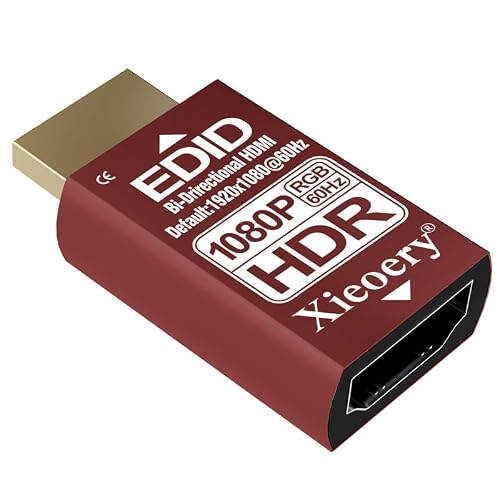
Specs
- Connector: HDMI male
- Default mode: 2560×1440 at 60Hz
- Listed modes: 1080p, 2K and 4K options, with HDR variants in the same line
- Size: 1.3 x 0.8 x 0.4 inches
- Listed compatible devices: desktop PCs, gaming consoles, monitors
- Power: none required, plug and play, no drivers
Most dummy plugs wake up at 1080p, which leaves a remote session one manual change away from the resolution you actually want. The xieoery defaults to 2560×1440 at 60Hz, a sensible home base for remote play: high enough for a desktop monitor client, light enough for a handheld to downscale cleanly, and a common native target for 1440p panels. The same line offers 1080p and 4K variants, so the default mode is the thing to check when ordering.
The body is small at 1.3 inches long, which helps on crowded back panels where a long dongle would press against a neighboring cable. The listing names desktop PCs, gaming consoles and monitors among compatible devices and repeats the usual promise for this class: no drivers, no power lead, nothing to configure beyond the OS display settings.
Best for: remote players who want the virtual display to wake up at 1440p without any fiddling after a reboot.
Malarpon HDMI EDID Emulator Passthrough

Specs
- Type: inline passthrough, male-to-female
- Shell: aluminum, third-generation design
- EDID handling: bi-directional, works from either end
- Listed modes: up to 3840×2160 at 60Hz over HDMI 2.0, with this variant’s fixed profile at 1024×768 at 59Hz
- Pack size: 4
- Size: about 1.6 inches long
The Malarpon solves the neighboring problem. Instead of replacing a monitor, it sits in line with one, between the PC and the display or a KVM, and keeps telling the PC that the display is present when the screen is powered down, disconnected or switched to another machine. That keeps the desktop layout, resolution and window positions stable, the daily annoyance in dual-PC streaming desks and shared-monitor setups. It can also serve as a plain dummy plug: connect a monitor once so it learns the EDID, then remove the monitor and the adapter keeps reporting it.
The aluminum shell and bi-directional design mean it works from either the source or the display end, and this four-pack suits a desk with more than one machine behind a switch. Read the variant line before ordering, since Malarpon sells several fixed profiles; this one is the 1024×768 at 59Hz profile, aimed at keeping a session alive rather than feeding a high-resolution stream.
Best for: KVM and shared-monitor desks where the real screen sleeps, switches away or gets unplugged.
FAQ
Will a dummy plug work with integrated graphics?
Often yes for basic modes, but read the listing first. Some plugs, the DTECH in this roundup among them, state that their 4K modes are for discrete graphics cards and do not support integrated graphics PCs. A plug also cannot offer a mode the GPU cannot produce, so on an APU or mini PC, expect the lower part of the mode list.
Can I stream games at 120Hz through a dummy plug?
Yes, provided every link in the chain agrees. The plug’s mode list must include the resolution and refresh figure you want, the graphics card port must match (HDMI 2.1 for 4K at 120Hz), and the streaming software must be set to that mode. Set the virtual display’s refresh figure in your OS display settings once, and the host will offer it to clients such as Moonlight from then on.
What is the difference between a dummy plug and a passthrough emulator?
A dummy plug is closed at the far end: it creates a virtual display and gives you nowhere to attach a real screen, which is what a fully headless PC needs. A passthrough emulator passes the video signal through to a real monitor while holding its EDID in place when the monitor is off or disconnected. Choose the passthrough when a physical display exists but comes and goes, and the closed plug when no display will be attached at all.
Does a dummy plug need drivers, software or power?
No. All five picks are passive devices that draw what they need from the HDMI port itself and present their mode list to the graphics card automatically. The only setup is choosing the virtual display’s resolution and refresh figure in your OS after the plug goes in.
Conclusion
For most headless gaming PCs, the choice comes down to the mode list. The Woieyeks is the clean single-plug answer for 4K 120Hz streaming, the EVanlak adds 144Hz modes at 1440p and 1080p for high-refresh remote play, and the xieoery suits anyone who wants the virtual screen to wake up at 1440p by default. The DTECH five-pack covers a shelf of discrete-GPU machines in one purchase, while the Malarpon passthrough guards a real monitor on a KVM rather than replacing it. Match the plug to your card’s port and the screen you stream to, and the monitor can go back in its box.
FAQ
Will a dummy plug work with integrated graphics?
Can I stream games at 120Hz through a dummy plug?
What is the difference between a dummy plug and a passthrough emulator?
Does a dummy plug need drivers, software or power?
More from Amazon
Programs that pair well with the guide above. Offers and eligibility are set by Amazon and may change.
Free shipping on eligible items, Prime Video and more. Eligible new members can start with a free trial.
Start a Prime free trialAd-free music streaming. Eligible new subscribers can start with a free trial.
Try Music Unlimited freeA Prime membership for ages 18-24 with a trial period. Eligibility is set by Amazon.
See Prime for Young AdultsAudiobooks and podcasts to listen to on the go. Eligible new members can start with a free trial.
Try Audible freeAs an Amazon Associate we earn from qualifying purchases.