Key takeaways
- Find the best router for Frontier Fiber: ASUS RT-AX3000, TP-Link Archer AX55, Deco X20 mesh and more, matched to your plan speed and home size.
Frontier Fiber hands you a clean Ethernet connection from the ONT, so the router you plug in decides how fast that connection feels in every room. The rental eero works, yet it limits the ports, controls, and multi-gig headroom many households want, and the monthly rental adds up over a year of service. Choosing your own router means matching the WAN port to your plan, covering the rooms you actually use, and keeping the settings under your control.


This guide is for Frontier Fiber households, from apartments on the 500 Mbps plan to larger homes on gigabit and multi-gig tiers, plus gamers and remote workers who need steady latency and wired ports. Every router below was picked from its name and specifications on its Amazon listing, with a Gigabit or faster WAN port that connects straight to the Frontier ONT by Ethernet cable. Read the plan-matching advice first, then pick the model that fits your home.
Quick Picks
As an Amazon Associate we earn from qualifying purchases
| Product | Best for | Key spec from title |
|---|---|---|
| ASUS RT-AX3000 | A solid all-round upgrade from the rental unit | AX3000 dual-band Wi-Fi 6 with USB 3.0 |
| TP-Link Archer AX55 | A mid-range pick for busy family homes | AX3000 dual-band Wi-Fi 6 with VPN support |
| TP-Link Deco X20 (3-Pack) | Whole-home coverage with no dead zones | AX1800 Wi-Fi 6 mesh covering up to 5,800 sq ft |
| NETGEAR Nighthawk RAX45 | Strong wireless throughput for many devices | AX4300 6-stream Wi-Fi 6 |
| ASUS RT-AX1800S | A budget first step off the rental router | AX1800 dual-band Wi-Fi 6 with AiMesh |
How to Choose
Match the WAN Port to Your Frontier Plan
Frontier confirms its fiber service works with any router that supports an Ethernet WAN connection, because the ONT converts the fiber signal into a standard Ethernet handoff and needs no modem of its own. Your plan still decides which WAN port makes sense: a Gigabit WAN port handles the 500 Mbps tier with room to spare and delivers close to gigabit speed on the 1 Gig tier, while the 2 Gig tier needs a 2.5G WAN port to avoid capping your connection. Check the plan on your Frontier bill before you shop, and buy a router whose WAN port is at least as fast as that plan.
Coverage That Fits Your Home, Not the Box Claim
Coverage figures on router boxes describe open space with few walls, so treat them as a ceiling rather than a promise for your floor plan. A single router usually serves a small apartment or a one-story home well, while two-story homes, thick walls, and long hallways push you toward a mesh system with a node on each floor. Count the rooms where people stream, game, or work, and note which sit farthest from where the ONT cable enters the house. Place the main unit near the center of the home when the cable run allows it, and add a node only where the signal truly drops. Coverage you will never use wastes money better spent on a faster WAN port.
Wired Ports and the Devices That Need Them
Wireless speed gets the headlines, yet a wired connection still wins for a gaming PC, a work laptop on video calls, and a streaming box in the living room. Count the devices you want to plug in before you choose, because most routers here offer four LAN ports and a mesh node often offers only two. A console, a desktop, a TV box, and a network drive already fill four ports, so a switch may become part of the plan. Check whether the router supports wired backhaul for mesh nodes, since an Ethernet link between nodes keeps the wireless bands free for your devices. Think of ports as part of the router, not an afterthought you fix later.
Setup, Security, and Living With the Router
A router you dread managing will stay on default settings, so pick one whose app and web interface you can actually navigate. Look for automatic firmware updates, a guest network for visitors, and parental controls if children share the connection, and confirm the security features do not need a paid subscription to stay useful. Note the warranty length and where the support pages live, because a router is a device you will rely on for years. Keep the admin password changed from the default, write down the network name and password you set, and place the router in the open rather than inside a closed cabinet. A few minutes of setup care pays off every day the network runs.
The 5 Best Options
ASUS RT-AX3000
The RT-AX3000 is the straightforward pick for a Frontier household that wants a clear step up from the rental router without learning a new ecosystem. Its AX3000 Wi-Fi 6 radios handle a gigabit plan comfortably, the four LAN ports cover a console and a desktop with room left over, and the USB port takes a shared drive or a printer. AiMesh lets you add another ASUS router later instead of replacing this one, which suits homes that may grow. It fits apartments and mid-size homes where one strong router reaches every room.
Specs
- Dual-band Wi-Fi 6 (802.11ax), AX3000
- 1x Gigabit WAN port and 4x Gigabit LAN ports
- 1x USB 3.0 port
- AiMesh compatible for extendable coverage
- AiProtection by Trend Micro and Adaptive QoS
Best for: A Frontier gigabit household that wants a dependable all-round router with room to expand.
Watch out for: Its Gigabit WAN port caps throughput near gigabit speed, so it cannot use the full speed of a 2 Gig Frontier plan.
TP-Link Archer AX55
The Archer AX55 suits a busy family home where many phones, laptops, and smart devices share one Frontier connection. Its AX3000 Wi-Fi 6 radios and OFDMA handling keep video calls smooth while someone else streams, and the built-in VPN client and server give remote workers a simple way to reach a home network. HomeShield adds parental controls and security tools without a separate device, and EasyMesh support leaves a path to add coverage later. Four high-gain antennas and beamforming aim the signal toward the rooms that need it most.
Specs
- Dual-band Wi-Fi 6 (802.11ax), AX3000
- Gigabit Ethernet router with VPN clients and server
- EasyMesh compatible
- HomeShield security with parental controls
- OFDMA and MU-MIMO
- USB 3.0 port
Best for: A family on a Frontier gigabit plan that wants VPN tools and parental controls in one box.
Watch out for: Its Gigabit WAN port limits the top speed on Frontier plans above 1 Gig, so check your tier before buying.
TP-Link Deco X20 (3-Pack)
The Deco X20 is the pick when one router cannot reach the far rooms of a larger Frontier home. Three units work as a single network with one name, so phones move between rooms without dropping a call, and the system covers up to 5,800 sq ft according to its listing. Six Ethernet ports across the three units give you wired spots for a console and a TV box, and wired backhaul keeps node-to-node traffic off the wireless bands. Setup runs through the Deco app, which suits households that want mesh coverage without a complicated install.
Specs
- Dual-band Wi-Fi 6 mesh system, AX1800
- Covers up to 5,800 sq ft
- 3-pack with 6 Ethernet ports in total
- Supports wired backhaul
- Replaces wireless routers and extenders
Best for: A larger Frontier home with dead zones that needs one seamless network across several rooms.
Watch out for: Each unit is AX1800, so a single device will not match the peak wireless speed of the AX3000 routers in this guide.
NETGEAR Nighthawk RAX45
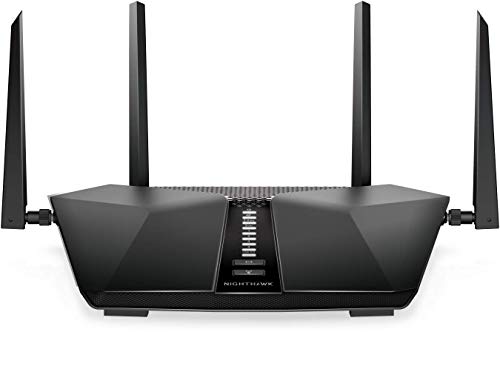
The Nighthawk RAX45 is built for homes where many devices pull bandwidth at the same time, from game downloads to 4K streams and cloud backups. Its six-stream AX4300 Wi-Fi 6 design gives the 5 GHz band more capacity than the AX3000 models here, which helps when several people stream at once. The Nighthawk app handles setup and basic controls, and the angular design with external antennas suits a desk or a shelf near the ONT. It is a strong fit for a Frontier gigabit household that measures its network by how many devices stay fast together.
Specs
- 6-stream AX4300 Wi-Fi 6 router (RAX45-100NAS)
- Dual-band Wi-Fi 6 (802.11ax)
- Designed for many connected devices at once
Best for: A device-heavy Frontier home that wants extra wireless capacity on the 5 GHz band.
Watch out for: Verify the exact seller and listing before ordering, since this model is sold through third-party sellers on Amazon US.
ASUS RT-AX1800S

The RT-AX1800S is the budget way to stop renting a router on a Frontier 500 Mbps plan. Its AX1800 Wi-Fi 6 radios are plenty for an apartment or a small home, and it carries the same ASUS software as its bigger siblings, including AiMesh, parental controls, and a built-in VPN. The subscription-free network security keeps protection active without a monthly add-on, and four external antennas help the signal reach the rooms around it. It is the right size for a household that wants its own router without paying for speed its plan cannot deliver.
Specs
- Dual-band Wi-Fi 6 (802.11ax), AX1800
- Subscription-free network security
- Parental control and built-in VPN
- AiMesh compatible
- 4 external antennas
Best for: A small Frontier household on the 500 Mbps plan that wants a low-cost router of its own.
Watch out for: Its AX1800 speed and Gigabit WAN port leave no headroom for a gigabit or multi-gig plan upgrade.
Which One Fits Your Situation
A Small Apartment on the 500 Mbps Plan
Pick the ASUS RT-AX1800S. Its AX1800 radios cover a small space easily, and the Gigabit WAN port has plenty of headroom for a 500 Mbps Frontier plan. You get ASUS parental controls, a built-in VPN, and AiMesh for later, all without paying for capacity your plan cannot use. Keep the router out in the open near the ONT, and you have a simple setup that replaces the rental unit from day one.
A Family Home on the Gigabit Plan
Pick the TP-Link Archer AX55. Its AX3000 radios and OFDMA handling suit a house where streaming, calls, and homework overlap, and HomeShield gives parents controls without extra hardware. The VPN client and server help anyone working from home, while EasyMesh leaves a way to add coverage if a far room struggles. It is the balanced choice for the most common Frontier tier.
A Large Home With Dead Zones
Pick the TP-Link Deco X20 3-pack. One router rarely covers two floors and a far bedroom well, and three mesh units create a single network that follows you from room to room. The listed 5,800 sq ft coverage suits a larger floor plan, and wired backhaul keeps the mesh link fast where Ethernet is available. Place one unit near the ONT and the others where the signal fades.
A Device-Heavy Home That Streams and Games
Pick the NETGEAR Nighthawk RAX45 or the ASUS RT-AX3000. The RAX45 brings six-stream AX4300 capacity for many devices streaming at once, while the RT-AX3000 adds a USB port and AiMesh expansion for a household that may grow. Both connect to the Frontier ONT by Ethernet and suit a gigabit plan. Choose the RAX45 for raw wireless capacity and the RT-AX3000 for ports and expansion.
Common Mistakes
- Buying a DOCSIS cable modem for Frontier Fiber: the ONT already converts fiber to Ethernet, so a cable modem is the wrong device entirely.
- Picking a router with a Gigabit WAN port for a 2 Gig plan and then wondering why speeds stop near gigabit.
- Placing the router inside a closed cabinet or behind the TV, where the signal is blocked before it reaches the far rooms.
- Forgetting that a Frontier landline phone service may need the Frontier gateway to stay connected, so check before removing it.
- Leaving the admin password at its default and never turning on automatic firmware updates.
Frequently Asked Questions
Can I use my own router with Frontier Fiber?
Yes. Frontier confirms you can use your own router with Frontier Fiber, because the ONT converts the fiber signal into a standard Ethernet connection. Plug an Ethernet cable from the ONT into the WAN port of your router, leave the connection type on DHCP, and the router receives its address automatically. No modem, PPPoE login, or VLAN setting is needed on most Frontier fiber plans.
Do I need a modem for Frontier Fiber?
No. Frontier Fiber does not use a traditional modem, since the ONT installed by the technician functions as the modem and hands your router an Ethernet connection. You only need a router with a Gigabit or Multi-Gigabit WAN port. Do not buy a DOCSIS cable modem for Frontier Fiber, because it connects to cable lines rather than fiber and will not work.
What WAN port speed do I need for my Frontier plan?
A Gigabit WAN port suits the 500 Mbps plan and delivers close to full speed on the 1 Gig plan. The 2 Gig plan needs a 2.5G WAN port, and the 5 Gig and 7 Gig plans need a 10G WAN port to use their full speed. Check the plan on your Frontier bill first, then choose a router whose WAN port is at least as fast as that plan.
Will my Frontier TV service still work with my own router?
It depends on how your TV service is delivered. Frontier TV that relies on coax and MoCA may need the Frontier-provided gateway to stay connected for the guide and DVR features. If you only use streaming apps over the internet, your own router works fine. Check your TV setup before removing the Frontier gateway from the network.
FAQ
Can I use my own router with Frontier Fiber?
Do I need a modem for Frontier Fiber?
What WAN port speed do I need for my Frontier plan?
Will my Frontier TV service still work with my own router?
More from Amazon
Programs that pair well with the guide above. Offers and eligibility are set by Amazon and may change.
Free shipping on eligible items, Prime Video and more. Eligible new members can start with a free trial.
Start a Prime free trialAd-free music streaming. Eligible new subscribers can start with a free trial.
Try Music Unlimited freeA Prime membership for ages 18-24 with a trial period. Eligibility is set by Amazon.
See Prime for Young AdultsAudiobooks and podcasts to listen to on the go. Eligible new members can start with a free trial.
Try Audible freeAs an Amazon Associate we earn from qualifying purchases.