
Our Short List of 3
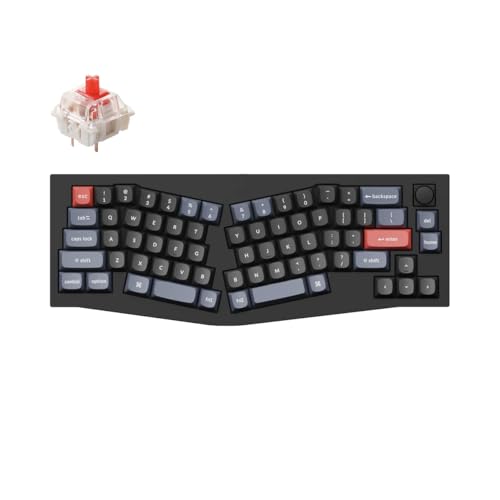
- Best for: Typists who want an Alice layout with full switch choice.
- 65% Alice layout
- Gateron G Pro Red switches
- Rotary knob
- Gasket mount design

- Best for: Typists who want a true split with a function row.
- 75% split layout
- 91 keys
- Full aluminum frame
- PBT keycaps
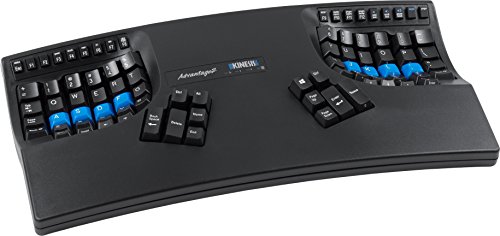
- Best for: Typists ready for the deepest ergonomic change.
- Cherry MX Brown switches
- Contoured keywells
- 20-degree tenting
- Thumb key cluster
All 3 Picks at a Glance
| Product | Specs | Action |
|---|---|---|
| Keychron Q8 |
| Check price on Amazon |
| Keychron Q11 |
| Check price on Amazon |
| Kinesis Advantage2 |
| Check price on Amazon |
Key takeaways
- A guide to the best mechanical ergonomic keyboards: split layouts, tenting angles and switches from Keychron, Kinesis and Cloud Nine for long typing days.
A flat keyboard asks your wrists to bend outward and your shoulders to round inward for hours at a time, and a mechanical board with the same straight shape does not fix that problem. The real decision is not which switch feels best, but which shape lets your hands rest in a neutral position while you keep the tactile feedback and key travel that mechanical switches provide. Split layouts, contoured keywells and adjustable tenting all change the angle of your hands, and each one suits a different kind of typist.
This guide is for programmers, writers and office workers who type for most of the day, and for gamers who want a mechanical feel without the wrist strain of a straight board. Every keyboard below was chosen from the name and specifications shown on its Amazon page, so the layouts, switches and dimensions match what the listings state.
Quick Picks
As an Amazon Associate we earn from qualifying purchases
| Product | Best for | Key spec from title |
|---|---|---|
| Keychron Q8 | Alice layout fans | Alice layout, Gateron G Pro Red |
| Keychron Q11 | Split typing | Split layout, 91 keys |
| Kinesis Advantage2 | Contoured keywells | Cherry MX Brown, 20-degree tenting |
| Cloud Nine C989M | Full-size split | Kailh Brown switches, 104 keys |
How to Choose
Split Layouts and Tenting
Split keyboards separate the two halves of the board so your hands sit shoulder-width apart instead of crowded together, and that single change removes much of the forearm twist that a straight keyboard demands. Some boards split into two fully separate halves, while others keep a fixed Alice-style curve that angles the inner keys without a gap. Tenting raises the inner edge of each half, which rotates your thumbs upward and takes pressure off the wrists. Look for a board whose split and tenting you can adjust, because a fixed angle that suits one person can feel wrong for another.
Switch Feel and Sound
Mechanical switches decide how each keystroke feels, and the choice matters more on an ergonomic board because you will type on it for long stretches. Linear switches travel smoothly from top to bottom with no bump, which suits fast typing and gaming. Tactile switches add a small bump partway down, so you can feel the actuation point without pressing the key all the way down. Clicky switches add an audible click on top of the bump, which some typists love and some coworkers do not. Hot-swappable boards let you change switches later without soldering, so you can start with one feel and swap to another as your taste settles.
Programmability and Layouts
An ergonomic keyboard asks you to relearn some key positions, so the ability to remap keys matters more than it does on a standard board. Boards with QMK or VIA support let you move any key, build layers for symbols and shortcuts, and store the layout on the keyboard itself. Thumb clusters are the other big layout question: some boards put space, enter and backspace under your thumbs, which keeps your pinkies free, while others keep a more familiar arrangement. Count the keys before you buy, because compact ergonomic boards often drop the number row or the function row, and that trade only works if you are comfortable using layers.
Size, Weight and Desk Fit
Ergonomic boards are wider and heavier than standard keyboards, and that changes how they fit on a desk. A fully split board needs room for two halves plus a mouse beside them, so measure your desk before ordering. Full-size split boards keep the number pad and the full key count, which suits data entry and spreadsheet work, while compact Alice boards save space and keep your mouse closer to your body. Weight is worth checking too: a heavy board stays put during fast typing, while a light board slides around unless it has solid rubber feet or a grippy base.
The 4 Best Options
Keychron Q8
- Best for: Typists who want an Alice layout with full switch choice.
- 65% Alice layout
- Gateron G Pro Red switches
- Rotary knob
- Gasket mount design
Typists who want an Alice layout with full switch choice.
The 65 percent layout has no number pad, so spreadsheet work needs a layer or a separate pad.
The Keychron Q8 takes the Alice layout, which angles the two halves of the keyboard toward each other, and builds it into a solid mechanical board with genuine switch choice. The 65 percent layout keeps the letters, numbers and arrows in a compact frame while dropping the number pad, so your mouse sits closer to your body. Gateron G Pro Red switches give a smooth linear feel that suits long typing sessions, and the rotary knob handles volume or scrolling without reaching for the mouse. A gasket mount softens each keystroke, and QMK and VIA support lets you remap every key.
Keychron Q11
- Best for: Typists who want a true split with a function row.
- 75% split layout
- 91 keys
- Full aluminum frame
- PBT keycaps
Typists who want a true split with a function row.
The two halves need desk space on both sides, and the cable between them limits how far apart they can sit.
The Keychron Q11 is a fully split keyboard, so the left and right halves separate completely and you can place them as far apart as your shoulders need. The 75 percent layout keeps 91 keys, including a function row, which is more than most split boards manage. Two rotary knobs sit on the outer edges, one on each half, and the full aluminum frame gives the board a planted feel on the desk. PBT keycaps resist shine from long use, the RGB backlight keeps legends visible in dim rooms, and hot-swappable Red switches let you change the feel without tools.
Kinesis Advantage2
- Best for: Typists ready for the deepest ergonomic change.
- Cherry MX Brown switches
- Contoured keywells
- 20-degree tenting
- Thumb key cluster
Typists ready for the deepest ergonomic change.
The keywell layout takes weeks to learn, and the thumb cluster moves keys you have used for years.
The Kinesis Advantage2 is the most radical shape in this group, with two deep contoured keywells that cradle your fingers and a thumb cluster that moves space, enter and backspace under your thumbs. Cherry MX Brown switches give a light tactile bump without the noise of a clicky switch, and the 20-degree tenting angle lifts the inner edges so your wrists stay neutral. The board carries 68 keys in a compact footprint, and the three-year warranty reflects a design that has been refined over many years. This is the board for typists who are ready to relearn their key positions in exchange for the deepest ergonomic change available.
Cloud Nine C989M
The Cloud Nine C989M is a full-size split keyboard, so it keeps all 104 keys including the number pad while separating the halves for a natural hand position. Kailh Tactile Brown switches give a gentle bump that confirms each keystroke without a loud click. The two halves separate by up to eight inches, and seven degrees of tenting lifts the inner edges to ease wrist strain. Ten macro keys sit along the top for shortcuts and repeated commands, and a USB pass-through port keeps a spare connection on the board itself. The RGB backlight lights the legends in low light.
Specs
- Kailh Tactile Brown switches
- Full-size split layout
- 104 keys
- Halves separate up to 8 inches
- 7-degree tenting
- 10 macro keys
- USB pass-through
- RGB backlight
- Wired USB connection
Best for: Typists who need a number pad on a split board.
Watch out for: The full-size frame is wide, so check that your desk has room for both halves and a mouse.
ASIN: B084BP8T18
Which One Fits Your Situation
Long Typing Days at a Desk
If you type for eight hours a day, the Kinesis Advantage2 gives the deepest change, with keywells and tenting that reshape your whole hand position. The Cloud Nine C989M is the safer step if you still need a number pad and a familiar key count. Either way, give the new shape two full weeks before judging it, because the first days feel slow on any ergonomic board.
Programmers Who Remap Everything
Programmers should start with the Keychron Q8 or Q11, because QMK and VIA support lets you move any key and build layers for brackets, symbols and shortcuts. The Q11 adds a function row and a second knob, which suits coders who keep debugging controls close. Hot-swappable switches mean you can try a linear switch for code and a tactile one for prose.
Small Desks and Shared Spaces
The Keychron Q8 is the smallest board here, and its 65 percent Alice layout leaves room for a mouse on a tight desk. The Q11 splits apart, which helps on a narrow desk because you can angle each half around a monitor stand or a notebook. Skip the Cloud Nine C989M in a small space, since its full-size frame needs the most room of the four.
First Ergonomic Keyboard
First-time buyers should pick the Keychron Q8, because the Alice curve changes your hand angle without moving any keys to unfamiliar places. The layout feels different on day one and natural by the end of the week. If you want a bigger change later, the Q11 or the Kinesis Advantage2 are the next steps, and the Q8 keeps its value as a second board for travel or a second desk.
Common Mistakes
- Buying the most radical shape first instead of starting with a gentle Alice curve and learning what your hands actually need.
- Choosing switches for gaming when you type all day, then wondering why your fingers ache by the afternoon.
- Ignoring the key count and discovering too late that the board has no number row or function row for your workflow.
- Placing a split board on a desk that is too narrow, then pushing the halves together and losing the whole point of the split.
- Judging an ergonomic board after one day instead of giving your hands two weeks to adjust to the new shape.
Frequently Asked Questions
Are mechanical ergonomic keyboards better for wrist strain?
They can help, because split layouts and tenting keep your wrists in a more neutral position than a straight board allows. The shape matters more than the switch, so pick a layout that matches your shoulder width and typing style. If you already have wrist pain, talk to a clinician before choosing a board, and take regular breaks whatever you buy.
Do I need hot-swappable switches on an ergonomic keyboard?
Hot-swappable switches are useful because ergonomic boards are harder to return once you have used them, and swapping switches lets you fix a feel you dislike. If you already know you like linear or tactile switches, a fixed board is fine. If you are unsure, the extra flexibility is worth having.
How long does it take to adjust to a split keyboard?
Most typists need one to two weeks of daily use before a split layout feels natural. Typing speed usually drops for the first few days, then recovers as muscle memory adapts. Alice layouts adjust faster than fully split boards or keywell designs, so start there if you need to stay productive while you learn.
Can I use an ergonomic keyboard for gaming?
Yes, and many gamers prefer them, because the split angle keeps the left hand relaxed during long sessions and hot-swappable switches let you pick a fast linear feel. The trade is that compact layouts may move keys you use in games, so check that your most-used keys sit where your fingers expect them before committing.
FAQ
Are mechanical ergonomic keyboards better for wrist strain?
Do I need hot-swappable switches on an ergonomic keyboard?
How long does it take to adjust to a split keyboard?
Can I use an ergonomic keyboard for gaming?
More from Amazon
Programs that pair well with the guide above. Offers and eligibility are set by Amazon and may change.
Free shipping on eligible items, Prime Video and more. Eligible new members can start with a free trial.
Start a Prime free trialAd-free music streaming. Eligible new subscribers can start with a free trial.
Try Music Unlimited freeA Prime membership for ages 18-24 with a trial period. Eligibility is set by Amazon.
See Prime for Young AdultsAudiobooks and podcasts to listen to on the go. Eligible new members can start with a free trial.
Try Audible freeAs an Amazon Associate we earn from qualifying purchases.









