Key takeaways
- Pro: Low profile keeps the monitor clear
- Pro: Cable management
- Pro: Screw adapter included
- Con: Weight capacity not listed
- Con: Highest in this tier
The best microphone arms under $75 are the FIFINE BM88 for a low-profile clamp arm, the InnoGear low-profile arm for a 3.3 lb load, and the AA Audio Accessory arm for heavy mics up to 6.6 lbs. All are compared from listing specifications.
A microphone arm lifts the mic off your desk, cuts keyboard thumps and puts the capsule where your mouth is. It also frees desk space, which matters in small rooms. This page compares arms from their listing text only: weight capacity, mount style, adapters and cable management. Nothing here comes from our own use, so check the maker page for anything the listing leaves out.
The main decision is weight capacity. Light USB mics suit a standard arm, while a heavier dynamic mic needs a sturdier one. Home office, small-space and gaming uses are covered in the buying section and the FAQ below, so you can match an arm to your mic and your desk.
Quick Comparison
| Model | Key specs per listing | Best for |
|---|---|---|
| FIFINE BM88 | Low-profile stick stand, desk mount clamp, cable management, screw adapter | Gaming and streaming desks |
| FIFINE AmpliGame BM38 | Metal, RGB, desk mount clamp, 3/8 to 5/8 inch screw adapter | RGB desks |
| InnoGear Low Profile | Low profile, desk mount, 3.3 lb capacity, vibration resistant, adjustable angle | Popular USB mics |
| Samson MBA38 | 38 inch boom arm, desk clamp, for studio, podcast and USB mics | A longer reach |
| AA Audio Accessory Low Profile | Low profile, 6.6 lb max load, gear lock design, for heavy mics | Heavier dynamic mics |
| Aokeo AK-55 | Desk low profile, adjustable, for Blue Yeti, Snowball iCE, HyperX QuadCast, SoloCast, Elgato Wave | The lowest tier of the group |
FIFINE BM88 Low Profile Microphone Boom Arm
As an Amazon Associate we earn from qualifying purchases at no extra cost to you.

Spec line: Low profile microphone boom arm stand for gaming and streaming, adjustable stick stand, desk mount clamp, cable management, screw adapter, for podcast, streaming and gaming.
The BM88 is a low-profile arm, so the mic sits near desk height and does not block your monitor view. The listing mentions an adjustable stick stand, a desk mount clamp, cable management and a screw adapter, so you can fit mics with different thread sizes. The clamp attaches to the edge of the desk without drilling, though you need a desk edge thick enough for it. The listing does not state the weight capacity, so check the maker page, particularly if you plan to use a heavy dynamic mic. It is the highest-priced pick in this group, but it covers the practical features and is aimed at gaming and streaming setups.
- Pro: Low profile keeps the monitor clear
- Pro: Cable management
- Pro: Screw adapter included
- Con: Weight capacity not listed
- Con: Highest in this tier
FIFINE AmpliGame BM38 Metal Microphone Boom Arm

Spec line: Metal microphone boom arm stand with RGB for gaming, gaming RGB mic arm, desk mount clamp, 3/8 inch to 5/8 inch screw adapter, for recording and streaming.
The BM38 adds RGB to a metal arm, so it suits desks that already have lit gear. The listing mentions a desk mount clamp and a screw adapter for both 3/8 and 5/8 inch threads, which covers most mics. Metal construction suggests sturdiness, but the listing does not state the weight capacity or how far the arm reaches, so check the maker page. The lighting is the only difference from simpler arms, and it matters only if you like the look. It sits lower than the BM88 and is the better match if you want to pair it with an RGB mic from the same brand. The listing is gaming-focused, so the target is clear.
- Pro: Metal construction
- Pro: RGB lighting
- Pro: Covers 3/8 and 5/8 inch threads
- Con: Weight capacity not listed
- Con: RGB adds nothing functional
InnoGear Low Profile Mic Arm Boom Arm

Spec line: Low profile mic arm boom arm microphone stand desk mount, black, for Fifine AM8, K669B, Elgato, Blue Yeti, Shure SM58 and SM7B, 3.3 lb weight capacity, vibration resistant, adjustable angle.
InnoGear gives a clear weight number: 3.3 lb, which covers many USB mics but not the heaviest broadcast dynamics. The listing names compatible mics, including the Fifine AM8 and K669B, Elgato and Blue Yeti, and also mentions the Shure SM58 and SM7B. Treat those names as marketing and check the weight of your mic against the 3.3 lb limit; heavier broadcast mics may exceed it. Vibration resistance and an adjustable angle are the other listed features. The arm has a low-profile design, so it stays below the screen line. It is a sound choice if you use a mic from the Fifine, Elgato or Blue range, and a poor one if you have a heavy mic.
- Pro: Clear 3.3 lb weight capacity
- Pro: Named compatible mics
- Pro: Vibration resistant
- Con: Limit rules out heavy mics
- Con: Compatibility list needs a weight check
Samson MBA38 38 Inch Microphone Boom Arm
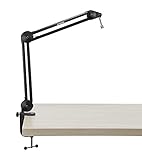
Spec line: 38 inch microphone boom arm, studio podcast USB mic stand with desk clamp.
The MBA38 offers the longest listed reach, at 38 inches, which makes it a useful pick for a deep desk or a mic that has to reach over a keyboard. The listing mentions a desk clamp and use with studio, podcast and USB mics, but it does not state a weight capacity, a cable management system or the screw adapters. Samson is a known audio brand, so the arm should suit studio-style setups. The longer reach comes with a bigger footprint, so it needs more room than a low-profile stick arm. It does not mention lighting or a low-profile design, so it is a traditional arm. Pick it if you need distance and want a recognized name.
- Pro: 38 inch listed reach
- Pro: Desk clamp
- Pro: Recognized audio brand
- Con: Weight capacity not listed
- Con: Larger footprint than low-profile arms
AA AUDIO ACCESSORY Low Profile Mic Arm
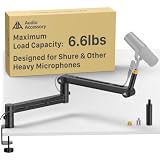
Spec line: Low profile mic arm, 6.6 lb max load, gear lock design for heavy mics, sturdy metal microphone boom arm, for Shure SM7B, SM7dB, MV7, Blue Yeti and Rode PodMic.
This is the pick for heavier mics. The listing gives a 6.6 lb maximum load, twice the InnoGear figure, and names a gear lock design meant to keep heavy mics from sagging. The compatibility list includes the Shure SM7B and SM7dB, the Shure MV7, the Blue Yeti and the Rode PodMic, which are heavy broadcast mics. A sturdy metal construction follows from the listed load, though the listing does not mention arm length or cable management. If your mic is on the heavy side, this arm should hold it better than lighter models. It is also useful if you plan to upgrade your mic later, since the capacity leaves room to grow.
- Pro: 6.6 lb maximum load
- Pro: Gear lock design against sagging
- Pro: Works with heavy broadcast mics
- Con: Arm length not listed
- Con: Cable management not mentioned
Aokeo AK-55 Low Profile Microphone Arm

Spec line: Desk low profile adjustable mic boom arm stand, suitable for Blue Yeti, Snowball iCE, HyperX QuadCast, SoloCast, Elgato Wave and others.
The Aokeo AK-55 is the lowest-priced arm here and the listing is brief. It describes a low-profile, adjustable desk arm and lists compatible mics, including the Blue Yeti, Snowball iCE, HyperX QuadCast and SoloCast and the Elgato Wave. It does not state the weight capacity or clamp range, so check the maker page, especially with a heavy mic. The named mics are USB models, so the arm is intended for light to medium mics rather than heavy broadcast dynamics. Aokeo is a lesser-known brand, so confirm support and warranty. It is a sensible starting point for a streaming desk that uses a mainstream USB mic and needs to save desk space on a limited budget.
- Pro: Lowest in this tier
- Pro: Low-profile design
- Pro: Compatible mics named in the listing
- Con: Weight capacity not listed
- Con: Lesser-known brand
How to Choose Under $75
Check the weight capacity first
Weight decides whether an arm will hold your mic. Light USB mics suit a 3.3 lb arm such as the InnoGear. Heavier broadcast dynamics need an arm with a higher rated load, like the 6.6 lb AA Audio Accessory. If the listing gives no weight, check the maker page and your mic specifications.
Pick the mount and thread size
Most arms clamp to a desk edge, so check that your desk is thick enough. A 3/8 inch to 5/8 inch screw adapter, as on the Fifine arms, covers the common mic threads. Skip arms that do not state a thread adapter unless you have confirmed compatibility.
Think about height and desk space
Low-profile arms keep the mic below the monitor and suit small desks, while a longer arm like the 38 inch Samson reaches farther. In a small space, measure the distance from the clamp to your mouth and leave room for the arm to swing.
Look at cable management and noise
Cables that dangle can thump on the desk, so cable management helps. Vibration-resistant arms reduce handling noise. Everything here stays within the $75 ceiling, so you can add a shock mount or pop filter if needed.
A quick decision summary: choose the FIFINE BM88 for a clean gaming desk, the BM38 for RGB, the InnoGear for popular USB mics up to 3.3 lb, the Samson MBA38 for a long reach, the AA Audio Accessory for heavy mics, and the Aokeo AK-55 for the lowest entry point. Whatever you choose, tighten the clamp on a solid part of the desk and route the cable along the arm so it does not pull the mic out of position. Read the maker page for load limits and reach details that the listing leaves out. If you are unsure between two models, prefer the one whose listing states more about its specifications and fit, because it leaves fewer surprises when the box arrives.
FAQ
What does a microphone arm do?
It holds the mic close to your mouth and off the desk. That reduces keyboard thumps, frees desk space and keeps the position steady during long sessions.
Are mic arms useful in a home office?
Yes. They keep the mic out of the way of your laptop or keyboard and make video calls easier. A low-profile arm such as the InnoGear or Aokeo stays below the screen line.
Which arm suits a small desk?
A low-profile arm, such as the FIFINE BM88 or InnoGear. The 38 inch Samson MBA38 needs more room. Measure your desk depth and clamp thickness before ordering.
Which arm is best for gaming?
The FIFINE BM88 and BM38 are described for gaming and streaming. The BM38 adds RGB. Check mic weight against the load listed by each arm.
Will any arm hold a heavy mic?
No. Check the listed weight capacity. The AA Audio Accessory lists 6.6 lb, while the InnoGear lists 3.3 lb, so choose by the weight of your mic.
Last updated: November 2026
FAQ
What does a microphone arm do?
Are mic arms useful in a home office?
Which arm suits a small desk?
Which arm is best for gaming?
Will any arm hold a heavy mic?
More from Amazon
Programs that pair well with the guide above. Offers and eligibility are set by Amazon and may change.
Free shipping on eligible items, Prime Video and more. Eligible new members can start with a free trial.
Start a Prime free trialAd-free music streaming. Eligible new subscribers can start with a free trial.
Try Music Unlimited freeA Prime membership for ages 18-24 with a trial period. Eligibility is set by Amazon.
See Prime for Young AdultsAudiobooks and podcasts to listen to on the go. Eligible new members can start with a free trial.
Try Audible freeAs an Amazon Associate we earn from qualifying purchases.