Our Short List of 3

- Best for: Editors who ingest and edit across a fast local network.
- Socket: AMD AM5
- Chipset: AMD X870E
- Form factor: ATX
- Memory: 4 x DDR5 DIMM slots

- Best for: High-core Ryzen editing rigs with several NVMe drives.
- Socket: AMD AM5
- Chipset: AMD X870E
- Form factor: ATX
- Memory: DDR5

- Best for: Editors who want fast wired networking and four M.2 slots in one ATX board.
- Socket: AMD AM5
- Chipset: AMD X870E
- Form factor: ATX
- Memory: DDR5
All 3 Picks at a Glance
| Product | Specs | Action |
|---|---|---|
| ASUS ProArt X870E-Creator WiFi |
| Check price on Amazon |
| ASUS ROG Crosshair X870E Hero |
| Check price on Amazon |
| GIGABYTE X870E AORUS Master |
| Check price on Amazon |
Key takeaways
- Compare four motherboards chosen for video editing builds, covering fast M.2 storage, strong power delivery, USB4 and wired networking up to 10 Gb.
The motherboard decision in an editing build is really a decision about data flow. Timelines stutter when media sits on slow storage, exports crawl when the processor cannot hold its boost clocks, and a day of footage takes forever to ingest when the board lacks fast ports. Picking a board for editing means picking how quickly footage moves from card to drive to timeline, and how much storage and memory the system can grow into later.
This guide serves three kinds of builders: editors assembling a fresh workstation around current AMD or Intel processors, upgraders whose older board limits drive count or memory, and small-studio builders who move footage across a local network. Every board below was chosen from the names and specifications on its Amazon product page, with weight given to M.2 slot counts, memory ceilings, wired networking speed and the high-bandwidth ports used for drives and capture gear.
Quick Picks
As an Amazon Associate we earn from qualifying purchases.
| Product | Best for | Key spec from title |
|---|---|---|
| ASUS ProArt X870E-Creator WiFi | Networked editing workstations | Dual USB4 with 10 Gb LAN |
| ASUS ROG Crosshair X870E Hero | High-core Ryzen editing rigs | 5 M.2 slots |
| GIGABYTE X870E AORUS Master | Balanced AM5 editing builds | 4 M.2 slots with 5GbE LAN |
| MSI PRO Z790-A MAX WiFi | Intel LGA1700 editing builds | 4 M.2 Gen4 slots with Wi-Fi 7 |
How to Choose
Start With the Socket, Then the Chipset
Every other choice follows from the processor. AMD’s AM5 socket covers Ryzen 7000, 8000 and 9000 chips and still has new processors coming, while Intel’s LGA 1700 tops out at 14th generation Core and the newer LGA 1851 takes Core Ultra Series 2. Once the socket is fixed, the chipset sets the ceiling for fast storage and ports: X870E and Z790 boards here carry more M.2 slots and faster networking than entry chipsets, which is exactly where editing builds feel limits first.
Count M.2 Slots and Their Generations
Editing storage works best in layers: one NVMe drive for the system and applications, one for cache and scratch files, and one or two for active project media. That makes three M.2 slots a practical floor and four or five comfortable. Generation matters too. A PCIe 5.0 slot feeds the fastest current drives, while PCIe 4.0 slots remain quick enough for media and cache. Check how slots share lanes with the graphics card, because on some boards filling a slot slows the GPU connection.
Memory Room and Power Delivery
Timelines with effects, nested sequences and large stills eat memory, so four DIMM slots matter more than two: they let a build start with two sticks and double capacity later without replacing anything. All four boards here use DDR5. Power delivery is the quiet partner to that headroom. Long exports hold every core at high load for minutes or hours, and boards with more power stages run those loads with less heat and less throttling, which keeps export times consistent from the first render to the last.
Ports and Networking Move the Footage
A board earns its place in an editing studio at ingest time. USB4 and Thunderbolt-class ports pull footage from fast card readers and external SSDs without becoming the bottleneck, and they double as display connections on some boards. Wired networking deserves the same attention: 2.5 Gb Ethernet is the floor here, 5 Gb suits a single fast server, and 10 Gb keeps multi-camera projects flowing from network storage. WiFi 7 is a useful backup, but cable speeds decide how a working day feels.
The 4 Best Options
ASUS ProArt X870E-Creator WiFi
- Best for: Editors who ingest and edit across a fast local network.
- Socket: AMD AM5
- Chipset: AMD X870E
- Form factor: ATX
- Memory: 4 x DDR5 DIMM slots
Editors who ingest and edit across a fast local network.
Populating the second PCIe 5.0 x16 slot makes both slots run at x8, so check the lane table in the manual before adding a second card.
ASUS built the ProArt line for creators rather than gamers, and the X870E-Creator shows it in the port layout. Dual USB4 ports handle fast external drives and docks, while the pairing of 10 Gb and 2.5 Gb Ethernet suits editors who pull projects from a network-attached storage box instead of local disks. Four M.2 slots split between PCIe 5.0 and PCIe 4.0 give room for a system drive, a scratch drive and a media library, and the 16+2+2 power design keeps high-core Ryzen processors fed during long exports.
Watch out for: Populating the second PCIe 5.0 x16 slot makes both slots run at x8, so check the lane table in the manual before adding a second card.
ASUS ROG Crosshair X870E Hero
- Best for: High-core Ryzen editing rigs with several NVMe drives.
- Socket: AMD AM5
- Chipset: AMD X870E
- Form factor: ATX
- Memory: DDR5
High-core Ryzen editing rigs with several NVMe drives.
Filling every M.2 slot can share lanes with the graphics slot on X870E boards, so read the lane-sharing table in the manual before installing drives.
The Crosshair X870E Hero is the flagship of this group, aimed at editors pairing a high-core Ryzen processor with several NVMe drives. Five M.2 slots mean a boot drive, a dedicated cache and scratch drive, and mirrored media storage can all live on the board without adapters. Its 18+2+2 power stages target sustained multi-core loads such as software encoding and effects rendering, and USB4 support keeps fast external enclosures in play. Builders who also tune memory or processor clocks get the deepest control set here.
Watch out for: Filling every M.2 slot can share lanes with the graphics slot on X870E boards, so read the lane-sharing table in the manual before installing drives.
GIGABYTE X870E AORUS Master
- Best for: Editors who want fast wired networking and four M.2 slots in one ATX board.
- Socket: AMD AM5
- Chipset: AMD X870E
- Form factor: ATX
- Memory: DDR5
Editors who want fast wired networking and four M.2 slots in one ATX board.
The listing title names the socket as LGA 1718, Gigabyte’s label for AM5, so match it with Ryzen 7000, 8000 or 9000 processors only.
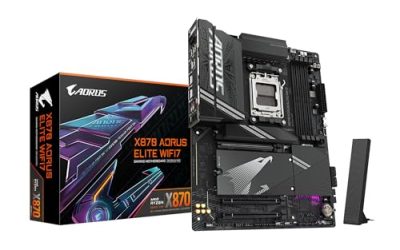
Gigabyte’s X870E AORUS Master lands between the two ASUS boards: flagship storage and networking without the creator-specific extras. Four M.2 slots cover the usual system, scratch and media split, dual USB4 ports serve external drives and displays, and 5Gb Ethernet doubles the wired speed of standard boards for editors copying projects from a server. The board’s EZ-Latch fittings speed up drive and graphics card swaps, which matters in a working studio where machines get opened often for upgrades and maintenance.
Watch out for: The listing title names the socket as LGA 1718, Gigabyte’s label for AM5, so match it with Ryzen 7000, 8000 or 9000 processors only.
MSI PRO Z790-A MAX WiFi
The only Intel board in this roundup, the PRO Z790-A MAX WiFi suits editors holding a 12th, 13th or 14th generation Core processor who want a work-first feature set. Four M.2 Gen4 slots and SATA ports give plenty of room for active projects plus bulk archive drives, and the 16-phase power design with 80A stages keeps an i7 or i9 steady through long renders. Wi-Fi 7 and 2.5G LAN cover networking, while the plain styling and ProSeries layout favor reliability over decoration.
Specs
- Socket: Intel LGA 1700
- Chipset: Intel Z790
- Form factor: ATX
- Memory: DDR5, up to 7800+ MHz (OC)
- Expansion: PCIe 5.0 x16 slot
- Storage: 4 x M.2 Gen4 slots, SATA 6Gb/s
- Networking: 2.5G LAN, Wi-Fi 7, Bluetooth 5.4
Best for: Intel editing builds that mix NVMe speed with SATA archive drives.
Watch out for: LGA 1700 ends with 14th generation Core processors, so this board has no next-generation CPU upgrade path.
Which One Fits Your Situation
Building a Fresh AMD Editing Workstation
Start with the ProArt X870E-Creator if the new machine will live on a network and pull media from shared storage, since its 10 Gb Ethernet and dual USB4 ports remove the two most common bottlenecks. Choose the Crosshair X870E Hero instead when the plan centers on a high-core Ryzen chip and as many internal NVMe drives as the board can hold.
Feeding a Studio NAS or Server
Editors who keep projects on a network box should rank these boards by wired speed first. The ProArt X870E-Creator leads with 10 Gb Ethernet, the AORUS Master follows at 5 Gb, and both pair that link with enough M.2 slots for a local cache drive, so scrubbing stays smooth while originals live on the server.
Upgrading an Intel Editing PC
If a 12th, 13th or 14th generation Core processor already sits in the parts bin or the current machine, the MSI PRO Z790-A MAX WiFi is the natural landing spot. Its four M.2 Gen4 slots and SATA ports carry over an existing drive collection, and Wi-Fi 7 modernizes the connection side without changing platform.
One Machine for Editing and Everything Else
Plenty of editors also stream, game or record on the same PC. The AORUS Master fits that mixed life well: four M.2 slots and PCIe 5.0 graphics support cover editing storage and a strong GPU, USB4 handles capture gear and fast external drives, and 5 Gb Ethernet keeps uploads and network media moving at once.
Common Mistakes
- Buying a board with two M.2 slots, then discovering the scratch drive and the media drive have to share one slot’s worth of space.
- Matching a DDR4 memory kit to a DDR5-only board, or the other way around, because the chipset name looked familiar.
- Filling every M.2 slot before reading the lane-sharing table, then finding the graphics card running at reduced width.
- Choosing a socket with no upgrade path for a machine that is meant to gain a faster processor in two years.
- Overlooking the front-panel USB header, then finding the case’s fast Type-C port has nothing to connect to.
Frequently Asked Questions
Does the motherboard change export speed?
Only indirectly. The processor and graphics card do the encoding work, but the board decides whether the processor can hold its boost clocks through a long export and whether cache and media drives can feed it data fast enough. Weak power delivery or slow storage connections show up as longer, less consistent export times.
How many M.2 slots does an editor need?
Three is a workable minimum: system, scratch and media each get a drive. Four or five slots add room for a dedicated cache drive or a mirrored copy of active projects. Boards in this roundup carry four or five slots, which is why they suit editing better than compact boards that stop at two.
Can these boards run a second graphics card?
Some can, with limits. The ProArt X870E-Creator carries two PCIe 5.0 x16 slots that run at x8 each when both are populated, and most editing applications gain little from a second card unless the workflow uses GPU rendering or multiple displays. Check the slot layout against your case and cooler before planning a dual-card build.
Is WiFi 7 worth having on an editing board?
It helps as a flexible backup, not as the main pipeline. Wired Ethernet still moves large files faster and more steadily, which is why every board here pairs WiFi 7 with at least 2.5 Gb wired networking. Use wireless for peripherals, quick transfers and rooms where cabling is impractical, and cable the machine for project work.
FAQ
Does the motherboard change export speed?
How many M.2 slots does an editor need?
Can these boards run a second graphics card?
Is WiFi 7 worth having on an editing board?
More from Amazon
Programs that pair well with the guide above. Offers and eligibility are set by Amazon and may change.
Free shipping on eligible items, Prime Video and more. Eligible new members can start with a free trial.
Start a Prime free trialAd-free music streaming. Eligible new subscribers can start with a free trial.
Try Music Unlimited freeA Prime membership for ages 18-24 with a trial period. Eligibility is set by Amazon.
See Prime for Young AdultsAudiobooks and podcasts to listen to on the go. Eligible new members can start with a free trial.
Try Audible freeAs an Amazon Associate we earn from qualifying purchases.