Key takeaways
- Ten B550 boards compared for the Ryzen 5 5600X: ATX and microATX picks, Wi-Fi and 2.5GbE options, BIOS caveats and who each board fits. Updated October 2026.
The best board for a Ryzen 5 5600X is rarely the most expensive one. The chip is a six-core, 65W part on the AM4 socket, so a solid B550 board with DDR4 memory and PCIe 4.0 covers everything it can do. Among the ten listings here, the GIGABYTE B550 AORUS Elite AX V2 is the strongest all-rounder on paper, the GIGABYTE B550M K is the cheapest, and the ASUS TUF Gaming B550-PLUS WiFi II is the sensible middle. Every board is a B550, which sidesteps the BIOS problems older boards can have with Ryzen 5000.
Short list by use case
Our top picks


![ASUS AMD B550 Socket AM4 Compatible Motherboard ROG STRIX B550-A GAMING [ATX]](https://m.media-amazon.com/images/I/41Ib306zjkL._SL500_.jpg)


As an Amazon Associate we earn from qualifying purchases at no extra cost to you.
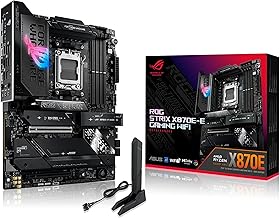
- GIGABYTE B550 AORUS Elite AX V2 – best all-round, 12+2 power phase claim
- ASUS ROG Strix B550-F Gaming WiFi II – best for features and 2.5Gb LAN
- ASUS TUF Gaming B550-PLUS WiFi II – best middle option with BIOS Flashback
- GIGABYTE B550 Eagle WIFI6 – best value with Wi-Fi 6
- GIGABYTE B550 Gaming X V2 – best wired-only value
- MSI B550 Gaming WIFI6E – best for DDR4 overclock claims
- ASUS Prime B550M-A WiFi II – best compact board with Wi-Fi
- MSI PRO B550M-P – best basic microATX
- GIGABYTE B550M K – cheapest entry
- ASUS ROG STRIX B550-A GAMING – premium name, sparse listing
All ten at a glance
| Model | Chipset and socket | Form factor | Key point from title | Best for |
|---|---|---|---|---|
| GIGABYTE B550 AORUS Elite AX V2 | B550 (per name), AM4 | ATX | 12+2 power phase, 2.5 GbE, Wi-Fi 6 | All-round |
| ASUS ROG Strix B550-F Gaming WiFi II | B550, AM4 | ATX | Wi-Fi 6E, 2.5Gb LAN, HDMI 2.1 | Feature-rich |
| ASUS TUF Gaming B550-PLUS WiFi II | B550, AM4 | ATX | Wi-Fi 6, 2.5Gb LAN, Flashback | Middle ground |
| GIGABYTE B550 Eagle WIFI6 | B550, AM4 | ATX | 10+3 power phase, Wi-Fi 6 | Value |
| GIGABYTE B550 Gaming X V2 | B550, AM4 | ATX | 10+3 power phase, GbE | Wired budget |
| MSI B550 Gaming WIFI6E | B550, AM4 | ATX | DDR4 4800+ OC claim, 1G LAN | Memory tuners |
| ASUS Prime B550M-A WiFi II | B550, AM4 | microATX | Wi-Fi 6, ECC claim, HDMI 2.1 | Compact |
| MSI PRO B550M-P | B550, AM4 | microATX | DDR4 4400+ OC claim, M.2 Gen4 | Basic compact |
| GIGABYTE B550M K | B550, AM4 | microATX | 3+3 power phase, 2X M.2 | Cheapest |
| ASUS ROG STRIX B550-A GAMING | B550, AM4 | ATX | Minimal title | Check the listing |
Each board in turn
GIGABYTE B550 AORUS Elite AX V2
The title lists Ryzen 5000, 4000 and 3000 support, DDR4, a 12+2 power phase layout, two M.2 slots, PCIe 4.0, a front USB-C connector, Wi-Fi 6, 2.5 GbE, Q-Flash Plus and RGB Fusion on an ATX board. The 12+2 figure is the highest in the group, which matters more if you later move to a hungrier Ryzen 5000 chip. For a 65W 5600X it is more than needed, so you are partly buying headroom. The 2.5 GbE port helps only if your router and switch support that speed, and the Wi-Fi 6 card is adequate rather than cutting-edge. The front USB-C connector is a header, so it needs a case with a matching front-panel port. The V2 in the name marks a revision, so check the exact model before you order.
Q-Flash Plus is Gigabyte’s BIOS update tool that can work without a CPU installed, which helps with older stock.
- Pros: strong power phase claim; Wi-Fi 6 and 2.5 GbE; named CPU support.
- Cons: overbuilt for the 5600X; V2 revision, so confirm which version ships.
Who it’s for: buyers planning a bigger Ryzen 5000 upgrade. Who should skip it: strict budgets.
ASUS ROG Strix B550-F Gaming WiFi II
The title shows AMD AM4, 3rd Gen Ryzen, ATX, DDR4, PCIe 4.0, Wi-Fi 6E, 2.5Gb LAN, BIOS Flashback, HDMI 2.1, an addressable RGB header and Aura Sync. Wi-Fi 6E is the newest wireless standard in the group. The title says “3rd Gen Ryzen” and does not mention 5000 series directly, so verify support on the manufacturer page, though B550 boards generally handle Ryzen 5000. HDMI 2.1 is irrelevant while the 5600X is installed, because the chip has no video output, but it would matter if you later fit a G-series processor. The addressable RGB header and Aura Sync are lighting features. Premium-tier styling usually adds cost without adding speed for a six-core part, so weigh the extras honestly.
- Pros: Wi-Fi 6E; 2.5Gb LAN; BIOS Flashback.
- Cons: Ryzen 5000 not named in the title; likely a higher price tier than the 5600X needs.
Who it’s for: feature-minded builders. Who should skip it: value buyers.
ASUS TUF Gaming B550-PLUS WiFi II
This ATX board lists AM4, 3rd Gen Ryzen, DDR4, PCIe 4.0, Wi-Fi 6, 2.5Gb LAN, BIOS Flashback, USB 3.2 Gen 2 and Aura Sync. It is the pragmatic middle option: the Flashback feature helps with firmware updates, and the 2.5Gb LAN is a modern extra. Like the ROG board, its title names 3rd Gen Ryzen only, so check the CPU list. The USB 3.2 Gen 2 mention is useful for fast external drives. The TUF line is positioned as a durable mid-range family, though that is brand positioning rather than anything the title proves. Compared with the cheaper Gigabyte boards, you are paying for Flashback, 2.5Gb LAN and the ASUS firmware interface.
- Pros: Flashback; 2.5Gb LAN; fast USB.
- Cons: Wi-Fi 6 rather than 6E; CPU list not explicit.
Who it’s for: sensible mid-range builds. Who should skip it: small cases.
GIGABYTE B550 Eagle WIFI6
The title names Ryzen 5000, 4000 and 3000, DDR4, a 10+3 power phase layout, 2X M.2, PCIe 4.0, USB-C, Wi-Fi 6, GbE LAN and EZ-Latch. It is a straightforward ATX value board with wireless built in. The 10+3 layout is close to the Gaming X V2 below, so think of them as sibling designs, with Wi-Fi as the difference. EZ-Latch is a tool-free release for the graphics slot, and RGB Fusion handles lighting. Two M.2 slots are enough for a main drive and one extra, and the USB-C mention is a connector for the front panel or rear port, so check which it is. If you want to save a little more, the Gaming X V2 drops the wireless card.
- Pros: Wi-Fi 6 included; 5000 series named; 10+3 claim.
- Cons: only gigabit LAN; two M.2 slots.
Who it’s for: wireless value. Who should skip it: wired-only users who do not need Wi-Fi.
GIGABYTE B550 Gaming X V2
This one lists Ryzen 5000, 4000 and 3000, DDR4, 10+3 power phase, 2X M.2, PCIe 4.0, a front USB-C connector, GbE LAN, Q-Flash Plus and RGB Fusion. Compared with the Eagle WIFI6 it has no Wi-Fi in the title, but it does list Q-Flash Plus. If you plan to use Ethernet, this is the simplest value ATX pick here. The 10+3 power phase layout matches the Eagle, so VRM headroom is similar. Q-Flash Plus is Gigabyte’s CPU-free BIOS update tool, a real help if the board arrives with older firmware and you do not own a spare compatible chip. The front USB-C connector depends on your case having a matching port, and the V2 revision label should be confirmed before purchase.
- Pros: Q-Flash Plus; front USB-C; named Ryzen support.
- Cons: no wireless listed; V2 revision to confirm.
Who it’s for: wired value builds. Who should skip it: Wi-Fi-only homes.
MSI B550 Gaming WIFI6E
The title says ATX, supports Ryzen 5000, 5000 G-Series, 4000 G-Series and 3000, AM4, DDR4 Memory Boost 4800+MHz/OC, PCIe 4.0 x16, M.2 Gen4 and 1G LAN. The model name includes WIFI6E, but the title does not describe the wireless card, so confirm it. The memory boost figure is an overclock claim, not a promise. Notice also that the title mentions 5000 G-Series and 4000 G-Series support, which means the HDMI and DisplayPort outputs are for those chips and idle with a 5600X. Gigabit LAN is fine for most households. If you like a clean title with every key spec, this listing is a little muddled, so compare it against the manufacturer page.
- Pros: clear Ryzen 5000 support; M.2 Gen4; Wi-Fi in the name.
- Cons: 1G LAN only; wording about wireless is unclear.
Who it’s for: builders who like MSI. Who should skip it: buyers who want explicit specs.
ASUS Prime B550M-A WiFi II
A microATX board with DDR4, PCIe 4.0, Wi-Fi 6, ECC memory support in the title, HDMI 2.1 and an RGB header. It is a tidy compact option. The ECC claim is of limited use with a 5600X, because this chip is a consumer part and ECC memory is usually a specialised choice, so do not buy it for that alone. The Prime line is ASUS’s plainer series, so expect fewer extras than the TUF or ROG boards, though the Wi-Fi 6 card and HDMI 2.1 output cover the basics. A microATX layout limits you to fewer expansion slots, and the case must support the smaller board size. For a living-room or small-desk PC it is a tidy fit.
- Pros: microATX with Wi-Fi 6; HDMI 2.1; RGB header.
- Cons: fewer expansion slots; the 5600X has no integrated video, so the HDMI outputs will sit idle.
Who it’s for: compact builds. Who should skip it: multi-card setups.
MSI PRO B550M-P
The title says mATX, supports Ryzen 5000, 5000 G, 4000 G and 3000 G processors, AM4, DDR4 Memory Boost (4400+ MT/s OC), PCIe 4.0 x16 and M.2 Gen4. No wireless or LAN detail appears, so check the listing. It is a basic compact board for a straightforward gaming PC where you want the fewest extras. Its title mentions 5000 G-Series, 4000 G-Series and 3000 G-Series chips, so check that the exact BIOS covers the non-G 5600X, which the Ryzen 5000 mention suggests. M.2 Gen4 means a fast NVMe drive will run at its full interface speed, but only one slot is described. Add a cooler and a case with airflow rather than spending on board extras.
- Pros: low-cost compact; named Ryzen 5000 support.
- Cons: sparse listing; no Wi-Fi mentioned.
Who it’s for: basic compact builds. Who should skip it: feature seekers.
GIGABYTE B550M K
The cheapest board here: Micro-ATX, AM4, Ryzen 5000, 4000 and 3000, DDR4, a 3+3 power phase layout, 2X M.2, PCIe 4.0, USB 3.2 Gen 1, GbE and Q-Flash. The small power phase count suggests a lighter VRM, which a 65W chip can handle at stock, but a sturdier board is the wiser choice for longer or hotter loads. The listing shows two M.2 slots and PCIe 4.0, which are adequate for a first build. Q-Flash helps with firmware updates, though it may need a compatible CPU, unlike the Plus version on other Gigabyte boards. Remember that no wireless card is mentioned, so budget a USB or PCIe adapter if you have no cable.
- Pros: lowest entry cost; two M.2 slots; Q-Flash.
- Cons: light VRM claim; no Wi-Fi; basic USB.
Who it’s for: tight budgets. Who should skip it: future upgraders.
ASUS ROG STRIX B550-A GAMING
The title only says AMD B550 Socket AM4 compatible, ATX. It has no memory type, M.2 count, Wi-Fi or Ryzen generation detail, so this is the weakest listing to evaluate. The ROG line is premium positioned, but you should verify everything on the manufacturer page. Ask four things: which memory type it uses, how many M.2 slots there are, whether Wi-Fi is built in and which Ryzen generations the shipped BIOS supports. Because B550-A is an older model name, stock may carry older firmware, so look for a flash option that works without a CPU before ordering it for a 5600X.
- Pros: ATX B550 from a major brand.
- Cons: almost no specification in the title; likely premium cost.
Who it’s for: buyers who already know this model. Who should skip it: anyone comparing on listing data.
How we picked these
We read product titles, published specifications, manufacturer documentation and buyer reviews, and treated every title statement as a seller claim. Nobody on the team used or measured these units. We kept to B550 boards for the 5600X because the chipset was designed alongside Ryzen 5000, and we included both ATX and microATX sizes. Where a title was thin we said so rather than guessing, and we grouped near-identical boards, such as the two Gigabyte 10+3 models, as variants of one design.
What to look for in a 5600X board
Socket, chipset and BIOS
The 5600X is an AM4 chip, a six-core, 12-thread part with a 65W TDP. B550 boards support Ryzen 5000, while B450 and X470 boards typically need a BIOS update first, and A320 or X370 support varies by model. Because a board with an old BIOS may not boot a new chip, look for a flash feature that works without a CPU, such as ASUS BIOS Flashback or Gigabyte Q-Flash Plus. Our guide to graphics cards for Ryzen 5 helps with the next purchase, since this chip has no integrated graphics. A BIOS-update checklist for an AM4 board and a new chip: confirm the board’s CPU support list names the 5600X, note the minimum BIOS version, and look at the sticker or box for the shipped version. If it is older, use a flash button, or update with an older compatible CPU. Keep power stable during the flash, and never interrupt it.
VRM sizing for a 65W chip
The 5600X does not need an elaborate VRM. A board with a decent heatsink can run it at stock, and a small power phase count is acceptable if you stay on the 5600X. If you may upgrade later, a stronger VRM such as the 12+2 claim on the AORUS Elite offers headroom. Treat phase numbers as layout descriptions, since heatsink and airflow matter as well. The Wraith Stealth cooler that normally comes in the 5600X box is adequate for stock use, and a larger tower cooler adds quiet headroom. A board with an exposed, bare VRM and a poor case fan layout can run warmer than a smaller board with a proper heatsink, so look at the photos, not just the number.
Memory
The AM4 socket uses DDR4 only. Mainstream DDR4 kits at 3200 or 3600 are commonly chosen for Ryzen 5000 because they balance cost and performance. The 4400+ and 4800+ numbers in some titles are overclock claims. Use two sticks in the slots the manual recommends, and enable the memory profile in the BIOS. Check the memory support list for the board you pick, especially if you buy a large kit, and leave the profile at its default if you see instability. AM4 and AM5 memory are not interchangeable, so do not reuse DDR5 or buy a kit meant for another platform.
PCIe, M.2 and LAN
B550 provides PCIe 4.0 for the graphics slot and for the CPU-attached M.2 slot, while other lanes connect through the chipset at PCIe 3.0. For most gamers, one fast NVMe drive plus a graphics card uses everything that matters. Choose Wi-Fi only if you cannot run a cable, and choose 2.5Gb LAN only if your network supports it.
Size and case fit, plus an overspend check
ATX boards need a mid-tower, while microATX boards fit smaller cases. Before you buy, ask three questions:
- Will you upgrade the CPU later? If not, skip the 12+2 board.
- Is Wi-Fi required? If not, choose the Gaming X V2.
- Will you fit more than two M.2 drives? If so, check slot counts in the manual.
Also check any combo or used listing for old firmware and plan a safe BIOS flash on stable power.
Mistakes buyers make
The biggest is buying a board without checking that it supports Ryzen 5000, particularly an older B450 model. Another is assuming the motherboard’s HDMI port works with the 5600X; it does not, because the chip lacks integrated graphics. Buyers also overspend on features they never use, then underspend on the cooler or the graphics card, where money matters more. Others trust phase counts without looking at heatsinks, or pick DDR4 kits that are not on the support list. If you are weighing platforms, our comparisons of the Ryzen 5 5600X and Core i5-12400F and the Core i5-13400F may help you decide before buying. Another common slip is ignoring ESD: touch bare metal on the case before you handle the socket and memory, and never slide the board across a surface. Finally, buyers sometimes assume a V2 or II revision is an upgrade without reading what changed, so read the revision notes.
Verdict
The GIGABYTE B550 AORUS Elite AX V2 is the safest all-round pick if you want headroom, while the ASUS TUF Gaming B550-PLUS WiFi II is the sensible middle with Flashback. On a tight budget the GIGABYTE B550 Eagle WIFI6 adds Wi-Fi at a modest tier, and the GIGABYTE B550M K is the cheapest way in. Always confirm CPU support and firmware before buying. For a compact case, choose the ASUS Prime B550M-A WiFi II over the plainer MSI PRO B550M-P when Wi-Fi matters. If a listing, such as the ROG STRIX B550-A GAMING, leaves out the details you need, treat it as unverified until the manufacturer page confirms them.
Related guides
- Gaming Headsets For Competitive Fps Directional Audio
- How Many Ram Slots Does A Motherboard Need
- Xmp Vs Expo Explained
Frequently asked questions
Is B550 the right chipset for a Ryzen 5 5600X?
For most buyers, yes. B550 is an AM4 chipset that supports Ryzen 5000 and provides PCIe 4.0 for the graphics slot and an M.2 drive. The 5600X is a six-core, 65W processor, so it does not need a premium board. X570 adds extra lanes and costs more, while older B450 boards may work but often need a BIOS update first.
Will a B450 board work with the Ryzen 5 5600X?
Many B450 boards support Ryzen 5000 after a BIOS update, but the update must be done before or with a compatible CPU, which creates a chicken-and-egg problem if the board shipped with old firmware. The boards in this list are B550 models, which were made for Ryzen 5000, though some stock may still carry older firmware.
Does the Ryzen 5 5600X have integrated graphics?
No. The 5600X needs a separate graphics card, so the HDMI and DisplayPort outputs on the motherboard will not work with it. Video outputs on a motherboard only work with processors that have integrated graphics, such as G-series chips. Plan the graphics card purchase together with the board, and ensure your PSU and case can host it.
Is a 3+3 power phase board like the GIGABYTE B550M K enough?
The 5600X is a 65W chip, so a modest VRM can run it at stock settings, but the listing gives limited detail about cooling. Phase counts are seller claims, and a small VRM may run hotter under long loads. If you plan to upgrade to a more demanding Ryzen later, a sturdier board gives more headroom.
Should you pay extra for Wi-Fi and 2.5GbE on a 5600X board?
Only if you need them. A wired connection is more stable for gaming, and a standard gigabit port is fine for most home internet plans. Wi-Fi helps if the PC sits far from the router, and 2.5GbE helps if your network and router support it. Otherwise, the money is better spent on a faster SSD or a better cooler.