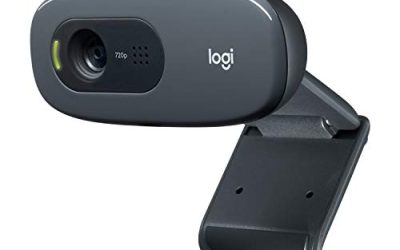
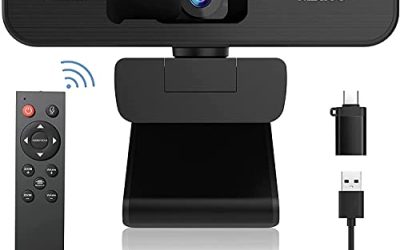
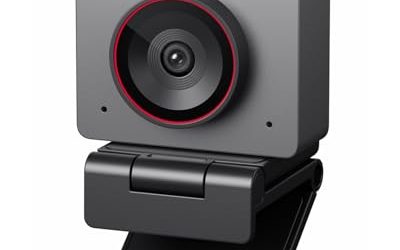
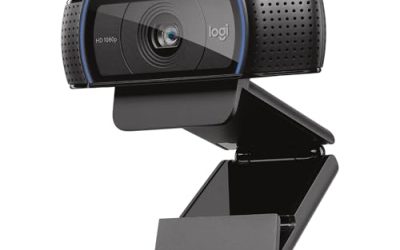
Our Top Picks


A plug and play webcam should need exactly one step: plug it in. The real decision is what you get beyond that basic promise, because every camera here connects the same way yet behaves very differently once a call starts. Resolution and frame rate decide how you look in motion, the field of view decides how much of your room joins the meeting, and the focus system decides whether leaning back turns you into a blur. Those are the differences worth paying for — not bundled software.
The four webcams below all work over USB with no drivers to install, on the operating systems their listings name. They were picked from their Amazon listings, and the resolutions, frame rates, fields of view and microphone details quoted are the ones those listings state. Optional maker software exists for some of them, but none of it is required for the camera to work in your calls and streams.
Quick Picks
As an Amazon Associate we earn from qualifying purchases.
| Product | Best for | Key spec from title |
|---|---|---|
| Logitech Brio 4K | 4K meetings and streaming headroom | 4K at 30 fps, 90-degree field of view |
| Logitech C920s HD Pro | Everyday video calls | Full HD 1080p, autofocus, privacy shutter |
| Logitech C922x Pro Stream | Streaming at a smooth 720p60 | 1080p30 or 720p60, tripod included |
| NexiGo N60 | Wide-angle group calls on a budget | 110-degree lens, no drivers needed |
How to Choose
Understand What Plug and Play Actually Promises
Plug and play webcams follow the USB Video Class standard, which Windows, macOS and Chrome OS already understand, so the camera appears in your apps the moment it is connected. What the standard does not cover is fine-tuning: exposure controls, field-of-view switching and firmware updates may live in the maker’s optional app. That is not a failure of the plug and play promise — the camera works without any of it — but it is worth knowing before you assume every advertised feature is reachable from inside Zoom or Teams alone.
Match Resolution and Frame Rate to Your Real Calls
Most meeting platforms cap outgoing video well below 4K, so a 1080p camera at 30 frames per second covers ordinary calls completely. Frame rate matters more once you move: streamers and presenters benefit from 720p at 60 frames per second, which keeps gestures and gameplay overlays smooth. A 4K sensor earns its place for recording, cropping in on your face without losing sharpness, and future-proofing, rather than for a standard work call. Buy for the app you actually use, not the biggest number on the box.
Pick a Field of View and Focus Type for Your Room
Field of view runs from a tight head-and-shoulders crop to the N60’s 110-degree sweep that takes in a whole meeting table. A narrow view flatters solo calls and hides a messy room; a wide view suits shared spaces and whiteboard sessions but shows everything behind you. Focus splits the same way: autofocus models such as the C920s keep you sharp as you move, while fixed-focus cameras are simpler and fine when you sit at a steady distance from the screen.
Check the Microphone, Mount and Privacy Details
Every camera here carries built-in microphones, in stereo or dual configurations, which saves buying a separate mic for casual calls — though a headset will still sound better in a noisy room. Mounting is the other practical detail: most clip onto a monitor, while the C922x also bundles a tabletop tripod for angled shots. Finally, a physical privacy shutter or cover, fitted to the Brio, C920s and N60, closes the lens completely when the camera is idle, which no software indicator light quite replaces.
The 4 Best Options
1. Logitech Brio 4K
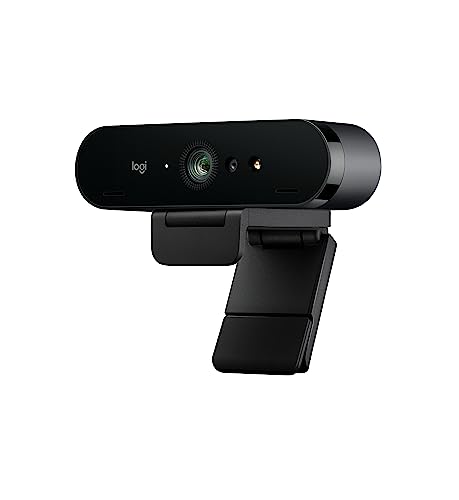
The Brio is the flagship of this group and the only one shooting 4K. It records 4K at 30 frames per second, steps down to 1080p at 60 or 720p at 90, and offers three field-of-view presets — 65, 78 and 90 degrees — so the same camera frames a tight call or a wider shot. RightLight 3 with HDR handles backlit rooms and windows, dual noise-canceling microphones pick up speech from the desk, and an infrared sensor adds Windows Hello face sign-in. A privacy shutter is included, and everything runs from a single USB connection.
Specs
- Video: 4K Ultra HD at 30 fps, 1080p at 60 fps, 720p at 90 fps
- Zoom: 5x digital zoom
- Field of view: 65°, 78° and 90° presets
- Lighting: RightLight 3 with HDR
- Microphones: dual noise-canceling omnidirectional mics
- Sign-in: Windows Hello infrared sensor
- Extras: privacy shutter included
- Connection: USB
Best for: Buyers who record or stream and want 4K headroom plus face sign-in.
Watch out for: Reaching the full 4K feed depends on a USB 3.0 connection and an app that accepts it; most calling apps will run the Brio at 1080p or lower. One aggregator flags this listing as the 2017 version, so confirm the variant on the listing before ordering.
ASIN: B01N5UOYC4
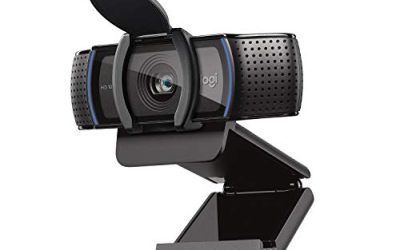
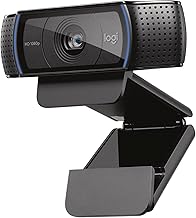
2. Logitech C920s HD Pro
The C920s is the straightforward recommendation for daily calls. It delivers Full HD 1080p at 30 frames per second with autofocus and HD light correction, so faces stay sharp and sensibly exposed without any setup. Stereo audio comes from dual microphones, one on each side of the lens, and the attachable privacy shutter closes over the glass when the working day ends. The listing states compatibility with PC, Mac, Chrome OS and Xbox alongside the usual calling apps, which makes it an easy hand-me-down camera for a household with mixed machines.
Specs
- Video: Full HD 1080p at 30 fps
- Focus: autofocus
- Lighting: HD light correction
- Microphones: stereo audio with dual mics
- Privacy: attachable privacy shutter
- Compatibility per listing: PC, Mac, Chrome OS and Xbox
- Connection: USB, plug and play
Best for: Everyday work and family calls where the camera simply has to work well.
Watch out for: It tops out at 1080p30, so there is no high-frame-rate mode; streamers who want 720p60 should look at the C922x instead.
ASIN: B07K986YLL
3. Logitech C922x Pro Stream

The C922x is aimed at people in front of an audience rather than a meeting. Its headline mode is 720p at 60 frames per second, which keeps a streamer’s movements smooth, with 1080p at 30 available when detail matters more than motion. Autofocus and HD light correction carry over from Logitech’s call-focused models, the 78-degree field of view frames a streamer plus some background, and dual omnidirectional microphones handle voice. Unusually for this group, a tabletop tripod comes in the box, which helps anyone filming away from the monitor.
Specs
- Video: 1080p at 30 fps or 720p at 60 fps
- Focus: autofocus
- Field of view: 78 degrees
- Microphones: dual omnidirectional mics
- Lighting: HD light correction
- Included accessory: tabletop tripod
- Connection: USB 2.0
Best for: Streamers and creators who value smooth 720p60 motion and want a tripod included.
Watch out for: The 60 fps mode is 720p only — 1080p is capped at 30 fps — and the connection is USB 2.0, so there is no path to higher resolutions later.
ASIN: B01LXCDPPK
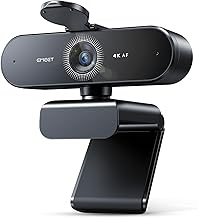
4. NexiGo N60
The N60 covers the opposite end of the market: a simple, wide, inexpensive camera that asks nothing of its owner. Its 2-megapixel sensor produces a 1080p picture at 30 frames per second through a 110-degree lens, wide enough to take in a small group around one screen. Focus is fixed, so there is nothing to hunt or pulse as you move, and the listing emphasises true plug and play behaviour — USB in, no drivers, no software. A dual stereo microphone and a sliding privacy cover round out a package clearly built for convenience.
Specs
- Sensor: 1080p 2MP CMOS
- Video: 1920 × 1080 at 30 fps
- Field of view: 110 degrees
- Focus: fixed focus
- Microphone: dual stereo microphone
- Privacy: sliding privacy cover
- Connection: USB 2.0/3.0, plug and play with no drivers
Best for: Group calls, shared family computers and anyone who wants the widest view for the least fuss.
Watch out for: Fixed focus means sitting unusually close or far softens the image, and the 110-degree lens shows a great deal of the room behind you — tidy up or angle it carefully.
ASIN: B088TSR6YJ
Which One Fits Your Situation
Your Days Are Back-to-Back Video Calls
Take the C920s. Its 1080p picture, autofocus and light correction match what meeting platforms actually transmit, the stereo microphones are adequate for a quiet room, and the privacy shutter ends the day cleanly. Spending more buys resolution your call software will not send, so the sensible money stops here unless you also record content away from meetings.
You Stream Games or Present to an Audience
The C922x is built for you, mainly for its 720p at 60 frames per second, which keeps a facecam fluid over gameplay, and for the bundled tripod that frees the camera from the top of the monitor. If your channel is growing into recorded 4K content as well, the Brio covers both jobs, but for live streaming alone the C922x hits the practical target.
Several People Share One Screen
Choose the N60 and its 110-degree lens. Two or three people around a kitchen table or a small meeting room fit in frame without shuffling chairs, and fixed focus means nobody drifts out of sharpness as they lean in and out. It is also the easiest camera here to move between computers, since there is no software to reinstall anywhere it goes.
You Want One Camera for Years, Including 4K Recording
The Brio is the long-term buy. Even if today’s calls run at 1080p, the 4K sensor lets you crop into the frame for recordings, the three field-of-view presets adapt it to different rooms, and Windows Hello support adds daily convenience on a compatible PC. It is the most expensive route here, but it is the only one you will not outgrow when your software catches up.
Common Mistakes
- Assuming plug and play means every feature works inside every app, when fine controls often live in the maker’s optional software.
- Plugging a 4K webcam into a USB 2.0 port and wondering why the picture tops out below 4K.
- Choosing the widest field of view by default, then discovering the whole room — laundry, doors, passers-by — is in every call.
- Relying on a webcam microphone across a noisy room instead of moving closer or using a headset.
- Leaving the lens uncovered all day when a shutter or privacy cover would close it in a second.
Frequently Asked Questions
Do plug and play webcams work on Mac and Chromebook as well as Windows?
Yes, that is the point of the USB Video Class standard all four cameras here follow: the operating system already carries the driver. The C920s listing states PC, Mac, Chrome OS and Xbox compatibility outright. What varies is the optional software — a maker’s tuning app may exist for one system and not another — but the camera itself works for calls on any of them without installing anything.
Why does my 4K webcam only show 1080p in Zoom or Teams?
Because the app, not the camera, usually sets the ceiling. Most meeting platforms send and receive at 1080p or below regardless of what the sensor can do, and some also need a USB 3.0 connection before 4K is even offered. The 4K ability of a camera like the Brio still pays off in recording software and when cropping the frame, but for ordinary meetings expect the platform’s limit, not the box’s headline number.
Is autofocus worth having on a webcam?
If you sit still at a desk, fixed focus is honestly fine — the N60 is built on that assumption and works well at a normal seating distance. Autofocus earns its keep when you stand, present, hold products up to the lens or share a camera between people at different distances. In those cases a focusing camera such as the C920s or C922x saves the repeated shuffle closer to the screen to get sharp.
Can I use one of these webcams with a games console?
In one case, explicitly yes: the C920s listing names Xbox among its compatible platforms. Console support is the exception rather than the rule for webcams, and it changes with console system updates, so treat it as a bonus for that specific model. For PC, Mac and Chromebook use — the purpose these cameras are sold for — all four work through the same driver-free USB connection.
FAQ
Do plug and play webcams work on Mac and Chromebook as well as Windows?
Why does my 4K webcam only show 1080p in Zoom or Teams?
Is autofocus worth having on a webcam?
Can I use one of these webcams with a games console?
More from Amazon
Programs that pair well with the guide above. Offers and eligibility are set by Amazon and may change.
Free shipping on eligible items, Prime Video and more. Eligible new members can start with a free trial.
Start a Prime free trialAd-free music streaming. Eligible new subscribers can start with a free trial.
Try Music Unlimited freeA Prime membership for ages 18-24 with a trial period. Eligibility is set by Amazon.
See Prime for Young AdultsAudiobooks and podcasts to listen to on the go. Eligible new members can start with a free trial.
Try Audible freeAs an Amazon Associate we earn from qualifying purchases.