Our Short List of 3

- Best for: Workers with slim-bezel 24 inch monitors who remove the filter often.
- Brand: Kensington
- Model: K55418WW
- Screen size: 24 inch
- Aspect ratio: 16:9

- Best for: Dual-monitor setups and small offices equipping matching 24 inch desks.
- Brand: Mamol
- Pack contents: 2 privacy filters
- Screen size: 24 inch
- Aspect ratio: 16:9
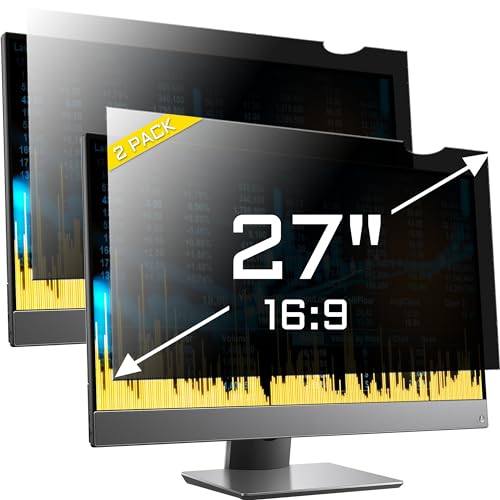
- Best for: Owners of curved 27 inch monitors who want a spare filter included.
- Brand: ZYY
- Pack contents: 2 privacy filters
- Screen size: 27 inch
- Aspect ratio: 16:9
All 4 Picks at a Glance
| Product | Specs | Action |
|---|---|---|
| Kensington MagPro 24 Inch Magnetic Privacy Screen |
| Check price on Amazon |
| Mamol 24 Inch Computer Privacy Screen, 2 Pack |
| Check price on Amazon |
| ZYY 27 Inch Privacy Screen Filter, 2 Pack |
| Check price on Amazon |
 APeiSi 32 Inch Privacy Screen Filter |
| Check price on Amazon |
Key takeaways
- Compare the best privacy screens for computer monitors, from magnetic 24 inch filters to a 32 inch shield, with sizing, angle and mounting checks.
A privacy screen only works when it matches your monitor exactly, so the real decision is not which brand sounds strongest but which filter fits your panel size, aspect ratio, bezel style and daily routine. A filter cut for a 24 inch 16:9 display will leave gaps on a 27 inch screen, and a tab-mounted film behaves very differently from a magnetic panel you remove several times a day.
This guide is for office workers, remote staff and anyone handling sensitive documents on a desktop monitor in a shared space. The picks below cover the most common desktop sizes, 24, 27 and 32 inch 16:9 panels, across magnetic, adhesive, slide-tab and hanging mounts, drawn from the sizes, finishes and fitting details stated in each Amazon listing title and product information.
Quick Picks
As an Amazon Associate we earn from qualifying purchases
| Product | Best for | Key spec from title |
|---|---|---|
| Kensington MagPro 24 Inch Magnetic Privacy Screen | Slim-bezel 24 inch monitors | Magnetic and removable, 16:9 fit |
| Mamol 24 Inch Computer Privacy Screen, 2 Pack | Dual-monitor desks | Two 24 inch 16:9 filters per pack |
| ZYY 27 Inch Privacy Screen Filter, 2 Pack | Curved 27 inch monitors | 27 inch 16:9, curved screen fit |
| Magnetic Privacy Screen for 27 Inch Monitor | Tool-free hanging mounts | Magnetic hanging frame, 16:9 fit |
| APeiSi 32 Inch Privacy Screen Filter | Large 32 inch monitors | 32 inch 16:9, side blackout design |
How to Choose
Match the Diagonal and Aspect Ratio First
Privacy filters are cut to a stated diagonal and aspect ratio, and both numbers have to match your monitor before anything else matters. Most desktop panels are 16:9, so a filter listed for a 24 inch 16:9 screen measures roughly 20 15/16 by 11 13/16 inches of viewable area. A 16:10 monitor with the same diagonal needs a taller filter, and forcing a 16:9 film onto it leaves an exposed strip. Check the listing dimensions against your screen’s viewable width and height rather than trusting the diagonal alone, because two monitors with the same diagonal can have different active areas.
Pick a Mounting Style You Will Actually Use
The mounting method decides how often you will bother removing the filter. Magnetic screens such as hanging or snap-on designs lift off in seconds, which suits shared desks and anyone who shows their screen to colleagues. Adhesive strips hold a film flush and nearly invisible but are slower to remove and can lose grip over time. Slide-mount tabs sit between those extremes, letting the filter slide in and out while staying aligned. Raised bezels accept tabs easily, while slim-bezel and frameless monitors often need magnetic or adhesive fitting, so check the listing’s bezel notes before ordering.
Understand the Privacy Angle in the Listing
Listings describe privacy in degrees, and the wording matters. Some filters state that the screen blacks out across a 60 degree viewing area, meaning viewers seated well off to the side see a dark panel while the person directly in front keeps a clear image. Others quote a narrower per-side figure. A tighter angle protects you in crowded rows but also darkens the screen sooner when you shift in your chair. Remember that these filters guard the left and right sides only, so someone standing directly behind you can still read the display, a limitation several listings state openly.
Weigh Finish, Glare and Extra Filtering
Most filters offer two faces or a single finish, and the choice affects everyday comfort. A matte side reduces reflections from windows and ceiling lights, while a glossy side keeps text and colors closer to the bare panel. Many listings also describe anti-scratch surfaces and blue light or UV filtering as part of the film stack, which can help during long sessions in bright rooms. Keep in mind that any privacy film dims the display somewhat, so a monitor with brightness headroom handles a filter better than one already running near its maximum output.
The 5 Best Options
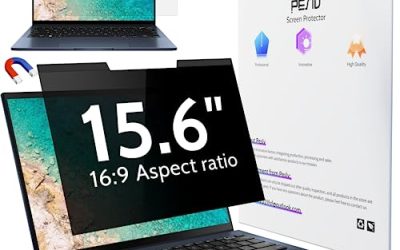
Kensington MagPro 24 Inch Magnetic Privacy Screen
- Best for: Workers with slim-bezel 24 inch monitors who remove the filter often.
- Brand: Kensington
- Model: K55418WW
- Screen size: 24 inch
- Aspect ratio: 16:9
Workers with slim-bezel 24 inch monitors who remove the filter often.
The magnetic fit depends on the monitor’s bezel design, so confirm compatibility with your exact model.
The MagPro is the pick for modern 24 inch monitors with slim bezels, where slide tabs have nothing to grip and adhesive feels too permanent. Its magnetic attachment lets the filter snap on for focused work and lift off when a colleague needs to see the screen, and the listing positions it specifically for slim-bezel desktop displays. The anti-glare surface and blue ray reduction suit bright offices, while the removable design means the same filter can move between a home desk and an office desk without leaving residue or needing a fresh set of mounting strips each time.
Mamol 24 Inch Computer Privacy Screen, 2 Pack
- Best for: Dual-monitor setups and small offices equipping matching 24 inch desks.
- Brand: Mamol
- Pack contents: 2 privacy filters
- Screen size: 24 inch
- Aspect ratio: 16:9
Dual-monitor setups and small offices equipping matching 24 inch desks.
Film-style filters need careful, dust-free installation to avoid bubbles under the surface.
Two matching monitors are common on office desks, and this Mamol pack covers both with a pair of 24 inch 16:9 filters in one box. The film is a removable, anti-scratch protector that also carries the listing’s eye protection angle, combining anti-glare and blue light filtering with the privacy layer. Because it ships as a two pack, it also works as a spare for a second workstation or a replacement if one film gets damaged. The listing is sold by Mamol Direct and ships from Amazon, which keeps ordering and returns straightforward for office buyers outfitting several desks.
ZYY 27 Inch Privacy Screen Filter, 2 Pack
- Best for: Owners of curved 27 inch monitors who want a spare filter included.
- Brand: ZYY
- Pack contents: 2 privacy filters
- Screen size: 27 inch
- Aspect ratio: 16:9
Owners of curved 27 inch monitors who want a spare filter included.
The listing notes touch input will not work through this filter on touchscreen monitors.
Curved 27 inch monitors rule out many rigid filters, and this ZYY two pack is listed specifically for curved desktop screens as well as flat ones. The listing states the filter blocks ninety-six percent of UV light and sixty-five percent of blue light, and that on-screen content stays visible only when viewed straight on, with privacy blocking from thirty degrees outward. Both sides of the film are usable, with a matte face for glare control and a glossy face for privacy use. The stated filter size of 23 9/16 by 13 1/4 inches matches the standard viewable area of 27 inch 16:9 panels.
Magnetic Privacy Screen for 27 Inch Monitor
This hanging magnetic screen suits 27 inch flat monitors where you want privacy without sticking anything to the panel. The listing describes a magnetic quick installation that is adhesive-free and leaves no residue, so the screen can hang on the monitor for private work and come off cleanly for collaboration or cleaning. It combines the privacy layer with an anti-glare filter and blue light blocking, and the surface is described as scratch and fingerprint resistant. For renters, hot-deskers and anyone wary of adhesive on a work-issued monitor, the hang-on design avoids commitment while still narrowing the viewing angle.
Specs
- Screen size: 27 inch
- Aspect ratio: 16:9
- Mounting: Magnetic hanging, adhesive-free
- Features: Anti-glare filter, blue light blocking
- Surface: Scratch and fingerprint resistant
- Fit note: For flat monitors
Best for: Shared or work-issued 27 inch monitors where adhesive is not an option.
Watch out for: The listing limits this design to flat monitors, so curved panels need a film-style filter instead.
ASIN: B0FNNGNLS8
APeiSi 32 Inch Privacy Screen Filter
- Best for: Users with 32 inch monitors working in open-plan or public-facing spaces.
- Brand: APeiSi
- Model: APF32.0W9
- Screen size: 32 inch
- Aspect ratio: 16:9
Users with 32 inch monitors working in open-plan or public-facing spaces.
Measure your panel’s viewable area carefully, since 32 inch monitors vary more between brands.
Large 32 inch monitors expose more screen to the room, and this APeiSi filter is cut for that size in 16:9 format. The listing states the screen blacks out across a sixty degree viewing area and that the filter blocks UV and blue light from the monitor. At 27.87 by 15.67 inches it matches the viewable area of typical 32 inch desktop panels. The package includes the filter, a cleaning cloth, double-sided adhesive and transparent plastic tabs plus installation instructions, giving you both mounting routes in the box so you can choose a permanent or removable fit.
Which One Fits Your Situation
You Work on a Slim-Bezel Monitor in a Bright Office
Modern office monitors often have thin frames that leave no lip for slide tabs, and strong ceiling light adds glare on top of the privacy problem. A magnetic filter built for slim bezels answers both issues, snapping on without adhesive and presenting an anti-glare face to the room. Choose the magnetic 24 inch option if your panel matches that size, and raise the monitor brightness slightly to offset the dimming every privacy film causes.
You Run Two Matching Monitors at One Desk
A dual-monitor desk doubles the exposed screen area, and buying two separate filters risks mismatched tint and finish between panels. A two pack of identical 24 inch films keeps both screens consistent and usually leaves the second filter as either the matching half or a ready spare. This route suits home offices and small teams standardizing on one monitor size, as long as both displays share the same diagonal, aspect ratio and viewable dimensions.
Your Monitor Is Curved or Larger Than Standard
Curved panels and 32 inch screens narrow the field quickly, because rigid hanging frames cannot follow a curve and small filters leave the edges exposed. For a curved 27 inch monitor, pick the film listed for curved screens and confirm the 23 9/16 by 13 1/4 inch size. For a big flat 32 inch display, choose the filter cut to 27.87 by 15.67 inches and use the included tabs or adhesive for a secure fit.
You Share a Desk or Use a Work-Issued Monitor
If the monitor is not yours, permanent adhesive is a poor idea, and a filter that hangs on magnetically leaves no residue when removed. That makes the hanging 27 inch screen the practical choice for hot-desking, rented workspaces and loaner equipment. It also comes off in seconds when a colleague needs to view the display with you, then drops back on when you return to sensitive work.
Common Mistakes
- Ordering by diagonal alone and ignoring aspect ratio, so a 16:9 filter lands on a 16:10 monitor and leaves an uncovered strip.
- Skipping the viewable-area measurement, even though two monitors with the same diagonal can have different active widths and heights.
- Assuming a privacy filter hides the screen from every direction, when the listings only protect side angles and not viewers standing behind you.
- Fitting slide tabs to a frameless or slim-bezel monitor that cannot hold them, instead of choosing a magnetic or adhesive design.
- Leaving the monitor brightness unchanged after fitting a film, then judging the filter too dark when a small brightness increase fixes it.
Frequently Asked Questions
How do I measure my monitor for a privacy screen?
Measure the viewable screen area, not the outer frame: width and height of the lit display, plus the diagonal in inches. Compare those figures with the filter dimensions in the listing, such as 23 9/16 by 13 1/4 inches for a 27 inch 16:9 panel. Also confirm the aspect ratio, since a 16:10 monitor needs a taller filter than a 16:9 model of the same diagonal.
Will a privacy screen stop people behind me from reading my monitor?
No. Privacy filters narrow the side viewing angles, so people seated to your left or right see a darkened screen, but the image stays fully visible from directly in front and from behind your chair. Listings state this limitation openly. If your desk faces a walkway behind you, repositioning the monitor matters as much as the filter itself.
Can I remove a privacy screen and put it back later?
That depends on the mounting style. Magnetic and hanging screens lift off and reattach in seconds, and slide-tab films can slide out and back in. Adhesive-mounted films are the least suited to frequent removal, since the strips can lose grip and collect dust. If you share your screen often during the day, choose a magnetic or tab design from the start.
Does a privacy screen work on a touchscreen or curved monitor?
Only when the listing says so. Some films are listed for curved monitors, while others are limited to flat panels, and at least one listing in this guide warns that touch input stops working through the filter. Check the compatibility notes for your exact screen type before ordering, because a rigid hanging frame cannot follow a curved panel and a thick film can interfere with touch sensors.
FAQ
How do I measure my monitor for a privacy screen?
Will a privacy screen stop people behind me from reading my monitor?
Can I remove a privacy screen and put it back later?
Does a privacy screen work on a touchscreen or curved monitor?
More from Amazon
Programs that pair well with the guide above. Offers and eligibility are set by Amazon and may change.
Free shipping on eligible items, Prime Video and more. Eligible new members can start with a free trial.
Start a Prime free trialAd-free music streaming. Eligible new subscribers can start with a free trial.
Try Music Unlimited freeA Prime membership for ages 18-24 with a trial period. Eligibility is set by Amazon.
See Prime for Young AdultsAudiobooks and podcasts to listen to on the go. Eligible new members can start with a free trial.
Try Audible freeAs an Amazon Associate we earn from qualifying purchases.