Our Short List of 3

- Best for: Two larger monitors on their own stands, where surface depth matters most.
- Top surface: 36 x 22 inches
- Lift: dual pneumatic springs, Z-frame design
- Height range: 6.5 to 17 inches
- Load: up to 33 lb on the desktop, 4 lb on the keyboard tray

- Best for: Heavier dual-monitor setups and anyone who changes height several times a day.
- Desktop: 35 x 16.3 inches
- Lift: electric motor with one-touch control
- Height range: 5.7 to 19.7 inches
- Load: up to 55 lb total (44 lb desktop, 11 lb keyboard tray)

- Best for: Buyers who want a dual-monitor converter working the day it arrives, with no build step.
- Width: 36 inches, two-tier design
- Monitor capacity: 2, as listed
- Lift: spring-loaded, 11 height settings
- Assembly: none, arrives fully assembled
All 5 Picks at a Glance
| Product | Specs | Action |
|---|---|---|
| VIVO 36 inch V Series (DESK-V000V) |
| Check price on Amazon |
| FLEXISPOT 35 inch Electric |
| Check price on Amazon |
| Vari VariDesk Pro Plus 36 |
| Check price on Amazon |
 HUANUO 36 inch Z Shaped |
| Check price on Amazon |
 VIVO 36 inch K Series (DESK-V036KW) |
| Check price on Amazon |
Key takeaways
- Five standing desk converters that honestly fit two monitors, compared on surface width, lift type, height range and the load each frame can carry.
A converter that feels fine under a laptop can turn shaky and cramped once two monitors sit on it. The real decision is whether the surface is wide and deep enough for both screens on their stands, whether the frame and lift are strong enough for their combined weight, and whether the base footprint still fits the desk you already own. Two 24 or 27 inch monitors plus a keyboard is a very different load from a single screen, and the listings below separate themselves on exactly those points.
This guide is for dual-monitor users who want to stand without replacing their desk. Every pick is a tabletop converter whose Amazon listing states dual-monitor or multiple-monitor support, with the surface size and load figure printed on the page. The five split into pneumatic, gas spring, spring-loaded and electric lifts, so you can match the mechanism to how often you change height.
Quick Picks
As an Amazon Associate we earn from qualifying purchases
| Product | Best for | Key spec from title |
|---|---|---|
| VIVO 36 inch V Series (DESK-V000V) | Deep surface for two monitors on stands | 36 x 22 inch top, dual monitor riser |
| FLEXISPOT 35 inch Electric | Heavy dual setups, push-button lift | Motorized lift, up to 55 lb load |
| Vari VariDesk Pro Plus 36 | Zero assembly on arrival | 11 height settings, spring-loaded lift |
| HUANUO 36 inch Z Shaped | Widest keyboard tray | 36 x 20.5 inch platform, dual gas springs |
| VIVO 36 inch K Series (DESK-V036KW) | Shallow desks, taller users | 36 x 15.7 inch top, 4.5 to 20 inch lift |
How to Choose
Surface Width and Depth for Two Screens
Two monitors side by side need width first: a 36 inch top holds two 27 inch screens on their stands, while narrower risers force the stands to hang off the edges. Depth matters just as much. A deep surface around 22 inches leaves room behind the screens for stand feet and cables, while a shallow 15.7 inch top pushes the monitors closer to your eyes and leaves little space for anything else on the upper tier. Measure your two stands together, including their feet, before choosing.
Load Capacity With Headroom to Spare
Add up both monitors with their stands, then add anything else that will ride on the top tier. Converters in this guide list desktop loads from 28.6 to 55 lb, and a pair of 27 inch monitors on stands can eat most of the smaller figure on its own. Working near the limit makes any lift feel strained and can add wobble at full height. Leave a clear margin between your combined weight and the listed maximum, and check the separate keyboard tray limit too, since trays are often rated for only a few pounds.
Lift Type and Height Range
Pneumatic and gas spring models rise with a squeeze handle and your own gentle pull, which suits a few changes per day. A spring-loaded frame with fixed settings clicks into place and feels planted, but your ideal height has to land on one of its steps. An electric motor lifts a heavy dual-monitor load at the touch of a button, which suits frequent changes. Compare the listed height range as well: taller users need a converter that reaches higher above the desk, and every model here lists its own minimum and maximum.
Footprint and Keyboard Tray Layout
A converter sits on your existing desk, so its base footprint decides whether the desk still works. Deep bases need a deep desk, and the whole unit should sit flat without hanging over the back edge where cables drop. The keyboard tray shapes your typing position: wide trays around 36 inches hold a full keyboard and mouse together, while narrower trays near 25 inches suit compact keyboards. Removable trays help when you would rather type on the desk surface itself at sitting height.
The 5 Best Options
VIVO 36 inch V Series (DESK-V000V)
- Best for: Two larger monitors on their own stands, where surface depth matters most.
- Top surface: 36 x 22 inches
- Lift: dual pneumatic springs, Z-frame design
- Height range: 6.5 to 17 inches
- Load: up to 33 lb on the desktop, 4 lb on the keyboard tray
Two larger monitors on their own stands, where surface depth matters most.
A recent crawl of this listing showed no featured offers, so confirm a live buying option on the page before ordering; the tray is also limited to 4 lb.
This is the deep-surface option in the group. The 36 x 22 inch top gives two monitors on their own stands genuine room, with space behind the screens for cables instead of a tangle at the edge. Dual pneumatic springs in a Z-frame lift the load with a touch locking mechanism, and the two-tier layout keeps the keyboard on its own lower deck. If your pair of screens feels crowded on shallower risers, this is the layout that fixes it.
Watch out for: A recent crawl of this listing showed no featured offers, so confirm a live buying option on the page before ordering; the tray is also limited to 4 lb.
FLEXISPOT 35 inch Electric
- Best for: Heavier dual-monitor setups and anyone who changes height several times a day.
- Desktop: 35 x 16.3 inches
- Lift: electric motor with one-touch control
- Height range: 5.7 to 19.7 inches
- Load: up to 55 lb total (44 lb desktop, 11 lb keyboard tray)
Heavier dual-monitor setups and anyone who changes height several times a day.
A recent crawl of this listing showed no featured offers, so confirm a live buying option on the page; the motor also needs a nearby power outlet.
The motorized pick. A one-touch electric lift raises the surface from 5.7 to 19.7 inches, and the listing rates the frame for up to 55 lb of gear, naming dual monitors as the intended load. That is the most headroom in this guide, which matters when two monitors, their stands and a laptop all ride together. The 35 x 16.3 inch desktop is shallower than the VIVO V Series, so this model trades some surface depth for lift strength and push-button ease.
Watch out for: A recent crawl of this listing showed no featured offers, so confirm a live buying option on the page; the motor also needs a nearby power outlet.
Vari VariDesk Pro Plus 36
- Best for: Buyers who want a dual-monitor converter working the day it arrives, with no build step.
- Width: 36 inches, two-tier design
- Monitor capacity: 2, as listed
- Lift: spring-loaded, 11 height settings
- Assembly: none, arrives fully assembled
Buyers who want a dual-monitor converter working the day it arrives, with no build step.
Height changes land on 11 fixed steps rather than any point in between, so check that one step puts the screens at your standing eye level.
The no-assembly pick. The Pro Plus 36 arrives fully assembled, so it goes from box to desk in minutes, and its spring-loaded lift offers 11 height settings across a two-tier design. The Amazon listing gives a monitor capacity of 2, which matches the dual-screen purpose directly, and a keyboard tray is included in the box. For a gaming or work desk that already has everything else in place, this is the converter that asks the least of you on day one.
Watch out for: Height changes land on 11 fixed steps rather than any point in between, so check that one step puts the screens at your standing eye level.
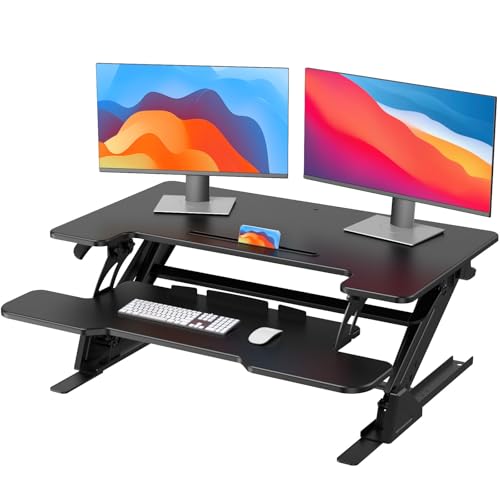
HUANUO 36 inch Z Shaped
- Best for: Full-size keyboard users who want the widest tray under two monitors.
- Top platform: 36 x 20.5 inches
- Lift: dual gas springs, listed as tested for over 20,000 cycles
- Height range: 5.9 to 17.3 inches
- Load: up to 28.6 lb on the desktop, 4.4 lb on the keyboard tray
Full-size keyboard users who want the widest tray under two monitors.
The 28.6 lb desktop load is the lowest in this guide, so weigh your two monitors with stands before choosing it; a recent crawl also showed no featured offers on the listing.
The tray-focused pick. Its 36 x 20.5 inch top platform is listed for dual monitors or a laptop and monitor combo, and the 36 x 8.3 inch keyboard tray below is the widest here, holding a full-size keyboard and mouse with a device slot for a phone or tablet. Dual gas springs handle the lift, and the listing states they are tested for over 20,000 lift cycles. The Z-shaped frame keeps the unit planted as it rises to 17.3 inches.
Watch out for: The 28.6 lb desktop load is the lowest in this guide, so weigh your two monitors with stands before choosing it; a recent crawl also showed no featured offers on the listing.
VIVO 36 inch K Series (DESK-V036KW)
- Best for: Shallow desks and taller users who need extra lift height for two monitors.
- Desktop: 36 x 15.7 inches
- Lift: pneumatic spring with squeeze-handle adjustment
- Height range: 4.5 to 20 inches
- Load: up to 33 lb, listed as holding multiple monitors
Shallow desks and taller users who need extra lift height for two monitors.
The 15.7 inch depth leaves little room behind the monitors, so deep stand feet may crowd the back edge; a recent crawl of this listing showed no featured offers, so confirm a live buying option.
The shallow-desk pick. At 36 x 15.7 inches, the K Series top takes up less front-to-back room than the others, which helps on desks that are not very deep, and the white finish suits lighter setups. The listing states the desktop supports up to 33 lb and easily holds multiple monitors or a laptop and monitor combination. Its pneumatic lift runs from 4.5 to 20 inches, the tallest upper reach in this guide, which taller users will appreciate.
Watch out for: The 15.7 inch depth leaves little room behind the monitors, so deep stand feet may crowd the back edge; a recent crawl of this listing showed no featured offers, so confirm a live buying option.
Which One Fits Your Situation
You Run Two 27 Inch Monitors on Their Own Stands
Pick the VIVO V Series. Its 36 x 22 inch surface is the deepest here, so both stands sit fully on the top tier with cable room behind them, and the 33 lb desktop load covers a typical pair. The HUANUO is the fallback if you also want the widest keyboard tray.
You Change Height Many Times a Day
Pick the FLEXISPOT Electric. A motor does the lifting, so a heavy dual-monitor load rises and lowers at the touch of a button instead of relying on your arms. Its 55 lb total load figure also leaves the most headroom for a laptop joining the two screens, and the 5.7 to 19.7 inch range covers most sitting and standing heights.
Your Desk Is Shallow or Your Space Is Tight
Pick the VIVO K Series. The 15.7 inch deep top and matching footprint leave more of a small desk usable, while the 36 inch width still fits two monitors side by side. Check that your monitor stands have compact feet, since depth behind the screens is limited, and route cables down the back early so they do not eat into the surface.
You Want It Working the Day It Arrives
Pick the VariDesk Pro Plus 36. It arrives fully assembled with the keyboard tray in the box, and the listing states a monitor capacity of 2. Set it on the desk, place your screens, plug everything in, and choose one of the 11 height settings. Nothing needs building, bolting or balancing before your first standing session.
Common Mistakes
- Weighing only the monitor panels and forgetting the stands, which can add several pounds per screen to the load the lift must carry.
- Measuring surface width but not depth, then finding the monitor stand feet hang over the back edge of a shallow top.
- Loading the keyboard tray past its small listed limit with a heavy keyboard, wrist rest and mouse all riding on it.
- Choosing a manual lift for a heavy dual-monitor setup you raise and lower many times a day, when an electric model would suit better.
- Leaving no cable slack for full height, so monitor and power leads pull tight or drag the screens when the converter is raised.
Frequently Asked Questions
Can a smaller converter hold two monitors?
It depends on width and the listed load rather than the label on the box. Two 24 inch monitors can fit a narrower top if their stands are compact, but every pick in this guide is 35 or 36 inches wide because that width holds two 27 inch screens on stands without crowding. Match your stand footprint to the surface dimensions on the listing.
Do I need a monitor arm with a desk converter?
Not always. If your monitors have height-adjustable stands, the converter alone can put both screens at a good standing eye level. An arm helps when the stands are fixed or take up too much surface depth, but the arm and screens together still count against the listed load, so add their weight before deciding.
How much load capacity do two monitors need?
Add both monitors with their stands, plus anything else on the top tier. Many pairs land between 20 and 30 lb, which is why the 28.6 lb HUANUO suits lighter screens while the 55 lb FLEXISPOT suits heavier ones. Keep a margin below the listed maximum so the lift stays smooth at full height.
Is an electric or a manual lift better for two monitors?
Electric lifts handle heavy loads with no arm effort and suit frequent changes, but need a power outlet and add a motor that can fail. Pneumatic, gas spring and spring-loaded models are simpler and work anywhere, though you guide the weight yourself. Choose by your combined monitor weight and how often you move between sitting and standing.
FAQ
Can a smaller converter hold two monitors?
Do I need a monitor arm with a desk converter?
How much load capacity do two monitors need?
Is an electric or a manual lift better for two monitors?
More from Amazon
Programs that pair well with the guide above. Offers and eligibility are set by Amazon and may change.
Free shipping on eligible items, Prime Video and more. Eligible new members can start with a free trial.
Start a Prime free trialAd-free music streaming. Eligible new subscribers can start with a free trial.
Try Music Unlimited freeA Prime membership for ages 18-24 with a trial period. Eligibility is set by Amazon.
See Prime for Young AdultsAudiobooks and podcasts to listen to on the go. Eligible new members can start with a free trial.
Try Audible freeAs an Amazon Associate we earn from qualifying purchases.