Key takeaways
- Keep chat, guides, and second screens in view with the best tablet stands for gaming and streaming desks, from foldable docks to clamp-on arms.
A tablet has quietly become one of the most useful screens on a gaming desk. Streamers park one beside the monitor for chat and alerts, RPG players keep a wiki or map open on it, and plenty of gamers use one for Discord calls, companion apps, or a cloud gaming session on the couch-side table. The problem is placement: a tablet lying flat on the desk is hard to read, slides around, and eats space your keyboard and mouse need.
A good tablet stand fixes all of that. It lifts the screen toward eye level, holds it steady while you tap through menus, and keeps the charging cable routed neatly out of the way. The five stands below cover the main ways gamers actually use a tablet at a desk, from a simple foldable dock to a clamp-on arm that floats the screen next to your monitor.
Disclosure: As an Amazon Associate, we earn from qualifying purchases made through links in this article, at no extra cost to you.
Quick Picks
| Product | Best for | ASIN |
|---|---|---|
| Lamicall Adjustable iPad Stand for Desk | Best overall | B0FP9GJBMV |
| UGREEN Tablet Stand Holder for Desk | Best compact foldable | B0BD4FB61Y |
| LISEN Rotating Tablet Stand | Best for stream chat | B0CST4CYVH |
| KABCON Tablet Stand | Best for large tablets | B09T6TG2FK |
| KU XIU Aluminum Alloy Tablet Arm Stand | Best clamp-on arm | B0CG5TFWV8 |
How to Choose a Tablet Stand for a Gaming Desk
Pick the form factor first
Desk stands sit on a weighted base and suit a tablet that mostly lives in one spot. Folding stands collapse flat, which suits a setup that gets packed away or a tablet that travels between desk and couch. Clamp-on arms grip the edge of the desk and hold the tablet up in the air, which is the best option when desk space is tight or you want the screen floating beside your monitor like a small second display.
Match the stand to your tablet size
Every stand lists a supported size range, and it matters most at the extremes. Compact stands built for 4 to 11 inch devices can wobble under a 12.9 inch iPad Pro, while a stand built for large tablets looks oversized under a mini. Check the range against your tablet, and if you use a thick protective case, confirm the hooks or cradle are deep enough to hold the tablet with the case still on.
Look for angle range and rotation
A chat display needs to tilt back so you can read it at a glance, while a tablet used for drawing or note-taking needs to lean much flatter. Dual-axis hinges give you both tilt and height changes. Rotation is worth having if you switch between landscape video and portrait chat layouts, since a rotating base or head lets you turn the screen without lifting the whole stand off the desk.
Stability beats cleverness
A stand that slowly sinks or tips when you tap the screen gets old fast. Weighted metal bases stay planted, silicone pads stop sliding and protect the desk surface, and hinges you can tighten will keep holding their angle after months of daily adjustment. If you plan to tap through menus mid-game, favor a heavier base over the lightest folding design.
Think about cables and charging
A tablet running chat or a second-screen app all evening will need power. Stands with a charging notch or an open back let you plug in a cable while the tablet sits in the cradle. Route the cable down the back of the stand and behind the desk so it stays clear of your mouse area.
The Best Tablet Stands for Gaming and Streaming
Lamicall Adjustable iPad Stand for Desk
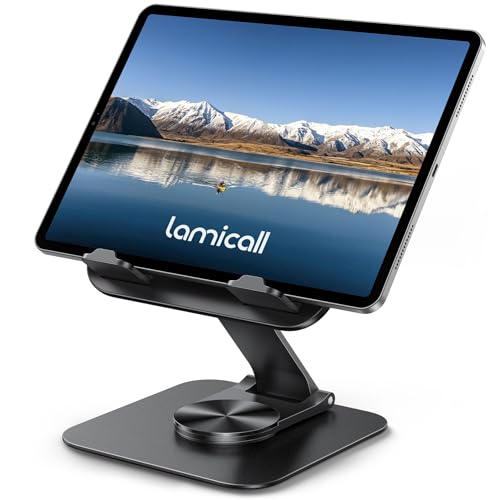
Specs
- Fits tablets and phones from 4.7 to 13 inches
- 360 degree rotation with dual-axis adjustment
- Heavy-duty metal base and support rod
- Ultra-slim body that folds flat for storage
- Model STDT02; hex wrench and manual included in the box
This is the stand to buy if you want one design that handles every job on the desk. The rotating base lets you swing the tablet from a landscape video layout to a portrait chat layout with one hand, and the dual-axis hinge gives you a wide tilt range for reading guides or watching a stream back. The weighted metal base keeps it planted when you tap the screen, which is where lighter folding stands tend to skate across the desk.
When the session ends, it folds down slim enough to slide into a drawer or a backpack side pocket, so it works for a desk that doubles as a workspace during the day. It is a strong fit for streamers who keep a tablet dedicated to chat and want to reposition it often without fuss.
Best for: Most gamers who want one versatile stand for chat, video, and guides.
UGREEN Tablet Stand Holder for Desk

Specs
- Aluminum construction with a thickened, weighted base
- Fits devices from 4 to 12.9 inches
- Dimensions of 7.2 x 4.72 x 6.98 inches
- Item weight of 1.01 pounds
- Charging notch for using the tablet while it charges
- Foldable design for storage and travel
UGREEN’s stand is the tidy, no-drama option. The aluminum body and thick base give it a planted feel that suits a permanent spot beside a monitor, and the finish matches the blacked-out look of most gaming desks. The hinge adjusts smoothly through its angle range, so you can set a comfortable tilt for reading chat and leave it there all week.
The charging notch is a small detail that matters during long sessions: the tablet can stay plugged in while it sits in the cradle, so a battery warning never interrupts a stream. It folds flat when you need the desk clear, though most owners will likely leave it set up full time. Pick this one if you value a clean look and set-and-forget stability over constant repositioning.
Best for: A permanent chat or second-screen spot on a tidy desk.
LISEN Rotating Tablet Stand

Specs
- Al-Ti alloy construction
- Fits devices from 4.7 to 12.9 inches
- 360 degree rotation with height and angle adjustment
- Joint tension can be tightened with the included adjustment tool
- Weighted, widened base with anti-slip silicone
- Item weight of 14.8 ounces; folds flat
The LISEN stand solves the most common complaint about adjustable stands: hinges that loosen over time until the tablet slowly droops. Its bridge screw adjustment lets you tighten or loosen the joint tension yourself with the tool stored in the base, so the stand keeps holding the angle you set months later. That makes it a smart buy for a tablet you reposition every day.
The full rotation suits streamers who flip between a landscape dashboard and a portrait chat column, and the wide weighted base stays steady while you do it. It folds flat for storage, and the alloy build feels a step above basic plastic stands. If your last stand sagged into uselessness, this is the replacement designed to avoid a repeat.
Best for: Streamers who adjust their tablet angle daily and hate hinge sag.
KABCON Tablet Stand

Specs
- Solid aluminum construction
- Supports tablets up to 15 inches, including Surface Pro models
- Eye-level raised design for desk use
- Adjustable viewing angle
- Model Ad-bm1-103363
- Black finish
Most tablet stands top out around 13 inches, which leaves owners of large tablets and small portable monitors with few options. The KABCON stand is built for that bigger gear: its solid aluminum frame supports devices up to 15 inches, and the raised, eye-level design lifts the screen higher than a typical low cradle. That extra height suits a tablet used as a genuine second display beside a laptop or monitor.
Digital artists in gaming setups also use this style of stand for drawing tablets, since the firm frame holds the device steady under pen pressure. The footprint is larger than a folding stand, so measure your desk space first. Choose it when your tablet is one of the big models, or when you want a stand that can also hold a portable monitor for a dual-screen setup on the road.
Best for: Large tablets, Surface Pro devices, and portable monitors.
KU XIU Aluminum Alloy Tablet Arm Stand

Specs
- Aluminum alloy body with a CNC-machined finish
- Retractable clip fits devices from 7 to 15.6 inches
- Five adjustable joints plus a 360 degree rotating head
- Maximum height of 24 inches
- Load capacity of 3.3 pounds (1.5 kg)
- C-clamp mounts to surfaces up to 1.96 inches thick, no tools needed
When there is no desk space left to give, an arm stand takes the tablet off the surface entirely. The KU XIU clamps to the back or side edge of the desk and holds the tablet up in the air, where it can float beside your monitor as a chat screen or hover above the desk for an overhead view of a drawing or a board game stream. Five joints and a rotating head give it the widest positioning range of any pick here.
The clamp installs by hand and grips desks, shelves, and headboards up to about two inches thick. Keep the load limit in mind: at 3.3 pounds it handles any tablet comfortably, but position the arm segments so the weight stays balanced over the clamp. For streamers with packed desks, this is the stand that adds a screen without taking anything away.
Best for: Crowded desks and streamers who want a floating chat screen.
FAQ
Can a tablet stand hold a 12.9 inch iPad Pro?
Yes, as long as the stand’s supported range includes it. Four of the five picks here cover 12.9 inch models, and the KABCON goes further, up to 15 inches. Check the range before buying, and favor a weighted base with larger tablets, since a big screen on a light stand can tip when you tap near the top edge.
Is a tablet stand worth it for streaming chat?
It is one of the cheapest upgrades a small streamer can make. A stand puts chat at a fixed, readable angle beside your monitor, keeps the tablet charged through long sessions, and frees you from glancing down at a phone lying flat on the desk. Rotating models also let you switch chat to a portrait layout that fits more messages on screen.
Will these stands work with a case on my tablet?
Most will, provided the case is not extremely thick. Cradle-style stands hold the tablet by its bottom edge, so slim and mid-weight cases are fine. LISEN notes a device thickness limit of about 0.7 inches, and very rugged cases can exceed that. If your tablet wears a heavy-duty case, a clip-style arm stand with an adjustable grip is the safer choice.
What is the difference between a desk stand and a clamp arm?
A desk stand sits on the surface on a weighted base, so you can move it around freely but it occupies desk space. A clamp arm grips the edge of the desk and holds the tablet in the air, which saves space and allows higher, more flexible positioning, but it is fixed to one spot and has a lower weight limit.
Conclusion
For most gaming and streaming desks, the Lamicall Adjustable iPad Stand is the easiest recommendation: it rotates, tilts, folds flat, and stays steady under daily use. The UGREEN is the cleaner set-and-forget dock, the LISEN is built for people who adjust angles constantly, the KABCON covers the largest tablets and portable monitors, and the KU XIU arm wins when desk space runs out. Match the stand to how your tablet actually earns its place in the setup, and that extra screen becomes far more useful.
FAQ
Can a tablet stand hold a 12.9 inch iPad Pro?
Is a tablet stand worth it for streaming chat?
Will these stands work with a case on my tablet?
What is the difference between a desk stand and a clamp arm?
More from Amazon
Programs that pair well with the guide above. Offers and eligibility are set by Amazon and may change.
Free shipping on eligible items, Prime Video and more. Eligible new members can start with a free trial.
Start a Prime free trialAd-free music streaming. Eligible new subscribers can start with a free trial.
Try Music Unlimited freeA Prime membership for ages 18-24 with a trial period. Eligibility is set by Amazon.
See Prime for Young AdultsAudiobooks and podcasts to listen to on the go. Eligible new members can start with a free trial.
Try Audible freeAs an Amazon Associate we earn from qualifying purchases.