Key takeaways
- Compare the best under desk cable management trays for gaming setups: clamp-on mesh, long steel and screw-in racks that lift strips off the floor.
A gaming desk hides a second desk underneath it: a power strip, two or three chunky power bricks, a USB hub, and enough spare cable to trip over every time you stretch your legs. An under desk cable management tray fixes that by giving all of it a home. The strip and bricks sit in an open steel rack bolted or clamped beneath the desktop, the slack loops neatly inside, and the floor under your desk goes back to being floor.
Trays are the heavy lifters of cable organization. Sleeves and raceways route individual runs, and boxes hide a strip on the floor, but only a tray lifts the whole power cluster off the ground and keeps it reachable. That matters on a gaming setup, where you swap headsets, add a capture device, or pull a brick far more often than at a plain office desk. This guide compares five trays across the three mounting styles that matter — clamp-on, screw-in, and tape-or-screw hybrid.
Disclosure: As an Amazon Associate, we earn from qualifying purchases made through links in this article, at no extra cost to you.
Quick Picks
| Product | Best for | ASIN |
|---|---|---|
| Litwaro Metal Mesh Cable Management Tray | No-drill clamp mounting | B0BZ3GHM8N |
| QUELIEN 25.3 Inch Clamp-Mounted Cable Tray | Long desks and wide strips | B0F47ZLBBB |
| PAMO Cable Management Under Desk Set of 2 | Two-zone screw-in steel | B08N1LM2GF |
| Cinati Under Desk Cable Management Tray | Compact and glass desks | B0BPLRX32S |
| Delamu 2 Pack Metal U Channel Tray | Tape or screw flexibility | B0B6HN3DTT |
How to Choose an Under Desk Cable Management Tray
Mounting style comes first. Clamp-on trays grip the edge of the desktop and need no holes, which makes them the default pick for glass desks, rented rooms, and anyone who rearranges often. Screw-in trays are the firmest option and the best choice for a permanent setup with heavy bricks, but they need a wood or particle-board underside thick enough to hold screws. Tape mounting is the lightest-duty route: fine for cables alone, weak under a loaded strip, so treat tape as a trial run before committing to screws.
Measure your strip, not your desk. The tray has to fit the widest thing you plan to put in it, plug heads included. A slim strip fits almost anywhere, but a wide surge protector with side-facing outlets, or a row of wall warts, needs a tray at least 4.5 inches wide inside. Length matters less: a 13-inch tray holds one strip comfortably, while a 25-inch tray or a two-tray set spreads a big setup across zones.
Check the listed capacity. Every tray here publishes a load figure: a strip plus three bricks plus cable slack usually lands between five and ten pounds. Stay comfortably under the listed capacity, especially with clamp mounts, where an overloaded tray can creep or tilt over time. Mesh and perforated designs also shed heat better than solid channels when several bricks sit together.
Mind the desk edge and underside. Clamp trays need a flat edge with clear space behind it, and desks with drawers, crossbars, or modesty panels right at the edge can block them. Screw-in trays need a clear run of solid desktop underside; check where the mounting holes land before you order. On a height-adjustable desk, a tray earns its keep twice over, because the whole power cluster rises and falls with the desktop and only the strip’s own cord has to flex between desk and wall.
The Best Under Desk Cable Management Trays
Litwaro Metal Mesh Cable Management Tray

Specs
- Carbon steel mesh basket, 13.38 x 4.72 inches
- Type C clamp mount, no drilling, inward or outward installation
- Listed capacity of about 15 lbs
- Two pass-through holes on each side for cable routing
- Soft rubber pads at the clamp contact points
- Model BJXCJ_01; item weight 1.63 pounds
The Litwaro is the tray most gaming desks should begin with. Its carbon steel mesh basket clamps onto the desk edge with no holes, and the listing puts assembly at three minutes or less. The clamps can face the tray inward, tucked against the desk’s back edge, or outward if you want the strip within easy reach. Rubber pads keep the clamp from marking the desktop, and the mesh body lets heat escape from warm bricks instead of trapping it.
At 13.38 inches long it takes a slim strip, a couple of adapters, and the slack from your monitor and PC runs. The two holes on each side pay off daily: cables enter and exit the basket where they need to instead of draping over the rim. The honest limit is width — a wide surge protector with a brick beside it will not sit down inside a 4.72-inch basket, so measure your strip first.
Best for: renters and standing-desk owners who want a no-drill tray that can move when the setup changes.
QUELIEN 25.3 Inch Clamp-Mounted Cable Tray

Specs
- 25.3-inch carbon steel tray
- Clamp-on installation, no drilling required
- Holds power strips, chargers, and cable slack along a long run
- Model Udct-clamp-001
- Item weight 1.1 kilograms
- White finish on this listing
Most trays force a big setup into one short basket. The QUELIEN stretches the clamp-on idea to 25.3 inches, long enough for a full-size strip, a hub, and several bricks laid side by side instead of piled up. It mounts with clamps rather than screws, so the extra length does not demand extra holes in the desktop, and the carbon steel body keeps the long span from feeling flimsy when loaded.
A long tray changes how you route things. Put the strip at one end, bricks in the middle, and coil spare length at the far end, and each device cable drops out near the gear it feeds. That layout also spreads heat along the tray instead of gathering it in one hot cluster. The trade-off is footprint: a 25-inch tray needs a clear run of desk edge and underside, so it suits wide gaming desks better than compact ones.
Best for: wide gaming desks with a long strip and several bricks that need spreading out, without drilling.
PAMO Cable Management Under Desk Set of 2

Specs
- Set of 2 powder-coated alloy steel trays
- Each tray measures 17.32 inches in length
- Screw-in installation with flat head screws included
- Angled Easy Access design for adding and removing cables
- Includes 10 cable ties
- Part number P-05-002; set weight 3.91 pounds
PAMO sells its tray as a pair, and the pair is the point. Two 17.32-inch steel trays let you split a setup into zones — one tray near the PC for the tower and monitor, another near the console or laptop dock — rather than running every cable to one central pile. The trays are 1mm powder-coated steel with rounded edges, screwed into the underside of the desk for a hold that does not shift when you tug a cable free.
The angled Easy Access profile tilts the opening toward you, which makes a genuine difference when you are working blind under a desk: cables drop in and lift out instead of being threaded through a flat channel. The steel build handles large multi-outlet strips and heavy laptop power supplies. The condition is the mounting itself — you need a wooden or MDF desktop, and glass or very thin tops are not suitable for the screws.
Best for: permanent gaming setups on wood desks that need power in two places at once.
Cinati Under Desk Cable Management Tray
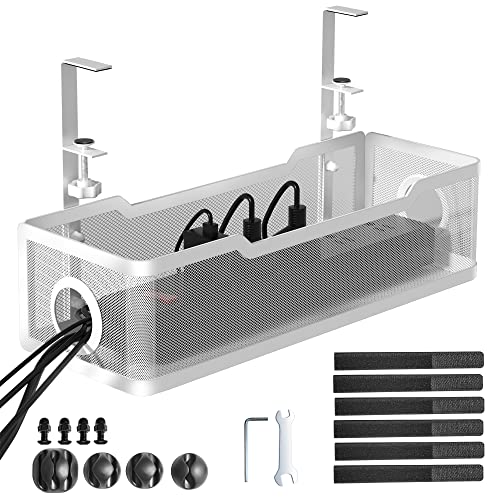
Specs
- Fully welded metal tray with powder-coated finish
- 13.4 x 4.6 x 3.1 inches
- Listed capacity of 10 lbs
- Clamp fits desktops from 0.4 to 2.4 inches thick
- Anti-scratch mats on the clamp
- Includes 1 tray, 4 cable clips, and 6 cable ties
The Cinati is the compact clamp tray done carefully. The clamp range is the widest in this guide, gripping desktops from 0.4 to 2.4 inches thick, and because it hangs from the edge rather than screwing in, it works on glass and metal desks that rule out screw-in trays entirely. Anti-scratch mats sit between clamp and desktop, and the tray opening can face inward or outward depending on how you like to reach your strip.
Inside, 13.4 inches of welded, powder-coated steel holds up to its listed capacity of 10 lbs — one strip and its adapters, neatly off the floor. Cinati bundles four cable clips and six ties, so the runs feeding the tray can be tidied in the same session. It will not swallow a whole battlestation’s worth of power gear; this is a one-strip tray for a focused setup, and its small size is why it fits desks where longer trays foul drawers and crossbars.
Best for: compact desks, glass tops, and single-strip setups that need a movable clamp tray.
Delamu 2 Pack Metal U Channel Tray

Specs
- Two metal U-shaped channels, 15.75 inches each
- Tape installation with a listed capacity up to 4 lbs
- Screw installation with a listed capacity up to 11 lbs
- Includes 6 cable ties and 8 screws
- Includes 2 single-hole and 4 four-hole cable holders
- Includes 1 roll of strong adhesive tape
Delamu’s two-pack hedges the mounting bet. Each metal U channel can go up with the included adhesive tape for a no-tool install, or with screws when you want the firmer hold — and the listing is honest about the difference, putting tape at a listed capacity of up to 4 lbs and screws at up to 11 lbs. That makes the set a sensible way to test a layout: tape the channels where you think they belong, live with them, then screw them down once the arrangement proves itself.
Two separate 15.75-inch channels also route more intelligently than one long tray. Run power in one channel and signal cables in the other, and the strip’s bricks stop leaning on your HDMI and USB runs. The accessory set is generous, so most desks can be finished with what is in the box. Keep expectations matched to the tape figure, though: a loaded strip belongs on the screw mount.
Best for: trying a two-zone layout first with tape, then making it permanent with screws.
FAQ
Will a clamp-on tray work on a glass desk?
Yes, and clamping is the right approach for glass, since drilling is off the table. The Cinati and Litwaro trays in this guide both grip the desk edge with padded clamps, so nothing bites into the surface. Check the clamp’s thickness range against your top, and keep the load modest and centered.
How much weight can an under desk tray hold?
Go by the listed capacity on the product page. The trays here range from a listed 4 lbs for tape mounting on the Delamu set to about 15 lbs for the Litwaro clamp tray. A typical strip with three bricks and cable slack weighs five to ten pounds, so most screw and clamp trays handle a normal gaming load with room to spare, while tape mounts should carry cables only.
Do trays work with height-adjustable desks?
They work especially well with them. Mount the tray and strip under the desktop, plug every device into that strip, and the whole cluster rises and falls with the desk. Only the strip’s own cord needs enough slack to reach the wall outlet at full height, which removes the bundle that otherwise stretches and snags through the desk’s travel range.
Tray, box, or raceway — which do I actually need?
They solve different problems. A tray lifts a power strip and bricks off the floor and keeps them reachable under the desk. A box hides a strip sitting on the floor or desktop behind a lid. A raceway routes a run of cables along a wall or desk edge. Most tidy gaming setups use a tray for power under the desk and short raceway sections for the drops that remain visible.
Conclusion
An under desk cable management tray is the single change that makes a gaming setup look finished from every angle, because it removes the floor-level tangle your eyes catch every day. Pick the mount before the model: clamp trays like the Litwaro and Cinati keep renters and glass-desk owners hole-free, the long QUELIEN spreads a big power cluster along a wide desk, PAMO’s twin steel trays suit a permanent two-zone build, and Delamu’s pair lets you rehearse the layout on tape first. Measure your strip, respect the listed capacity, and the underside of your desk will stay as clean as the top.
FAQ
Will a clamp-on tray work on a glass desk?
How much weight can an under desk tray hold?
Do trays work with height-adjustable desks?
Tray, box, or raceway — which do I actually need?
More from Amazon
Programs that pair well with the guide above. Offers and eligibility are set by Amazon and may change.
Free shipping on eligible items, Prime Video and more. Eligible new members can start with a free trial.
Start a Prime free trialAd-free music streaming. Eligible new subscribers can start with a free trial.
Try Music Unlimited freeA Prime membership for ages 18-24 with a trial period. Eligibility is set by Amazon.
See Prime for Young AdultsAudiobooks and podcasts to listen to on the go. Eligible new members can start with a free trial.
Try Audible freeAs an Amazon Associate we earn from qualifying purchases.