
Our Short List of 3

- Native resolution: 1920 × 1080 (1080p)
- Brightness: 3,800 lumens (as published)
- Contrast ratio: 50,000:1
- Throw: short throw — 100-inch image at 3.6 ft (as published)
- Resolution: 1920 × 1080
- Light source: laser
- Brightness: 300 ANSI lumens
- Battery: 52Wh built-in — 1.8 h Eco mode / 2.5 h Standard mode (as published)

- Resolution: 1080p
- Brightness: 450 ISO lumens
- Color: 90% DCI-P3 (as published)
- Stand: 130-degree adjustable built-in stand
All 3 Picks at a Glance
| Product | Specs | Action |
|---|---|---|
| Optoma GT1080HDRx — the short-throw pick for small rooms |
| Check price on Amazon |
| NEBULA Capsule 3 Laser — the two-pound portable with a battery |
| Check price on Amazon |
| XGIMI MoGo 3 Pro bundle — the tilting-stand portable |
| Check price on Amazon |
Key takeaways
- Best projectors for apartments: a short-throw Optoma, a pocket-size NEBULA laser, and a portable XGIMI. No mounts, no drilling, renter-friendly picks.
Apartment projection starts with constraints that a dedicated theater room never has to think about. The throw distance is whatever fits between a coffee table and the only blank wall. The screen competes with a sofa, a desk, and a kitchen for the same square footage. And anything that needs a ceiling mount, wall brackets, or drilled holes is a non-starter for most renters, because every hole has to be filled and painted over on move-out day. That is a different shopping problem from picking a projector to replace a TV in a permanent setup, and it calls for different priorities: short throw distances, projectors that live on a table or shelf and go back in a closet afterward, and setup that works without tools.
The three picks below are the apartment-friendly options from our verified pool, and each solves the small-space problem a different way. One is a short-throw projector that builds a 100-inch picture from just 3.6 feet away. One is a two-pound laser portable with a built-in battery, so it can move from the living room to the bedroom and run unplugged. The third is a portable with a tilting built-in stand, so you can aim it at a wall or a ceiling without a tripod. A quick availability note before we start: the NEBULA showed offers present in the listing copy we re-opened, while the Optoma’s copy showed no featured offer and the XGIMI copy we reviewed was an older crawl, so confirm live availability on those two listings before you order.
As an Amazon Associate, we earn from qualifying purchases.
Quick answer
If your room is genuinely small and the projector has to sit close to the wall, get the Optoma GT1080HDRx — its published short throw makes a 100-inch image from 3.6 feet, and at 3,800 lumens as published it is the brightest pick here by a wide margin. If you want one projector that moves around the apartment and works without a power outlet, get the NEBULA Capsule 3 Laser — it weighs 2 pounds, runs on a built-in battery, and carries its own streaming platform. If easy setup matters most, get the XGIMI MoGo 3 Pro bundle — its 130-degree adjustable stand and automatic setup take the aiming work out of movie night, and its dual Harman Kardon speakers are the strongest published audio in this group.
Key takeaways
- Throw distance is the first spec that matters in an apartment: the Optoma GT1080HDRx publishes a 100-inch image at 3.6 feet, so it works in rooms where a standard-throw projector physically cannot focus a big picture.
- Brightness figures are not interchangeable across these picks. The Optoma publishes 3,800 lumens, the XGIMI publishes 450 ISO lumens, and the NEBULA publishes 300 ANSI lumens. ANSI and ISO figures are measured under different standards, so treat the two portables as dark-room devices and the Optoma as the only pick here that tolerates some ambient light.
- Only the NEBULA Capsule 3 Laser publishes a built-in battery (52Wh, rated at 1.8 hours in Eco mode and 2.5 hours in Standard mode). The XGIMI listing publishes no battery runtime, so do not count on unplugged use from it.
- None of the three needs a mount, a bracket, or a single drilled hole. All three work from a table, a shelf, or their own built-in stand.
- The Optoma’s output is 1080p. Its 4K wording refers to input support — it accepts a 4K UHD signal and displays it at 1080p.
The picks
Optoma GT1080HDRx — the short-throw pick for small rooms
- Native resolution: 1920 × 1080 (1080p)
- Brightness: 3,800 lumens (as published)
- Contrast ratio: 50,000:1
- Throw: short throw — 100-inch image at 3.6 ft (as published)
The defining apartment problem is distance, and this is the pick that answers it directly. The GT1080HDRx publishes a 100-inch display at just 3.6 feet, which means it can sit on a coffee table or a low media console in front of the sofa and still fill a wall. There is no mount to install and nothing to attach to the ceiling — when movie night ends, it goes back on a shelf. Its published brightness of 3,800 lumens is in a completely different class from the two portables in this roundup, making it the realistic choice if your living room has windows you cannot fully darken or lamps you do not want to switch off.
It is also the most gaming-capable pick here, which suits how many apartment setups double as gaming dens. The listing publishes an Enhanced Game Mode running at 120Hz at 1080p with 8.4ms response, a 50,000:1 contrast ratio, and HDR10 support. Two honesty notes matter. First, the output resolution is 1920 × 1080 — the 4K in its specs is input support, not native 4K projection. Second, availability was unconfirmed in the listing copy we verified from: it showed no featured offer, so check the live listing before ordering. At 7.7 pounds and 12.4 × 9.5 × 4.5 inches, it is the least portable pick here, but it is still small enough to move between rooms or store in a cabinet.
Check the Optoma GT1080HDRx on Amazon
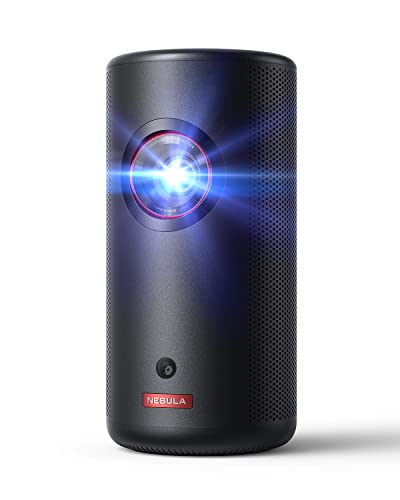
NEBULA Capsule 3 Laser — the two-pound portable with a battery
- Resolution: 1920 × 1080
- Light source: laser
- Brightness: 300 ANSI lumens
- Battery: 52Wh built-in — 1.8 h Eco mode / 2.5 h Standard mode (as published)
The Capsule 3 Laser is the pick for apartments where the projector cannot have a permanent home at all. It weighs 2 pounds (900 g), so it moves from the living room to the bedroom in one hand and stores in a drawer. Its laser light source produces a 1920 × 1080 picture at a published 300 ANSI lumens, with a maximum picture size of 120 inches. Autofocus and auto keystone handle setup each time you move it, which matters in a rental where the projector lands on a different table every session. This is the standard-throw portable of the group, so give it a few feet of distance from the wall rather than expecting coffee-table placement inches away.
What separates it from the other portable here is independence from the wall outlet. The built-in 52Wh battery is rated at 1.8 hours in Eco mode and 2.5 hours in Standard mode — enough for most films without a cable crossing the room — and the listing notes support for PD charging and power-bank use. Android TV 11.0 with Google Assistant and Chromecast is built in, so no external streaming stick is required, and the single 8W Dolby Digital speaker covers casual viewing. The trade-off is brightness: 300 ANSI lumens means a darkened room for a watchable picture. Offers were present in the listing copy we re-opened, which makes it the easiest of the three to actually buy right now.
Check the NEBULA Capsule 3 Laser on Amazon
XGIMI MoGo 3 Pro bundle — the tilting-stand portable
- Resolution: 1080p
- Brightness: 450 ISO lumens
- Color: 90% DCI-P3 (as published)
- Stand: 130-degree adjustable built-in stand
The MoGo 3 Pro approaches the apartment problem from the setup angle. Its built-in stand adjusts through 130 degrees, so the projector can sit on a side table and tilt up at a wall — or keep tilting and use the ceiling, a trick that works well in studio apartments and bedrooms where wall space is spoken for. No tripod, no mount, no furniture rearrangement. The listing publishes 450 ISO lumens, 1080p resolution, and 90% DCI-P3 color coverage, with screens up to 120 inches, and XGIMI’s ISA 2.0 technology handles the automatic setup after you aim it.
Its dual 5W Harman Kardon speakers are the strongest published audio in this roundup, which counts in apartments where a separate soundbar is one more box to store. Google TV with licensed Netflix is built in, and the listing credits the platform with more than 10,000 apps. Two caveats come straight from the listing record. First, this ASIN is a bundle: the package includes a Creative Optical Filter alongside the projector, so check the box contents match what you want. Second, the listing copy we opened was an older crawl, so treat availability as unconfirmed and verify it on the live listing. Note also that the page publishes no built-in battery runtime — plan on a nearby power outlet.
Check the XGIMI MoGo 3 Pro bundle on Amazon
How to choose
Measure your throw distance before anything else. Pace out the distance from where a projector can realistically sit — a coffee table, a shelf, the arm of the sofa — to the wall you will project on. If that distance is under four feet and you still want a big image, the short-throw Optoma is the only pick of the three built for it: 100 inches at 3.6 feet, as published. The two portables are standard-throw designs that need more room to reach the same size, so they suit apartments where the projector can sit further back.
Match brightness to your light control, and read the units carefully. The Optoma publishes 3,800 lumens; the portables publish 450 ISO lumens and 300 ANSI lumens. ANSI and ISO brightness are measured under different standards, so the portable figures are not directly comparable to each other, let alone to the Optoma’s. The practical rule: if you can blackout-curtain the room or watch after dark, either portable works; if the room stays moderately lit, the Optoma’s output is the safer bet.
Decide whether streaming needs to be built in. The NEBULA (Android TV 11.0) and the XGIMI (Google TV) carry their own platforms, apps, and voice control, so they are complete viewing devices out of the box. The Optoma’s published specs center on the projection engine and gaming mode rather than a smart platform, so plan on feeding it from a console, laptop, or streaming device you already own.
Be honest about power and sound. Only the NEBULA publishes a battery, so it is the one pick that works on a balcony, in a bedroom without a spare outlet, or during a movie night far from the wall. For sound, the XGIMI’s dual 5W Harman Kardon speakers lead this group on published specs, the NEBULA’s single 8W Dolby Digital speaker is adequate for dialogue-driven viewing, and the Optoma is best paired with whatever audio you already have.
Run the renter checklist. Every pick here passes it: no mounting hardware, no drilling, nothing that marks a wall, and each one stores away in a cabinet or closet. The last step is administrative — because two of these three listings had unconfirmed availability in the copies we verified, confirm the live listing by its exact ASIN before you order.
Who should skip these picks
Skip all three if you are building a permanent, ceiling-mounted home theater — that is a different product class, and a fixed installation deserves a projector chosen for it. Skip them if native 4K output is a requirement: every pick here displays at 1080p, and the Optoma’s 4K support covers incoming signals only. If your plan is to replace a TV in a bright, sunlit living room for daytime viewing, the two portables will look washed out, and you should be looking at a TV-replacement projector roundup instead. And if you need a guaranteed in-stock purchase today, the NEBULA is the only one of the three whose listing showed offers present in the copy we verified — the Optoma and XGIMI listings both need a live availability check first.
FAQ
Do I need to mount a projector to use one in an apartment?
No. All three picks are designed to work from furniture. The Optoma sits on a table or console close to the wall thanks to its short throw, the NEBULA is a two-pound portable with autofocus and auto keystone for wherever it lands, and the XGIMI has a built-in stand that tilts through 130 degrees, so it can aim at a wall or ceiling without any hardware attached to either.
How bright does an apartment projector need to be?
It depends on light control more than room size. In a darkened room, the portables’ published figures — 300 ANSI lumens for the NEBULA and 450 ISO lumens for the XGIMI — produce a watchable picture at moderate sizes. In a room with ambient light you cannot block, the Optoma’s published 3,800 lumens is the appropriate class. Keep in mind that ANSI and ISO lumens come from different measurement standards, so compare the numbers as rough tiers, not exact equivalents.
Which of these projectors works without a power outlet?
Only the NEBULA Capsule 3 Laser. Its listing publishes a built-in 52Wh battery rated at 1.8 hours in Eco mode and 2.5 hours in Standard mode, plus support for PD charging and power-bank use. The XGIMI listing publishes no battery runtime, and the Optoma is a mains-powered tabletop unit, so both of those need an outlet within cable reach.
Is the Optoma GT1080HDRx a 4K projector?
No, and the distinction matters. Its native output is 1920 × 1080. What it publishes is HDR10 support and 4K UHD input support, meaning it can accept a 4K signal from a console or streaming device and display it at 1080p. That is a useful feature — your 4K sources will work without any fuss — but if you sit close to a very large image and want true 4K detail, none of the picks in this roundup provides it.
Final verdict
Apartments reward projectors that adapt to the room instead of demanding the room adapt to them. Choose the Optoma GT1080HDRx if your space is tight and your room is not fully dark: the published 100-inch image at 3.6 feet and 3,800-lumen output solve the two hardest apartment problems at once, as long as you confirm availability on the live listing first. Choose the NEBULA Capsule 3 Laser if the projector needs to disappear into a drawer between uses and work anywhere, including away from an outlet — it is the most flexible pick here and the one whose listing showed offers present. Choose the XGIMI MoGo 3 Pro bundle if setup simplicity, ceiling projection, and built-in sound top your list, and you are comfortable verifying stock on a listing whose reviewed copy was older. Any of the three gets you a big picture with zero holes in the wall — which, in a rental, is half the battle.
Product and ASIN Reference
| Product | ASIN | Best for |
|---|---|---|
| Optoma GT1080HDRx | B0BDTPC3QG | Short throw in small rooms; brightest picture |
| NEBULA Capsule 3 Laser | B0BCWNQPQ7 | Portability and battery-powered viewing |
| XGIMI MoGo 3 Pro bundle | B0DG8NVZJS | Tilting-stand setup and built-in sound |
More from Amazon
Programs that pair well with the guide above. Offers and eligibility are set by Amazon and may change.
Free shipping on eligible items, Prime Video and more. Eligible new members can start with a free trial.
Start a Prime free trialAd-free music streaming. Eligible new subscribers can start with a free trial.
Try Music Unlimited freeA Prime membership for ages 18-24 with a trial period. Eligibility is set by Amazon.
See Prime for Young AdultsAudiobooks and podcasts to listen to on the go. Eligible new members can start with a free trial.
Try Audible freeAs an Amazon Associate we earn from qualifying purchases.









