Our Top Picks

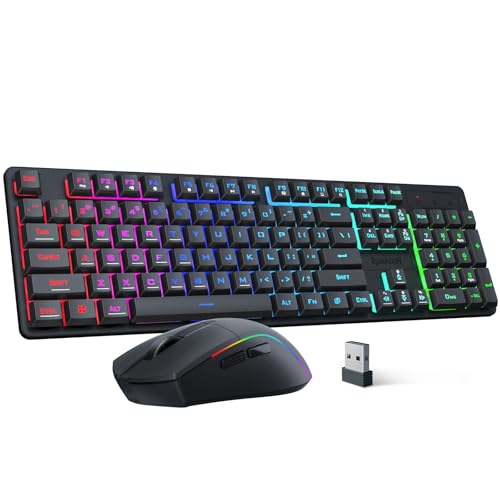

A keyboard and mouse combo sounds like a simple purchase until the two parts arrive and refuse to work as a pair. One may need its own software, the other may use a different lighting system, and the mouse may feel too heavy while the keyboard keys feel too soft for fast commands. The real decision is not about picking the brightest set. It is about finding a matched pair that shares one setup routine, one lighting style, and a comfortable feel for the games you play most.
This guide is for first-time PC gamers building a complete desk setup, players replacing a worn office set, and households that want one tidy bundle instead of two separate boxes. It suits players who move between a desktop and a laptop and want fewer cables to manage. Each combo below was chosen from its name and listed details on Amazon, with attention to connection type, keyboard layout, mouse sensitivity, lighting control, and the extras that make long sessions easier.
Quick Picks
As an Amazon Associate we earn from qualifying purchases
| Product | Best for | Key spec from title |
|---|---|---|
| Redragon S101-3 PRO Gaming Keyboard and Mouse | First gaming setup with a wrist rest | RGB backlit keyboard with 7200 DPI mouse |
| Redragon S107 Gaming Keyboard and Mouse | High mouse sensitivity on a wired desk | RGB keyboard with 10000 DPI mouse |
| Redragon S107KS Wireless Gaming Keyboard and Mouse | Wireless play across several devices | RGB backlit tri-mode combo with 10000 DPI mouse |
| Logitech G502 HERO and G213 RGB Gaming Keyboard | Custom buttons and tuned mouse weight | LIGHTSYNC RGB keyboard with 25600 DPI mouse |
| Redragon S101M-KS Wireless Gaming Keyboard and Mouse | Cable-free gaming with media controls | Tri-mode RGB keyboard with 4800 DPI mouse |
How to Choose
Match the connection to your desk
A wired combo suits a fixed desktop where the keyboard and mouse stay in one place and a steady link matters more than freedom of movement. Wireless and tri-mode sets suit shared desks, living-room play, and players who switch between a desktop and a laptop during the day. Check whether one receiver controls both parts, because a single receiver leaves a spare USB port free and keeps setup simple. Also check whether the set still works while charging, so a low battery does not end a session. A wired fallback is useful even on a wireless set, especially for long evenings when charging would otherwise interrupt play.
Check the keyboard layout before the lighting
RGB lighting draws the eye first, but layout decides whether the board fits your hands and your games. A full-size board keeps the number pad and dedicated function keys, which helps strategy games, creative work, and players who use many shortcuts. A compact board frees space for wide mouse sweeps, which helps fast shooters. Look for media keys, a volume control, and a wrist rest if you play for hours. Anti-ghosting matters when several keys are pressed together, so check how many simultaneous key presses the listing supports before choosing a board for action games.
Read the mouse details, not just the headline number
The highest DPI figure is rarely the setting most players use, so treat it as headroom rather than a daily target. More useful details are the number of DPI steps, whether sensitivity can change with a button during play, the polling rate, and the mouse weight. A lighter mouse suits fast flicks and long sessions, while a heavier mouse can feel steadier for careful aiming. Count the programmable buttons and check whether the software lets you remap them. A comfortable shape matters more than any single number, so note whether the listing describes a contoured, ambidextrous, or palm-grip design.
Decide how much lighting control you really want
Some combos offer a few fixed lighting modes that change with a key press, while others need software to unlock custom colours, brightness, and effects. Fixed modes suit players who want colour without installing anything, and they work well on a shared family computer. Software control suits players who want the keyboard and mouse to match the rest of a setup or change colour with a game. Check whether lighting settings save to the hardware, because saved settings keep your look after a restart. Also check whether the keyboard and mouse share one lighting system, since mismatched glow can look untidy on a desk.
The 5 Best Options
Redragon S101-3 PRO Gaming Keyboard and Mouse

The Redragon S101-3 PRO is a strong starting point for a first gaming desk because it covers the basics without asking the buyer to learn new software first. The full-size board keeps the number pad and function row, the wrist rest supports long sessions, and the macro keys give strategy and MMO players extra commands within easy reach. Quiet membrane keys suit shared rooms and late-night play, while the mouse steps through several sensitivity levels with a dedicated button. It is a practical wired set for everyday gaming, homework, and office work in one place.
Specs
- Full-size RGB backlit keyboard with 6 backlight modes
- Mouse with 10 lighting effects and 800 to 7200 DPI
- 5 dedicated macro keys for recording command sequences
- 114 keys with 4 independent media keys
- Ergonomic wrist rest and foldable keyboard stand
- Anti-ghosting keyboard with quiet membrane keys
- Wired connection for Windows 10 and 11
Best for: A first gaming setup that needs a full-size board, a wrist rest, and macro keys in one box.
Watch out for: The set is wired only, so check cable length and USB port placement before placing it on a wide desk.
Redragon S107 Gaming Keyboard and Mouse
The Redragon S107 suits players who want a wired combo with generous mouse headroom and a keyboard that handles fast, multi-key action. The mouse adjusts to 5000 DPI with its button and reaches 10000 DPI through Redragon software, with polling up to 1000 Hz for responsive movement. The keyboard adds 25-key anti-ghosting, floating keycaps, and 12 multimedia function keys, so complex commands and quick media changes stay within reach. Six RGB lighting modes on the keyboard and eight effects on the mouse give the desk a lively look without extra hardware.
Specs
- RGB gaming keyboard with 6 lighting modes
- Mouse adjustable to 5000 DPI by button and 10000 DPI through software
- Polling rate up to 1000 Hz
- 25-key anti-ghosting keyboard
- 12 multimedia function keys and floating keycaps
- 8 lighting effects on the mouse
- Foldable keyboard stand and wired plug-and-play connection
Best for: Wired players who want high mouse sensitivity, fast polling, and strong anti-ghosting for action games.
Watch out for: Full 10000 DPI needs Redragon software installed, so confirm the software works with your system before relying on that top setting.
Redragon S107KS Wireless Gaming Keyboard and Mouse
The Redragon S107KS is the wireless upgrade in this group for players who move between devices or hate cable clutter. It connects by wire, Bluetooth, or a shared 2.4G receiver, and the keyboard can connect to up to five devices at once. The 65g mouse feels light during fast movement, reaches 10000 DPI, and runs at up to 1000 Hz polling, while its battery lasts up to 200 hours depending on use. Six RGB modes on the keyboard and customisable mouse lighting keep the pair looking matched, and Redragon software handles macros, DPI, and button remapping.
Specs
- Tri-mode connection: wired, Bluetooth, and 2.4G with a shared receiver
- Mouse up to 10000 DPI with polling up to 1000 Hz
- 65g lightweight mouse with battery life up to 200 hours
- Keyboard connects to up to five devices
- 25-key anti-ghosting keyboard with 12 multimedia keys
- 6 RGB lighting modes on the keyboard
- Mouse lighting customisable with over a million RGB colours
Best for: Wireless desks and players who switch between a desktop, a laptop, and other devices.
Watch out for: The shared receiver uses USB-A, so a laptop with only USB-C ports needs an adapter or a hub.
Logitech G502 HERO and G213 RGB Gaming Keyboard

This Logitech bundle pairs two well-known parts into a combo for players who like to tune every control. The G502 HERO mouse uses the HERO 25K sensor with a 100 to 25600 DPI range, 11 programmable buttons, on-board memory, and five 3.6g weights for adjusting balance. The G213 Prodigy keyboard uses tactile mech-dome keys, a spill-resistant design, an integrated palm rest, and dedicated media controls. LIGHTSYNC RGB lets the keyboard and mouse share lighting schemes through G HUB software, which also syncs with other Logitech G gear.
Specs
- G502 HERO mouse with HERO 25K sensor and 100 to 25600 DPI
- 11 programmable buttons on the mouse with on-board memory
- Five 3.6g adjustable weights in the mouse
- G213 Prodigy keyboard with LIGHTSYNC RGB and 16.8 million colours
- Tactile mech-dome keys with anti-ghosting gaming matrix
- Spill-resistant keyboard with integrated palm rest and adjustable feet
- Dedicated media controls and G HUB software for lighting sync
Best for: Players who want many programmable buttons, adjustable mouse weight, and synced lighting across Logitech gear.
Watch out for: The keyboard uses mech-dome keys rather than true mechanical switches, so check the key feel if you expect a mechanical click.
Redragon S101M-KS Wireless Gaming Keyboard and Mouse
The Redragon S101M-KS suits players who want wireless freedom without giving up media controls or a full-size layout. Its tri-mode design covers wired play, Bluetooth, and a shared 2.4G receiver that controls both parts at once. Ten independent multimedia keys and 12 combination keys make volume, playback, and shortcuts easy during a game. The mouse offers five DPI levels from 800 to 4800, seven buttons, and polling from 125 to 1000 Hz. Eight RGB backlight patterns with adjustable speed and brightness give the set a clear gaming look.
Specs
- Tri-mode connection: wired, Bluetooth, and 2.4G with a shared receiver
- RGB backlight with 8 backlight patterns
- Mouse with 5 DPI levels from 800 to 4800
- 10 independent multimedia keys and 12 combination multimedia keys
- 7 programmable mouse buttons with polling from 125 to 1000 Hz
- Rechargeable keyboard with up to 300 hours of use with RGB off
- Splash resistance, WIN lock function, and detachable USB-C cable
Best for: Cable-free gaming and everyday use where media keys and a full-size wireless board matter.
Watch out for: The keyboard is membrane rather than mechanical, and battery life drops sharply when RGB lighting stays on.
Which One Fits Your Situation
You are building a first gaming desk
Choose the Redragon S101-3 PRO because it gives a full-size board, a wrist rest, macro keys, and a capable mouse in one wired box. The quiet keys suit shared rooms, the fixed layout needs little setup, and the dedicated DPI button lets a new player find a comfortable sensitivity without opening software.
You play fast shooters and want a light, responsive mouse
Choose the Redragon S107KS because its 65g mouse, 10000 DPI ceiling, and 1000 Hz polling suit quick movement and fast turns. Tri-mode connection also lets you switch between a desktop and a laptop, while the full-size keyboard keeps shortcuts close during competitive matches. The shared receiver keeps setup simple, and the light mouse reduces wrist strain during long matches.
You want deep customisation and a tuned mouse
Choose the Logitech G502 HERO and G213 bundle because the mouse offers 11 programmable buttons, on-board memory, and adjustable weights. The keyboard adds LIGHTSYNC RGB, a palm rest, and dedicated media controls, so the pair suits MMO, strategy, and simulation players who remap many commands. On-board memory keeps your bindings ready on another computer, and the palm rest supports long strategy sessions.
You want a tidy wireless desk with easy media control
Choose the Redragon S101M-KS because one shared receiver controls both parts, the keyboard carries ten media keys, and the set works wired, over Bluetooth, or through 2.4G. It suits living-room desks, shared workspaces, and players who move the combo between computers. The media keys put volume and playback within reach, and the detachable cable gives a wired fallback when the battery runs low.
Common Mistakes
- Choosing a combo for its brightest lighting while ignoring keyboard layout, mouse weight, and connection type.
- Assuming the highest DPI figure is the best daily setting instead of checking the DPI steps and polling rate.
- Buying a wireless set without checking whether one receiver controls both parts or whether the set works while charging.
- Picking a compact board to save space, then missing the number pad and function keys used in strategy games and daily work.
- Skipping the software check, then finding that full DPI, macros, or custom lighting need a download that does not suit the computer.
Frequently Asked Questions
Do RGB keyboard and mouse combos need software to work?
Most combos work as plug-and-play sets for typing, clicking, and basic lighting, so you can start playing right after connecting them. Software is usually needed only for custom lighting, macros, remapped buttons, and the highest DPI settings. Check the listing for each combo before buying if you want those extras without installing anything.
Is a wireless combo as responsive as a wired combo?
A modern wireless combo with a 2.4G receiver and a high polling rate can feel responsive for everyday play and many competitive games. Wired play still gives the most direct link and removes battery worries during long sessions. Tri-mode sets offer the best of both, because you can switch to a cable when a battery runs low.
What DPI should I use for gaming?
Most players settle well below the highest DPI on the box, often using a middle setting that lets them aim steadily without overshooting targets. Start with a lower DPI for careful aiming, then raise it in small steps until movement feels natural. A dedicated DPI button helps because it lets you change sensitivity during play without opening software.
Can I use a gaming combo for work and study?
Yes, a full-size gaming combo works well for writing, spreadsheets, and video calls because it keeps the number pad, function keys, and media controls. Quiet membrane keys suit shared rooms, while a wrist rest or palm rest helps during long typing sessions. Choose a set with a comfortable key feel and a mouse shape that suits your hand.
FAQ
Do RGB keyboard and mouse combos need software to work?
Is a wireless combo as responsive as a wired combo?
What DPI should I use for gaming?
Can I use a gaming combo for work and study?
More from Amazon
Programs that pair well with the guide above. Offers and eligibility are set by Amazon and may change.
Free shipping on eligible items, Prime Video and more. Eligible new members can start with a free trial.
Start a Prime free trialAd-free music streaming. Eligible new subscribers can start with a free trial.
Try Music Unlimited freeA Prime membership for ages 18-24 with a trial period. Eligibility is set by Amazon.
See Prime for Young AdultsAudiobooks and podcasts to listen to on the go. Eligible new members can start with a free trial.
Try Audible freeAs an Amazon Associate we earn from qualifying purchases.