
Our Short List of 3

- Best for: Gamers who want maximum mouse room.
- 60% layout, 61 keys
- Hot-swappable switches
- RGB backlight, 18 modes
- 2.4GHz wireless, Bluetooth and USB-C wired
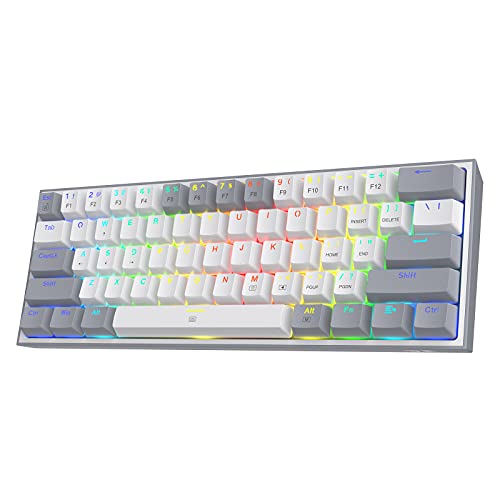
- Best for: A first 60 percent board on a tight budget.
- 60% layout, 61 keys
- Hot-swappable switches
- RGB backlight
- Wired USB-C connection

- Best for: Typing across a laptop, tablet and phone.
- Bluetooth multi-device keyboard
- Pairs with up to 3 devices
- Up to 2-year battery life on 2 AAA batteries
- Works with Windows, Mac, ChromeOS, Android and iOS
All 4 Picks at a Glance
| Product | Specs | Action |
|---|---|---|
| Royal Kludge RK61 |
| Check price on Amazon |
| Redragon K617 Fizz |
| Check price on Amazon |
| Logitech K380 |
| Check price on Amazon |
 Keychron K3 Max |
| Check price on Amazon |
Key takeaways
- Compare the best small keyboards: compact 60 and 75 percent boards from Royal Kludge, Redragon, Logitech and Keychron that save desk space without losing feel.
A full-size keyboard eats a third of a small desk and pushes the mouse out to an awkward angle, which is why so many people end up typing on a board that does not fit their space. The real decision is which keys you can live without, because every small keyboard trades something away: the number pad, the function row, the arrow keys or the dedicated navigation cluster. Pick the trade that matches your work, and a small board feels like freedom instead of a compromise.
This guide is for students, small-desk workers and gamers who want more mouse room without giving up a mechanical feel. Every keyboard below was chosen from the name and specifications shown on its Amazon page, so the layouts, switches and dimensions match what the listings state.
Quick Picks
As an Amazon Associate we earn from qualifying purchases
| Product | Best for | Key spec from title |
|---|---|---|
| Royal Kludge RK61 | Compact gaming | 61 keys, hot-swappable, RGB |
| Redragon K617 Fizz | Compact, entry tier | 61 keys, hot-swappable, RGB |
| Logitech K380 | Multi-device typing | Bluetooth, 3 devices, 2-year battery |
| Keychron K3 Max | Low-profile, function row | Slim board, Gateron Brown, QMK/VIA |
How to Choose
Layout Size and Missing Keys
Small keyboards come in a few standard sizes, and each one drops a different set of keys. A 60 percent board keeps 61 keys and drops the number pad, the function row and the navigation cluster, so arrows and function keys live on a layer you reach with a function key. A 65 percent board adds back the arrows and a few navigation keys, while a 75 percent board keeps the function row in a compact frame. Count the keys you use every day before choosing, because a board that drops your most-used key will slow you down far more than the saved desk space helps. Check the layout diagram on the listing first.
Switches and Typing Feel
The switch decides how each keystroke feels, and small keyboards use the same switches as full-size boards. Linear switches travel smoothly with no bump, which suits fast typing and gaming. Tactile switches add a small bump that confirms each press, while clicky switches add an audible click. Hot-swappable boards let you change switches later without soldering, which matters on a small board because you cannot fix a feel you dislike by moving keys around. Low-profile switches are thinner and quieter, which suits shared rooms and travel. Try a switch tester first if you have never typed on mechanical switches.
Connection and Battery
Small keyboards travel well, so the connection matters more than it does on a desk-bound board. Wired USB-C gives the lowest latency and never needs charging, which suits gaming. Bluetooth lets you pair with a laptop, tablet or phone and switch between them, while 2.4GHz wireless gives a stable gaming connection without a cable. Battery life varies widely: the K380 runs for up to two years on two AAA batteries, while backlit gaming boards need charging far more often. Pick the connection that matches where the board will live. A detachable cable is easier to replace than a fixed one if it frays.
Build and Portability
A small keyboard should survive being tossed in a bag, so build quality matters. Look for a solid frame that does not flex when you type hard, keycaps that resist shine, and a detachable cable that you can replace if it frays. Weight is a trade: a heavy board stays put during fast typing, while a light board travels better. Check the dimensions against your bag and your desk, because a 60 percent board is barely wider than a sheet of paper, while a 75 percent board needs a few more inches. Rubber feet keep the board planted during fast typing sessions.
The 4 Best Options
Royal Kludge RK61
- Best for: Gamers who want maximum mouse room.
- 60% layout, 61 keys
- Hot-swappable switches
- RGB backlight, 18 modes
- 2.4GHz wireless, Bluetooth and USB-C wired
Gamers who want maximum mouse room.
Arrows and function keys live on a layer, so check that the layer layout suits your habits.
The Royal Kludge RK61 is the classic 60 percent keyboard, with 61 keys in a frame that measures 11.4 by 3.9 by 1.7 inches, so it leaves most of your desk free for the mouse. Hot-swappable switches let you change the feel without soldering, and the RGB backlight offers 18 lighting modes. Three connection modes cover every setup: 2.4GHz wireless, Bluetooth and wired USB-C, and a coiled aviator cable comes in the box. Double-shot keycaps resist wear and let the backlight shine through, and the 8-degree ergonomic angle keeps your wrists comfortable during long sessions.
Redragon K617 Fizz
- Best for: A first 60 percent board on a tight budget.
- 60% layout, 61 keys
- Hot-swappable switches
- RGB backlight
- Wired USB-C connection
A first 60 percent board on a tight budget.
The wired-only connection means a cable on the desk, and there is no wireless mode for travel use.
The Redragon K617 Fizz is the straightforward 60 percent pick, a compact board with hot-swappable switches and RGB backlight at the entry tier of the market. Sixty-one keys cover letters, numbers and the keys you use most, with the rest on a function layer. The wired USB-C connection keeps latency low for gaming, and the detachable cable makes the board easy to pack. The frame is small enough to sit beside a laptop without crowding it, and the RGB backlight keeps the legends visible when the lights are low. This is the board for a first small keyboard or a second board for a dorm desk.
Logitech K380
- Best for: Typing across a laptop, tablet and phone.
- Bluetooth multi-device keyboard
- Pairs with up to 3 devices
- Up to 2-year battery life on 2 AAA batteries
- Works with Windows, Mac, ChromeOS, Android and iOS
Typing across a laptop, tablet and phone.
The membrane-style keys feel different from mechanical switches, and there is no backlight for dark rooms.
The Logitech K380 is the multi-device pick, a quiet Bluetooth keyboard that pairs with up to three devices and switches between them with a single key press. The compact frame uses round keys in a familiar layout, and the board works with Windows, Mac, ChromeOS, Android and iOS, so one keyboard covers a laptop, a tablet and a phone. Two AAA batteries run the board for up to two years, which means you can forget about charging entirely. There is no backlight, which keeps the battery life long and the frame slim.
Keychron K3 Max
- Best for: Typists who want a function row in a slim frame.
- 75% layout, low-profile design
- Gateron Brown switches
- 2.4GHz wireless and Bluetooth
- QMK and VIA support
Typists who want a function row in a slim frame.
Low-profile switches only take low-profile keycaps, so standard keycap sets will not fit.
The Keychron K3 Max is the low-profile pick, a 75 percent board that keeps the function row in an ultra-slim frame. Gateron Brown switches give a gentle tactile bump without a loud click, and the hot-swappable design lets you change switches later. QMK and VIA support lets you remap every key and build layers for shortcuts, and the board connects over 2.4GHz wireless or Bluetooth to Mac and Windows machines. The white backlight variant keeps the legends visible without the distraction of full RGB, and the model number is K3M-A3.
Which One Fits Your Situation
Small Desks and Dorm Rooms
The RK61 is the pick for the smallest desks, because its 60 percent frame leaves the most room for a mouse and a notebook. The K617 Fizz is the fallback if you want the same size with a wired connection and a lower tier of the market. Either board frees up enough space that your mouse stops bumping the keyboard edge during fast movements on a small desk.
Typing on Several Devices
The Logitech K380 is the pick if you type on a laptop, a tablet and a phone, because one button switches it between three paired devices. The two-year battery life means it is always ready. The K3 Max is the alternative if you want the same multi-device trick with mechanical switches and a function row for coding and writing.
Gaming in a Tight Space
The RK61 is the pick for gaming, because its wireless modes and hot-swappable switches suit fast play, and the 60 percent frame gives your mouse the room it needs. The K617 Fizz works too if you prefer a wired connection and do not need wireless. Always check the function layer first, since your most-used game keys need to sit where your fingers expect them during a match.
Quiet Shared Rooms
The K3 Max is the pick for quiet rooms, because its low-profile Brown switches are gentle and the slim frame suits a shared desk. The K380 is the quietest option of all, with no mechanical click at all. Either board keeps you from disturbing a roommate or a library table, and both travel quietly in a bag on campus every day.
Common Mistakes
- Buying a 60 percent board without checking where the arrow keys live, then struggling with text editing.
- Choosing a board for its size alone and ending up with switches that feel wrong for all-day typing.
- Picking a wired-only board for travel, then carrying a cable everywhere and wishing for Bluetooth.
- Ignoring keycap compatibility on low-profile boards, where standard keycaps do not fit.
- Forgetting that a small keyboard still needs a stable surface, and typing on a wobbly tray that makes the board slide.
Frequently Asked Questions
Can I use a 60 percent keyboard for everyday work?
Yes, if your work does not depend on a number pad or a function row. Arrows and function keys live on a layer you reach with a function key, which most people learn within a week. If you enter numbers all day, add a separate number pad or choose a 75 percent board instead.
Are small keyboards good for gaming?
Yes, and many gamers prefer them, because the compact frame leaves more room for mouse movement. The trade is that some game keys move to a function layer, so check that your most-used keys are in their usual places. Hot-swappable switches let you tune the feel for fast play.
Do small keyboards work with tablets and phones?
Bluetooth models like the K380 and the K3 Max pair with tablets and phones as well as laptops. Wired-only boards need an adapter and a compatible device. Check the board’s compatibility list before buying if tablet use is part of your plan.
How long does a small wireless keyboard battery last?
It varies widely: the K380 runs for up to two years on two AAA batteries, while backlit gaming boards need charging every few days to a few weeks depending on the lighting. Turning the backlight down or off extends battery life sharply. Check the maker’s battery figure for the lighting level you actually use.
FAQ
Can I use a 60 percent keyboard for everyday work?
Are small keyboards good for gaming?
Do small keyboards work with tablets and phones?
How long does a small wireless keyboard battery last?
More from Amazon
Programs that pair well with the guide above. Offers and eligibility are set by Amazon and may change.
Free shipping on eligible items, Prime Video and more. Eligible new members can start with a free trial.
Start a Prime free trialAd-free music streaming. Eligible new subscribers can start with a free trial.
Try Music Unlimited freeA Prime membership for ages 18-24 with a trial period. Eligibility is set by Amazon.
See Prime for Young AdultsAudiobooks and podcasts to listen to on the go. Eligible new members can start with a free trial.
Try Audible freeAs an Amazon Associate we earn from qualifying purchases.









