Key takeaways
- A specification-based review of the GameSir Tegenaria Lite wired controller, covering PC compatibility, Hall sticks, back buttons and connection unknowns.
This review analyzes published product information. We have not performed detailed research of this unit.
As an Amazon Associate, we earn from qualifying purchases.
A wired controller with useful extras—and some missing detail
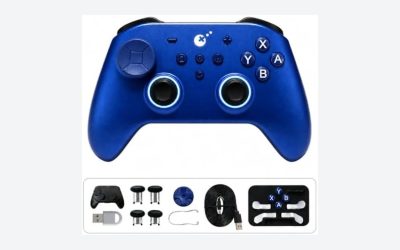
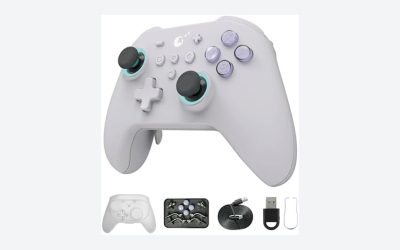
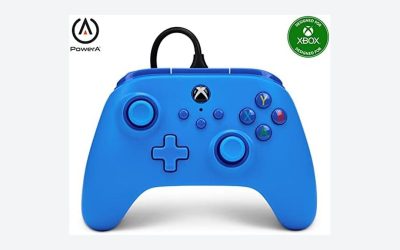
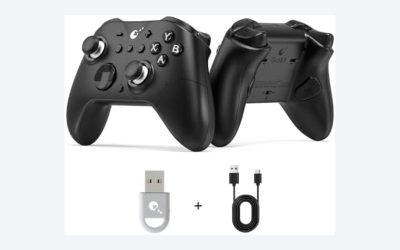
The GameSir Tegenaria Lite combines a wired connection, Hall Effect sticks, two mappable rear buttons and configurable Turbo in the Retro Grey configuration reviewed here. For PC players, the appeal is straightforward: extra input options without making wireless connectivity part of the buying decision. The retailer title shortens the name to Tegenaria, while its feature descriptions repeatedly identify the controller as Tegenaria Lite; this review follows that more specific identification.
This is a specification-based assessment of the supplied retailer listing, not a hands-on test. Its strongest case rests on the stated controls and connection type, rather than promises about competitive performance. Several practical details remain unspecified, particularly the cable, PC input mode and remapping process. Those omissions matter more than the listing’s broad assurances about responsiveness.
Specifications for the listed wired configuration
| Product | GameSir Tegenaria Lite wired controller |
|---|---|
| Listed color | Retro Grey |
| Connection | Wired; connector type, cable length and cable removability not specified |
| Listed compatibility | PC, Switch, iOS, Android and Steam |
| Sticks | Hall Effect joysticks |
| Advertised polling rate | 1000Hz; platform conditions not stated |
| Additional controls | Two mappable back buttons |
| Turbo-supported inputs | A/B/X/Y/L1/R1/L2/R2 |
| Vibration | Dual asymmetric rumble motors |
| Listed dimensions | Approximately 6.30 × 2.36 × 3.90 inches; axes not labeled |
| Listed weight | 0.51 pounds |
PC connection: simple in principle, underspecified in practice
The listing describes wired, plug-and-play operation and explicitly includes PC and Steam among its supported environments. That makes the Tegenaria Lite a plausible desk controller for someone who does not need untethered play. No Bluetooth or wireless receiver mode is specified, so it should be selected for wired use rather than as a flexible wireless option.
However, wired support alone does not settle every setup question. The published listing information does not identify the connector, supported Windows versions, XInput or DirectInput behavior, or whether configuration software is required for particular features. Steam compatibility also should not be read as a guarantee of automatic recognition in every game. If you depend on a particular title, launcher or controller input mode, verify that combination before committing.
Cable length and whether the cable detaches are also unknown. At a desk, these details determine routing flexibility; for a PC connected to a television, reach may become the deciding factor. The evidence is not detailed enough to recommend a specific extension or adapter.
Hall sticks and polling claims need separate scrutiny
GameSir’s listing specifies Hall Effect joysticks and advertises a 1000Hz polling rate. These are relevant input specifications, but neither establishes how this exact controller feels in a game. The listing does not provide independent latency results, stick calibration data or the conditions under which the polling rate applies. Its assertions about immediate response and competitive gains therefore remain promotional claims, not measured conclusions.
The same caution applies to its claims about drift resistance and dead zones. Hall Effect sensing is the stated stick technology; the supplied evidence does not establish lifetime reliability or prove that every game will receive input without a dead zone. Players who prioritize fine aiming should look for confirmation of calibration controls, sensitivity adjustment and in-game behavior rather than treating the sensor label as a complete description of stick quality.
Trigger technology is another distinction worth preserving. The listing identifies Hall Effect sticks, not Hall Effect triggers. It also does not specify trigger stops, trigger travel or analog trigger behavior. Racing players and anyone seeking short-travel shooter controls should not infer those features from the joystick specification.
Rear buttons and Turbo offer different kinds of flexibility
The two mappable back buttons are the clearest additional control feature. Assigning frequently used actions to rear inputs could reduce the need to move a thumb away from a stick, depending on your grip and mapping. That is a practical reason to consider this controller for games with frequent jumps, reloads or other repeated actions.
Yet the listing does not explain how mappings are assigned, whether profiles are stored, or whether the rear buttons can appear as independent inputs to PC software. Treat them as advertised remappable controls, not confirmed extra keyboard keys or macro buttons. Their position and actuation feel are also unestablished by the supplied specifications.
Turbo is separately listed for A/B/X/Y and L1/R1/L2/R2. It automates repeated presses on supported buttons, which may be useful where a game calls for repetitive input. The listing does not state repetition speeds or configuration steps. Check a game’s rules before enabling automated input in competitive play. The button names establish supported Turbo assignments, but they do not establish the physical face-button arrangement or stick layout.
Cross-platform use and physical fit
Switch, iOS and Android compatibility broadens the advertised scope beyond PC. However, there are no device-specific connection instructions, operating-system requirements or adapter details. For mobile use especially, platform support should be treated as a starting point for verification, not proof that the controller will connect directly to your particular device.
Dual asymmetric rumble motors are included in the listed feature set, though per-game and per-platform vibration behavior is not documented. Likewise, the stated dimensions and weight provide basic sizing information without establishing grip comfort, button reach or suitability for smaller hands. If your priority is a familiar Nintendo-style control arrangement rather than these extra functions, the site’s GameCube-style controller guide offers a more layout-focused starting point.
Verdict: promising controls, conditional recommendation
The Tegenaria Lite’s listed combination of wired connectivity, Hall sticks, rear-button mapping and Turbo makes it worth considering for a PC desk setup. The buying decision should hinge on confirming cable suitability, game recognition and the remapping workflow. Choose it for the specified control features—not unverified latency, longevity or aiming advantages—and verify mobile connection requirements separately if cross-platform use is important.
Sources: Supplied retailer listing for this GameSir Tegenaria wired configuration.
Check the exact product and current offer on Amazon