Our Top Picks
Short Answer
For a first PC VR headset, the Meta Quest 3S is the easiest start: cameras on the headset handle tracking, so there are no base stations to mount, and it reaches your PC library through Meta Quest Link over Wi-Fi or a USB-C cable. The Quest 3 runs the same Link system with sharper 2064 x 2208 per-eye displays, while the PlayStation VR2 and the Vive Pro 2 ask for extra adapters or room-mounted sensors in exchange for their own strengths.


Comparison Table
As an Amazon Associate we earn from qualifying purchases
| Product | Best for | Key spec from title |
|---|---|---|
| Meta Quest 3S 128GB | First headset, simplest setup | 1832 x 1920 per eye, Fresnel lenses |
| Meta Quest 3 512GB | Sharpest easy-setup option | 2064 x 2208 per eye, pancake lenses |
| PlayStation VR2 | OLED contrast on a single cable | 2000 x 2040 per eye OLED, 110° field of view |
| HTC VIVE Pro 2 Full Kit | A dedicated room-scale space | 2448 x 2448 per eye, Base Station 2.0 |
The Best Options
Meta Quest 3S 128GB
The Meta Quest 3S 128GB is the gentlest on-ramp because almost nothing has to be installed: cameras on the headset track your controllers, so there are no sensors to mount and no cables crossing the floor. For PC games you install the free Meta Quest Link app, then connect over Wi-Fi with Air Link or plug in a USB-C cable for a steadier wired link. A clear patch of floor around 2 by 2 metres covers room-scale play, and seated games need even less. Its Fresnel lenses look softer at the edges than the Quest 3’s optics, the honest trade for the simpler start.
Specs
- Display: 1832 x 1920 pixels per eye with Fresnel lenses
- Processor: Snapdragon XR2 Gen 2
- Storage: 128 GB
- Controllers: two Touch Plus controllers included
- Model number: SK-1000926-01
Best for: first-time buyers who want PC VR running within an hour of opening the box.
Watch out for: the soft fabric strap and edge softness push many owners toward an upgraded strap later.
ASIN: B0F2GYMC8H
Meta Quest 3 512GB
The Meta Quest 3 512GB keeps the same beginner-friendly recipe as the 3S — inside-out tracking, no base stations, Link software on the PC — and upgrades what you actually look at. Pancake lenses hold the image crisp toward the edges at 2064 x 2208 per eye, and the slimmer visor sits closer to your face, which helps during longer sessions. PC play works wirelessly through Air Link on a Wi-Fi 6 router or wired with a USB-C Link cable, which also tops up the battery as you play. The 512 GB of onboard storage only matters for standalone games, because PC titles live on your computer’s drive.
Specs
- Display: 2064 x 2208 pixels per eye, 120 Hz refresh rate
- Processor: Snapdragon XR2 Gen 2 with 8 GB RAM
- Storage: 512 GB
- Battery average life: 2.2 hours
- Controllers: two Touch Plus controllers with wrist straps and AA batteries included
Best for: newcomers who expect to stay with PC VR and want the clearest picture without room hardware.
Watch out for: wireless Link play depends on your router; a weak or distant router causes stutters that a cable avoids.
ASIN: B0CD1JTBSC
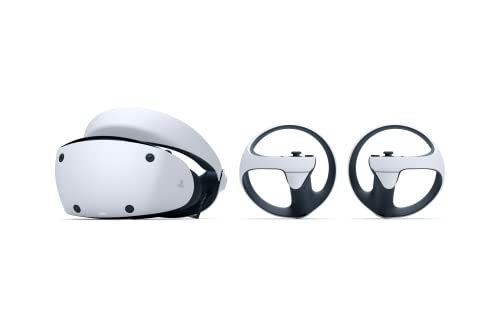
PlayStation VR2
The PlayStation VR2 is the one option here born on a console, so its PC path has an extra step: Sony’s official PlayStation VR2 PC adapter, plus a DisplayPort 1.4 cable you supply yourself. Once connected, the free PlayStation VR2 app and SteamVR handle the rest, and four cameras built into the headset manage tracking with nothing to mount in the room. The draw is the display hardware — OLED panels at 2000 x 2040 per eye with deep contrast that LCD headsets cannot match — along with Sense controllers that feel familiar to anyone coming from a DualSense gamepad.
Specs
- Display: 2000 x 2040 pixels per eye, OLED, 4K HDR visuals
- Field of view: 110 degrees
- Tracking: inside-out via four embedded cameras, plus eye tracking hardware
- Controllers: PlayStation VR2 Sense controllers with finger touch detection
- Model number: 1000032456
Best for: households that already own a PS5 and want one headset serving console and PC.
Watch out for: the PC adapter and DisplayPort cable are separate purchases, and PS5-side features such as HDR, eye tracking and headset feedback do not operate on PC.
ASIN: B0C1QJ6VHY
HTC VIVE Pro 2 Full Kit
The HTC VIVE Pro 2 Full Kit follows the traditional tethered route: a cable carries DisplayPort and USB from the headset to your PC, and the two included Base Station 2.0 sensors watch the room from opposite corners. That mounting work — tripods or wall brackets, a power outlet near each station, clear sight lines between them — is the cost of the steadiest room-scale tracking in this group, and the kit answers with the sharpest panels here at 2448 x 2448 per eye and a 120 Hz refresh rate. First-timers should treat it as a small installation project, ideally in a room that can stay set up.
Specs
- Display: 4896 x 2448 combined resolution (2448 x 2448 per eye), LCD
- Refresh rate: 120 Hz with a 120-degree field of view
- Included: headset, two Base Station 2.0 sensors, two wireless controllers
- Connectivity: DisplayPort and USB, SteamVR compatible
- Audio: Hi-Res certified headphones with 3D spatial sound
Best for: buyers with a spare room who want maximum tracking stability and resolution from day one.
Watch out for: setup is the longest here, and the tether cable limits how freely you can turn in fast games.
ASIN: B09FPCT3H8
How to Choose
Start With How the Headset Connects
Connection type decides your whole first week. Inside-out headsets such as the Quest 3S, Quest 3 and PS VR2 carry their tracking cameras onboard, so setup is mostly software: install the companion app, draw a guardian boundary, and play. Base-station systems like the Vive Pro 2 add a hardware afternoon before the first game. Neither approach is wrong, but a first-time buyer should choose deliberately — convenience now, or a fixed installation that stays calibrated. Also check your graphics card’s ports before ordering, because tethered headsets need a free DisplayPort output that some laptops and compact PCs simply do not have.
Count the Extras Before You Buy
The headset is rarely the whole purchase. Quest owners often add a USB-C Link cable for wired play or a battery strap for longer wireless sessions. The PS VR2 needs Sony’s PC adapter and a DisplayPort 1.4 cable, neither of which sits in the headset box. Vive Pro 2 buyers may need tripods or wall mounts for the base stations, plus power strips near two corners of the room. List every accessory your chosen route requires, confirm each one is actually in the box or in your cart, and you will avoid the classic first-week stall where the headset arrives before the cable that makes it work.
Measure Your Play Space Honestly
Room-scale VR asks for a clear rectangle of floor, roughly 2 by 2 metres, with nothing fragile at arm’s height and no ceiling fan or low light fitting inside your swing radius. Standing-only and seated modes shrink that requirement to the space around a chair, which suits desks and small bedrooms. Base stations widen the tracked area but demand that their corner positions stay undisturbed, while inside-out headsets redraw their boundary in seconds if furniture moves. Walk your intended space with arms extended before choosing; the right headset is the one whose tracking style matches the room you genuinely have, not the room you plan to tidy someday.
Match the Display to the Games You Play
Resolution figures only tell half the story. Pancake lenses on the Quest 3 keep text and cockpit instruments readable across the whole view, which matters for simulators and virtual desktops. The PS VR2’s OLED panels trade a little sharpness for contrast that makes dark horror and space games look dramatically deeper. Fresnel lenses on the Quest 3S concentrate clarity in the centre, fine for most action titles. Refresh rate matters too: 120 Hz panels can feel smoother in fast movement, provided your graphics card can feed them. Decide which visual quality you will notice every session, then let that rank the headsets.
Frequently Asked Questions
Do I need a powerful gaming PC for PC VR?
You need a VR-ready graphics card, but not a flagship one. The Quest Link app and SteamVR both publish minimum specifications, and most mid-range gaming PCs from the last few years qualify for the headsets above. Higher-resolution models such as the Vive Pro 2 reward stronger cards, because the PC must render two high-resolution views at speed.
Can I play SteamVR games on a Quest 3S or Quest 3?
Yes. Connect the headset to your PC with the Meta Quest Link app, either wirelessly through Air Link or with a USB-C cable, and SteamVR titles run on the PC while the headset acts as the display and tracking system. The games themselves install on your computer, so the headset’s onboard storage size does not limit your PC library.
How much room do I need for room-scale VR?
Plan on a clear area of about 2 by 2 metres for full room-scale play, with extra margin so outstretched arms never reach walls or shelves. Smaller spaces still work for standing-only or seated games, which need little more than the footprint of a chair and enough clearance to turn and reach comfortably without stepping anywhere.
What should a first-time buyer budget for beyond the headset?
Expect a short extras list rather than one big surprise. Common additions are a Link cable or dedicated router placement for Quest headsets, the official PC adapter and a DisplayPort cable for the PS VR2, and tripods or mounts for Vive base stations. A comfortable replacement strap is the other frequent early purchase across all four models.
FAQ
Do I need a powerful gaming PC for PC VR?
Can I play SteamVR games on a Quest 3S or Quest 3?
How much room do I need for room-scale VR?
What should a first-time buyer budget for beyond the headset?
More from Amazon
Programs that pair well with the guide above. Offers and eligibility are set by Amazon and may change.
Free shipping on eligible items, Prime Video and more. Eligible new members can start with a free trial.
Start a Prime free trialAd-free music streaming. Eligible new subscribers can start with a free trial.
Try Music Unlimited freeA Prime membership for ages 18-24 with a trial period. Eligibility is set by Amazon.
See Prime for Young AdultsAudiobooks and podcasts to listen to on the go. Eligible new members can start with a free trial.
Try Audible freeAs an Amazon Associate we earn from qualifying purchases.