Our Top Picks
Pros & cons
- 11 programmable buttons add extensive control customization
- Adjustable weights let you fine-tune balance and feel
- LIGHTSYNC RGB syncs lighting with other Logitech gear
- Wired connection limits cable-free desk setups
- Heavier than typical lightweight esports mice at 0.27 pounds
 Razer DeathAdder V3 Pro Wireless Gaming Mouse1000 Hz5.01 x 2.65 x 1.69 inches0.1 poundsCheck on Amazon
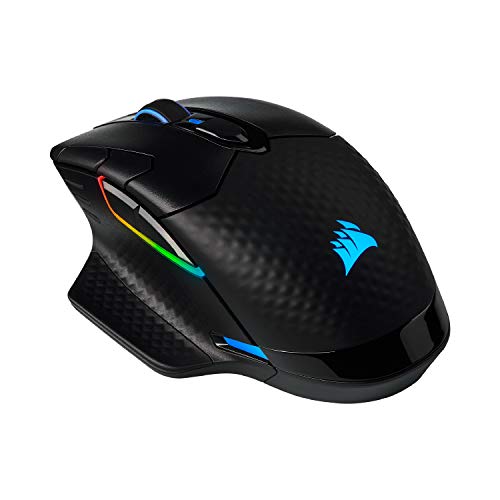 Corsair Dark CORE RGB PRO SE Wireless FPS/MOBADark Core RGB Pro SE5 x 3.5 x 1.69 inches0.3 poundsCheck on Amazon

The real decision when you shop for a wireless ergonomic gaming mouse is not whether wireless can keep up with a cable. Modern 2.4 GHz links already match wired response for most players. The decision is which contoured shell keeps your hand relaxed through a three-hour session, how much weight you are willing to lift thousands of times a night, and whether the battery lasts until you choose to charge it rather than dying mid-match. Get the shape wrong and no sensor will save your wrist.

This guide is for palm-grip and claw-grip players who want a sculpted right-handed mouse without a cable, for MMO and strategy players who need extra buttons, and for competitive players who want a light shell that still supports the hand. Every mouse below was chosen from its Amazon listing name and specifications, and each one is a wireless model with an ergonomic, contoured shape.
Quick Picks
As an Amazon Associate we earn from qualifying purchases.
| Product | Best for | Key spec from title |
|---|---|---|
| Logitech G502 LIGHTSPEED | MMO and strategy players who want many programmable buttons | HERO 25K sensor, LIGHTSPEED wireless |
| Razer Basilisk V3 Pro | Players who want a tilt wheel and very long battery life | Focus Pro 30K optical sensor, HyperSpeed wireless |
| Razer DeathAdder V3 Pro | Competitive players who want the lightest ergonomic shell | 63 g, Focus Pro 30K optical sensor |
| Corsair Dark Core RGB Pro SE | Players who want Qi wireless charging and swappable grips | 18,000 DPI optical sensor, Slipstream wireless |
How to Choose
Shape and grip come first
An ergonomic mouse is defined by its shell, not by its sensor. Look for a right-handed contour with a thumb rest and a flared side that supports your ring finger, then match the length to your hand. A shell around 130 mm long suits most medium and large hands in a palm grip, while a shorter or narrower body fits a claw grip better. If possible, compare the listed length and height against a mouse you already own. A shape that forces your wrist to twist will cause fatigue long before the battery runs out, so treat comfort as the first filter and treat every other specification as secondary.
Weight and balance decide how fast it feels
Weight matters more than most buyers expect because you lift and reposition the mouse hundreds of times in a session. A mouse near 63 g feels almost weightless and suits fast flick aiming, while a mouse near 114 g feels planted and suits players who rest their whole hand on the shell. Some models include removable tuning weights so you can shift the balance toward the palm or the front. Check whether the listed weight includes the battery and any weights, because a mouse that feels light on paper can feel heavy once its cells are installed.
Wireless link and battery set the routine
Every mouse here connects over a 2.4 GHz wireless link with a USB receiver, and most also include Bluetooth or a wired mode for charging while you play. Check the polling rate on the listing, since 1,000 Hz is the standard for smooth tracking and some models support higher rates with a separate dongle. Battery claims vary with lighting and polling settings, so read the listed hours as a best case and expect less with lighting at full brightness. A mouse with a charging dock or Qi support changes the routine entirely, because you top it up by setting it down.
Buttons, wheel, and software shape daily use
Count the buttons you will actually use before you count the buttons on the box. Two extra thumb buttons cover most games, while eleven or more suit MMOs and strategy titles where every ability needs a bind. A free-spinning or tilt wheel helps with scrolling long inventories and web pages, and a DPI clutch button lets you drop sensitivity for a precise shot. Check whether the companion software stores profiles on the mouse itself, because on-board memory means your bindings travel with the mouse to another PC without reinstalling anything.
The 4 Best Options
Logitech G502 LIGHTSPEED
The G502 LIGHTSPEED is the pick for players who want a full-featured ergonomic shell with no cable attached. Its right-handed shape carries a sculpted thumb rest and eleven programmable buttons, so MMO and strategy players can bind abilities, macros, and DPI shifts without reaching for the keyboard. The HERO 25K sensor tracks up to 25,600 DPI, the dual-mode wheel switches between notched and free-spinning scrolling, and six removable weights let you tune the balance. It is the heaviest mouse in this guide, and that weight is the trade for everything it carries.
Specs
- Sensor: Logitech HERO 25K, 100 to 25,600 DPI
- Connection: LIGHTSPEED 2.4 GHz wireless, wired USB
- Buttons: 11 programmable buttons
- Battery: Up to 60 hours without lighting, up to 48 hours with lighting
- Weight: 114 g, plus six removable tuning weights
- Charging: POWERPLAY wireless charging compatible
- Scroll wheel: Dual-mode hyper-fast scroll wheel
Best for: MMO and strategy players who want many programmable buttons and a tunable, planted shell.
Watch out for: The right-handed shape does not suit left-handed players, and the 114 g body feels heavy if you prefer fast, low-weight flick aiming.
Razer Basilisk V3 Pro
The Basilisk V3 Pro suits players who want a comfortable ergonomic shell with a standout wheel and a battery that lasts for weeks of evening play. Its HyperScroll tilt wheel switches between tactile notched scrolling and free spin, and it tilts left and right for extra commands. The Focus Pro 30K optical sensor reaches 30,000 DPI, the shell carries eleven programmable buttons including a DPI clutch for precise aiming, and the battery runs up to 90 hours over HyperSpeed wireless or 100 hours over Bluetooth. It connects over 2.4 GHz, Bluetooth, or USB-C, so it moves easily between a gaming PC and a laptop.
Specs
- Sensor: Razer Focus Pro 30K optical, up to 30,000 DPI
- Connection: HyperSpeed 2.4 GHz wireless, Bluetooth, wired USB-C
- Buttons: 11 programmable buttons, including DPI clutch
- Battery: Up to 90 hours on HyperSpeed wireless, up to 100 hours on Bluetooth
- Weight: 112 g
- Scroll wheel: HyperScroll tilt wheel with free-spin and tactile modes
- Lighting: Chroma RGB with 13 zones
Best for: Players who want a tilt wheel, long battery life, and a comfortable shell for mixed gaming and everyday use.
Watch out for: The 112 g body is on the heavier side for competitive shooters, and the fastest polling mode needs a HyperPolling dongle that is sold separately.
Razer DeathAdder V3 Pro
The DeathAdder V3 Pro is the pick for competitive players who want an ergonomic shape without the weight that usually comes with it. At 63 g it is one of the lightest ergonomic esports mice available, and its right-handed shell was refined with professional players to support a palm or claw grip through long matches. The Focus Pro 30K optical sensor reaches 30,000 DPI, the Gen-3 optical switches are built for fast, crisp clicks, and the battery lasts up to 90 hours over HyperSpeed wireless. Five programmable buttons keep the layout simple, which is exactly the point for players who want speed over extra controls.
Specs
- Sensor: Razer Focus Pro 30K optical, up to 30,000 DPI
- Connection: HyperSpeed 2.4 GHz wireless, wired USB-C
- Buttons: 5 programmable buttons
- Battery: Up to 90 hours on HyperSpeed wireless
- Weight: 63 g
- Switches: Optical Mouse Switches Gen-3
- Shape: Right-handed ergonomic, palm and claw grip
Best for: Competitive shooter players who want the lightest ergonomic shell and a simple five-button layout.
Watch out for: The minimal button count is too few for MMO play, there is no tilt wheel, and 8,000 Hz polling needs a HyperPolling dongle that is sold separately.
Corsair Dark Core RGB Pro SE
The Dark Core RGB Pro SE suits players who want a broad, comfortable shell with a charging routine that needs no cable at all. Its right-handed ergonomic shape ships with an interchangeable side grip so you can change the feel of the thumb area, and the SE version charges wirelessly on any Qi-compatible pad. The custom PixArt PAW3392 optical sensor reaches 18,000 DPI in 1 DPI steps, the Slipstream wireless link runs under 1 ms, and the battery lasts up to 50 hours. Eight programmable buttons, nine-zone RGB lighting, and iCUE software round out a mouse built for FPS and MOBA sessions.
Specs
- Sensor: Custom PixArt PAW3392 optical, up to 18,000 DPI
- Connection: Slipstream sub-1ms wireless, Bluetooth, wired USB
- Buttons: 8 programmable buttons
- Battery: Up to 50 hours of wireless gaming
- Weight: 142 g
- Charging: Qi wireless charging compatible
- Extras: Interchangeable side grip, 9-zone RGB lighting
Best for: FPS and MOBA players who want Qi wireless charging and a broad shell with a swappable side grip.
Watch out for: At 142 g it is the heaviest mouse in this guide, so it suits a planted palm grip far better than fast flick aiming.
Which One Fits Your Situation
Long evenings in MMOs and strategy games
Choose the Logitech G502 LIGHTSPEED. Its eleven programmable buttons and DPI shift controls give you room for abilities, macros, and camera commands without touching the keyboard, and the tuning weights let you set a planted balance for long sessions. The 60-hour battery means a full week of evening play on one charge.
Competitive shooters where every gram matters
Choose the Razer DeathAdder V3 Pro. Its 63 g shell is far lighter than the other mice here, so fast flicks and constant repositioning cost less effort, while the Focus Pro 30K sensor and Gen-3 optical switches keep tracking and clicks responsive. The simple five-button layout stays out of your way.
A mouse you rarely need to plug in
Choose the Razer Basilisk V3 Pro or the Corsair Dark Core RGB Pro SE. The Basilisk runs up to 90 hours over its wireless link, while the Dark Core SE charges on any Qi pad, so you top it up by setting it down. Pick the Basilisk for a lighter shell and a tilt wheel, or the Dark Core for a broader grip and cable-free charging.
Large hands or a full palm grip
Choose the Razer Basilisk V3 Pro or the Corsair Dark Core RGB Pro SE. Both have broad right-handed shells with a thumb rest that supports a full palm grip, and the Dark Core adds a swappable side grip to fine-tune the fit. The DeathAdder V3 Pro is the better choice if your hands are medium and you prefer a lighter shell.
Common Mistakes
- Buying on DPI alone: a 30,000 DPI sensor means little if the shell cramps your hand, so test the shape and grip before you compare sensor numbers.
- Ignoring hand size: a 130 mm shell suits medium and large hands, while smaller hands often do better with a shorter or narrower ergonomic body.
- Placing the receiver badly: a USB receiver buried behind a metal case or under the desk can cause dropouts, so keep it close to the mouse with a clear line of sight.
- Leaving lighting at full brightness: RGB lighting can cut battery life by hours, so dim it or switch it off if you want the listed battery figures to hold.
- Assuming every model charges the same way: some mice need a cable, some use a dock, and only the SE models support Qi pads, so check the charging method on the listing before you buy.
Frequently Asked Questions
Is wireless latency a problem for competitive play?
No, not with the mice in this guide. Their 2.4 GHz links run at 1,000 Hz polling with sub-1 ms response, which matches wired play for most players. Keep the receiver close to the mouse and away from metal obstacles, and use the wired mode only if you notice interference from nearby wireless devices.
How long does the battery really last?
It depends on lighting and polling settings. The Basilisk V3 Pro and DeathAdder V3 Pro list up to 90 hours, the G502 LIGHTSPEED lists up to 60 hours without lighting, and the Dark Core RGB Pro SE lists up to 50 hours. Turning RGB lighting down or off is the simplest way to stretch any of these figures toward the listed number.
Are these mice suitable for left-handed players?
No. All four mice in this guide have right-handed ergonomic shells with a thumb rest on the left side, so they do not suit left-handed players. If you play left-handed, look for a symmetrical wireless mouse instead and accept a flatter grip in exchange for a shape that works in either hand.
Do I need a charging dock or pad?
No, every mouse here charges over USB-C, so a dock or pad is optional. The Dark Core RGB Pro SE is the only one that charges on a Qi pad, and the G502 LIGHTSPEED works with a POWERPLAY charging mat. A dock or pad is convenient because it removes the cable routine, but it is not required to use any of these mice.
FAQ
Is wireless latency a problem for competitive play?
How long does the battery really last?
Are these mice suitable for left-handed players?
Do I need a charging dock or pad?
More from Amazon
Programs that pair well with the guide above. Offers and eligibility are set by Amazon and may change.
Free shipping on eligible items, Prime Video and more. Eligible new members can start with a free trial.
Start a Prime free trialAd-free music streaming. Eligible new subscribers can start with a free trial.
Try Music Unlimited freeA Prime membership for ages 18-24 with a trial period. Eligibility is set by Amazon.
See Prime for Young AdultsAudiobooks and podcasts to listen to on the go. Eligible new members can start with a free trial.
Try Audible freeAs an Amazon Associate we earn from qualifying purchases.