Our Top Picks
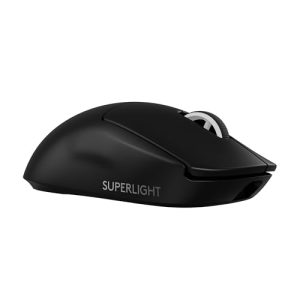
 Logitech G Pro X Superlight 2 Lightspeed WirelessClassic1.57 x 2.5 x 4.92 inches0.1 poundsCheck on Amazon
Pros & cons
- 95-hour battery life reduces how often you need to charge
- 60-gram weight suits fast, low-effort mouse movement
- HERO 2 sensor tracks up to 44,000 DPI with no smoothing
- POWERPLAY wireless charging pad is sold separately
- Premium features add a more complex setup than basic mice
Pros & cons
- Up to 250 hours of play on a single AA battery
- Lightweight 3.4-ounce body aids fast, precise movement
- Built-in receiver storage keeps the dongle from getting lost
- Relies on a AA battery rather than a built-in rechargeable cell
- Endurance mode trade-off needed to stretch battery life further

Choosing a wireless gaming mouse for a MacBook is a different decision from picking one for a Windows desktop. The mouse has to pair cleanly with macOS, keep input lag low without a cable, and work around the MacBook’s USB-C-only ports, since most 2.4GHz dongles still use USB-A. A mouse that feels perfect on a gaming PC can turn into a chore on a Mac if its software lacks macOS support, its dongle needs an adapter you do not own, or its Bluetooth connection stutters in the middle of a match.
This guide is for MacBook owners who game after work, students who play between classes, and anyone who wants one mouse for both games and everyday tasks. Every mouse below is a wireless gaming mouse with macOS support stated on its Amazon listing, chosen from the product titles and specifications on those listings. Together they cover ultralight competitive play, button-heavy games, long battery life, and travel-friendly designs, so you can match a mouse to how you actually play.
Quick Picks
As an Amazon Associate we earn from qualifying purchases.
| Product | Best for | Key spec from title |
|---|---|---|
| Logitech G Pro X Superlight 2 | Competitive FPS players who want the lightest mouse | 60g, 44,000 DPI HERO 2 sensor, 8kHz report rate |
| Logitech G502 X Lightspeed | Players who want many buttons and very long battery life | 13 programmable controls, up to 140 hours battery |
| Logitech G305 Lightspeed | Casual players and travellers who want a simple, light mouse | 12,000 DPI HERO sensor, 250-hour battery life |
| Razer Basilisk V3 Pro | MMO and all-round players who want a feature-packed ergonomic mouse | Focus Pro 30K optical sensor, HyperScroll tilt wheel |
How to Choose
Bluetooth or a 2.4GHz dongle
Most wireless gaming mice connect in two ways, and the choice matters more on a MacBook than on a desktop. Bluetooth pairs directly with your MacBook and leaves every port free, which suits travel and couch play, but it can add a small amount of latency and it usually caps the polling rate. A 2.4GHz dongle gives the lowest latency and the highest polling rates for competitive play, yet nearly every dongle is USB-A while MacBooks only carry USB-C, so you may need a hub or an adapter. Decide how you will connect before you buy, and check whether the dongle can live inside the mouse for travel.
macOS software support
A gaming mouse is only as flexible as the software that configures it, and macOS support varies widely. Logitech G Hub runs on macOS and lets you remap buttons, adjust DPI steps, and store profiles on the mouse itself. Razer mice work on a Mac over Bluetooth or a dongle for basic pointing and clicking, but the deeper Synapse customisation is built around Windows, so some lighting and macro options may be out of reach. Before you buy, check the listing for macOS in the system requirements and confirm that the features you care about actually work on a Mac.
Sensor and polling rate
The sensor decides how faithfully the mouse tracks fast flicks, and the polling rate decides how often it reports its position to your MacBook. Modern gaming sensors track cleanly up to 25,000 DPI and beyond, which is more than enough for any MacBook display, so do not chase the biggest DPI number on the box. Polling rate is the more useful figure: 1,000Hz is standard and feels smooth, while 8,000Hz polling can feel slightly more responsive in fast shooters. Higher polling also drains the battery faster, so weigh the gain against how often you want to recharge.
Shape, weight, and battery
Shape decides comfort over long sessions more than any specification on the box. Palm-grip players suit taller, ergonomic shells like the G502 X or the Basilisk V3 Pro, while claw and fingertip players suit smaller, symmetrical shells like the Superlight 2 or the G305. Weight matters too: a 60g mouse flicks faster and tires your wrist less, while a heavier mouse can feel steadier for slow, precise aiming. Battery life ranges from around 95 hours to 250 hours across the mice in this guide, and charging runs over USB-C except for the G305, which runs on a single AA battery.
The 4 Best Options
Logitech G Pro X Superlight 2
The Superlight 2 is the pick for MacBook owners who play competitive shooters and want the lightest mouse in this guide. At 60g it flicks and resets faster than any other mouse here, and the HERO 2 sensor tracks cleanly at high speeds, which suits fast aim training and ranked play. The shell is a plain, symmetrical shape that works for claw and fingertip grips, and it runs on LIGHTSPEED wireless through a USB-A dongle, so keep a USB-C adapter handy. It is the simplest, most focused mouse in the group, with no RGB and no extra buttons to get in the way.
Specs
- HERO 2 sensor with up to 44,000 DPI
- LIGHTSPEED wireless with up to 8kHz polling rate
- 60g weight with 5 programmable buttons
- LIGHTFORCE hybrid optical-mechanical switches
- Up to 95 hours of battery life
- USB-C charging
- Operating system: Windows, macOS
Best for: Competitive FPS players who want the lightest, fastest-feeling mouse.
Watch out for: It has no Bluetooth mode and no RGB lighting, and the USB-A dongle needs a USB-C adapter or hub on a MacBook.
Logitech G502 X Lightspeed

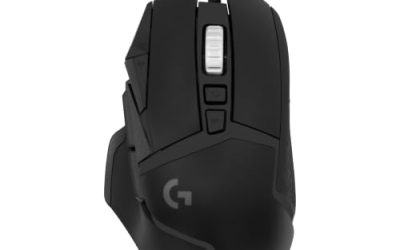
The G502 X Lightspeed is the pick for MacBook owners who want one mouse to handle games, work, and everything in between. Its 13 programmable controls give you room for weapon swaps, push-to-talk, and shortcuts without reaching for the keyboard, and the dual-mode scroll wheel switches between precise ratchet steps and free spinning for long documents. The HERO 25K sensor tracks accurately at up to 25,600 DPI, and the battery lasts up to 140 hours on a charge. It is heavier and larger than the ultralight picks here, but that size suits palm-grip players who want a mouse that fills the hand.
Specs
- HERO 25K sensor with 100 to 25,600 DPI
- LIGHTSPEED wireless with 68 percent faster response rate
- 13 programmable controls
- LIGHTFORCE hybrid optical-mechanical switches
- Up to 140 hours of battery life
- USB-C charging, POWERPLAY wireless charging compatible
- Reversible and removable DPI-shift button
- Operating system: Windows 10 or later, macOS 10.14 or later
- Weight: 102g
Best for: Players who want many buttons, a great scroll wheel, and a mouse that also works well for daily work.
Watch out for: The larger, heavier shell can feel bulky for small hands, and the USB-A dongle needs a USB-C adapter or hub on a MacBook.
Logitech G305 Lightspeed
The G305 is the pick for MacBook owners who want a straightforward wireless gaming mouse without a big outlay. It uses the same LIGHTSPEED wireless link as the more expensive Logitech mice, so tracking stays responsive in casual and mid-level play, and the HERO sensor covers up to 12,000 DPI. The mouse runs for up to 250 hours on a single AA battery, which is the longest battery life in this guide, and the small, symmetrical shell suits claw and fingertip grips and slips easily into a laptop bag. With six programmable buttons and on-board memory, it keeps its settings when you move it between machines.
Specs
- HERO sensor with up to 12,000 DPI
- LIGHTSPEED wireless
- 6 programmable buttons
- Up to 250 hours of battery life on one AA battery
- On-board memory for saved profiles
- Lightweight 99g design
- Compatible with PC and Mac
Best for: Casual players, students, and travellers who want a light, simple mouse with very long battery life.
Watch out for: It has no Bluetooth mode and no rechargeable battery, so keep spare AA batteries handy, and the USB-A dongle needs a USB-C adapter on a MacBook.
Razer Basilisk V3 Pro

The Basilisk V3 Pro is the pick for MacBook owners who play MMO, strategy, and story-driven games and want a mouse packed with features. Its ergonomic right-handed shell fills the palm comfortably during long sessions, and the HyperScroll tilt wheel switches between tactile steps and free spinning, which suits both inventory scrolling and fast document work. The Focus Pro 30K sensor tracks up to 30,000 DPI, and the mouse connects three ways: HyperSpeed 2.4GHz, Bluetooth, or wired USB-C. Bluetooth is the handy option here, since it pairs directly with a MacBook without taking up a port.
Specs
- Focus Pro 30K optical sensor with up to 30,000 DPI
- HyperScroll tilt wheel with tactile and free-spin modes
- Gen-3 optical switches
- 13-zone Chroma RGB lighting
- 13 programmable controls
- HyperSpeed wireless, Bluetooth, and wired USB-C
- Up to 150 hours of battery life on HyperSpeed wireless
- Operating system: Windows, macOS
- Weight: 112g
Best for: MMO and all-round players who want an ergonomic mouse with Bluetooth, a great scroll wheel, and deep customisation.
Watch out for: It is the heaviest mouse in this guide, and the full Synapse customisation suite is built around Windows, so some settings may not be available on macOS.
Which One Fits Your Situation
You play competitive shooters on a MacBook Pro
Pick the Logitech G Pro X Superlight 2. Its 60g shell and HERO 2 sensor give you the fastest flicks in this guide, and the 8kHz polling keeps tracking tight in ranked matches. The plain symmetrical shape suits claw and fingertip grips, which most competitive players prefer. Just remember the USB-A dongle needs a USB-C adapter, so keep one in your bag.
You want one mouse for games and daily work
Pick the Logitech G502 X Lightspeed. Its 13 programmable controls cover game commands and work shortcuts alike, the dual-mode scroll wheel suits long documents, and the 140-hour battery means you charge it rarely. The larger shell also suits palm-grip players who game for hours, and the removable DPI-shift button lets you drop sensitivity for precise aiming on demand.
You travel with a MacBook Air and play casually
Pick the Logitech G305 Lightspeed. It is small, light, and runs up to 250 hours on one AA battery, so you can toss it in a bag and forget about charging. The LIGHTSPEED link keeps casual games responsive, and on-board memory carries your settings between machines. At 99g it is light enough for long sessions without tiring your wrist.
You play MMO or strategy games and hate using ports
Pick the Razer Basilisk V3 Pro. Bluetooth pairs straight to your MacBook without touching a USB-C port, the ergonomic shell stays comfortable through long sessions, and the HyperScroll wheel and 13 programmable controls suit games with many commands. If you ever want lower latency for a shooter, switch to the HyperSpeed dongle instead.
Common Mistakes
- Buying a 2.4GHz-only mouse without checking how the USB-A dongle connects to a USB-C-only MacBook.
- Assuming every Windows software feature, such as macros and lighting profiles, works the same way on macOS.
- Choosing purely on the biggest DPI number instead of checking the shape, grip, and polling rate.
- Picking a heavy ergonomic mouse for claw or fingertip grip, or an ultralight symmetrical mouse for a full palm grip.
- Forgetting to check battery type and charging: the G305 runs on AA batteries, while the other mice here recharge over USB-C.
Frequently Asked Questions
Do wireless gaming mice work with a MacBook?
Yes. Every mouse in this guide lists macOS support on its Amazon listing and works as a pointing device on a MacBook. Bluetooth models pair directly, while 2.4GHz models connect through a dongle, which may need a USB-C adapter. Basic pointing, clicking, and scrolling work out of the box, while button remapping and DPI tuning depend on the maker’s macOS software.
Is Bluetooth or a 2.4GHz dongle better for gaming on a Mac?
A 2.4GHz dongle is better for competitive play because it gives lower latency and higher polling rates, which matter in fast shooters. Bluetooth is better for travel and casual play because it pairs directly and leaves your ports free. If you play both ways, a mouse with both connection types, like the Basilisk V3 Pro, covers each case.
Can I remap buttons and change DPI on macOS?
It depends on the mouse. Logitech G Hub runs on macOS and covers button remapping, DPI steps, and on-board profiles for the mice in this guide. Razer Synapse is built mainly around Windows, so some Basilisk V3 Pro settings may not be available on a Mac. Check the listing for macOS in the system requirements before you buy.
Will a gaming mouse drain my MacBook battery?
Barely. A wireless mouse runs on its own battery, so it draws almost nothing from your MacBook. Bluetooth uses a small amount of power from the laptop, while a 2.4GHz dongle draws a little more through the USB port. Either way, the effect on a MacBook battery is small compared with the game itself.
FAQ
Do wireless gaming mice work with a MacBook?
Is Bluetooth or a 2.4GHz dongle better for gaming on a Mac?
Can I remap buttons and change DPI on macOS?
Will a gaming mouse drain my MacBook battery?
More from Amazon
Programs that pair well with the guide above. Offers and eligibility are set by Amazon and may change.
Free shipping on eligible items, Prime Video and more. Eligible new members can start with a free trial.
Start a Prime free trialAd-free music streaming. Eligible new subscribers can start with a free trial.
Try Music Unlimited freeA Prime membership for ages 18-24 with a trial period. Eligibility is set by Amazon.
See Prime for Young AdultsAudiobooks and podcasts to listen to on the go. Eligible new members can start with a free trial.
Try Audible freeAs an Amazon Associate we earn from qualifying purchases.